
1 BY ONE 433NA-0001 Bedienungsanleitung

RING COLLAR
MUSIC WIRELESS HEADSET
1byone Products Inc.
ADD: 2313 E, Philadelphia Street, Ontario, CA 91761
www.1byone.com
Instruction Manual/ Manuel d'instructions/Bedienungsanleitung/
Manual de instrucciones/ 取扱説明書/Manuale di istruzioni

EN
EN
1 2
Start here
Following items are included
Ear cushions
USB cable
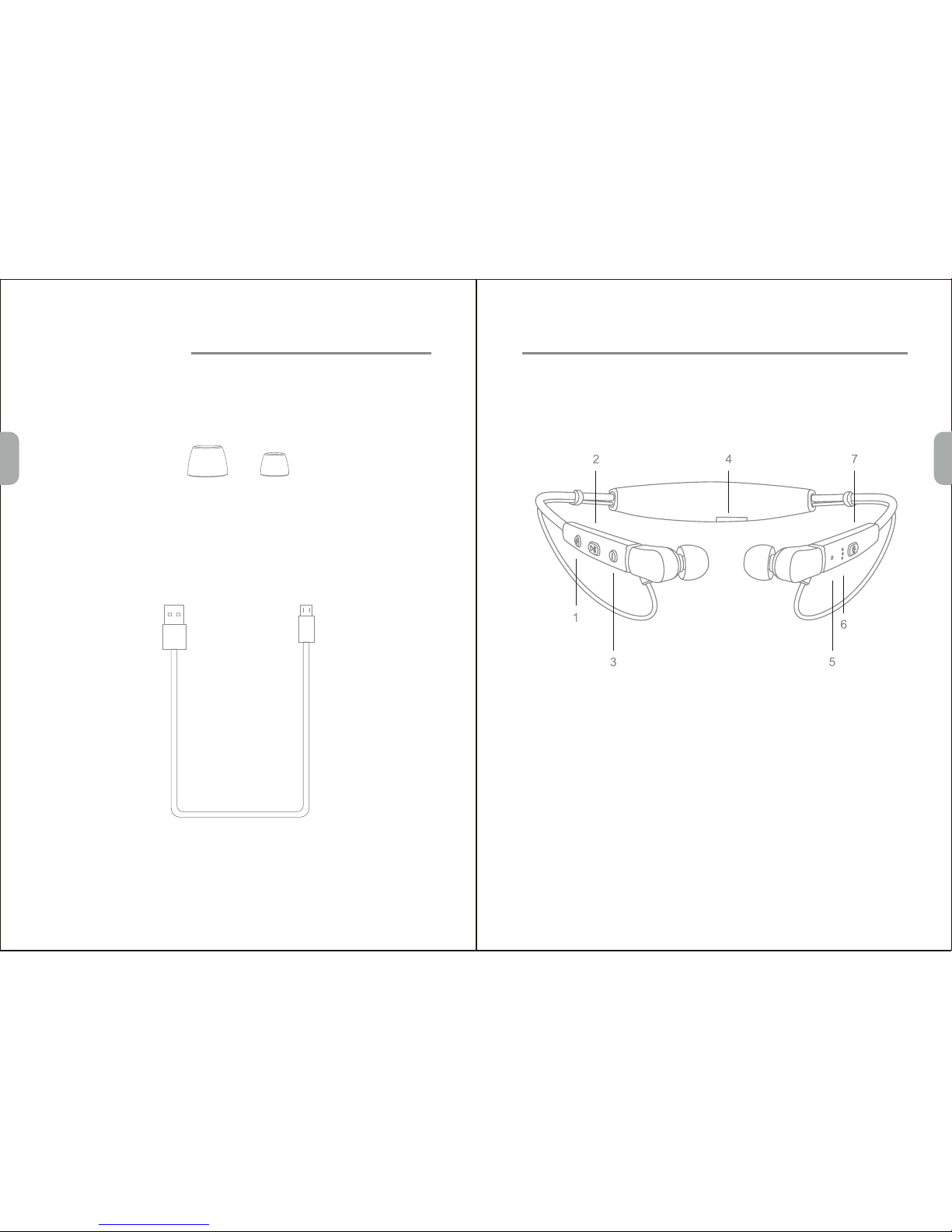
Product overview
1. Volume + / Track forward 5. Status indicator
2. Multifunction button 6. Talking mic
3. Volume - / Track back 7. Power
4. Charge port

EN
EN
3 4
Basic operation
Volume control
Press the Volume "+" or "-" to turn volume up or down, and you
will hear beep once reaching the maximum or minimum volume.
LED status indicator
Instruction
Power on
Power off
Standby
Incoming call
Pairing
LED status
Stays blue for about 1.5 seconds
Stays red for about 1.5 seconds
Blink blue twice every 5 seconds
Blink blue once every 3 seconds
Flashes Red and Blue alternately
Voice prompts
Power on
Power off
Pairing
/
Cell phone rings
Battery low Flashes red twice every 8 seconds Battery low
Charging Stays on red while charging,
Stays on blue after fully charged
/
Pairing
Press and hold the Power button for about 3 seconds until LED
flashes blue and red alternately, you hear "Power on" and
"Pairing", now earphone is in pairing mode.
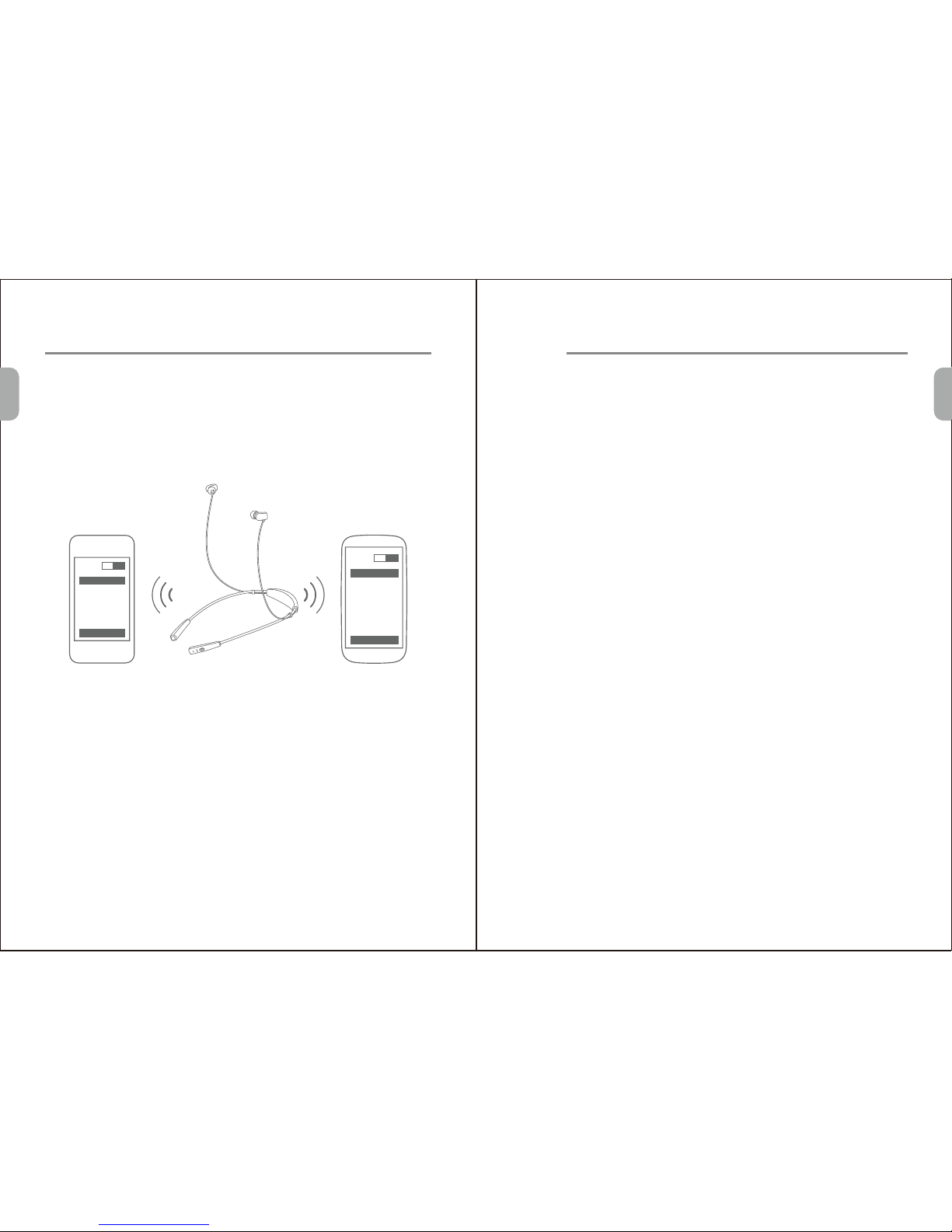
Activate Bluetooth on your phone and set it to search for new
devices.
Select “1byone BS006". If your phone asks, enter 0000 (four
zeros) for the passcode or accept the connection. The LED
indicator stops flashing red and blue once successfully paired,
you hear "Connection successful".Some phone list an option to
"Play through earphone", select to use the earphones.
Bluetooth
ON
1byone BS006
Connect
Bluetooth
Search
Pair one phone
1.
2.
3.
EN
EN
5 6
Pair another phone
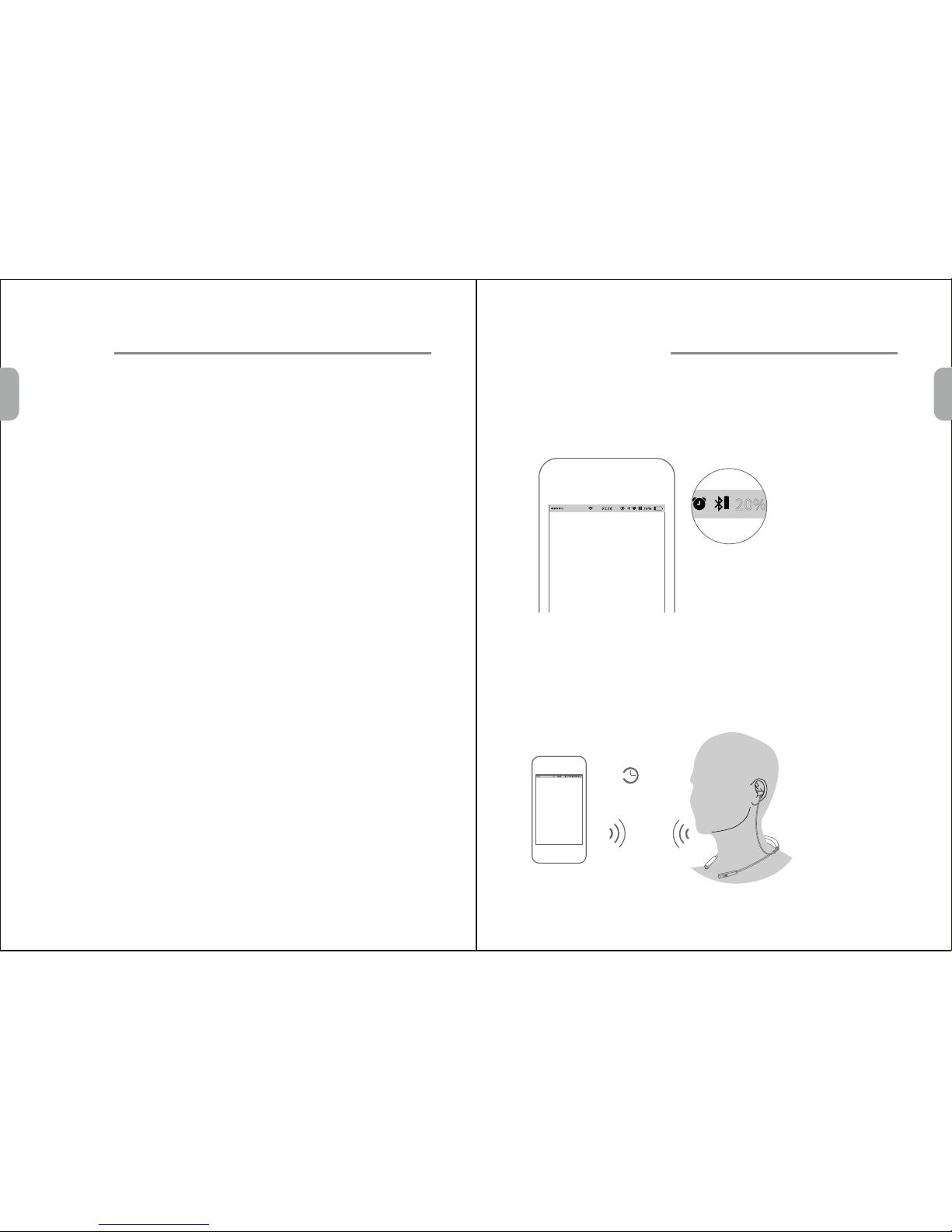
Multipoint technology enables you to pair another phone and take a
call from either.
To pair with another mobile phone, follow the steps for "Pair one
phone". After pairing successfully, restart the earphone to connect
to 2 paired mobile phone automatically.
Bluetooth
ON
1byone BS006
Connect
ON
1byone BS006
Bluetooth
Connect
Call
Answer a call
Redial the last call
Mute on/off
Press any button (Multifunction/Vol+/Vol-) once.
Double-press the Multifunction button in standby mode. The
mobile phone will redial the last call number.
Press the Volume "+" for about 2 seconds to mute on/off.
Reject a call
Press and hold the Multifunction button for about 2 seconds.
Press the Multifunction button once.
End a call
Switch between the earphone and phone
Press the Volume "-" for about 2 seconds during a call, the call
will be switched to the mobile phone, redo this operation again,
the call will be switched to the earphone.
End current call and answer new call
When a new call rings during a call, press the Multifunction button
once to answer new call and end current call simultaneously.
On hold current call and answer new call
When a new call rings during a call, hold the Multifunction button
for 2 seconds to hold current call and answer new call. To switch
between held call and active call, Hold the multifunction button
for 2 seconds.
EN
EN
7 8
Music
Music play / pause
Press Multifunction button once to play / pause music. (Some
phones may require you to start a media player first)
Track back/forward
Press the Volume "+" for about 2 seconds once to skip track
forward, press Volume "-" for about 2 seconds once to skip track
backward.
Switch Music and Call
When you receive a call while you are playing music, the music
automatically pauses to allow you to answer or ignore the call.
Once the call is ignored or ends, the music is resumed.
(Need media player support)
10min
? ?
Auto power-off
More features
Battery Indicator
When the distance between the earphone and the mobile phone
is beyond effective range, a voice prompt "Connection lost" and
earphone disconnects with the mobile phone, the earphones will
power off automatically after not being active for about 15
minutes.
When the earphone is connected to a device with iOS system, a
battery indicator will appear at the upper right of the system,
indicating battery status of the earphone.
Effective
range

EN
EN
9 10
Hard reset
Charging
Connection standby
Automatic connection after powering on
When battery is low, you will hear the voice prompt "Battery low".
It takes 1.5 hours to fully charge the earphone. The red LED
turns on during charging. The red LED will turn off and the blue
LED will turn on after being fully charged.
After successful pairing and connection, you will hear the voice
prompt "Connection successful". the earphone will be in turning
on mode or standby mode automatically and the blue LED will
flash twice every 5 seconds, when the earphone disconnect the
phone due to invalid distance, you will hear the voice prompt
"Connection lost".
When the earphone and phone have been paired once, they will
automatically connect when the earphone is on and Bluetooth is
activated on the phone.
If the earphone can not be turned on even when fully charged or
does not respond during use,follow the instructions below to
reset it:
1.While pressing and holding the multifunction button,connect
the earphone to your PC's USB or a USB adapter with the
charging cable.
2.Keep pressing and holding the multifunction button until
earphone turns on.The earphone should be reset successfull.
Note: The lifetime of the battery will be significantly reduced if your
earphone is left uncharged for a long period. We recommend that
you recharge your earphone at least once a month.
Clear paired list
In standy mode, press Vol+,Vol- and Multifunction buttons
simultaneously for about 5 seconds, LED indicator flashes
blue&red 4 times quickly, then clear all paired list, the earphone
will enter pairing mode automatically after power on next time.
Voice dial (Need phone support.)
Press Vol+ and Vol- simultaneously, you will hear beep, and wait
for phone prompt and then tell the phone to dial the name of a
stored contact.
FR
FR
11 12
Commencer ici
Les éléments suivants sont inclus
Les coussinets
USB câble
Présentation du produit
1.Volume + / piste vers l'avant 2.Multifunction Bouton
3.Volume - / piste de retour 4.Port de charge
5.Indicateur de statut 6.Parler micro
7.Activer / désactiver

FR
FR
13 14
Opération de base
Contrôle du volume
Appuyez sur le volume "+" ou "-" pour mettre le volume vers le
haut ou vers le bas, et vous entendrez un bip d'atteindre le
maximum ou minimum volume.
LED Indicateur d'état
Instruction LED d'état instructions vocales
Power on Séjours pour bleu environ 1.5 seconde Power on
Power off Séjours pour rouge environ 1.5 seconde Power off
Standby Blink bleu deux fois toutes les 5 secondes /
Incoming call Blink bleu une fois toutes les 3 secondes Cell phone rings
Pairing Clignote en rouge et bleu en alternance Paring
Battery low Flashes rouges deux fois toutes les 8 secondes Battery low
Charging Séjours sur le rouge pendant la charge, /
Séjours sur bleu après complètement
chargé
Pairing
Appuyez et maintenez enfoncé le bouton ON / OFF environ 3
secondes jusqu'à ce que LED clignote en bleu et rouge
alternativement, vous entendez "Power on" et "Pairing",
maintenant l'écouteur est en mode d'appariement.
Activez Bluetooth sur votre téléphone et le mettre à la recherche
de nouveaux périphériques.
Sélectionnez "1byone BS006". Si votre téléphone demande,
entrez 0000 (quatre zéros) pour le mot de passe ou d'accepter la
connexion. L'indicateur LED cesse de clignoter en rouge et bleu
une fois jumelé avec succès, vous entendez "Connection
successful". Certains liste de téléphone une option pour "Play
through earphone", sélectionnez pour utiliser les écouteurs.
Bluetooth
ON
1byone BS006
Connect
Appairer un téléphone mobile
1.
2.
3.
Bluetooth
Search

FR
FR
15 16
Appairer l’autre téléphone mobile
La technologie Multipoint permet de jumeler un autre téléphone et
de prendre un appel de soit.
Pour jumeler avec un autre téléphone mobile, suivez les étapes
pour "Pair onephone". Après le jumelage avec succès, redémarrez
l'écouteur pour se connecter à 2 paires téléphone mobile
automatiquement.
Bluetooth
ON
1byone BS006
Connect
ON
1byone BS006
Bluetooth
Connect
L’ appel
Répondre à un appel
Recomposer le dernier appel.
Mute on / off
Appuyez sur une touche (multifonction / Vol + / Vol-) une fois.
Appuyez deux fois sur le bouton multifonction en mode veille. Le
téléphone mobile recomposer le dernier numéro d'appel.
Appuyez sur le volume "+" pendant environ 2 secondes pour
couper on / off.
Rejeter un appel
Appuyez et maintenez enfoncé le bouton multifonction pendant
environ 2 secondes.
Appuyez une fois sur la touche multifonction.
Terminer un appel
Basculer entre l'écouteur et le téléphone
Appuyez sur le volume "-" environ 2 secondes au cours d'un
appel, l'appel sera basculé sur le téléphone mobile, de refaire
cette opération encore une fois, l'appel sera basculé sur
l'écouteur.
Terminer appel en cours et répondre nouvel appel
Quand un nouvel appel sonne pendant un appel, appuyez sur le
bouton multifonction une fois pour répondre nouvel appel et
mettre fin à l'appel en cours simultanément.
En attente appel en cours et répondre à nouvel appel
Quand un nouvel appel sonne pendant un appel, maintenez le
bouton multifonction pendant 2 secondes pour maintenir l'appel
en cours et répondre à de nouveaux appels. Pour basculer entre
l'appel en attente et appel actif, Maintenez la touche
multifonction pendant 2 secondes.

FR
FR
17 18
Music
Musique play / Pause
Appuyez sur le bouton multifonction une fois pour play / Pause
Musique. (Certains téléphones peuvent vous obliger à lancer un
lecteur multimédia en premier)
Suivre avant / arrière
Appuyez sur le volume "+" environ 2 secondes une fois pour
passer la piste en avant, Appuyez sur Volume "-" environ 2
secondes une fois pour sauter la piste en arrière.
Mettez la musique et des appels
vous Lorsqu'un appel sonne pendant un jeu de musique, la
musique met en pause automatiquement pour permettre de
répondre ou d'ignorer l'appel. Une fois que l'appel est ignoré ou
se termine, la musique reprend.
Besoin lecteur multimédia soutien
10min
? ?
Arrêt automatique
Plus de fonctionnalités
Indicateur de batterie
Lorsque la distance entre l'écouteur et le téléphone mobile est
hors de portée effective, un message vocal "Connexion perdue"
et se déconnecte des écouteurs avec le téléphone mobile,
l'écouteur se met automatiquement hors tension une fois pas actif
pendant environ 15 minutes.
Lorsque l'écouteur est connecté à un périphérique avec le
système iOS, un indicateur de batterie apparaît en haut à droite
du système, indiquant l'état de la batterie de l'écouteur.
Effective
range
Inhaltsverzeichnis
Sprachen:
Andere 1 BY ONE Headset Handbücher


