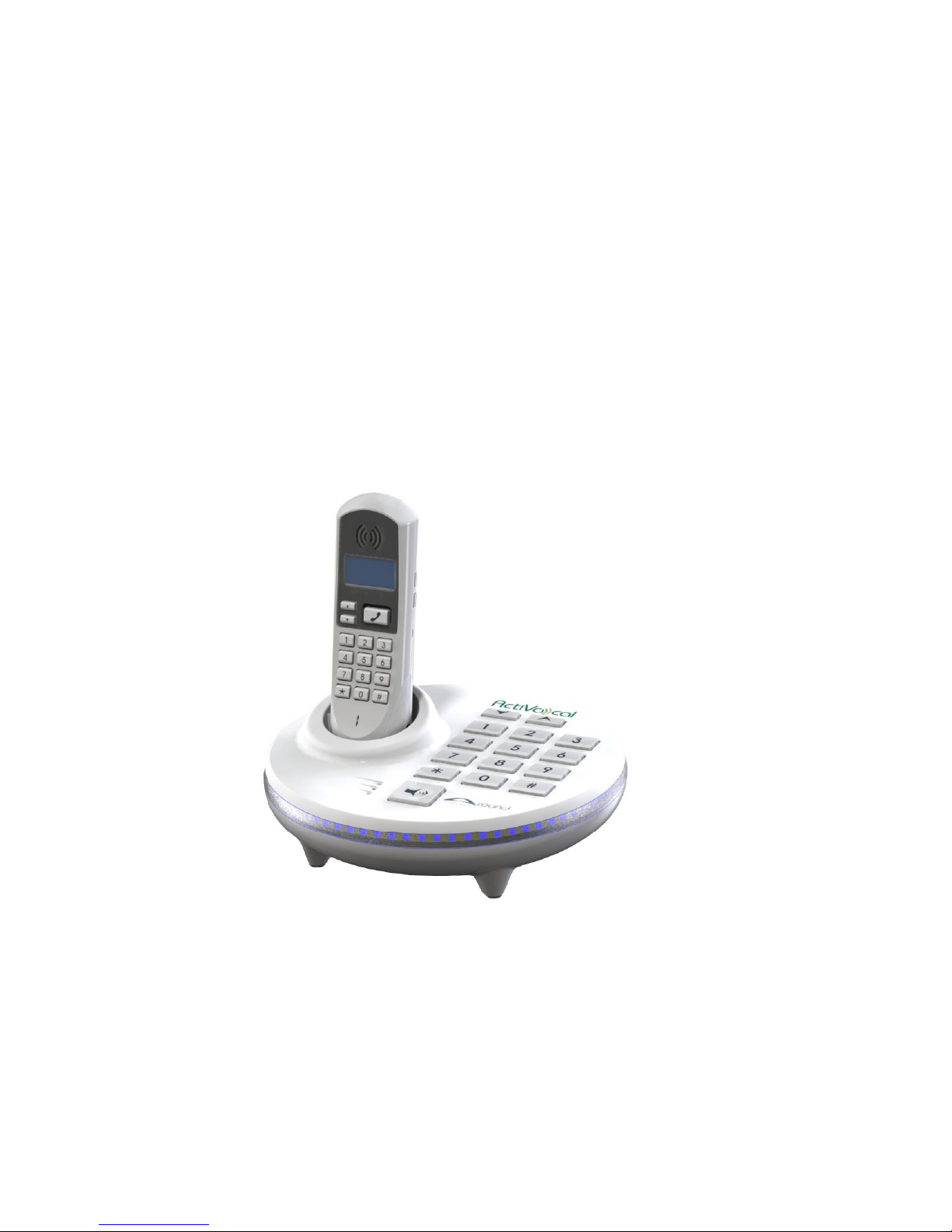
Activocal Around Betriebsanleitung

Around –User Manual ActiVocal
1
AROUND –VOICE ACTIVATED SPEAKERPHONE
USERS MANUAL
REV 1.5
DDV-242-000 REV.A July 2014

Around –User Manual ActiVocal
2
TABLE OF CONTENT
CHAPTER ONE - IMPORTANT SAFETY INSTRUCTIONS...................................................................................................................4
FOR BEST PERFORMANCE .........................................................................................................................................................5
AROUND TECHNICAL SPECIFICATIONS......................................................................................................................................7
WIRELESS HANDSET ..................................................................................................................................................................8
CHAPTER TWO –GETTING TO KNOW AROUND............................................................................................................................9
PACKAGE CONTENT...................................................................................................................................................................9
INSTALLATION INSTURCTIONS ................................................................................................................................................10
FIRST TIME WIZARD ................................................................................................................................................................10
CHARGING THE BATTERIES......................................................................................................................................................10
AROUND DURING A POWER OUTAGE.....................................................................................................................................11
USING AROUND VOICE RECOGNITION - GENERAL BACKGROUND .........................................................................................11
USING AROUND VOICE RECOGNITION - DAY BY DAY USE ......................................................................................................12
MAIN MENU –WHEN PHONE IS ON-HOOK (NOT IN A CALL) .................................................................................................13
MAIN MENU –WHEN PHONE IS OFF-HOOK (WHILE IN A CALL).............................................................................................13
SYSTEM SETUP MENU .............................................................................................................................................................14
PHONEBOOK MENU................................................................................................................................................................14
CHANGE VOLUME MENU........................................................................................................................................................14
NIGHT LIGHT MENU ................................................................................................................................................................15
OTHER, USE DEPENDENT, VOICE COMMANDS YOU CAN USE................................................................................................15
CHAPTER THREE –MANUALLY PLACING AND RECEIVING CALLS................................................................................................16
MANUALLY PLACING A CALL ...................................................................................................................................................16
MANUALLY ANSWERING A CALL.............................................................................................................................................16
CHAPTER FOUR –USING THE VOICE PHONEBOOK.....................................................................................................................17
ADDING A NEW NAME TO THE PHONEBOOK .........................................................................................................................17
CALLING A NAME FROM THE PHONEBOOK ............................................................................................................................18
DELETING A NAME FROM THE PHONEBOOK..........................................................................................................................20
DELETING THE ENTIRE PHONEBOOK.......................................................................................................................................21
HEARING THE CONTENT OF THE ENTIRE PHONEBOOK...........................................................................................................22
CHAPTER FIVE –TIME AND ALARM.............................................................................................................................................23
SETTING THE CLOCK ................................................................................................................................................................23
HEARING THE TIME .................................................................................................................................................................25

Around –User Manual ActiVocal
3
SETTING THE ALARM CLOCK ...................................................................................................................................................25
CANCELING THE ALARM CLOCK / FINDING OUT THE CURRENT ALARM TIME .......................................................................26
STOPPING/SNOOZZING YOUR ALARM....................................................................................................................................26
CHAPTER SIX –USING VOICE DIGITS...........................................................................................................................................27
DIALING A NUMBER (ON HOOK MODE)..................................................................................................................................27
DIALING DIGITS (OFF HOOK MODE)........................................................................................................................................28
CHAPTER SEVEN –EMERGENCY SITUATIONS .............................................................................................................................29
CHAPTER EIGHT –VOLUME.........................................................................................................................................................31
CHAPTER NINE –MISCULENIOS FUNCTIONS ..............................................................................................................................33
LOCATING THE HANDSET ........................................................................................................................................................33
INTERCOM MODE....................................................................................................................................................................34
NIGHT LIGHT............................................................................................................................................................................35
HANGING UP USING A VOICE COMMAND..............................................................................................................................36
HANDLING CALL WAITING.......................................................................................................................................................36
TURNING THE VOICE PROMPTS ON AND OFF.........................................................................................................................37
CHANGING THE TRIGGER SENSITIVITY....................................................................................................................................38
BACKING UP AND RESTORING YOUR PERSONAL DATA ..........................................................................................................39
CHAPTER TEN –WORKING WITH THE HANDSET ........................................................................................................................41
TURNING THE HANDSET ON/OFF............................................................................................................................................42
UNDERSTANDING THE DISPLAY ..............................................................................................................................................42
CHARGING THE HANDSET .......................................................................................................................................................43
MANUALLY ANSWERING A CALL.............................................................................................................................................43
MANUALLY PLACING A CALL ...................................................................................................................................................44
CHANGING THE SPEAKER VOLUME.........................................................................................................................................44
CHANGING THE DISPLAY BRIGHTNESS....................................................................................................................................44
CHANGING THE RINGER VOLUME...........................................................................................................................................45
VIEWING THE CALLER LIST ......................................................................................................................................................45
ENABLING/DISABLING THE FALL DETECTION FEATURE ..........................................................................................................45
ACTIVATING THE INTERCOM MODE .......................................................................................................................................46
CHAPTER ELEVEN –FREQUENTLY ASKED QUESTIONS................................................................................................................47
Important notices:.......................................................................................................................................................................49

Around Voice Activated Phone Limited Warranty:.....................................................................................................................49

Around –User Manual ActiVocal
4
CHAPTER ONE - IMPORTANT SAFETY INSTRUCTIONS
To prevent severe injury and loss of life/property, read this section carefully before using Around to ensure
proper and safe operation of your product.
• Use only the power supply that came with Around.
• Do not overload power outlets and extension cords. This can result in the risk of fire or electric shock.
• Completely insert the AC adapter/power plug into the power outlet. Failure to do so may cause electric shock
and/or excessive heat resulting in a fire.
• Unplug Around from power outlets if it emits smoke, and abnormal smell, or makes an unusual noise. These
conditions can cause fire or electric shock. Confirm that smoke has stopped emitting and contact Activocal’s
Customer Service line at +972-8-6996911
• Unplug from power outlets and never touch the inside of Around if its casing has been broken open.
• Never touch the plug with wet hands. Danger of electric shock exists.
• To prevent the risk of fire or electrical shock, do not expose Around to rain or any type of moisture.
• Do not place or use Around near automatically controlled devices such as automatic doors and fire alarms.
Radio waves emitted from Around may cause such devices to malfunction resulting in an accident.
• Do not allow the AC adaptor or telephone line cord to be excessively pulled, bent or placed under heavy objects.
• Unplug Around from power outlets before cleaning. Do not use liquid or aerosol cleaners.
• Do not disassemble Around.
• Do not spill liquids (detergents, cleansers, etc.) onto the telephone line cord plug, or allow it to become wet at
all. This may cause a fire. If the telephone line cord plug becomes wet, immediately pull it from the telephone
wall jack, and do not use.
• Consult the manufacturer of any personal medical devices, such as pacemakers or hearing aids, to determine if
they are adequately shielded from external RF (radio frequency) energy. (Around operates in the frequency range
of 2.4GHz, and its RF transmission power is 01mW max.)

Around –User Manual ActiVocal
5
• Do not use the product in health care facilities if any regulations posted in the area instruct you not to do so.
Hospitals or health care facilities may be using equipment that could be sensitive to external RF energy.
• Never install telephone wiring during an electrical storm.
• Never install telephone line jacks in wet locations unless the jack is specifically designed for wet locations.
• Never touch uninsulated telephone wires or terminals unless the telephone line has been disconnected at the
network interface.
• Use caution when installing or modifying telephone lines.
• The AC adaptor is used as the main disconnect device. Ensure that the AC outlet is installed near the product
and is easily accessible.
• When using Around, basic safety precautions should always be followed to reduce the risk of fire, electric
shock, and injury to persons, including the following:
• Do not use Around near water. For example, near a bathtub, washbowl, kitchen sink, or laundry tub, in a wet
basement or near a swimming pool.
• Do not use Around to report a gas leak in the vicinity of the leak.
FOR BEST PERFORMANCE
Base unit location / avoiding noise
The base unit and the cordless unit use radio waves to communicate with each other.
For maximum coverage and noise-free communications, place Around’s base unit at a convenient, high, and
central location with no obstructions between the handset and base unit in an indoor environment.
Place it away from electronic appliances such as TVs, radios, personal computers, wireless devices, or other
phones.
Place it facing away from radio frequency transmitters, such as external antennas of mobile phone cell stations.
(Avoid putting the base unit on a bay window or near a window.)
Coverage and voice quality depends on the local environmental conditions.

Around –User Manual ActiVocal
6
If the reception for Around’s base unit location is not satisfactory, move the base unit to another location for
better reception.
Keep Around away from electrical noise generating devices, such as fluorescent lamps and motors.
Around should be kept free from excessive smoke, dust, high temperature, and vibration.
Around should not be exposed to direct sunlight.
Do not place any objects on top of Around’s base.
When you leave Around unused for a long period of time, unplug the product from the power outlet.
Around should be kept away from heat sources such as heaters, kitchen stoves, etc. It should not be placed in
rooms where the temperature is less than 0 °C (32 °F) or greater than 40 °C (104 °F). Damp basements should also
be avoided.
The maximum calling distance may be shortened when the product is used in the following places: Near obstacles
such as shills, tunnels, underground, near metal objects such as wire fences, etc.
Operating Around near electrical appliances may cause interference. Move away from the electrical appliances.
Routine care
Wipe the outer surface of Around’s base and handset with a soft moist cloth.
Do not use benzene, thinner, or any abrasive powder.
Notice for product disposal, transfer, or return
• Around can store your private/confidential information. To protect your privacy/confidentiality, we recommend
that you erase information such as phonebook or caller list from the memory before you dispose of, transfer, or
return the product.

Around –User Manual ActiVocal
7
AROUND TECHNICAL SPECIFICATIONS
BASE UNIT
Parameter
Value
Dimensions
2.7” High, round, with a diameter of 8.2”
Weight
580 grams (without the AC adaptor)
Max. Power Consumption
12W
RF Frequency range:
2.402 GHz to 2.48 GHz (PurePath from TI)
RF transmission power
10mW
Power specifications
12V DC, 1.5A
Battery information
NiMH Battery,3.7V/330mAh. Note: The battery is charging while Around is
powered by the power adapter.
Battery Charge time
Approx. 4 hours (from discharged to fully charged)
Talk Time
Approx. 1.5 hours, without charging the cordless handset
Standby time
Approx. 2 hours, , without charging the cordless handset
Operating conditions
32 °F –104 °F, 20 % –80 % relative air humidity (dry)

Around –User Manual ActiVocal
8
WIRELESS HANDSET
Parameter
Value
Dimensions
6” high, 0.9” wide, 2” thick
Weight
100 grams
Max. Power
Consumption
0.5W
RF Frequency range:
2.402 GHz to 2.48 GHz (PurePath from TI)
RF transmission power
10mW
Power Charging
specifications
5VDC, 370mA.
Battery information
Li-ion Polymer Battery, 3.7V/800mAh. Note: The battery is charging while the
handset is in its base’s cradle and the base is powered by the power adapter.
Battery Charge time
Approx. 4 hours (from discharged to fully charged)
Talk Time
Approx. 10 hours (from fully charged to discharged)
Standby time
Approx. 18 hours (from fully charged to discharged)
Operating conditions
32 °F –104 °F, 20 % –80 % relative air humidity (dry)

Around –User Manual ActiVocal
9
CHAPTER TWO –GETTING TO KNOW AROUND
PACKAGE CONTENT
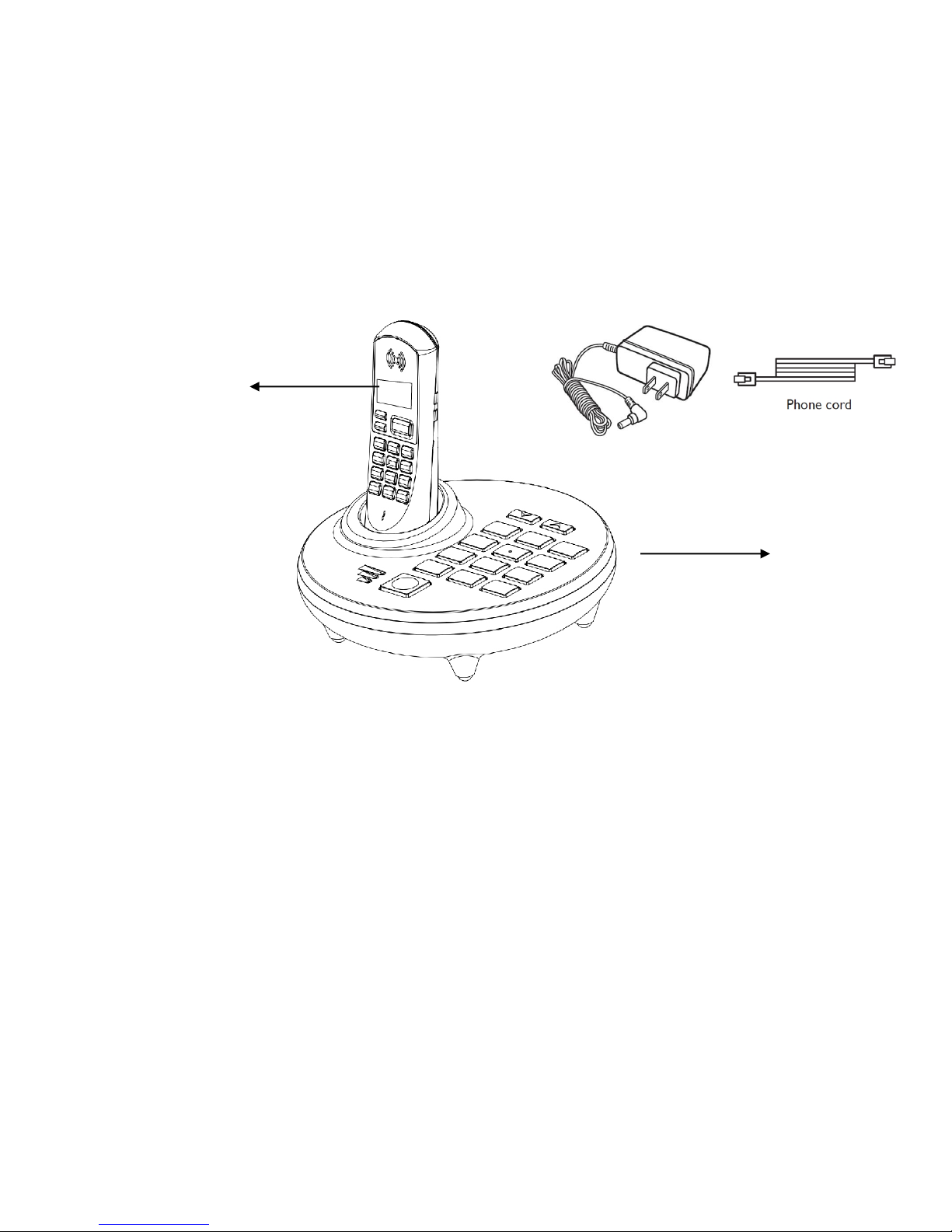
When unpacking, you should find the following items inside the box:
1. Around base unit.
2. Around Cordless handset.
3. AC Power supply unit.
4. RJ11 phone cable.
5. A quick setup guide.
6. A quick voice command guide.
7. This User’s Manual.
Around
base unit
Around
Cordless handset
AC Power supply
unit
RJ11 phone cable
unit

Around –User Manual ActiVocal
10
INSTALLATION INSTURCTIONS
1. Unpack all items from the box.
2. Connect the phone cable from your wall line jack to Around’s ‘Line’ marked jack.
3. Connect the power supply to Around’s base unit. This should be connected to the power marked
jack on one end and to the mains wall outlet on the other. Once connected, Around will greet you.
4. Position the base unit on a solid, dry flat surface. A bedside stool or desk is an idle location.
5. Place the cordless handset into its cradle on the base unit.
FIRST TIME WIZARD
Once all installation steps above are completed, Around will run the automatic introduction wizard
which will help you get to know Around for the first time.
Please note that you will be able to run this wizard again, using the voice command “run
setup wizard” found under the “system setup” menu.
CHARGING THE BATTERIES
Both the base unit and the cordless handset contain rechargeable batteries that will need to be
charged before you can use Around. Please allow up to 4 hours for the batteries to fully charge for
the first time before using Around.
Andere Handbücher für Around
2
Inhaltsverzeichnis
Andere Activocal Schnurloses Telefon Handbücher