ADLINK Technology MXN-4100 Bedienungsanleitung

Leading EDGE COMPUTING
MXN-4100
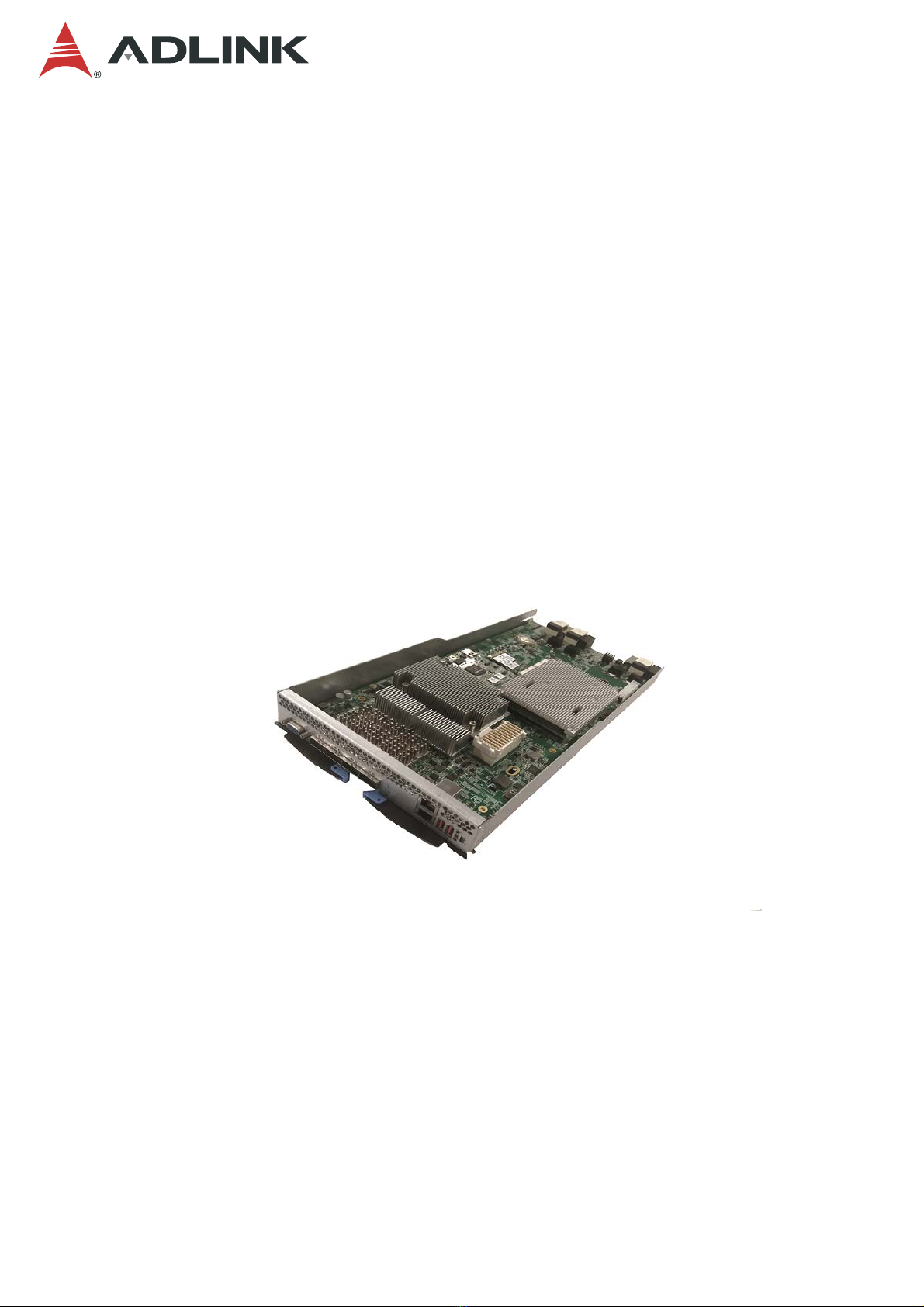
Switch Sled with
Intel® Ethernet Multi-Host Controller
User’s Manual
Manual Revision: 1.0
Revision Date: March 28, 2019
Part No.: 50-1Z270-1000

2
MXN-4100
Preface
Copyright 2019 ADLINK Technology, Inc.
This document contains proprietary information protected by copyright. All rights are
reserved. No part of this manual may be reproduced by any mechanical, electronic, or other
means in any form without prior written permission of the manufacturer.
Disclaimer
The information in this document is subject to change without prior notice in order to improve
reliability, design, and function and does not represent a commitment on the part of the
manufacturer.
In no event will the manufacturer be liable for direct, indirect, special, incidental, or
consequential damages arising out of the use or inability to use the product or
documentation, even if advised of the possibility of such damages.
Environmental Responsibility
ADLINK is committed to fulfill its social responsibility to global
environmental preservation through compliance with the European
Union's Restriction of Hazardous Substances (RoHS) directive and
Waste Electrical and Electronic Equipment (WEEE) directive.
Environmental protection is a top priority for ADLINK. We have enforced
measures to ensure that our products, manufacturing processes,
components, and raw materials have as little impact on the environment
as possible. When products are at their end of life, our customers are
encouraged to dispose of them in accordance with the product disposal and/or recovery
programs prescribed by their nation or company.
Battery Labels (for products with battery)
廢電池請回收
California Proposition 65 Warning
WARNING: This product can expose you to chemicals including acrylamide,
arsenic, benzene, cadmium, Tris(1,3-dichloro-2-propyl)phosphate (TDCPP), 1,4-
Dioxane, formaldehyde, lead, DEHP, styrene, DINP, BBP, PVC, and vinyl materials,
which are known to the State of California to cause cancer, and acrylamide, benzene,
cadmium, lead, mercury, phthalates, toluene, DEHP, DIDP, DnHP, DBP, BBP, PVC, and vinyl
materials, which are known to the State of California to cause birth defects or other
reproductive harm. For more information go to www.P65Warnings.ca.gov.
Trademarks
Product names mentioned herein are used for identification purposes only and may be
trademarks and/or registered trademarks of their respective companies.

3
MXN-4100
Revision History
Revision Release Date Description of Change(s)
1.0 2019-03-28 Initial release

4
MXN-4100
Table of Contents
Preface .................................................................................................................................. 2
1Overview .......................................................................................................................... 5
1.1 Introduction.............................................................................................................................5
1.2 Specifications..........................................................................................................................6
1.3 Switch Sled Front Panel..........................................................................................................7
1.4 Switch Sled Layout .................................................................................................................8
1.5 IO Expansion Module..............................................................................................................9
1.6 ADLINK PacketManager.......................................................................................................10
2Getting Started................................................................................................................11
2.1 Preparing the Switch Sled......................................................................................................11
2.1.1 Installing a COMe Module...............................................................................................................11
2.1.2 Installing an mSATA Module............................................................................................................12
2.1.3 Installing a CMM Module.................................................................................................................13
2.1.4 Installing an I/O Expansion Module.................................................................................................14
2.2 Front Panel ...........................................................................................................................15
2.3 Inserting and Removing the Switch Sled..............................................................................16
3Powering Up the Switch Sled....................................................................................... 17
3.1 Power-Up Behavior...............................................................................................................17
3.2 Health/Status Indicators and Buttons....................................................................................18
4Using the Switch Sled................................................................................................... 19
4.1 Login to the Switch System...................................................................................................19
4.1.1 Login Via Serial Port........................................................................................................................19
4.1.2 Local Login ......................................................................................................................................21
4.1.3 Via Network Port..............................................................................................................................23
4.2 Switch System IP Setup........................................................................................................24
4.3 COMe OS Version Check.....................................................................................................25
4.4 PacketManager on the Switch Sled......................................................................................26
4.4.1 Check PacketManager Installation Version.....................................................................................26
4.4.2 Command Line Interface and Configure Mode ...............................................................................27
4.4.3 Get Help and Check Version...........................................................................................................28
4.5 Fabric Mode..........................................................................................................................30
5Maintenance................................................................................................................... 32
5.1 Hot-Swapping the Switch Sled..............................................................................................32
5.2 Updating the Switch System BIOS .......................................................................................33
Safety Instructions.............................................................................................................34
Consignes de Sécurité Importantes ................................................................................. 36
Getting Service................................................................................................................... 38

5
MXN-4100
1 Overview
1.1 Introduction
The ADLINK MXN-4100 is a high-throughput high IO density switch sled that functions as an
interconnect for four compute nodes on the CSA-7400 Network Appliance and provides up to
4x 100G ports on front panel. The MXN-4100 is a building block used in the construction of
next generation high-performance firewalls and virtualized telecom elements.
The main features of the MXN-4100 are summarized as follows:
•Up to two MXN-4100 switch sleds are supported on the CSA-7400 (dual redundant)
•Data plane supports 4x 50Gb Ethernet throughput to four CPU sleds, up to 4x100G
ports on front plane
•Control plane supports independent 1G links that connect four compute nodes,
Chassis Management Modules (CMM) and 2x RJ45 ports on front panel
•Supports accelerated processing of NVGRE/VXLAN tunneling protocols to meet the
needs of Layer 2 connectivity for cloud computing
•ADLINK PacketManager software provides commonly used Layer 2 and Layer 3
switch protocol stacks and control APIs to accelerate application development
•Supports smart system management via on-board CMM module for remote system
diagnosis, shutdown, and startup

6
MXN-4100
1.2 Specifications
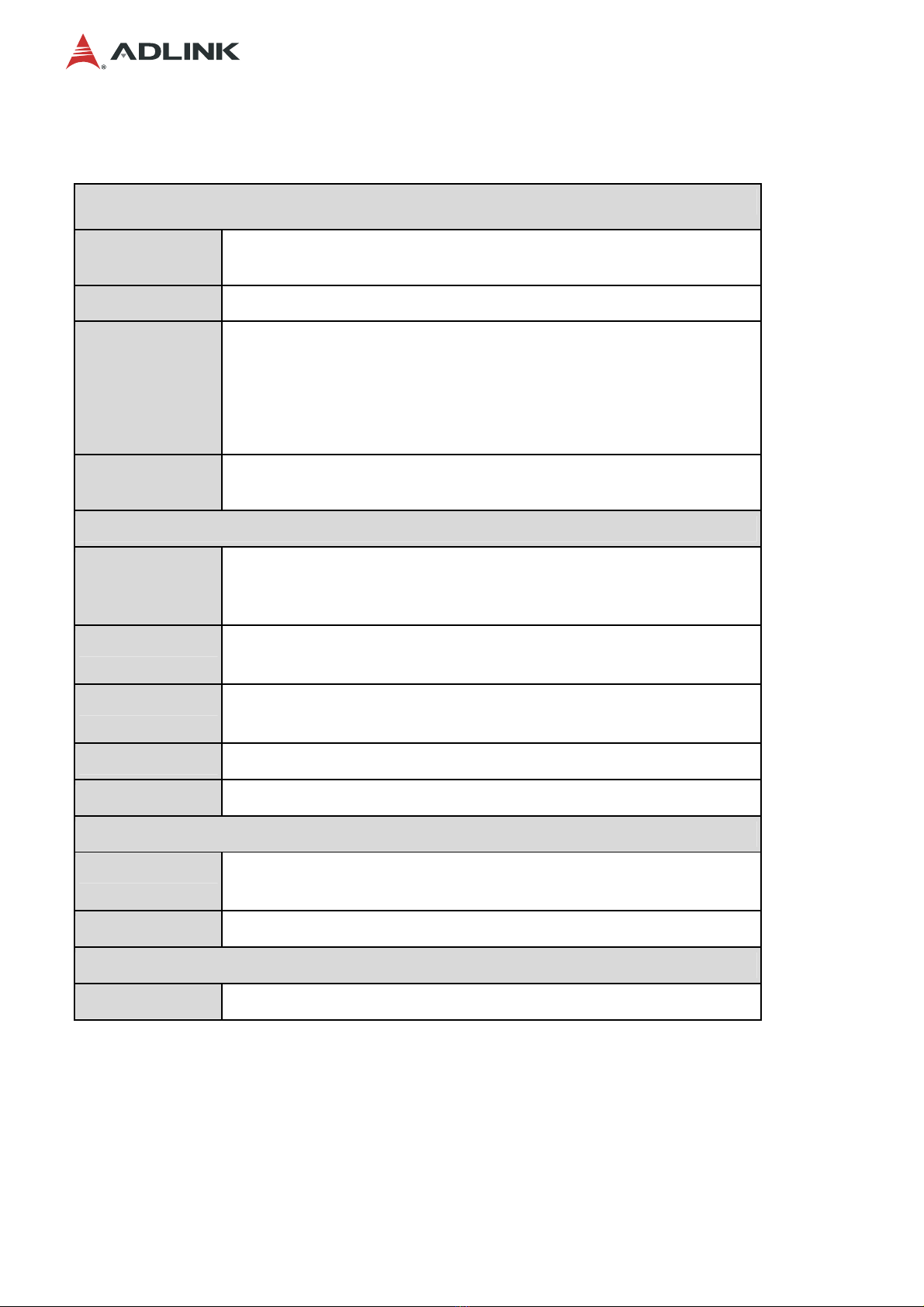
Core System
Switch Intel® Ethernet Multi-host Controller FM10840 (formerly Red Rock
Canyon) with 900Mbps bandwidth & 4x PCIe x8 Gen3
CMM Chassis management module (AST-1250)
COM Express
Module COM Express module with Type 6 interface as local management
(optional)
Intel® Core™ i7-4700EQ 2.4GHz, 4cores, GT2
Intel® Celeron® 2002E 1.5GHz, 2cores, GT1
2x SODIMM 1600/1333MHz DDR3, up to 16GB
Operating
System Linux Kernel 2.6 or above
I/O Interfaces
Data Plane 4x 100GBASE-SR4/100GBASE-LR4 QSFP28 ports (front panel)
NIM-1610: Switch I/O extension card with 16x 10G SFP+
(NIM-0440 with 4x 40G QSFP+ optional)
Control Plane 6x 1G to four CPU sleds, COMe and CMM
2x RJ-45 ports on switch panel
USB 1x USB 2.0 (one can be used as a console port)
1x USB serial console port to COMe module and CMM
Storage 2x mSATA as local storage
Backplane 4x PCIe x8 Gen3 to CPU nodes
Control Buttons and LEDs
Reset 1x Reset Button (front)
1x Hot Swap (front, see 5.1 Hot-Swapping the Switch Sled)
LEDs Power, Active/Standby (A/S), Hot Swap Status (ATN), Alarm (I, II, III)
Mechanical
Form Factor 213.9mmx 40.44mm x 432.1mm (W x H x D)

7
MXN-4100
1.3 Switch Sled Front Panel
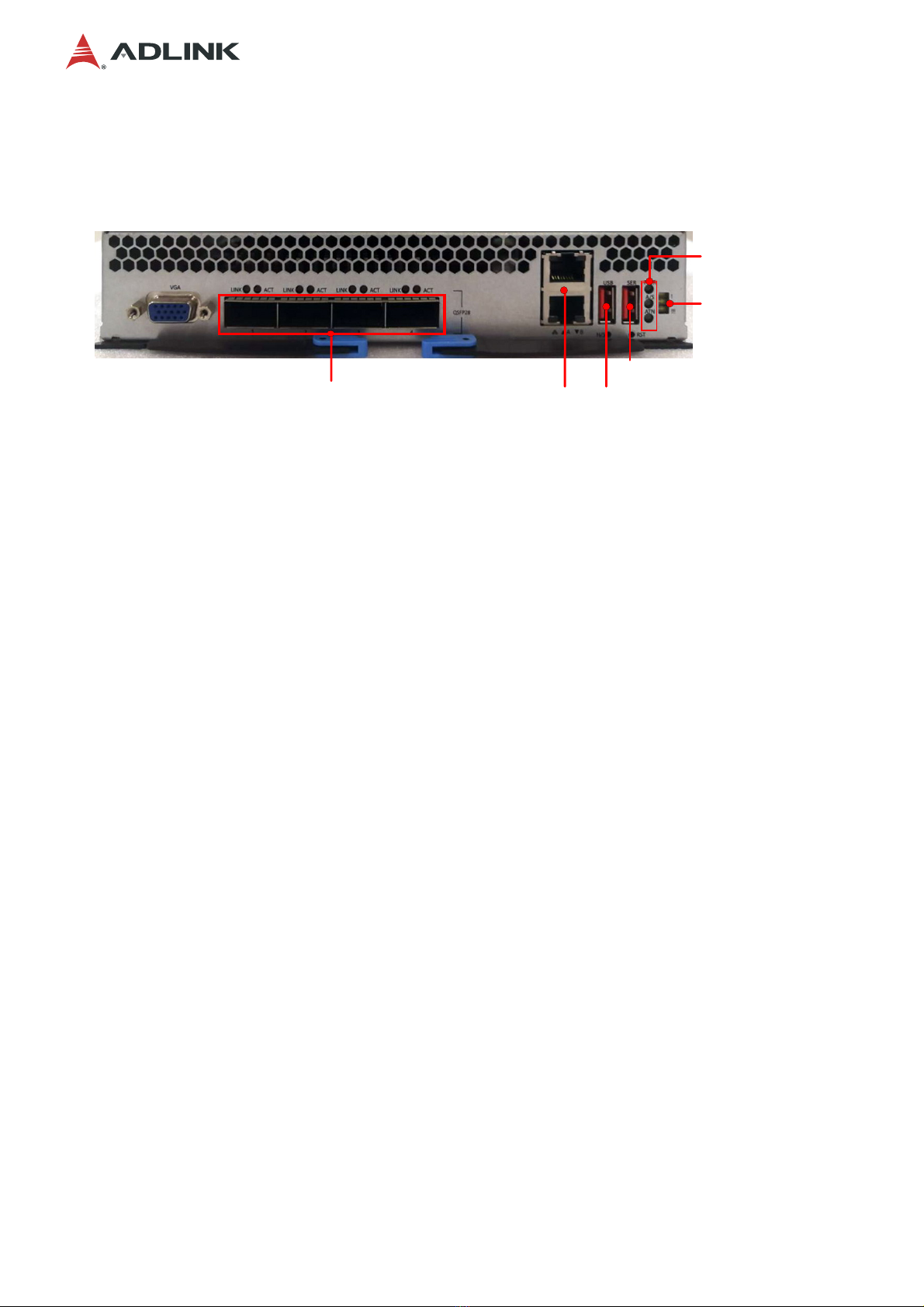
4x QSFP28 2x 1 GbE RJ-45 USB
Serial Console
PWR: Power LED
A
/S: CMM Active/Standby
A
TN: Hotswap Status
CMM Warning LEDs

8
MXN-4100
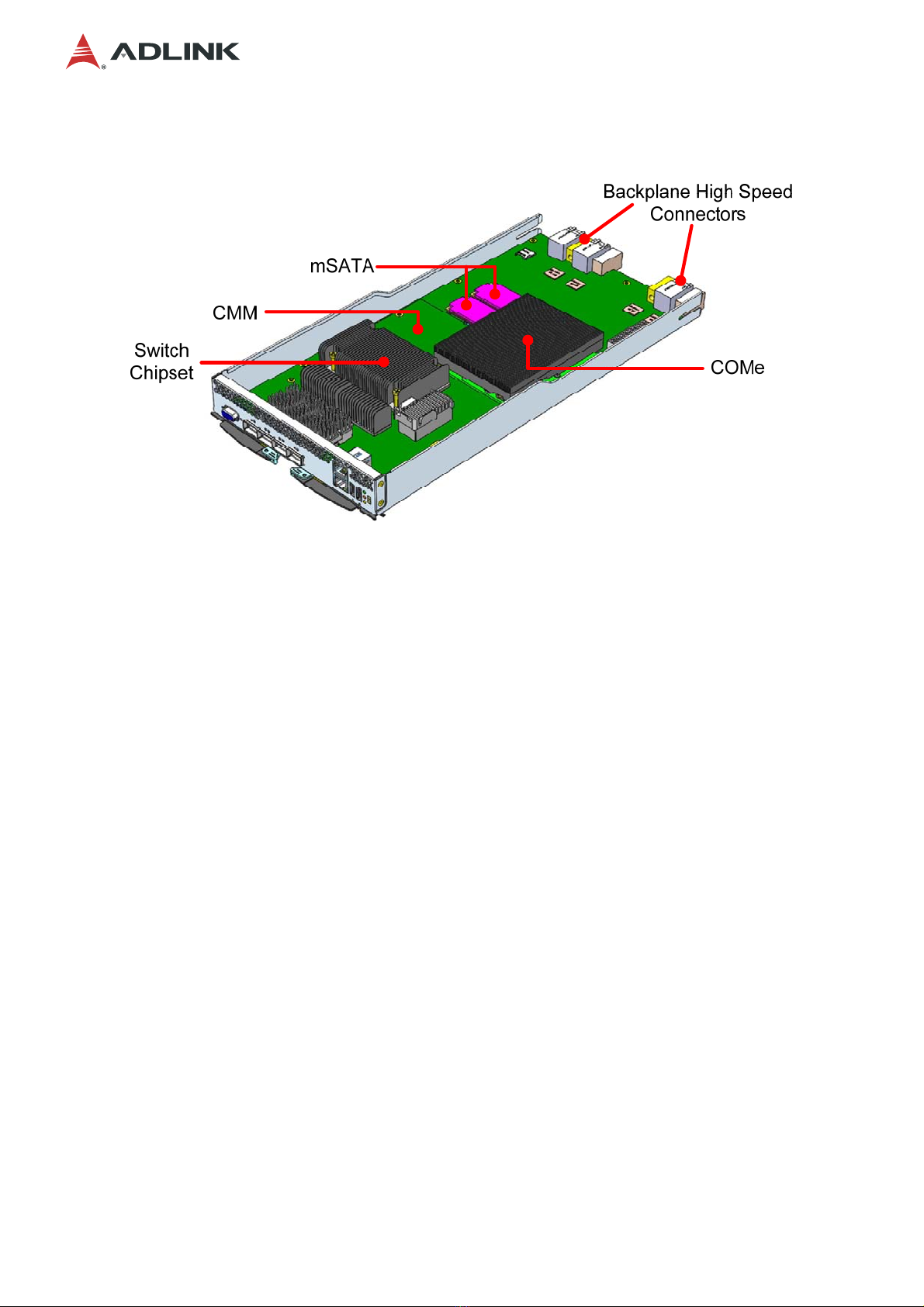
1.4 Switch Sled Layout

9
MXN-4100
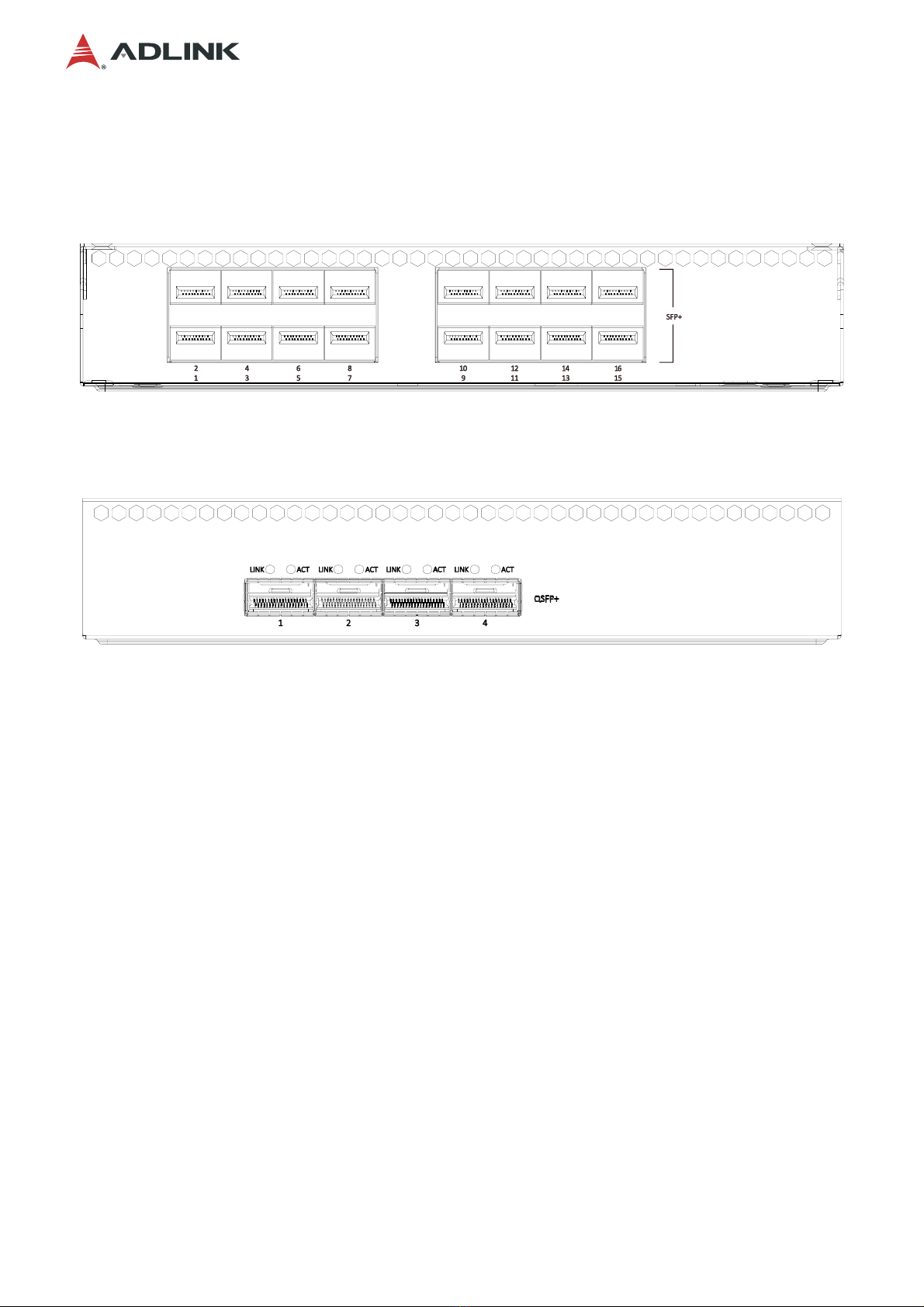
1.5 IO Expansion Module
NIM-1610
16x 10G SFP+
NIM-0440
4x 40G QSFP+ (optional)

10
MXN-4100
1.6 ADLINK PacketManager
ADLINK PacketManager runs on the COM Express (COMe) module in the MXN-4100, it
includes the most commonly used Layer2/3 stacks and switch management features,
including Port Manager, VLAN, LACP, IGMP, RSTP, LLDP, route protocols (RIP, OSPF, BGP),
VRRP, ACL and QoS.
For easy deployment and management, ADLINK PacketManager not only provides a friendly
command line interface (CLI), but also includes remote procedure call (RPC) based APIs to
allow further customization and integration with the customers’ management systems.
To learn more about the ADLINK PacketManager, please download the latest ADLINK
PacketManager documents from the ADLINK website:
https://www.adlinktech.com/Products/AdvancedTCA/ARiPSoftware/PacketManager
Inhaltsverzeichnis
Andere ADLINK Technology Schalten Handbücher

ADLINK Technology
ADLINK Technology cPCI-6S10 Series Bedienungsanleitung

ADLINK Technology
ADLINK Technology aTCA-3710 Bedienungsanleitung

ADLINK Technology
ADLINK Technology EU Series Bedienungsanleitung

ADLINK Technology
ADLINK Technology aTCA-3430 Bedienungsanleitung

ADLINK Technology
ADLINK Technology CSA-7400 Bedienungsanleitung