Aeon Labs Aeotec Nano switch Bedienungsanleitung

AeotecbyAeonLabsNanoSwitch.
AeotecNanoSwitchhasbeencraftedtopowerconnectedsocketsandswitchesusingZWavePlus.Itispoweredby
Aeotec’sGen5technology.
ToseewhetherNanoSwitchisknowntobecompatiblewithyourZWavesystemornot,pleasereferenceourZWave
gatewaycomparisonlisting.ThetechnicalspecificationsofNanoSwitchcanbeviewedatthatlink.
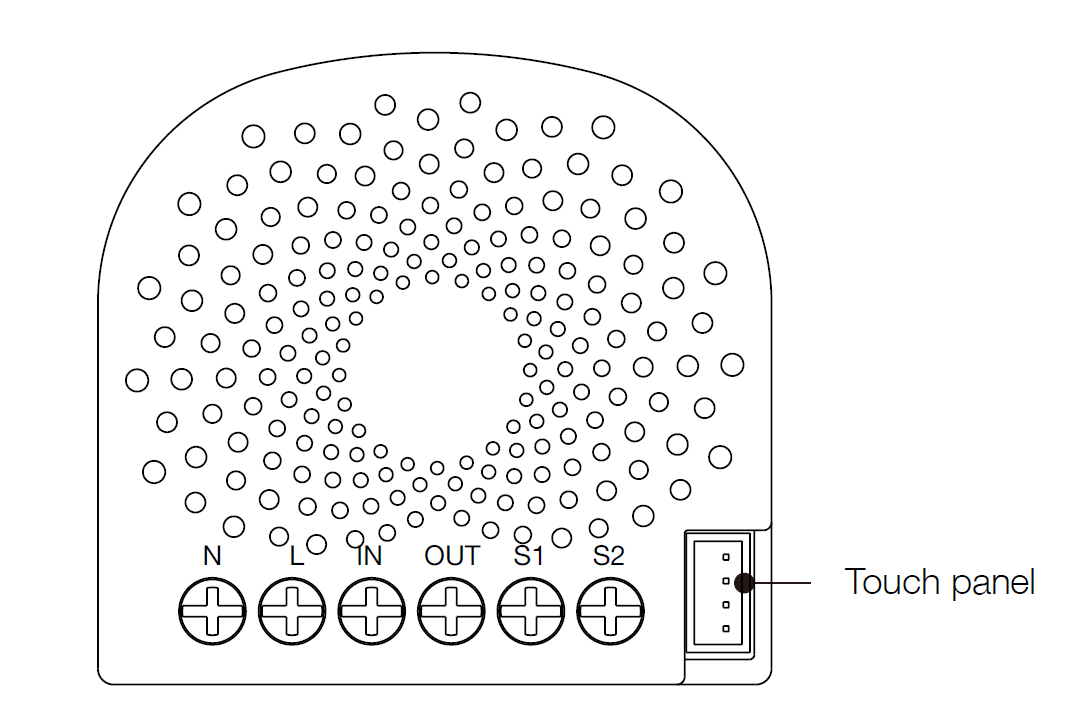
FamiliarizeyourselfwithyourNanoSwitch.
Notesforthewireconnectionports:
L–Powerinputforlive
N–Powerinputforneutral
IN–Inputforloadpowersupplytype(ie.if120VACisconnectedtoIN,thenOUTwilloutput120VACtotheload)
OUT–Outputforload(ThisisdirectlyconnectedtoyourLoadsinputtoreceivepower).

S1–Externalswitchcontrolforload
S2–Externalswitchcontrolforload
InstalltheNanoSwitch.
NanoSwitchinstallsbehindalightingswitchoramomentarypushbutton.Itworkswithonly3wire(withneutral)lighting
setups,thougheachinstallationofNanoSwitchisaccordinglyslightlydifferent:
1.Shutoffthemaincircuitbreakerofyourhomeforsafetyduringtheinstallationandensurethewiresarenotshortcircuited
duringtheinstallationwhichwillcausedamagetotheNanoSwitch.
Note:Yourhome’smaincircuitbreakermustsupporttheoverloadprotectionforsafety.
2.Preparingconnectionwires
14AWGpowerwiresforInput/Output.
18AWGcopperwiresforexternalmanualswitch.
Usethewirestrippercutthemetallicpartoftheconnectionwireandmakesurethelengthofthemetallicpartisabout5mm.
Note:Allconnectionwiresneedstobeflexiblecable.
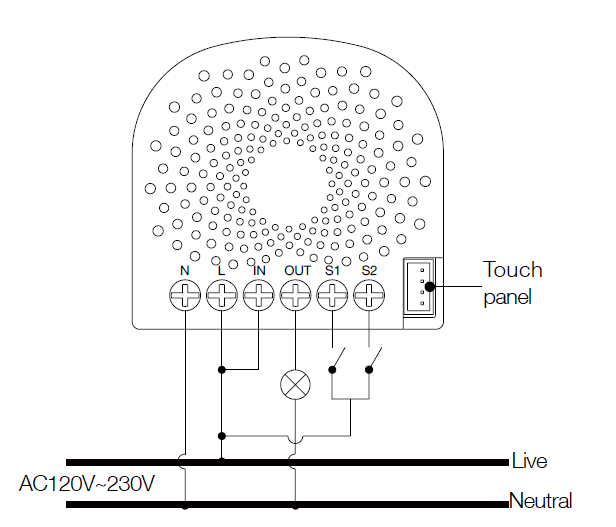
Wiringdiagramof120/230VACpowerinput.

Insomecases,youmayhavesomeloadsjustonlycanbeusedonthevoltageof24VDCandhopethatitstillcanbe
controlledbytheNanoSwitch,sopleaserefertothefollowingdiagramtoachievethis:
Wiringdiagramof120/230VACpowerinputconnectionto24VDCpoweroutput.
Note:The“IN”terminalshouldbeconnectedtothe“”of24VDCinput.
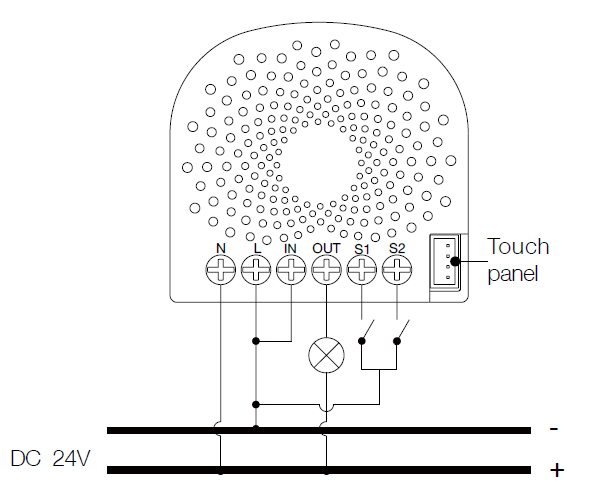
Wiringdiagramof24VDCpowerinput.
SincetheNanoSwitchalsosupportsthe24VDCpowerinput,soyoucanuseittocontroltheloadsthatpoweredby24VDC.

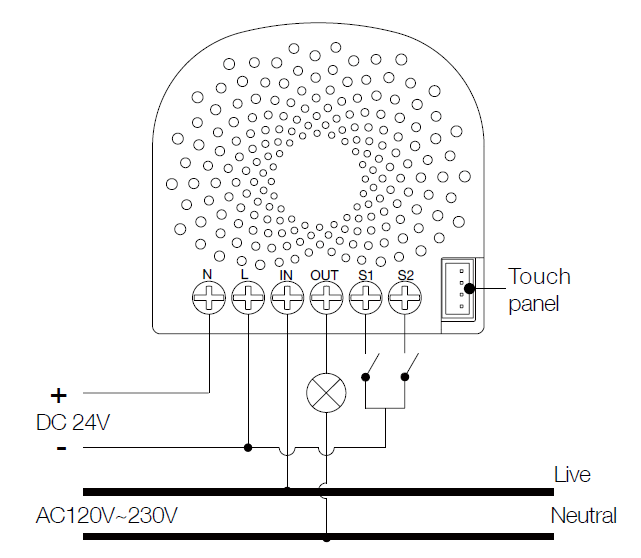
IftheoutputloadsshouldbeonlypoweredbyAC120VorAC230V,youcanchangethewireconnectionasbelow:
Wiringdiagramof24VDCpowerinputto120/230VACpoweroutput.
Note:The“IN”terminalshouldbeconnectedtothe“Live”ofAC120V/230Vpowerwire.
AllabovewiringdiagramsshowthattheNanoSwitchuses2Wayormomentarybuttonswitchesastheexternalmanual
switchfor2Wayconnection.
ThebelowdiagramwillshowyouthattheNanoSwitchusestheSPDT(SinglePoleDoubleThrow)switchesastheexternal
manualswitchfor3Wayconnection.
Wiringdiagramof3Wayconnectionfortheexternalmanualswitch.

3.InstallNanoSwitchtothegangbox.
a.Live/Hotwireconnection:ConnecttheLive/Hotwiretothe“L”terminalontheNanoSwitch.
b.Neutralwireconnection:ConnecttheNeutralwiretothe“N”terminalontheNanoSwitch.
c.Loadwireconnection:ConnecttheLoadwiretothe“OUT”ontheNanoSwitch.
d.External/manualSwitchconnection:Connect218AWGwirestothe“S1”and“S2”ontheNanoSwitch.
e.External/manualSwitchconnection:Connect218AWGwiresformthe2terminalsontheExternal/manualSwitchto
theLivewire.
Note:Thisisthephysicalconnectiondiagramfor120/230VACpowerinput.
4.Mountingthegangbox.
1.Positionallwirestoprovideroomforthedevice.PlacetheNanoSwitchinsidethegangboxtowardsthebackofthe
box.
2.Positiontheantennatowardsthebackofthebox,awayfromallotherwiring.
3.ReinstalltheNanoSwitchtothegangbox.
4.Reinstallthecoverontothegangbox.

Note:1.Thegangboxshouldbesized3×2×2.75inch/75×50×70mmorlarger,minimumvolume14in/230cm.
2.Useflexiblecopperconductorsonly.
5.RestorePower.
Restorepoweratthecircuitbreakerorfuse.
QuickStart.
AddingyourNanoSwitchtoaZWavenetwork.
AfteryourNanoSwitchisinstalledandpoweredon,youarenowabletomanuallycontroltheNanoSwitchtoturnitOn/Off
directlyviapressingyourNanoSwitch’sActionButton,itisnowtimetoaddyourNanoSwitchtotheZWavenetwork.Toset
yourZWavegateway/controllerintopairingmode,pleaserefertotherespectivesectionwithinyourcontrollerinstruction
manual.
1.SetyourZWavecontrollerintopairingmode.
2.PresstheActionButtonontheNanoSwitchonceortoggletheexternalmanualswitchonce,thegreenLED(non
secureindication)willblinktoindicatetheNanoSwitchisenteringintopairingmode.
3.IftheNanoSwitchhasbeensuccessfullyaddedtoyourZWavenetwork,itsRGBLEDwillbesolid.Ifthepairingwas
unsuccessful,theredLEDwillbeonfor2secondsandthenremainacolorfulgradient.Repeattheinstructionsabove
fromstep1.
WithyourNanoSwitchnowworkingasapartofyoursmarthome,you’llbeabletoconfigureitfromyourhomecontrol
software/phoneapplication.PleaserefertoyoursoftwareorgatewayuserguideforfurtherinstructionsonconfiguringNano
Switchtoyourneeds.
ThecolourofRGBLEDwillchangeaccordingtotheoutputloadpowerlevel:

Version LEDindication Output(A)
US
Green [0A,7.5A)
Yellow [7.5A,13.5A)
Red [13.5A,15.5A)
AU
Green [0A,5A)
Yellow [5A,9A)
Red [9A,10.5A)
EU
Green [0A,5A)
Yellow [5A,9A)
Red [9A,10.5A)
RemovingNanoSwitchfromaZWavenetwork.
YourNanoSwitchcanberemovedfromyourZWavenetworkatanytime.You’llneedtouseyourZWavenetwork’smain
controller.TosetyourZWavecontroller/gatewayintoremovalmode,pleaserefertotherespectivesectionwithinyour
controllerinstructionmanual.
1.SetyourZWavecontrollerintoremovalmode.
2.PresstheActionButtonontheNanoSwitchonceortoggletheexternalmanualswitch3timesinfastsuccession.
3.iftheNanoSwitchhasbeensuccessfullyremovedfromyourZWavenetwork,itsRGBLEDwillremaincolourful
gradient.Iftheremovalwasunsuccessful,theRGBLEDwillstillbesolid(followingthestateoftheoutputload),repeatthe
instructionsabovefromstep1.
Advancedfunctions.
ChangingmodeontheExternalSwitch/ButtonControl.
TheNanoSwitchcanbecontrolledvia2state(flip/flop)external/manualswitch,momentarypushbuttonorthe3wayswitch.
ToautomaticallydetectandsetthemodetotheappropriatetypeofmanualswitchwiredintoNanoSwitch,togglethebutton
onthemanualswitchonceandwait2secondsfortheNanoSwitchtodetectthetypeofmanualswitch.
YoucanalsosettheexternalswitchmodethroughConfigurationCommandClass.
Parameter120[1byte]istheparameterthatwillsetoneofthe3differentmodes.Youcansetthisconfigurationto:
(0)2stateswitchmode
(1)MomentarypushbuttonMode
(2)3wayswitchmode
Touchpanelcontrol.
AsyoucanseethattheNanoSwitch’ssurfacehasapinport,thisportisusedtoconnecttheTouchpanel.Whenyouhave
alreadyconnectedittotheNanoSwitch,youwillbepossibletocontroltheNanoSwitchthroughtheTouchpaneldirectly.

MonitoringEnergyConsumption.
TheAeotecNanoSwitchcanreportwattageenergyusageorkWhenergyusagetoaZWavecontrolpointwhenrequested.If
thisfunctionissupportedbythecontrolpoints,theenergyconsumptionwillbedisplayedintheuserinterfaceofthecontrol
points.(ThespecificZWavecommandssupportingenergymonitoringaretheMeterCommandClass.Automaticreportsare
senttoassociationgroup1,whichissetupviatheAssociationCommandClass.)Pleaseconsulttheoperationmanualfor
thesecontrolpointsforspecificinstructionsonmonitoringtheNanoSwitch.
Note:ThemodelZW139NanoSwitchdoesnothavetheabilitytomonitorenergyconsumption.ThemodelZW116Nano
Switchsupportstheenergymeteringfeatureandyoucanseethewords“withEnergyMetering”onitspackagingbox.
SecurityorNonsecurityfeatureofyourNanoSwitchinZWave
network.
IncludingNanoSwitchasanonsecuredevice:
IfyouwantyourNanoSwitchasanonsecuredeviceinyourZWavenetwork,presstheActionButtononceonNanoSwitch
whenyoupairittoyourgateway.
Ifinclusionissuccessful,thegreenLEDwillbeonfor2seconds,andthenreturntoasolidindication.Ifinclusionis
unsuccessful,theredLEDwillbeonfor2secondsandthenreturntoacolorfulgradient.
IncludingNanoSwitchasasecuredevice:
InordertotakefulladvantageoftheNanoSwitch,youwillwantyourNanoSwitchasasecuritydevicethatusesencrypted
messagestocommunicateinyourZwavenetwork.Asecurityenabledcontroller/gateway(orZWavePluscontroller)is
required.
1.SetyourZWavePluscontrollerintopairingmode.
2.PresstheActionButton2timeswithin1secondontheNanoSwitch,theblueLED(secureindication)willblinkto
indicatetheNanoSwitchisenteringintosecurepairingmode.
3.IftheNanoSwitchhasbeensuccessfullyaddedtoyourZWavenetwork,itsRGBLEDwillbesolid.Ifthepairingwas
unsuccessful,theredLEDwillbeonfor2secondsandthenremainacolorfulgradient,repeattheinstructionsabove
fromstep1.
ResetyourNanoSwitch.

Ifatsomestage,yourprimarycontrollerismissingorinoperable,youmaywishtoresetallofyourNanoSwitch’ssettingsto
theirfactorydefaults.
Todothis,pressandholdtheActionButtonfor20secondsandthenreleaseit.YourNanoSwitchwillnowberesettoits
originalsettings,andthegreenLEDwillbesolidfor2secondsandthenremainthecolorfulgradientstatusasaconfirmation.
Inhaltsverzeichnis
Andere Aeon Labs Schalten Handbücher

Aeon Labs
Aeon Labs Aeotec Smart Switch 7 Bedienungsanleitung

Aeon Labs
Aeon Labs Aeotec Micro Smart Energy Switch G2 Bedienungsanleitung

Aeon Labs
Aeon Labs Aeotec Heavy Duty Smart Switch Gen5 Bedienungsanleitung

Aeon Labs
Aeon Labs AEOR Series Bedienungsanleitung

Aeon Labs
Aeon Labs Aeotec G2 Bedienungsanleitung