
AL Tech Mediagate MG-250HD Bedienungsanleitung


Contents
Introduction ...........................................................3
Technical Support ..............................................................................................................4
Precautions ....................................................................................................................... 4
Specifications..................................................................................................................... 6
Package Content................................................................................................................7
Explanations of Front & Backview. ....................................8
1. Use as External USB HDD......................................... 11
1.1 Insert Hard Disk ..............................................................................................11
1.2 Format Built-in HDD via USB ...........................................................................12
1.2.1 Windows 98SE, ME.................................................................................................. 12
1.2.2 Windows 2000 .........................................................................................................14
1.2.3 Windows XP ............................................................................................................16
1.3 Copy Data via USB..........................................................................................18
1.3.1 Windows 98SE ........................................................................................................18
1.3.2 Windows ME............................................................................................................ 19
1.3.3 Windows 2000, XP ...................................................................................................20
1.3.4 Linux.......................................................................................................................21
1.3.5 Mac ........................................................................................................................ 21
2. Connect to an External Audio & Video Device..................... 23
2.1 Connect Video Cable to TV......................................................................................... 23
2.2 Connect Audio Cable................................................................................................... 24
3. Basic Setup....................................................... 26
3.1 Video Setup ...............................................................................................................26
3.2 Audio Setup ...............................................................................................................28
3.3 Photo View Setup ....................................................................................................... 29
3.4 Screen Ratio Setup .....................................................................................................30
3.5 Auto Play Setup.......................................................................................................... 31
3.6 SKIN..........................................................................................................................32
1

3.7 Others ........................................................................................................................33
4. How to Play (Remote Control) .................................... 35
4.1 Basic Screen Menu..........................................................................................35
4.1.1 Mode Selection.........................................................................................................35
4.1.2 File Selection............................................................................................................36
4.2 Play Video Files...............................................................................................38
7.3 Play DVD File...................................................................................................40
7.4 Play Audio File ................................................................................................42
7.5 Play Photo File ................................................................................................44
7.6 Make a Play List...............................................................................................46
8. Firmware Upgrade ................................................ 48
2

Introduction
The MediaGate MG-250HD fully supports HD (High Definition) files that look exceptionally clear on a HDTV (LCDTV, Normal TV),it also
has a docking station that gives you a simple cable connection to a TV or a monitor at home or in a car.
z2.5” Portable High Definition Multimedia Player
zThe latest and most powerful media decoding chip - Sigma DesignsEM8621 Chip
zFull HD file playback up to 1920 x 1080p
zDVD Manager - Playback of DVD Files are the same as an Original DVD title
zVideo output - HDMI, Component and Composite
zAudio output – Stereo, Digital Coaxial & Optical 5.1 ch. Sound, DTS down mix to stereo
zEasy Firmware Upgrade
3

Technical Support
Contact your local distributor in your country or AL Tech, Inc. in Korea www.airlinktek.com
Precautions
Please read the following carefully and refer to [Cautions] in the manual for proper use.
Copyright * We are not responsible for the useof illegal software, audio sources, video sources, etc.and the users must take legal
responsibility themselves.
Check the supported codec * The MediaGate MG-250HD may not play every media file.Please check the codec type. Also it may not play or run properly
depending on file charactertics or circumstances.
Cautions for USB Device
* If it is needed,also connect the power adapter when you connect the MediaGate MG-250HD to a PC.
The MediaGate MG-250HD may not be detected if the USB cable is more than 3 meters (9.8 feet). Recommended length is 3 meters
(9.8 feet) .
If the USB cable is too long, the transfer speed and the connection may not be to good.
We recommend you use the USBcable that was supplied with your MG-250HD.
If you connect this device to a USB 1.1 Host Adapter, the speed will be USB 1.1 (Max. 12Mbps), so we recommend you to connect to
USB2.0 for full speed of max. 480Mbps if possible.
Cautions when you insert a
HDD
* Only 2.5” SATA type HDD's can be used. You may use SATA or SATA 2 HDD's .
In case of a new HDD, please do a “Format” on a PC first and then fit it (For details, please refer to “1.2 Format Built-
in HDD via USB” ).
Cautions for the possibility of
electro-magnetic interference.
* MediaGate MG-250HD maypossibility give off certain electro-magnetic interference, and could have certain effects on a person with a heart
pace-maker.
Data Backup * We strongly recommend you to back up the data to another safe media. We are not responsible for data damage or loss within the built-
in HDD.
Cautions for use in a car.
* Make sure you only use the supplied car power adaptor (optional extra) when using the MG-250HD in a car.
Do not use the MediaGate MG-250HD while actually operating the vehicle.
Th3MG-250HD may not work properly and also drain the battery when the engine is turned off and the unit is left on for an extended period of time.
Using in a car while the engine is running may result in video & audio noise .
Cautions for drop, shock * Do not drop the device. It may cause critical damage to the hard drive .
Insert strange materials * Don’t insert steel materials (coins, etc.) or other materials that may cause the MediaGate MG-250HD to develop a defect.
Cautionsfor Disassembly &
Modification * Don’t try to disassemble or modify the MediaGate MG-250HD.As it may cause a malfunction.
Cautions for Storage * Do not stack any other heavy materials on the MediaGate MG-250HD.
Cautions for exposure to water,
moisture, etc .
* Do not expose the MediaGate MG-250HD to oil, water, dust, moisture or rain and wind.
If the MediaGate MG-250HD gets wet ,then dissconnect the power from it immediatly.
4

Cautions for heat * Keep the MediaGate MG-250HD away from heated areas. Set it up in well-ventilated places.
Cautions for magnetic materials * Keep all magnetic materials away from MediaGate MG-250HD. Magnetic materials such as speakers or magnets may erase or
cause damage to the data stored on the hard disk.
5
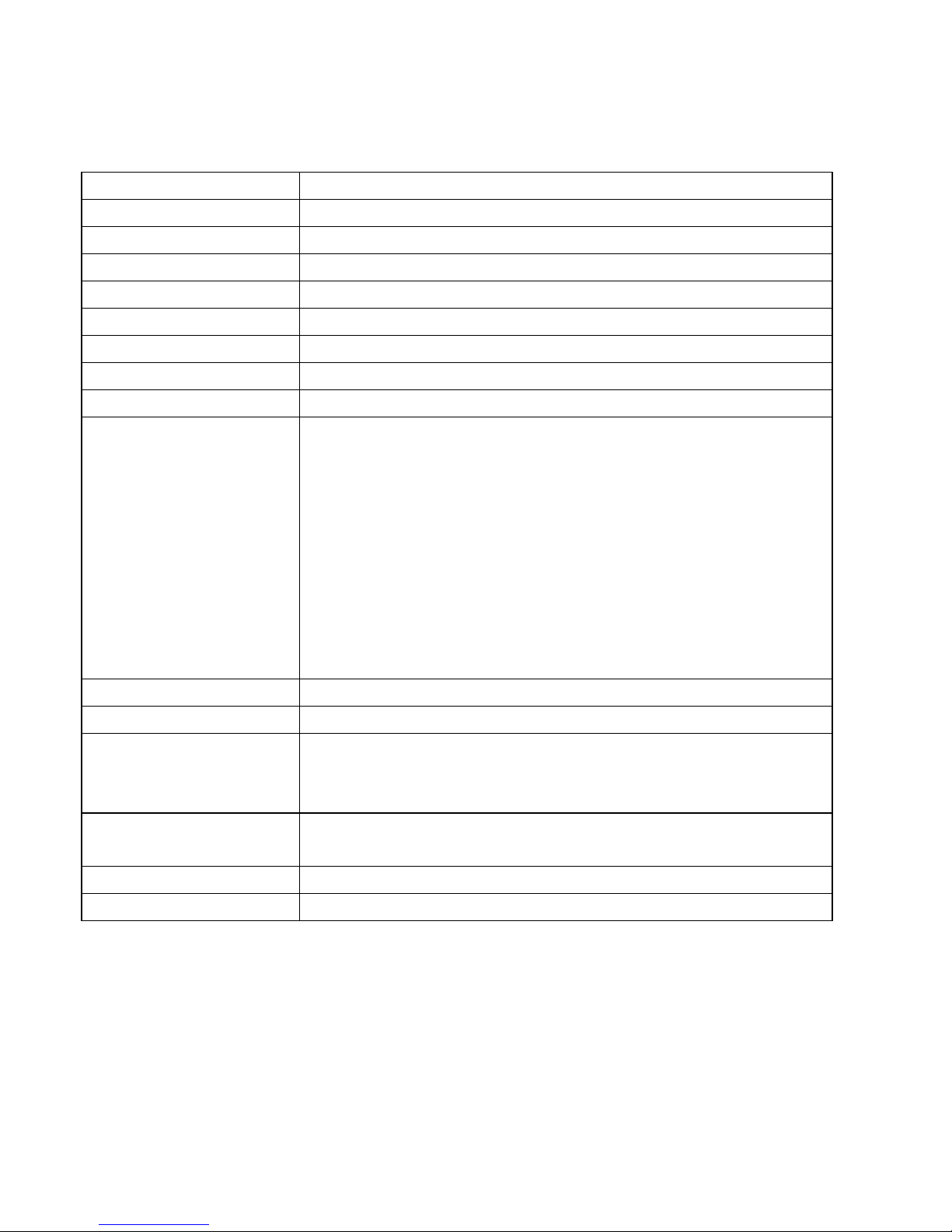
Specifications
Product Name MediaGate MG-250HD
Power 5V 2A
Weight 180g (without HDD)
Dimension MG-250HD : 75 x 125 x 18 mm / Docking Station : 125 x 100 x 100mm
Available OS USB Device Compatible: Windows 98SE/ME/2000/XP, Mac OS 9.0 higher, Linux 2.4 higher
USB Device Device Port x 1ea, 480Mbps USB 2.0 (USB 1.1 compatible)
HDD Type 2.5” SATA HDD
HDD File System NTFS / FAT32
TV Type NTSC / PAL
Video Format
AVI : MS-MPEG4v3/XviD/WMV9 (Does Not support XviD which has the GMC option applied)
WMV : WMV9
ASF : WMV9
MP4 : MPEG4 Video
DAT : MPEG1
VOB : MPEG2
MPG/MPEG : MPEG1/MPEG2
TP/TS/TRP : HD-MPEG2/SD-MPEG2
ISO, IFO
Other formats
Audio Format MP3, OGG, WAV, WMA
Photo Format JPG/JPEG, PNG, BMP, GIF
Video Output
COMPOSITE
HD COMPONENT Y, Pb, Pr (480p, 720p, 1080i)
HDMI (480p, 720p, 1080i, 1080p)
Audio Output STEREO L-R
S/PDIF Digital Output ( Coaxial/Optical )
Working Temperature 0˚C ~ 60˚C
Working Humidity 10% ~ 50%
6

Package Content
①MG-250HD - 1ea
②Docking Station – 1ea
③Remote controller, battery – each 1ea
④AV cable (composite + stereo cable) – 1ea
⑤USB cable (for connecting to a PC) - 1ea
⑥Power adapter – 1ea
⑦Setup CD (Windows 98 Driver, Manual) - 1ea
⑧Quick Installation Guide – 1ea
7

Explanations of Front & Backview.
< Front View >
②IR Receiver ③POWER
①Connector for a MG-250HD
④LED
③POWER
①Connector for docking station ⑤USB DVICE Port
①Connector for aMG-250HD Connector for a MG-250HD
②IR Receiver Receivesthe signalsfrom the remote control
③POWER Power On / Off
④PWR Power LED
Front View
⑤USB DVICE Port Connect a MG-250HD to a PC and copy & paste the contents via the USB
cable.
8

< Back View >
③
COAXIAL
⑤
Y, PB, P
R
①STEREO L-R
②CVBS
⑥OPTICAL
④HDMI
⑦PWR
①STEREO L-R Connect a stereo audio cable
②CVBS Connect a Composite Video cable
③COAXIAL Connect a Coaxial Audio Cable for digital audio
④HDMI Connect a HDMI cable
⑤Y, PB, PR Connect a Component Video (Y, Pb, Pr) cable
⑥OPTICAL Connect a Optical Audio Cable for digital audio
Back View
⑦PWR Connect the power cable
9
Inhaltsverzeichnis
Andere AL Tech Medienplayer Handbücher

AL Tech
AL Tech MediaGate MG-350HD Bedienungsanleitung

AL Tech
AL Tech Portable MPEG Player Bedienungsanleitung

AL Tech
AL Tech Mediagate MG-450HD Bedienungsanleitung

AL Tech
AL Tech MG-25P Bedienungsanleitung

AL Tech
AL Tech Mediagate MG-450HD Kurzanleitung

AL Tech
AL Tech MediaGate MG-35 Bedienungsanleitung

AL Tech
AL Tech MediaGate MG-350SHD Bedienungsanleitung

AL Tech
AL Tech Mediagate MG-45 Bedienungsanleitung


