AlcoSafe KX6000S Bedienungsanleitung

EN
Owner’s Manual
KX6000S
premium digital
alcohol breath detector
Please read this user manual before use.
Result of this unit for reference only.
Use ALKALINE batteries only.
DO NOT DRINK AND DRIVE!
TM

EN
The AlcoSafe KX6000S is a premium grade digital alcohol
breath detector that quickly screens for the presence of alcohol
in breath. The LCD-LED Dual display indicates the Blood Alco-
hol Content (BAC) in forms of numeric result (LCD) and alert
lights in Green/Yellow/Red (LED) for the test subject in seconds.
Please read this manual entirely before use.
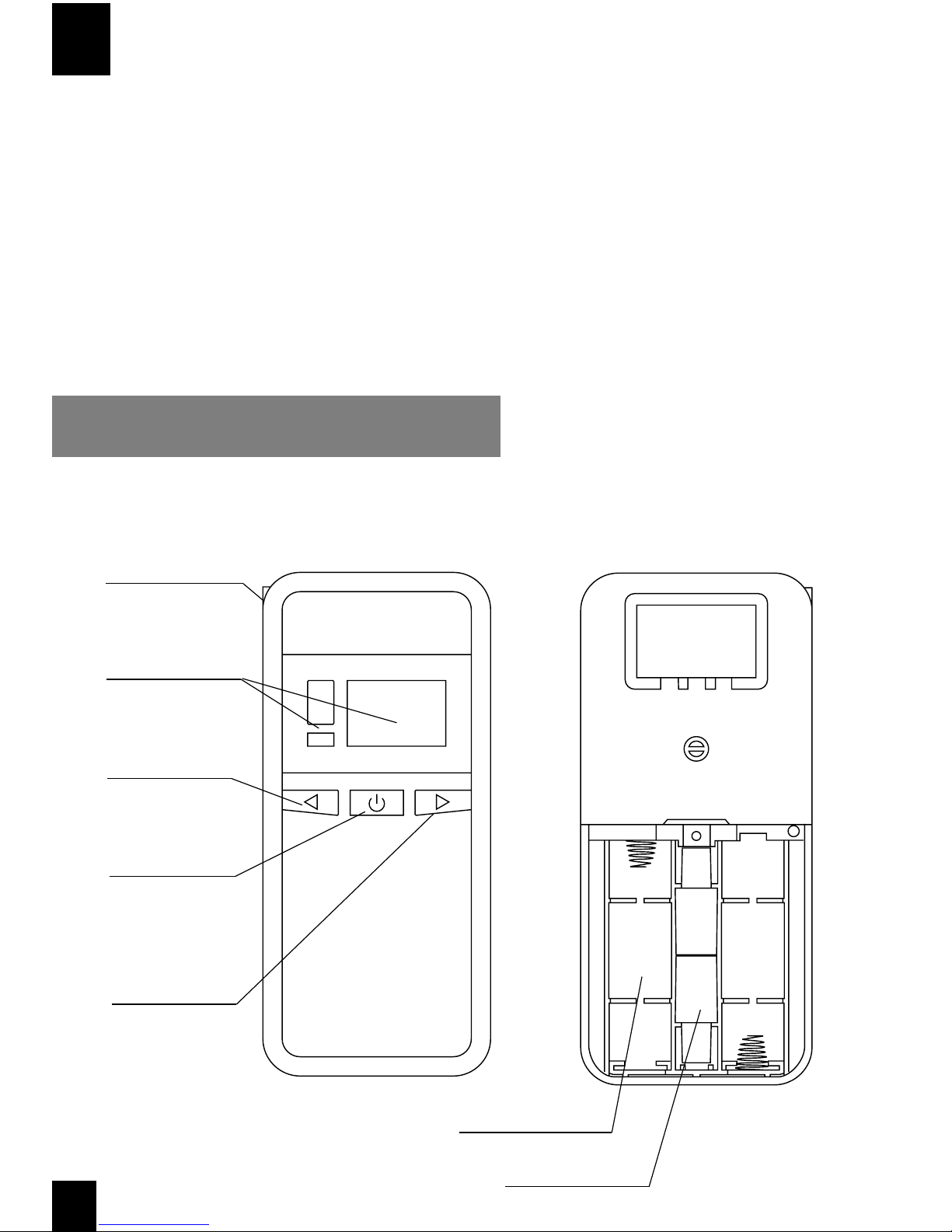
Components Diagram
1
Mouthpiece Slot
LCD-LED Dual Display
Left Button
(Select / Begin test)
Power Button
(OK / Conrm)
Right Button
(Recall last record /
Access user menu)
Battery Compartment
Mouthpiece Holder
(Hold 2 pcs)

EN
Installing the batteries
Press down the battery cover with small amount of pressure located on
the back of the unit. Push down and slide away from the unit to release
the cover. Install 2 AA ALKALINE batteries and close the battery cover.
How to use
IMPORTANT!
Wait 20 Minutes No Drinking No Smoking
Wait 20 minutes after the subject drinks, smokes or eats before testing. Failure to wait
20 minutes can give inaccurate BAC readings.
Insert mouthpiece: Insert the KX6000S mouthpiece rmly into
the mouthpiece slot on the upper left hand side of the unit.
Switch on: Press the Power button for 1
second to power on the unit. A single “beep”
is heard with current temperature displayed
on the Welcome screen.
Note: Unit will auto power-o after 30 seconds of inactivity.
Initialize sensor: Press the Left button to initi-
ate the sensor warm up and auto-cleansing
process. Timer will count down from 99.
Step 1
Step 2
Step 3
2

EN
Step 6
Read the results: The reading would be in range from 0.0 to 4.0
‰BAC (i.e: 0.00 to 0.40%BAC or 0.00 to 2.00 mg/l) depending on
the user pre-set BAC display format.
Note: Refer to‘Set BAC display format’for more about how to change the display format
for the BAC result
Step 4 Ready: Wait until ‘RDY’ (Ready) appears with a
single “beep” indicates the unit is ready to use.
3
Blowing: BLOW STEADILY into the mouthpiece
for 5 seconds. “BLOW 1-5...” appears on display
indicating sample being analyzed. Blow until
“beep” sound to signal completion of the test-
ing. A BAC reading will be displayed in LCD
and alert light in LED.
Step 5
Recall the last test record
Note: It is recommended to WAIT AT LEAST 1 MINUTE between tests for more accurate result
User could recall the last test record as below:
On Welcome screen, press Right button to show the cumulative
test count (the number of tests the unit performed).
Press Right button to show the last test record.
Note: KX6000S stores a maximum of 64 test records. Refer to‘Display test result records’
for guidance for retrieving previous test records
Press Right button again to return to Welcome screen.

EN
LOW - Green LED light
‰BAC (g/l) 0.0 - 0.1
%BAC 0.00 - 0.01
mg/l 0.00 - 0.005
ATTN - Yellow LED light
‰BAC (g/l) Between 0.1 and alert level (0.5g/l)
%BAC Between 0.01 and alert level (0.05%BAC)
mg/l Between 0.005 and alert level (0.25mg/l)
HIGH - Red LED light
‰BAC (g/l) Reaches or exceeds alert level
%BAC Reaches or exceeds alert level
mg/l Reaches or exceeds alert level
KX6000S detects BAC within the range 0.0 to 4.0 ‰BAC (i.e: 0.00
to 0.40%BAC or 0.00 to 2.00 mg/l).
Dierent system alert messages would be displayed on dierent measured
BAC level as below:
Note: Alert level is adjustable at (0.2 / 0.3 / 0.4 / 0.5 / 0.8 / 1.0 ‰BAC). Refer to‘Set alert level’
for guidance.
Illustration of BAC result
4

EN
On Screen Menu - Navigation path
5
SET temperature display format
SET BAC display format
SET alert level
(Refer to page 6)
(Refer to page 6)
(Refer to page 7)
On Welcome screen, Press Right button for 2 seconds to enter the
menu structure of :
- SET (Temperature display format, BAC display format,
Alert level, Beep sound)
- REC (Display test result record)
- TEST (Display cumulative test count)
- CAL (Calibration)
SET beep sound when blowing
(Refer to page 7)
Display test result records
(Refer to page 8)
Display cumulative test count
(Refer to page 9)
Calibration
(For dealer only,
not for end users)

Set temperature display format
EN
Set BAC display format
KX6000S displays temperature in format of Celsius °C / Fahrenheit °F. The display
format could be set as below:
On Welcome screen, press Right button for 2 seconds. SET mode
is displayed.
Press Left button to select your desired temperature display
format between Celsius °C / Fahrenheit °F. Press Power button to
conrm setting.
Press Power button 1 time to enter SET mode for setting temper-
ature display format. Current temperature display format blinks.
KX6000S displays BAC result in format of ‰BAC, %BAC, g/l or mg/l. The
display format could be set as below:
On Welcome screen, press Right button for 2 seconds. SET mode
is displayed.
Press Power button 2 times to enter SET mode for setting BAC
display format. Current BAC display format blinks.
Press Left button to select your desired BAC display format be-
tween ‰BAC, %BAC, g/l or mg/l. Press Power button to conrm
setting.
6

EN
Set alert level
Set beep sound when blowing
KX6000 gives alert message (RED light, blinking reading, beeping sound) when
the BAC result exceeded the alert level. Alert level could be set at dierent levels
(0.2 / 0.3 / 0.4 / 0.5 / 0.8 / 1.0 ‰BAC) as below:
On Welcome screen, press Right button for 2 seconds. SET mode
is displayed.
Press Power button 3 times to enter SET mode for setting alert
level. Current alert level blinks.
Press Left button to select your desired alert level between (0.2
/ 0.3 / 0.4 / 0.5 / 0.8 / 1.0 ‰BAC. Press Power button to conrm
setting.
KX6000S could be congured to give beep sound / no sound when blowing as
below:
On Welcome screen, press Right button for 2 seconds. SET mode
is displayed.
Press Power button 4 times to enter SET mode for setting beep
sound when blowing.
Press Right button to select your desire setting (beep sound
enabled: b-1; beep sound disabled: b-0) Press Power button to
conrm setting.
7

EN
8
Display test result records
KX6000S stores BAC test results up to 64 records. The stored records could be
recalled as below:
On Welcome screen, press Right button for 2 seconds. SET mode
is displayed. Again press Right button to enter the REC (Record)
mode.
Press Power button to display the latest record (indicated by the
serial number ‘1’ on the screen, followed by the corresponding
result) Press Power button again and so on to display the next
records sequentially. Press Right button to see the records in
reverse time direction.
Press Right button to exit REC (Record) mode. Press Right button
3 more times to return to the Welcome screen.
Display cumulative test count
KX6000S stores the number of tests it has performed as a cumulative test count.
On Welcome screen, press Right button for 2 seconds. SET mode
is displayed. Again press Right button 2 more times to enter the
TEST mode. Press Power button to show the cumulative test
count.
Press Right button to exit TEST mode. Press Right button 2 more
times to return to the Welcome screen.

Calibration
The KX6000S is calibrated during manufacture using advanced alcohol simulation
equipment. Known alcohol concentrations are passed through the sensor to
set baseline values for testing. During testing, the unit compares users’breath
samples to these baseline values.
The accuracy of breath alcohol testers can uctuate after six to twelve months of
normal use, depending on the number of tests performed and operating condi-
tions.
If this product is providing inconsistent test results, is not providing any test
results, or provides unusually high or low test results, the product should be recali-
brated by a trained professional.
Please contact your local dealer for recalibration and technical support.
EN
9
Precautions
1. Allow at least 20 minutes after drinking, smoking before testing.
2. For more accurate results, it is recommended to have the unit recali-
brated for every 6 months or 300 tests.
3. Only use the unit in a temperature range of 10 - 40°C or 50 - 104°F.
Operation above or below this range may aect the results.
4. Do not blow smoke, food or liquid into the unit.
5. Conditions that increase the amount of ketones on the breath, such as
diabetes and low caloric intake, may cause a false positive test.
6. Do not let yourself or anyone else drink and drive. Always use a desig-
nated driver when you or anyone else drinks alcohol.
7. Do not use the unit as a tool to determine you should operate a motor
vehicle or equipment. The BAC results are for reference only. The
manufacturer and distributor / importer disclaims any legal responsibil-
ity for the measured test value.
Error messages

Inhaltsverzeichnis
Andere AlcoSafe Prüfgeräte Handbücher
Beliebte Prüfgeräte Handbücher anderer Marken

SMART
SMART KANAAD SBT XTREME 3G Series Bedienungsanleitung

Agilent Technologies
Agilent Technologies BERT Serial Bedienungsanleitung

Agilent Technologies
Agilent Technologies N3280A Bedienungsanleitung

Vernier
Vernier Go Direct Voltage Bedienungsanleitung

Lifeloc
Lifeloc R.A.D.A.R. Bedienungsanleitung

Fluke
Fluke T5-600 Bedienungs- und Montageanleitung

PCB Piezotronics
PCB Piezotronics 8159-0112A Bedienungsanleitung

BW Technologies
BW Technologies MicroDock II Bedienungsanleitung

Sun Nuclear
Sun Nuclear 1027 Bedienungsanleitung

Biomark
Biomark HPR LITE READER Bedienungsanleitung

Hioki
Hioki 3169-20 Bedienungsanleitung

Ashcroft
Ashcroft ATE-100 Bedienungsanleitung