AOC n941S/plus Bedienungsanleitung

ServiceManual AOCn941Splus
1
LCD 显示器维修手册
English version
Brand:AOC
Model:n941S/plus
编制editor TPV-BJ-朱雨生 2011-11-24
审核 review TPV-BJ-常焕华 2011-11-24

ServiceManual AOCn941Splus
2
REVISION LIST
Version Release Date Revision History Model TPV Model No
A00 Nov-24-2011 Initial Release AOCn941S/plus T99ANSNYWVA1NNJ
T9BENSNYWVA1NNJ
T9BANSNDWVA1NNE

ServiceManual AOCn941Splus
3
CONTENTS
1. LCD Specifications ................................................................................................................................ 4
1.1 Product Features....................................................................................................4
1.2 Factory preset modes ............................................................................................5
1.3 Introduction of new feature.....................................................................................5
1.4 VGA 15pin Connector ............................................................................................6
2. Operation instruction............................................................................................................................. 7
2.1 Connection.............................................................................................................7
2.2 Control Buttons ......................................................................................................7
2.3 OSD User mode adjustment ..................................................................................8
3. Panel Feature....................................................................................................................................... 10
3.1 General Specifications .........................................................................................10
3.2 Electrical Absolute Ratings...................................................................................10
3.3 Electrical Characteristics......................................................................................10
3.4 TFT LCD Module Block Diagram..........................................................................11
3.5 LCD module input terminal pin assignment..........................................................12
3.6 Optical Specifications...........................................................................................12
4. Disassembly SOP................................................................................................................................ 13
4.1 appropriate tools ..................................................................................................13
4.2 Disassembly SOP................................................................................................14
5.Block Diagram....................................................................................................................................... 18
5.1 LCD Block Diagram..............................................................................................18
5.2 MainBoard Block Diagram ...................................................................................18
5.3 Power Board Block Diagram................................................................................19
5.4 Software Flow Chart.............................................................................................20
6. Circuit Schematic................................................................................................................................. 21
6.1 Main Board 1-715G3225-1...................................................................................21
6.2 Power Board 715G2892-7 ...................................................................................26
6.3 Inverter part----.....................................................................................................27
6.4 Key Board 715G4007-K01...................................................................................28
7.Explore Views........................................................................................................................................ 29
8. PCB Layout........................................................................................................................................... 30
8.1 MainBoard -- 715G3225-1 ...................................................................................30
8.2 PowerBoard 715G2892-7 ....................................................................................32
8.3 KeyBoard ---715G4007........................................................................................33
9. Maintenance Trouble treatment......................................................................................................... 34
9.1 Maintainability Requirement.................................................................................34
9.2 Trouble Shooting..................................................................................................34
9.3 Software programming step.................................................................................38
9.4 Writing DDC program step...................................................................................43
9.5 Factory mode adjustment.....................................................................................45
10.BOM List .............................................................................................................................................. 47
10.1 Model:T99ANSNYWVA1NNJ ..........................................................................47

ServiceManual AOCn941Splus
4
1. LCD Specifications
1.1 Product Features
Monitor Model AOC n941S/plus
LCD Panel
Driving system TFT Color LCD
Active Display Area 481mm(19inch)diagpnal
408.24mm (W)×255.15mm(H)
Pixel Pitch 0.2835 mm×0.2835mm
Display Colors 16.7M Colors
Max. Resolution 1440 x 900@75Hz
Input
Video R,G,B Analog Interface,75ohm,0.7V
Separate Sync. H/V TTL
H-Frequency 30kHz—80kHz
V-Frequency 55Hz--75Hz
Dot Clock 136.75MHz
Plug & Play VESA DDC2B /CI
Connector D-Sub 15pin
USB HUB No
OSD 14 language OSD menu
Power Consumption ON Mode <25W
Power Saving Mode <0.5W
Switch OFF <0.5W
Power Source 90~264VAC,47~63Hz, 1.5A Max supply current
Dimensions(including stand) 456.75mm×375.5mm×149.85mm
Weight (N. W.): 3.5kg
Environmental
Considerations
Operating Temp: 0° to 40°C
Storage Temp.: -25° to 55°C
Operating Humidity : 10% to 85%
Altitude:
Operating :0~ 3658m (0~ 12000 ft )
Non-Operating:0~ 12192m (0~ 40000 ft )
Safety FCC B CCC IEC950CB etc.

ServiceManual AOCn941Splus
5
1.2 Factory preset modes
STANDARD RESOLUTION HORIZONTAL
FREQUENCY VERTICAL
FREQUENCY
VGA
640×480 31.469kHz 59.94Hz
640×480 35.00kHz 66.66Hz
640×350 37.861kHz 72.80Hz
640 × 480 37.50kHz 75.00Hz
DOS-mode 640 × 480 31.469kHz 70.087Hz
720 × 400 31.469kHz 70.087Hz
Mac-mode 832 ×624 49.725kHz 74.50Hz
SVGA
800 × 600 35.16kHz 56.25Hz
800 × 600 37.879kHz 60.317Hz
800 × 600 48.07kHz 72.188Hz
800 × 600 46.875kHz 75Hz
XGA
1024 × 768 48.363kHz 60Hz
1024 × 768 56.476kHz 70.069Hz
1024 × 768 57.50kHz 72.074Hz
1024 × 768 60.023kHz 75.029Hz
1024 × 768 60.241kHz 74.927Hz
WXGA 1440 × 900 55.93kHz 60Hz
1440 × 900 70.635kHz 75Hz
1.3 Introduction of new feature
This product is no USB interface. Only VGA Interface.
White Luminance 200cd/m2(typ)

ServiceManual AOCn941Splus
6
1.4 VGA 15pin Connector
Pin No. Description Pin No. Description
1. Red Input 9. +5VDC
2. Green Input 10. Logic GND
3. Blue Input 11. N/A
4. N/A 12. SDA- DDC-Serial Data
5. Connection detect 13. H Sync
6. Red GND 14. V Sync
7. Green GND 15. SCL- DDC-Serial Clock
8. Blue GND
VGA Connector layout 15
610
11 15

ServiceManual AOCn941Splus
7
2. Operation instruction
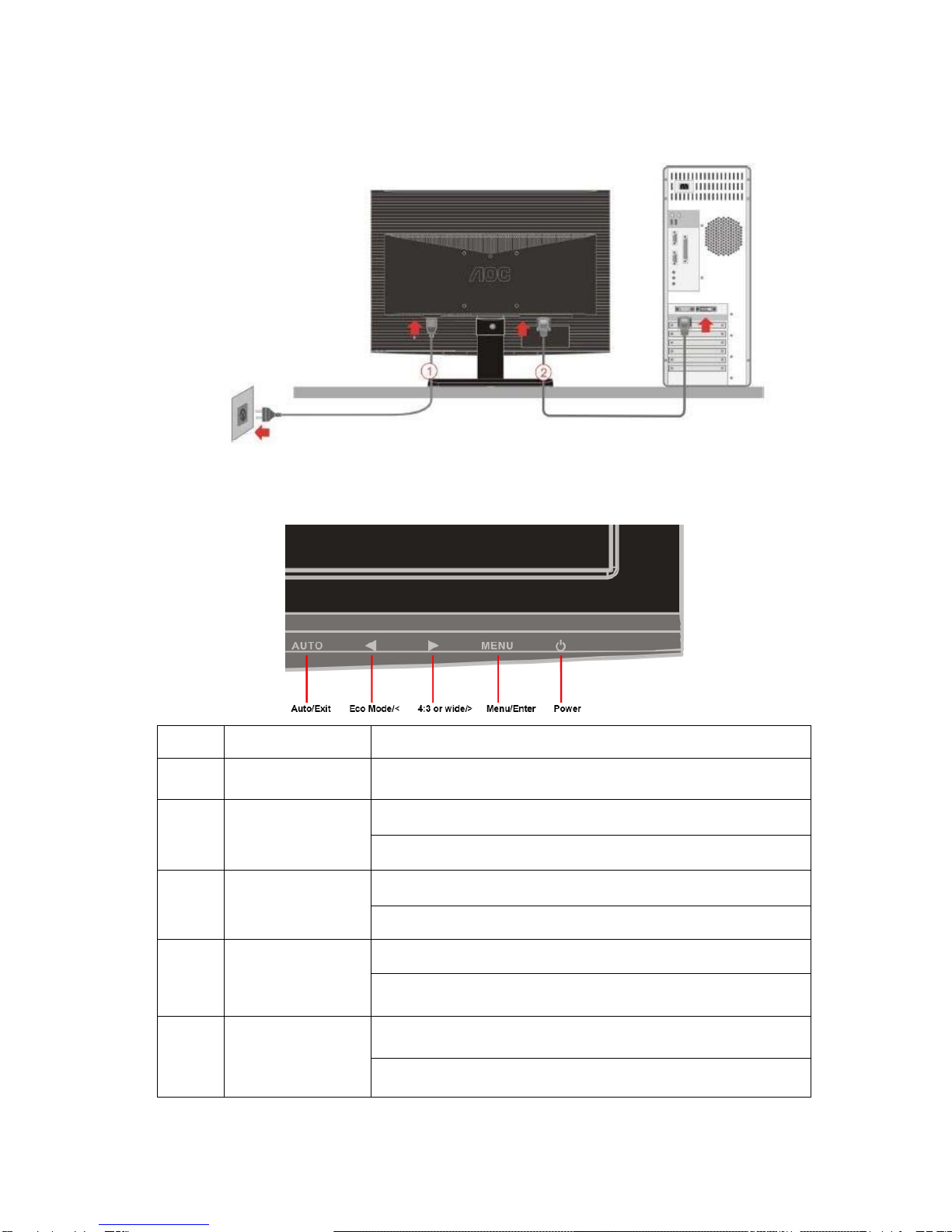
2.1 Connection
Connect the video cable from the video card of PC to the monitor.
The power cord should be connected.
Press the power button to turn on the monitor, the power indicator will light up.
2.2 Control Buttons
Control Description
1 Power Button To turn ON/OFF the moniteor, and power indicator (Green/Blue
and Amber/Orange).
2 Menu / Enter
Active main menu while no OSD display,enter next level on main
menu or sub menu status, or enter last level on adjustment bar..
Hotkey ,exit
34:3 or wide/ +
Hotkey,Audio volume adjust for VA,or chang 4:3 or wide image ratio
for SA .
OSD, increase current value of bar, or move to next item of menu
4 ECO mode(DCR)/ - If there is no OSD,select the ECO mode of brightness and DCR.
OSD, it will decrease current value of bar, or it will move to last
item of menu.
5 Auto / Exit
If there is no any OSD, select video source(DVI/RGB).
Press hold to 2s , it is auto configuration.
Exit current OSD and return to last level.

ServiceManual AOCn941Splus
8
2.3 OSD User mode adjustment
Hot key
┼─
AUTO Menu+Power
OSD Lock Function
Press “menu” and hold,with turn on “Power”, the OSD menu is locked. Again, the OSD menu is non-locked.
For the OSD menu function ,Please refer to “user manual” .
OSD Menu adjustment steps:
1.Press MENU button to display OSD main menu of as below, Press Left button or Right button may select other
main Menu.
2. Press MENU button to adjust items of each main menu.
3. Press Left button or Right button may select item you wish to enter.
4. Press MENU button to enter, and press Left button or Right button to adjust item you select.
5. Press EXIT button may back previous menu.
6. Repeat steps 2-5 to adjust an additional item, or select the EXIT button to return to previous menu.

ServiceManual AOCn941Splus
9

ServiceManual AOCn941Splus
10
3. Panel Feature
This specification applies to the 19 inch-wide Color TFT-LCD Module M190PW01.
The display supports the WXGA+ (1440(H) x 900(V)) screen format and 16.7M colors(RGB
6-bits+HiFRC). All input signals are 2-Channel LVDS interface compatible. This module does
not contain an inverter board for backlight.
3.1 General Specifications
3.2 Electrical Absolute Ratings
Item Symbol Min Typ Max Unit
Power Supply Voltage Vcc -0.3 5 +6 V
Lamp voltage Vblh 666 700 814 Vrms
Lamp Current IL 3.0 6.5 8.0 mArms
Lamp Frequency FL 40 50 80 kHz
3.3 Electrical Characteristics
a) TFT LCD module
Inhaltsverzeichnis
Andere AOC Monitor Handbücher

AOC
AOC 919Swa1 Bedienungsanleitung

AOC
AOC Q27G3Z Bedienungsanleitung

AOC
AOC 24P2Q Bedienungsanleitung

AOC
AOC 9GLR Bedienungsanleitung

AOC
AOC E2475SWQE Bedienungsanleitung

AOC
AOC LM-500 Bedienungsanleitung

AOC
AOC Porsche Design Agon PD32M Bedienungsanleitung

AOC
AOC 2036Sa Bedienungsanleitung

AOC
AOC LM721A Bedienungsanleitung

AOC
AOC CQ30G3Z Bedienungsanleitung

AOC
AOC 24B2H2 Bedienungsanleitung

AOC
AOC G2477FXQ Bedienungsanleitung

AOC
AOC E2243FWK Bedienungsanleitung

AOC
AOC Q3279VWFD8 Bedienungsanleitung

AOC
AOC 786ls Bedienungsanleitung

AOC
AOC AGON PRO Bedienungsanleitung

AOC
AOC 2212PH Bedienungsanleitung

AOC
AOC U4308V Bedienungsanleitung

AOC
AOC 917VW Bedienungsanleitung

AOC
AOC E2425SWD Bedienungsanleitung