Atlantis Land NetServer Pro A02-PSU-W54 Bedienungsanleitung

Where solutions begin
Company certified ISO 9001:2000
NetServer Pro
Wireless USB 2.0 Print Server
A02-PSU-W54
MANUAL
A02-PSU-W54_ME01

ITALIANO
Questo prodotto è coperto da garanzia Atlantis Land Fast-Swap
della durata di 3 anni. Per maggiori dettagli in merito o per accedere alla
documentazione completa in Italiano fare riferimento al sito
www.atlantis-land.com.
ENGLISH
This product is covered by Atlantis Land 3 years Fast-Swap warranty.
For more detailed informations please refer to the web site
www.atlantis-land.com.
For more detailed instructions on configuring and using this device,
please refer to the online manual.
FRANCAIS
Ce produit est couvert par une garantie Atlantis Land Fast-
Swap 3 ans. Pour des informations plus détaillées, référez-vous svp au
site Web www.atlantis-land.com.
DEUTSCH
Dieses Produkt ist durch die Atlantis Land 3 Jahre Fast-Swap Garantie
gedeckt. Für weitere Informationen, beziehen Sie sich bitte auf Web Site
www.atlantis-land.com.
ESPAÑOL
Este producto està cubierto de garantía Atlantis Land Fast-Swap
por 3 años. Para una información más detallada, se refiera por favor al
Web site www.atlantis-land.com.

The award of the information is facultative, but its lack will prevent
ATLANTIS LAND® from starting the Guarantee process requested.
Copyright
The Atlantis Land logo is a registered trademark of Atlantis Land SpA. All
other names mentioned mat be trademarks or registered trademarks of
their respective owners. Subject to change without notice. No liability for
technical errors and/or omissions.
R
R
Re
e
eg
g
gi
i
is
s
st
t
te
e
er
r
r
y
y
yo
o
ou
u
ur
r
r
p
p
pr
r
ro
o
od
d
du
u
uc
c
ct
t
t!
!
!
w
w
ww
w
ww
w
w.
.
.a
a
at
t
tl
l
la
a
an
n
nt
t
ti
i
is
s
s-
-
-l
l
la
a
an
n
nd
d
d.
.
.c
c
co
o
om
m
m
Registration on the web site
www.atlantis-land.com within 15 days
from the purchase of the product dismiss
the customer from showing a valid proof of
purchase (Sale Receipt or Invoice) in case
of the request of intervention. For further
information we invite you to look at our
web site at the section WARRANTY.

INDEX
5
INDEX
1.1 About this Guide................................................................................ 10
1.2 Package contents.............................................................................. 11
1.3 System Requirements....................................................................... 11
1.4 General Features .............................................................................. 11
1.5 The Front Panel LEDs ...................................................................... 13
1.6 The Rear Ports.................................................................................. 14
1.7 Default Settings................................................................................. 14
1.8 Cabling .............................................................................................. 15
1.9 Using The Utilities ............................................................................. 16
1.9.1 Installing PS-Utility..................................................................... 17
1.9.2 Launching PS-Utility .................................................................. 17
1.9.3 Setting Up Windows XP TCP/IP Printing................................... 19
1.10 Web Configuration .......................................................................... 20
1.10.1 Management............................................................................ 21
1.10.2 Configuration ........................................................................... 26
1.10.3 Tools ........................................................................................ 35
1.10.4 Help ......................................................................................... 40
1.11 Printing in Windows 98SE/ME ........................................................ 41
1.11.1 Installing the LPR for TCP/IP Printing Client ........................... 41
1.11.2 Adding LPR Printer Ports ........................................................ 43
1.11.3 Printing from Windows 98SE/Me............................................ 45
1.11.4 Setting TCP/IP Printing Settings.............................................. 49
1.12 Printing in Windows 2000/XP.......................................................... 51
1.12.1 Setting Up Windows 2000 TCP/IP Printing ............................. 51
1.12.2 Setting Up Windows XP TCP/IP Printing ................................ 58
1.13 Printing in MAC OS......................................................................... 65
1.13.1 Rendezvous Uses in MAC OS 10.2 ........................................ 65
1.14 Technical Features ......................................................................... 68
1.15 Support............................................................................................ 70
A02-PSU-W54_ME01(V1.0 January 2007)

NetServer Pro
7
Copyright Statement
No part of this publication may be reproduced, stored in a retrieval
system, or transmitted in any form or by any means, whether electronic,
mechanical, photocopying, recording or otherwise without the prior writing
of the publisher. Windows™ 98SE/2000/ME/XP are trademarks of
Microsoft® Corp. Pentium is trademark of Intel. All copyright reserved.
The Atlantis Land logo is a registered trademark of Atlantis Land SpA. All
other names mentioned mat be trademarks or registered trademarks of
their respective owners. Subject to change without notice. No liability for
technical errors and/or omissions.
Wireless LAN, Health and Authorization for use
Radio frequency electromagnetic energy is emitted from Wireless LAN
devices. The energy levels of these emissions however are far much less
than the electromagnetic energy emissions from wireless devices like for
example mobile phones. Wireless LAN devices are safe for use frequency
safety standards and recommendations. The use of Wireless LAN
devices may be restricted in some situations or environments for
example:
·On board of airplanes, or
·In an explosive environment, or
·In case the interference risk to other devices or services is perceived or
identified as harmful
In case the policy regarding the use of Wireless LAN devices in specific
organizations or environments (e.g. airports, hospitals, chemical/oil/gas
industrial plants, private buildings etc.) is not clear, please ask for
authorization to use these devices prior to operating the equipment.
Regulatory Information/disclaimers
Installation and use of this Wireless LAN device must be in strict
accordance with the instructions included in the user documentation
provided with the product. Any changes or modifications made to this
device that are not expressly approved by the manufacturer may void the
user’s authority to operate the equipment. The Manufacturer is not
responsible for any radio or television interference caused by
unauthorized modification of this device, of the substitution or attachment.

NetServer Pro
8
Manufacturer and its authorized resellers or distributors will assume no
liability for any damage or violation of government regulations arising from
failing to comply with these guidelines.
CE Mark Warning
This is a Class B product. In a domestic environment, this product may
cause radio interference, in which case the user may be required to take
adequate measures.
CE in which Countries where the product may be used freely:
Germany, UK, Italy, Spain, Belgium, Netherlands, Portugal, Greece,
Ireland, Denmark, Luxembourg, Austria, Finland, Sweden, Norway and
Iceland.
France: except the channel 10 through 13, law prohibits the use of other
channels.
CE/EMC Restriction of Liability
The product described in this handbook was designed, produced and
approved according to the EMC-regulations and is certified to be within
EMC limitations.
If the product is used in an uncertified PC, the manufacturer undertakes
no warranty in respect to the EMC limits. The described product in this
handbook was constructed, produced and certified so that the measured
values are within EMC limitations. In practice and under special
circumstances, it may be possible, that the product may be outside of the
given limits if it is used in a PC that is not produced under EMC
certification. It is also possible in certain cases and under special
circumstances, which the given EMC peak values will become out of
tolerance. In these cases, the user himself is responsible for compliance
with the EMC limits.
Declaration of Conformity
This equipment has been tested and found to comply with Directive
1999/5/CE of the European Parliament and of the Council on radio
equipment and telecommunications terminal equipment and the mutual
recognition of their conformity. After assessment, the equipment has been
found to comply with the following standards: EN 300.328 (radio), EN 301
489-1, EN 301 489-17 (electromagnetic compatibility) and EN 60950

NetServer Pro
9
(safety). This equipment may be used in all European Union contries and
in all countries applying Directive 1999/5/CE, without restriction, with the
exception of the following countries:
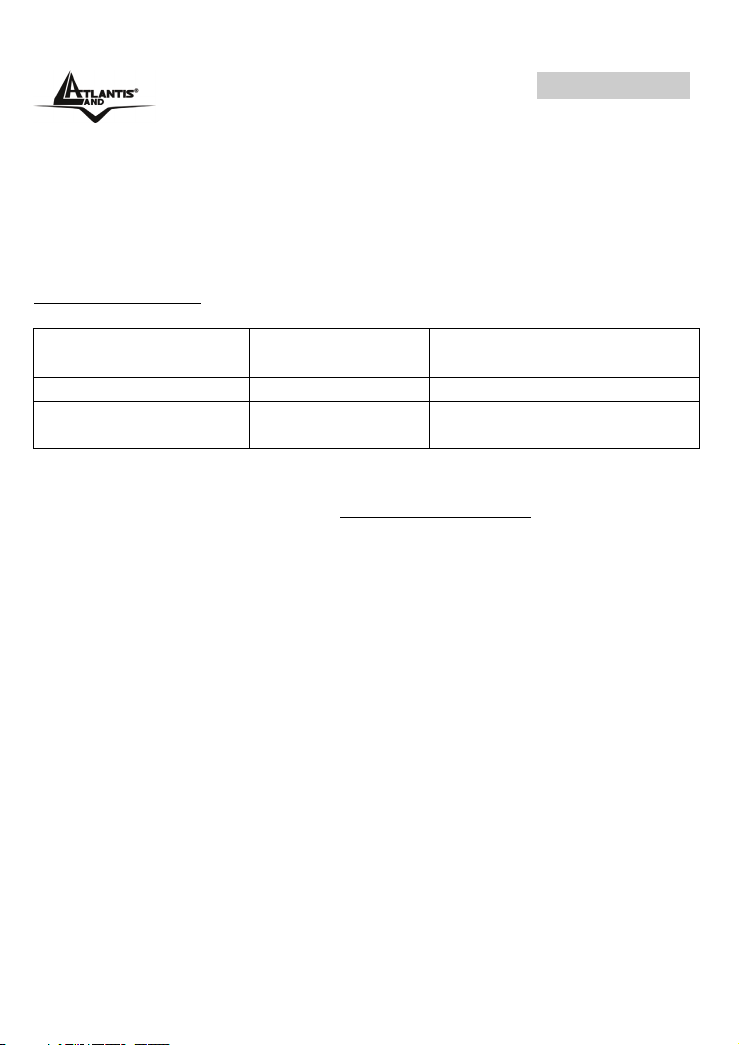
France:
When this equipment is used outdoors, output power is limited to within
the frequency bans listed on the chart. For more info, consult the website
www.art-telecom.fr.
Location Frequency Band
(MHz)
Power (EIRP)
Indoor (no restriction) 2400-2483,5 100mW(20dBm)
Outdoor 2400-2454
2454-2483,5
100mW(20dBm)
10mW(10dBm)
Italy:
For more info, consult the website www.comunicazioni.it

NetServer Pro
10
Congratulations on purchasing Atlantis Land NetServer Pro, the easiest
and fastest way to deploy printers on your network.
This compact print server can connect your network through an Access
Point under the infrastructure mode, or can be used in ad-hoc mode for
direct communication between PC/Notebook and print server anywhere
you wish to locate wireless printer services.
It manages the flow of print files from your workstation or file server to its
connected printers, delivering print jobs to high-performance printers
much faster than a file server or a PC acting as a print server can.
NetServer Pro features a Web-based Configuration Utility, which allows
you to set up the print server through the web browser easily and quickly.
It also includes a simple software utility PS-Utility, a user-friendly
program that allows you to complete settings for the print server.
1.1 About this Guide
This manual provides instructions and illustrations on how to use your
NetServer Pro, including:
Hardware Installation, describes the hardware installation
procedure for the product.
Using the Utilities, helps you to install and use the software.
Web Configuration, completes the configuration using the web
browser.
Printing in Windows XP, lets you complete printing task through
your print server in Windows XP environment.
Printing in MAC OS, lets you complete printing task through your
print server in MAC OS environment.

NetServer Pro
11
Illustrations or setting values in this manual are FOR
YOUR REFERENCE ONLY. The actual settings and
values depend on your system and network. If you
are not sure about the respective information, please
ask your net work administrator or MIS staff for help.
1.2 Package contents
Unpack the package and check all the items carefully, and be certain that
you have:
Atlantis Land NetServer Pro, CDRom with manual and PS-Utility,
Quick Start Guide, Power Adapter AC-DC (5V, 2.5A)
If any item contained is damaged or missing, please contact your local
dealer immediately. Also, keep the box and packing materials in case
you need to ship the unit in the future.
1.3 System Requirements
Operating System:
Microsoft Windows® 98SE/ME/NT/2000/XP/2003
Apple Mac OS X or above (with Apple Talk support)
For Web Configuration:
Java-enabled web browser, such as Microsoft® Internet Explorer
5.0 and Netscape Navigator 6.0.
1.4 General Features
Compact pocket size
Compliant with USB 2.0 high-speed printing
Fast 54Mbps WLAN connectivity based on IEEE 802.11g
wireless high-speed standard
Multi protocol support is ideal for shared printing in mixed-LAN
environments

NetServer Pro
12
Windows-based administrative program makes it possible to set
up in a few steps
Latest MIB-II (RFC 1213) for SNMP standard management
Offer LPR program for TCP/IP printing in Windows 95/98/ME
IP assignment support for DHCP, BOOTP and RARP
Support Web configuration
Provide Flash memory for easy firmware upgrade
Auto fallback data rate under noisy environment or longer range
distance
Printing Access control and display
E-mail notification for printer error messages; Support E-Mail
printing and FTP printing
Ability to save print server configuration into hard drive for easy
access and backup without the hassle to reconfigure if setting is
altered
Support IPP printing for Windows 2000/XP
Support second http port for remote web configuration and IPP
printing
Support UPnP (Universal Plug and Play) for Windows XP/2003
Support Mac OS 10.2 “Rendezvous” – Zero-configuration feature
Andere Handbücher für NetServer Pro A02-PSU-W54
1
Inhaltsverzeichnis
Andere Atlantis Land Druckserver Handbücher