
Audiophile APS PurePower 500 Bedienungsanleitung

User’s Guide and Warranty Information
PurePower 120 Volt models

Audiophile Power Supply • www.audiophileaps.com | 01
Contents
Table of Contents
About the PurePower APS 2
Safety Warnings 3
Installation
Inspecting the Equipment 4
PurePower Preparation 5
Activating Up Your PurePower 8
Operation 12
PurePower Maintenance 13
Specifications 14
Troubleshooting 16
Service and Support 17

02 | Pure Power in > Pure Sound out
About the Audiophile APS
The PurePower Audio Power Supply
The Audiophile Audio Power Supply (APS) provides pure regenerated power for your sensitive
home theater and audio equipment. This is accomplished through our double conversion technol-
ogy. We convert the incoming AC power to produce a clean DC supply, then recreate a new, 60
Hz, 120 volt AC wave form from the DC. We make sure that your system gets the power it was
designed for and your amplifiers get the current they need for top performance.
The APS also protects from power disturbances including power sags, power surges, over-
voltages, line noise, undervoltages, frequency variations, switching transients and harmonic distor-
tion. Power disturbances have the potential to damage sensitive hardware causing expensive
repairs with either catastrophic failures or degradation over time through chronic overheating.
With the APS you can safely eliminate the effects of power disturbances and guard the integrity
of your equipment.
In addition to pure power, the Audiophile APS provides you with something unique in audio
power regenerators - protection against power outage. The Audiophile APS maintains full wattage
output even when the power fails completely.
Providing outstanding performance and reliability, the
PurePower’s unique benefits include the following:
•True double conversion AC regeneration design with pure sine wave output. The APS filters
and regulates incoming AC power, creates a DC source, then regenerates new pure AC and
provides monitored, consistent power to your components.
•The APS improves amplifier performance by ensuring full wattage and improves signal com
ponent output quality by removing noise and distortion.
• The PurePower APS design allows any of our 6 available high quality, full contact receptacles
to supply digital, analog or amplifier components.
•Hours of extended viewing or listening time with optional APS PowerPack Modules
during outages.
•Optional Line surge protection guards against spikes and surges on coax or RJ11 lines.
•Start on battery capabilities allows you to power up the APS even if utility power is not
available.

Audiophile Power Supply • www.audiophileaps.com | 03
Safety Warnings
Safety Warnings
Read the following precautions before you install the APS.
IMPORTANT SAFTEY INSTRUCTIONS - SAVE THESE INSTRUCTIONS.
This manual contains important instructions that you should follow during installation and main-
tenance of the APS and batteries. Please read all instructions before operating the equipment and
save this manual for future reference.
DANGER
This APS contains LETHAL VOLTAGES. All repairs and service should be preformed by AUTHORIZED
SERVICE PERSONNEL ONLY. There are NO USER SERVICEABLE PARTS inside the APS.
WARNING
This APS contains its own energy source. The output receptacles may carry live voltage even when
the APS is not plugged in.
Under normal operating conditions, do not remove or unplug the input cord when the APS is
turned on. This removes the safety ground from the APS and the equipment connected to the
APS.
To reduce the risk of fire or electric shock, install this APS in a temperature and humidity con-
trolled, indoor environment, free of conductive contaminants. Ambient temperature must not
exceed 32°C (90°F). Do not operate near water or excessive humidity (95% max).
To comply with international standards and wiring regulations, the total equipment connected
to the output of this APS must not have an earth leakage current greater than 1.5 milliamperes.
CAUTION
Batteries can present a risk of electrical shock or burn from high short-circuit current. Observe
proper precautions. Servicing should be preformed by qualified service personnel knowledgeable
of batteries and required precautions.
Proper disposal of batteries is required. Refer to your local codes for disposal requirements.
Never dispose of batteries in a fire. Batteries may explode when exposed to flame.

04 | Pure Power in > Pure Sound out
Installation
Inspecting the Equipment
Before installation, please check to ensure that your PurePower APS package is complete and
undamaged. If any deficiencies are discovered, please contact your PurePower Dealer.
Shipping damage
If any equipment has been damaged during shipment, keep the shipping cartons and packing
materials for the carrier or place of purchase and file a claim for shipping damage. If you discover
damage after acceptance, file a claim for concealed damage.
To file a claim for shipping damage or concealed damage:
1) File with the carrier within 15 days of receipt of the equipment
2) Send a copy of the damage claim within 15 days to your Audiophile APS dealer.

Audiophile Power Supply • www.audiophileaps.com | 05
Installation
APS Preparation
The APS is designed for flexible configurations and can be rack mounted or placed on a shelf or
as a standalone cabinet.
If you are installing the APS in a rack, follow the instruction in “Rack-Mount Setup”.
Standalone / shelf component
When you position the APS horizontally on a shelf or in a non-rack style AV equipment stand or
enclosure, ensure there is sufficient clearance for airflow through the grilles at front and rear of
the unit.
Figure 1. Horizontal Cabinet Setup

06 | Pure Power in > Pure Sound out
Installation

Audiophile Power Supply • www.audiophileaps.com | 07
Installation
Rack-Mount
The APS can be installed in 19 or 23-inch racks and needs only 2U of rack space. Mounting rails
or a rack shelf are required for your Audiophile APS. If rails are not already installed in your rack
or included with your APS, contact your PurePower dealer.
Use the following procedure to install the APS in a rack:
· Place the APS on a flat, stable surface with the front of the APS facing toward you.
· Attach the mounting handles to the bracket with the screws provided in the accessory kit.
· Remove the screws attaching the front bezel from one side of the unit. Align the rack
mounting brackets with the screw holes on the side of the APS and replace screws.
· Repeat for the opposite side.
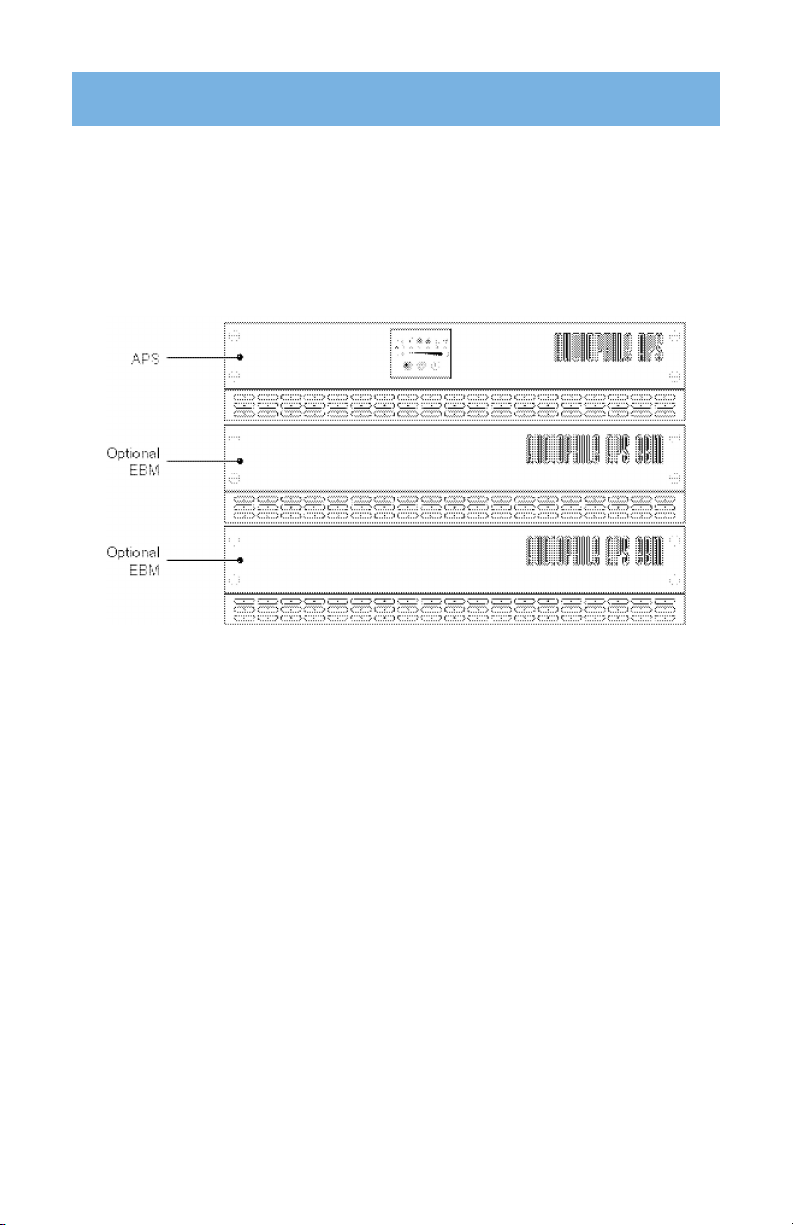
If installing optional PowerPacks, repeat Steps 1 through 4 for each cabinet.
NOTE The PowerPacks must be installed BELOW the APS.
Slide the APS and any optional PowerPacks into the rack. Continue to “Installing the APS” to
complete the installation.

08 | Pure Power in > Pure Sound out
Installation
Activating your PurePower APS
The following steps explain how to install and start the APS.
Activating the APS
· Plug the components to be supplied into the APS output receptacles. The PurePower APS
design allows any outlet to supply digital, analog or power amplifier components.
· DO NOT operate electric space heaters with the APS.
· Plug the APS power cord into a utility outlet. All front panel indicators flash briefly and the
APS conducts a self-test. When the self-test is complete, the ~ indicator flashes, indicating
the APS is in standby mode. If any other indicator flashes, see troubleshooting page.
· Start the APS by pressing the On | button. The ~ indicator stops flashing and the bar
graph indicators display the percentage of available power being supplied by the APS.
The PurePower APS is now in Normal mode and supplying power to your system.
Audiophile Power Supply • www.audiophileaps.com | 09
Installation
Installing optional Power Packs
Modules must be installed before powering the APS.
CAUTION: A small amount of arcing may occur when connecting a PowerPack Module to the
APS. This is normal and will not harm you. Insert the connection cable into the APS battery con-
nector quickly and firmly.
· Plug the first PowerPack cable into the battery connector on the APS rear panel
· If additional PowerPacks are to be installed, plug the cable of the second cabinet into the
battery connector on the previous Powerpack
NOTE: The batteries charge to 80% capacity in approximately 2 hours. However, it is recommend-
ed that the batteries charge for 24 hours after installation or long-term storage. The battery
charging process will occur during normal operation and will not interfere with the supply of
power from the APS.
Dieses Handbuch passt für folgende Modelle
2
Inhaltsverzeichnis


