AURATON 200 TRA Bedienungsanleitung

USER’S MANUAL
EN
200 TRA

2
Thank you for purchasing the modern temperature controller based
on an advanced microprocessor.
The Auraton TRA head with the Auraton 200 TRA controller is
a programmable room thermostat.
The Auraton TRA head is intended for installaon on M30x1.5 radiator
inserts and, using a special adapter, on Danfoss RA-N valves (the adapter
is supplied). The Auraton TRA head communicates directly with the
Auraton 200 TRA controller, receiving informaon about the current
temperature in the room and the preset temperature. There can be any
number of radiators with Auraton TRA heads in a room but all must be
paired with the same Auraton 200 TRA controller. If the number of the
Auraton TRA heads is larger, the speed of response of the radiators to
changes of temperature in the room increases, which is very benecial.
FrostGuard funcon
Protects the interior from freezing.
Enables cyclic reducon of set temperature
by 3°C for 6 hours.
Backlit LCD display
The backlit display enables device control even
in dark rooms.
AURATON 200 TRA
LCD
Basic information

3
LCD display
acknowledge
or on/o key
temperature
decrease key
• hold – controller on/o ( )
• short press – acknowledge temperature seng ( )
temperature
increase key
temporary temperature
decrease mode keys
AURATON 200 TRA temperature
controller explained

4
1. Temperature
In normal operang mode, the controller displays the temperature
of the room it is installed in.
2. Temperature unit ( )
Indicates temperature displayed in cengrade.
3. Temporary temperature decrease mode indicator ( )
Appears when the temporary temperature decrease program
is acve.
4. Temporary temperature decrease mode programming indicator ( )
WIndicates the temporary temperature decrease mode planned
by the user. Displayed when the mode is not executed but the
funcon of the temporary temperature decrease is acve (refer to
„Temporary temperature decrease seng” secon for more details).
5. Transmission symbol ( )
Indicates communicaon with the receiver.
6. Baery exhausted ( )
Displayed when the baery voltage drops below the allowed limit.
Replace the baery as soon as possible.
Display screen

5
Selecting proper location for
temperature controller
Battery installation / replacement
Baery sockets are located inside the controller on both sides of the
display. To install the baeries, remove the controller enclosure as
shown in the gure.
Place two AAA 1.5 V baeries in the baery socket observing the correct
polarity. Then, to improve the operaon, remove the baery cover from
the heads associated with this AURATON 200 TRA for 5 seconds, aer
this me reinstall it back.
NOTE: We recommend using alkaline bateries to supply AURATON
controllers. Rechargeable baeries should not be used because their
rated voltage is too low.
Controller locaon largely aects its proper operaon. When located
in a place without air circulaon or exposed to direct sunlight, the
controller may not control the temperature properly. The controller
should be located on an internal wall of a building (paron wall) in a
place with free air circulaon. Avoid locaons near sources of heat (TV
set, heater, refrigerator) or places exposed to direct sunlight. Locaon
near doors and the resultant vibraon may cause the controller to
funcon improperly.

6
Fixing the controller to the wall
Alternative xing methods
To x the AURATON 200 TRA controller to the wall:
1. Remove the enclosure (as described on the „Baery installaon/
replacement” secon).
2. Drill 2 holes diameter 6 mm in the wall (use the back of the
controller enclosure to set the right spacing of the holes).
3. Place plasc plugs in the drilled holes.
4. Screw the back of the controller enclosure to the wall with the two
screws provided.
5. Install the baeries and replace the controller enclosure.
NOTE: No expansion bolts are needed for wooden walls. Just drill holes
diameter 2.7 mm (instead of 6 mm) and screw the screws directly into
the wood.
The controller can be mounted to a smooth surface with e.g. two-sided
adhesive tape.
The controller can also be placed in any locaon on an even surface on a
support at the back of the enclosure.
hole for a
mounng screw
hole for a
mounng screw

7
Starting the controller for the first time
Temperature setting
FrostGuard function
Aer correct installaon on baeries, the LCD will display, for a second,
all segments (display test) followed by the rmware version number.
Aer a while, the current temperature in the room will be displayed. The
controller is ready to use.
To set the desired temperature in normal
operang mode:
1. Press the or key. The segment displaying
temperature will switch to edit mode and start
blinking.
2. With the and keys, set the desired temperature with
the accuracy of up to 0.2°C.
3. Press the <ok key to acknowledge selecon.
AURATON 200 TRA controller features the special FrostGuard funcon
to protect the room from possible freezing. The funcon is acvated
when the controller is switched o.
With the controller switched o, when the room temperature drops
to 2°C, the Fr ( ) symbols will appear and signal will be sent to the
receiver to start heang. When the temperature raises to 2.2°C, the
display will turn o again and signal will be sent to the receiver to turn
the heang o.
NOTE: When pressing any funcon key for the rst me, the backlight
is turned on and then the key funcon is acvated.

8
Setting the temporary
temperature decrease mode
Switching off the temporary
temperature decrease
If, for some reasons, you would like to decrease temperature
in the room, everyday and at the same me, by 3°C,
temporary reducon for 6 hours is possible. To do so:
1. Press and hold for 3 seconds both keys.
The moon symbol will be displayed ( ) .
2. The controller is switched to the temporary temperature decrease
mode and everyday at the same me will decrease the set
temperature in a normal mode by 3°C for 6 hours.
NOTE: Aer 6 hours, the controller will return to the main
temperature seng. Instead of the moon symbol ( ) the sun ( )
symbol will be displayed.
NOTE: The temporary temperature decrease mode always starts
when the funcon is turned on. This means that the possible temporary
temperature decrease has to be set at the me you want it to take
place.
Press and hold the keys again to switch o the temporary
temperature decrease mode.
The moon ( ) or sun ( ) symbol will disappear and only the room
temperature will be displayed. The controller returns to the normal
operang.

9
Description of the AURATON TRA head
baery cover
closing buon signaling
diode
The AURATON TRA head works with the wireless controller
AURATON 200 TRA. The head is installed directly on the radiator.

10
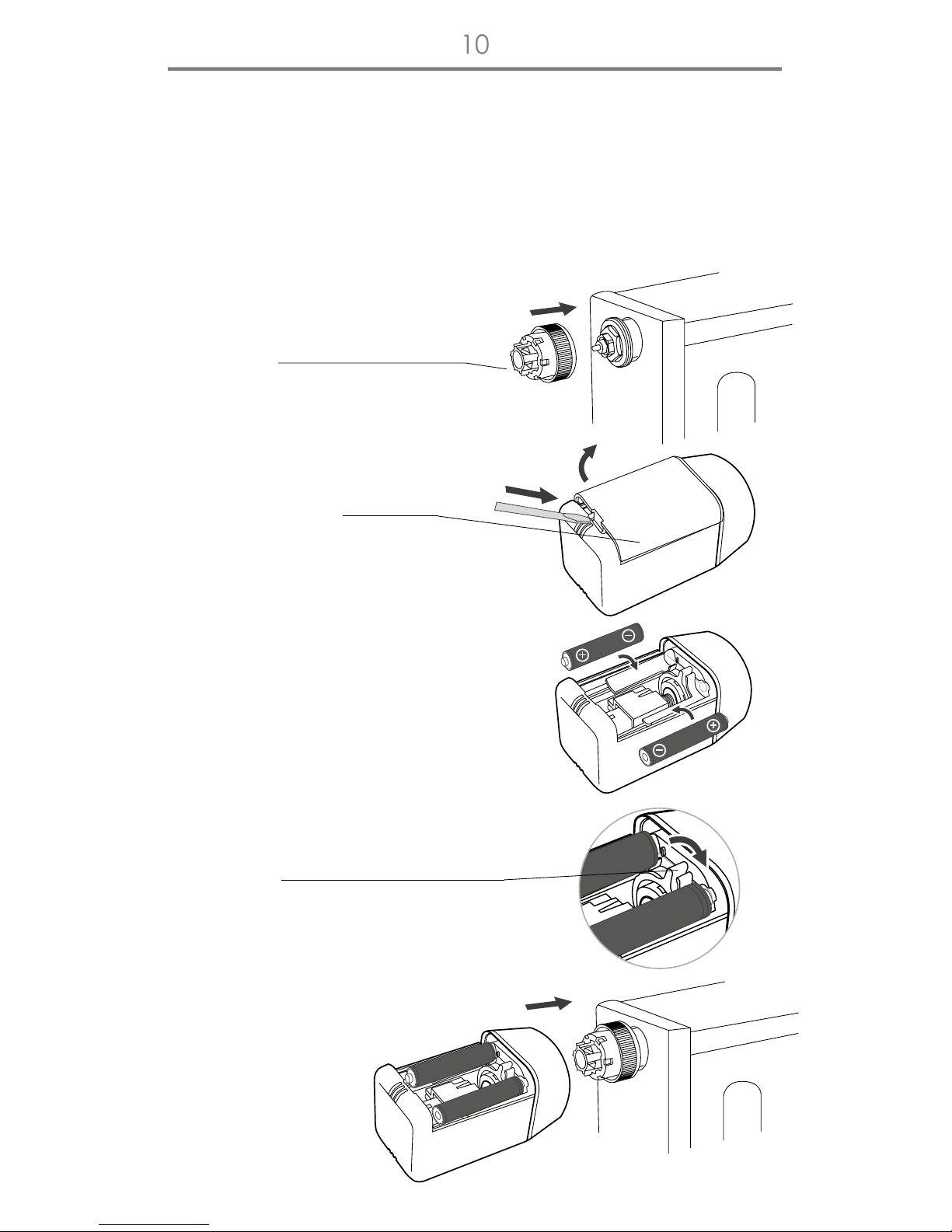
Method of installation of the TRA head
on a radiator with an M30x1.5 insert
In order to install the Auraton TRA head on a radiator with the most
common insert in the market, i.e. M30x1.5, the following acons must
be performed:
a) Screw the reducon ng A
onto the insert delivered with the
head (all the way).
b) Take o the head baery cover
using a at screwdriver.
c) Install two AAA baeries in the
head, paying aenon to their
polarity. The pin of the head moves
to the fully open posion, which
is necessary for installaon of the
head on the reducon ng.
d) Slide the safety ring into the
“released” posion.
e) Slide the head all the way onto the
reducing ng A.
Inhaltsverzeichnis
Andere AURATON Controller Handbücher