Aviosys IP Power 9223K-D Bedienungsanleitung

- 1-
Ref#9223KD0001
IP Power 9223K-D
User Manual
Release Date: 10/19/2012
Manual Version: 1.1
Firmware:4.01

- 2-
Ref#9223KD0001
Warning: Any changes made to this equipment without permission may cause
damages to the device!
IMPORTANT NOTICE
1. IP Power 9223K-D was designed to be used with a protective covering, the user is responsible
for any damages caused from misuse, or use under inappropriate conditions. Like plug in 2
power input at same time which cause the board damage.
2. Please use the power adapter provided by the dealer, the manufacturer is not responsible for
any damage caused from using power adapters not.
3. Do not shake the IP Power 9223K-D in any environment.
4. Please contact the dealer If IP Power 9223K-D is not working properly.
Copyright © 2012 All rights reserved. No part of this publication may be reproduced, stored in a
retrieval system, or transmitted in any form or by any means, electronic, mechanical,
photocopying, recording or otherwise, without the prior written consent of us.
All trademarks and products mentioned in this document are the properties of us.

- 3-
Ref#9223KD0001
Table of Content
1.) WELCOME.........................................................................................................................4
INTRODUCTION..........................................................................................................................4
2.) PRODUCT OVERVIEW ........................................................................................................4
FEATURES.................................................................................................................................4
MINIMUM SYSTEM REQUIREMENTS ...............................................................................................4
SPECIFICATION ..........................................................................................................................5
PACKAGE CONTENTS ...................................................................................................................5
3.) INTERFACE DESCRIPTION...................................................................................................7
HARDWARE INTERFACE................................................................................................................7
4.) HARDWARE SETUP............................................................................................................8
SETTING UP THE DEVICE...............................................................................................................8
NORMALLY CLOSED CIRCUIT (NC) OR NORMALLY OPEN CIRCUIT (NO)......................................................... 8
CONNECTING DEVICES TO THE 9223K-D.................................................................................................. 9
INTERNET ACCESSIBLE SETUP ......................................................................................................11
5.) IP EDIT SEARCH TOOL ......................................................................................................12
USING IP EDIT.........................................................................................................................12
IP SERVICE .............................................................................................................................14
6.) WEB INTERFACE ..............................................................................................................15
CONNECTING TO THE 9223K-D ...................................................................................................15
GPIO CONFIGURATION .............................................................................................................16
SET I/O............................................................................................................................................ 16
DEFINE I/O NAME ............................................................................................................................. 17
SYSTEM SETTINGS ....................................................................................................................19
SYSTEM CONFIGURATION .................................................................................................................... 19
ADVANCE SETUP................................................................................................................................ 20

DDNS.............................................................................................................................................. 20

- 4-
Ref#9223KD0001
E-MAIL ............................................................................................................................................. 21
CHANGE PASSWORD........................................................................................................................... 22
POWER SCHEDULE ............................................................................................................................. 22
NETWORK WAKE UP........................................................................................................................... 24
LOGOUT ........................................................................................................................................... 24
INTERNAL TIME .......................................................................................................................24
DATE/TIME SETTINGS ......................................................................................................................... 24
7.) CONTROLLING THE DEVICE ..............................................................................................25
CGI HTTP COMMANDS ............................................................................................................25
SET POWER COMMAND ...................................................................................................................... 25
SET DELAY POWER COMMAND ............................................................................................................ 26
READ POWER COMMAND ................................................................................................................... 26
RS232 CONTROL .....................................................................................................................26
8.) FREQUENTLY ASKED QUESTIONS (F.A.Q)..........................................................................27

- 5-
Ref#9223KD0001
1.) Welcome
Introduction
The 9223K-D is an industrial grade 4 port bare board relay perfect to power management through
an Ethernet connection. This device can easily integrate with other devices and allow power
control with your integrated system. With the 9223K-D robust design and high quality components
it provides an added incentive to other devices or can be used independently. The 9223K-D
brings an economical solution to a professional industry.
2.) Product Overview
Features
1. Embedded web server –No PC needed to connect.
2. Accessible with popular web browsers - IE, Google Chrome & Firefox.
3. Industrial 4 Port Relay design network controller.
4. Each output support current up to 8A as Normally Open (NO)
or 4A as Normally Closed(NC).
5. HI Grade relay selected for T5 Fluorescent Lights
6. Power surge protection design to against high voltage power surge.
7. Network protocols supported: Http, DDNS, DHCP, Virtual and Dynamic
IP. SNMP & SMTP
8. Timer Schedule - pre-set the time schedule to turn on / off thr. network.
9. Support NTP ( Network Time Protocol) - synchronize the time to the
webpage.
10. SDK for own software development.
11. Support power input range : 12 VDC ~24VDC
12. Option : Din Rail Stand
13. Option : 12V power adaptor
14. Option: RS232 Control (OEM projects) for system integration.
Minimum System Requirements
Network browser like IE / Firefox / Google Chrome under WIN2K/ XP or above
10/100 Ethernet switch/hub
Ethernet network port/card &Network cable
Internet (For remote access) or Ethernet Network (Internal Network use) with some type
of Internet connection, (i.e. ADSL, Cable, Dial up or any other forms of Internet service)

- 6-
Ref#9223KD0001
Specification
* Power Input : Support 2 styles - Green terminal Block or Black power jack
but user can only choose one power input to plug :
Either green terminal block or black jack .
or
DO NOT PLUG BOTH POWER IN.
It is mis - use and will cause damage which is out of our warranty support .
* Power Consumption: 500mA at 12V / 250mA at 24VDC
* Relay Specification: 240VAC / 30V DC
N.O .Maximum: 8Amp
N.C. Maximum: 4Amp
* Wring : I/O cable max. AWG14

- 7-
Ref#9223KD0001
Package Contents
Package Contents
1.) 9223K-D x 1
2.) 9223K-D Installation CD
Provide manual, software, and documentation
3) Option :
12V 1A power adaptor -
Input: 100-250VAC
Output: 12VDC , 1A
There are 5 style plug of power adaptor for most world wide
countries ( USA , UK , Australia & Europe) .
Notice: User can Only choose one power input - either to
green terminal jack or to black power adaptor jack. It will
cause the board damage if connect 2 power inputs .
4.) Option : Din Rail fix Stand
Example :
9223K-D with Din Rail stand.

- 8-
Ref#9223KD0001
3.) Interface Description
Hardware Interface
Power input
Spec : 12VDC~24VDC ,1 Amp
* Green terminal power line in.
OR
* Black power jack for adaptor.
Notice : User can only select one power input .
The board will be damaged if supply 2 power in which
Way is misused and out of warranty support.
Output
4 ports Power Control. Can connect as Normally Closed (NC) or
Normally Open (NO) Power ports
RS232 Port:
Option : BY OEM inquire.
RESET
Hold down for 10 seconds until you hear a long beep revert to
manufacturer default.
RJ45 Ethernet:
Plug in the RJ45 Ethernet cable to the Ethernet port

- 9-
Ref#9223KD0001
4.) Hardware Setup
*Before setup the device make sure of the following:
1.) Make sure that all the package contents are all included if anything is missing please
contact the store or your distributor.
2.) Make sure the power adaptor is the correct specification.
3.) Make sure that all the cables are working correctly
Setting up the Device
Warning: This part of the procedure can be very dangerous. Please follow instructions carefully
or consult an electrician or someone who is experienced in the field to assist in the part of the
procedure. Aviosys is not responsible for any damages to the device or harm caused by from
misuse, incorrect installation, and (or) dangerous environment.
Normally Closed Circuit (NC) or Normally Open Circuit (NO)
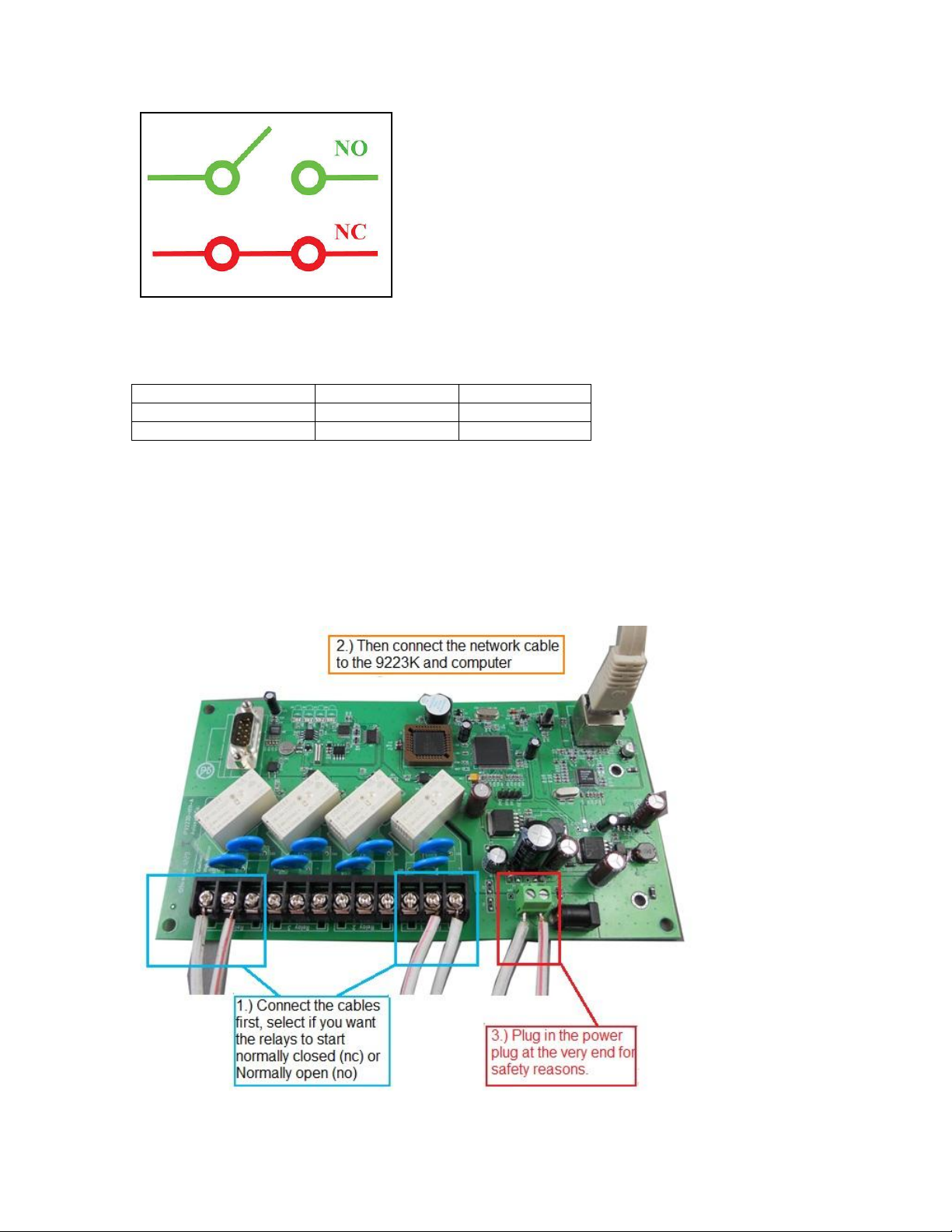
The 9223K-D consists of a total of four relays. Each of the relays on the board has the option to
pick whether this circuit will be normally closed (NC) or normally open (NO).
Each relay can support a voltage up to 250VAC / 30 VDC .& a current up to:
N.O .Maximum: 8 Amp
N.C. Maximum: 4 Amp

- 10-
Ref#9223KD0001
Note:
Please remember that you use normally open or normally closed the output control will either
create a open circuit or a closed circuit.
Device Status
Control Status
Circuit
Normally Closed
On
Open
Normally Open
On
Closed
Connecting devices to the 9223K-D
Warning: This part of the procedure can be very dangerous. Please follow instructions carefully
or consult an electrician or someone who is experienced in the field to assist in the part of the
procedure. Aviosys is not responsible for any damages to the device or harm caused by from
misuse, incorrect installation, and (or) dangerous environment.
When connecting the device it is crucial not to have the power of the 9223K-D connected.
Inhaltsverzeichnis
Andere Aviosys Computerhardware Handbücher
Beliebte Computerhardware Handbücher anderer Marken

EMC2
EMC2 VNX Series Betriebsanleitung

Panasonic
Panasonic DV0PM20105 Bedienungsanleitung

Mitsubishi Electric
Mitsubishi Electric Q81BD-J61BT11 Bedienungsanleitung

Gigabyte
Gigabyte B660M DS3H AX DDR4 Bedienungsanleitung

Raidon
Raidon iT2300 Bedienungsanleitung

National Instruments
National Instruments PXI-8186 Bedienungsanleitung