
AXC TrueBrake Bedienungsanleitung
TrueBrake Installation Manual v1.0 -November 2019
© Aeroxcraft Ltd 2019
AXC Logo is registered trademark of Aeroxcraft Ltd. Logitech the Logitech logo and other Logitech marks are owned by Logitech and may be
registered.
*Aeroxcraft Ltd will not be held responsible for any damage to your Logitech pedals or steering wheel.
www.axc-sim.com
Installation Manual
For Logitech G29/G920 Pedals
TrueBrake Installation Manual v1.0 -November 2019
© Aeroxcraft Ltd 2019
AXC Logo is registered trademark of Aeroxcraft Ltd. Logitech the Logitech logo and other Logitech marks are owned by Logitech and may be
registered.
*Aeroxcraft Ltd will not be held responsible for any damage to your Logitech pedals or steering wheel.
Introduction
We recommend you read these instructions in full
before starting to
install TrueBrake.*
Make sure you have all the correct tools
before
starting.
Take notes and/or photos
during disassembly that you
can refer to when re
-assembling the pedals.
Do not over
-tighten screws as you can strip the
threads.
If you are under 18 years old seek the help of a
responsible and competent adult
.
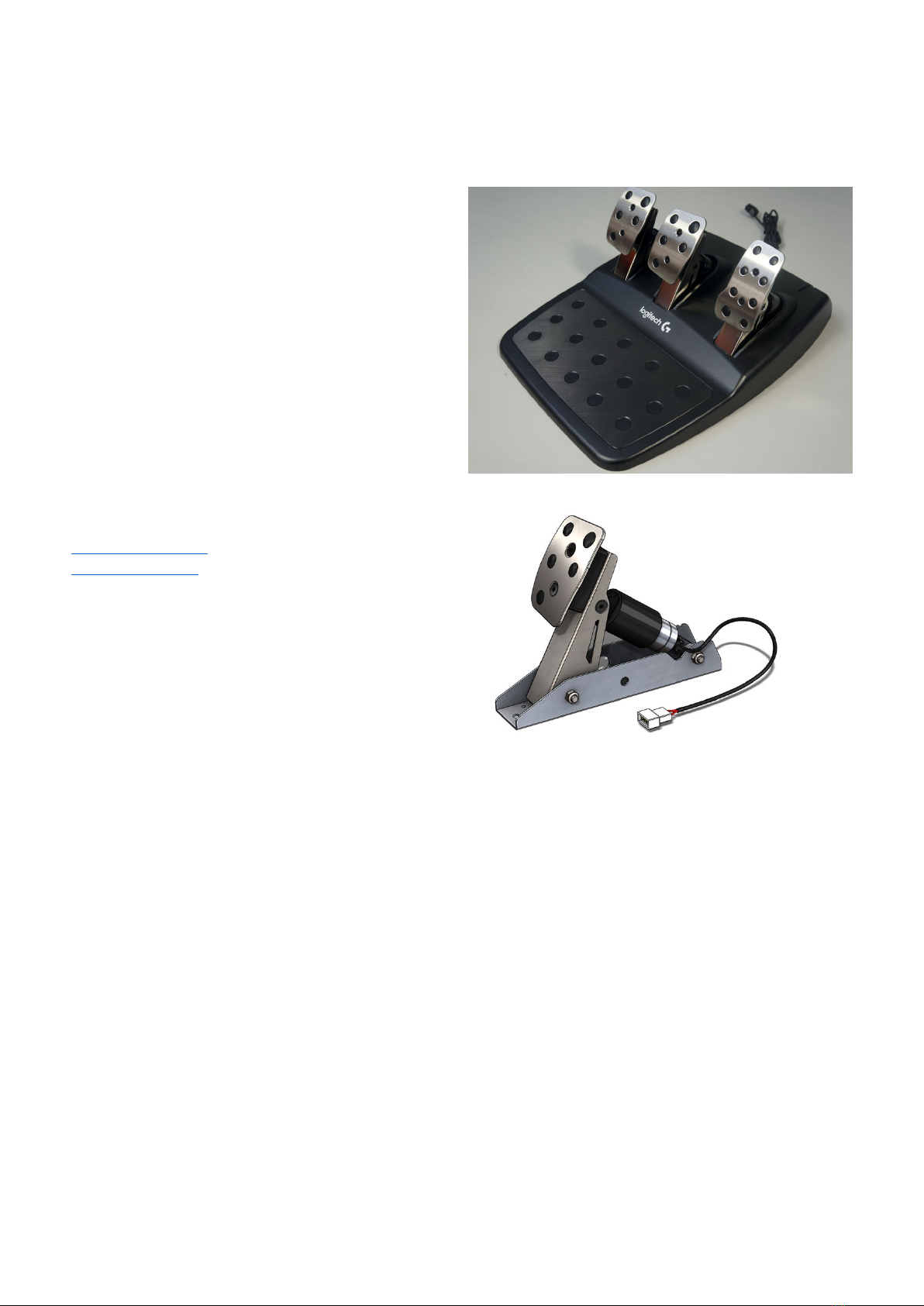
Logitech G29 / G920 Pedals
If you need any assistance please contact us at
drive@axc
-sim.com or contact us via our website at
www.axc
-sim.com.
Logitech Brake Pedal Unit with TrueBrake installed
Tools required:
•2.5mm and 5mm allen hex keys
•No.1 and No.2 Phillips screwdrivers
•10mm spanner or adjustable wrench
•
Long Nose Pliers
TrueBrake Installation Manual v1.0 -November 2019
© Aeroxcraft Ltd 2019
AXC Logo is registered trademark of Aeroxcraft Ltd. Logitech the Logitech logo and other Logitech marks are owned by Logitech and may be
registered.
*Aeroxcraft Ltd will not be held responsible for any damage to your Logitech pedals or steering wheel.
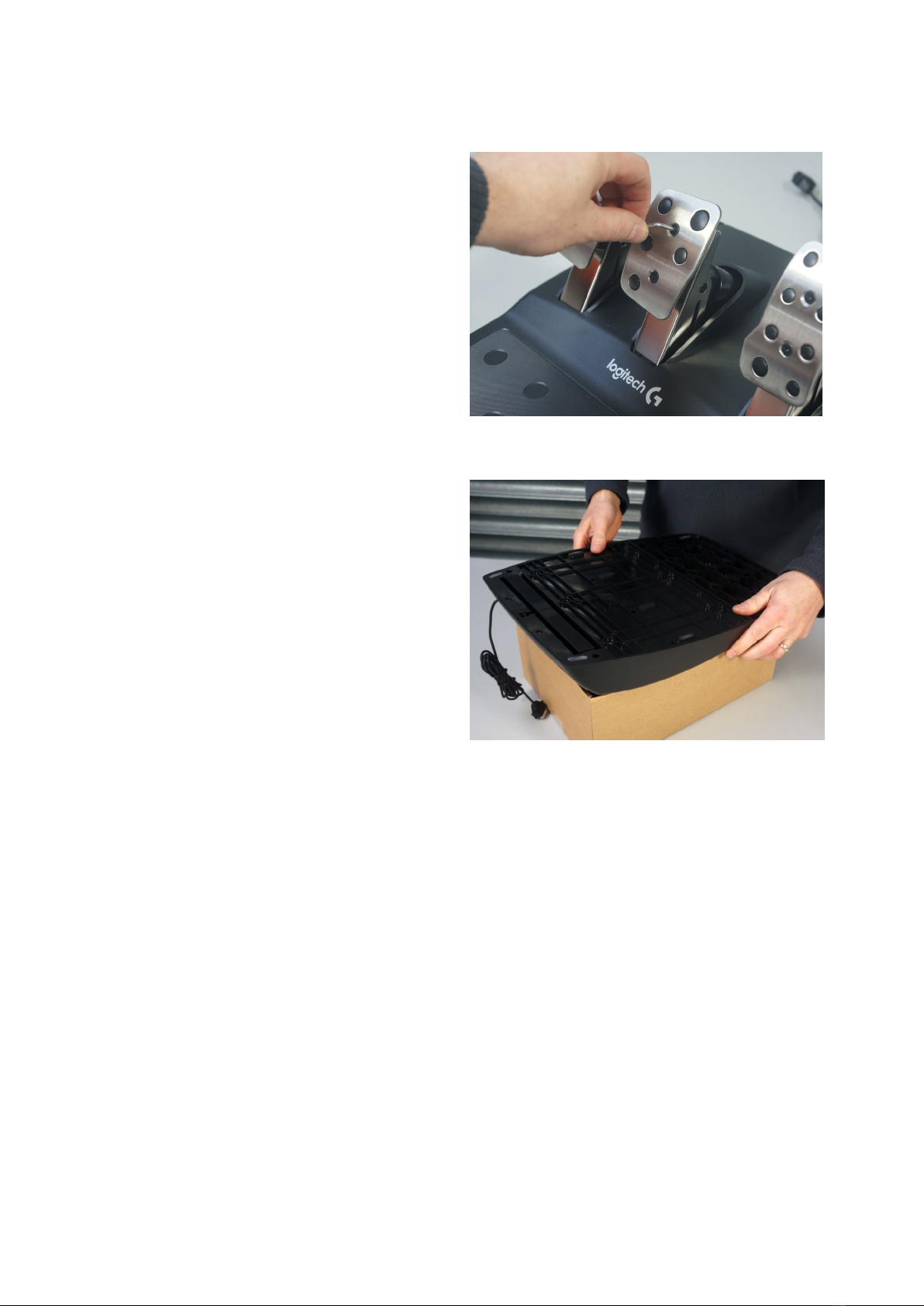
Step 1 – Remove foot pad
Take out the 2 hex screws on the brake pedal foot pad.
Remove the foot pad from the brake pedal.
The clutch and accelerator foot pads can remain in
place.
Step 2 – Support the pedal assembly
Use a suitable cardboard box to support the main
pedal
assembly whilst working on the underside of the
unit.
Missing this step out makes it much more difficult
to work on the inside of the pedal assembly.
TrueBrake Installation Manual v1.0 -November 2019
© Aeroxcraft Ltd 2019
AXC Logo is registered trademark of Aeroxcraft Ltd. Logitech the Logitech logo and other Logitech marks are owned by Logitech and may be
registered.
*Aeroxcraft Ltd will not be held responsible for any damage to your Logitech pedals or steering wheel.
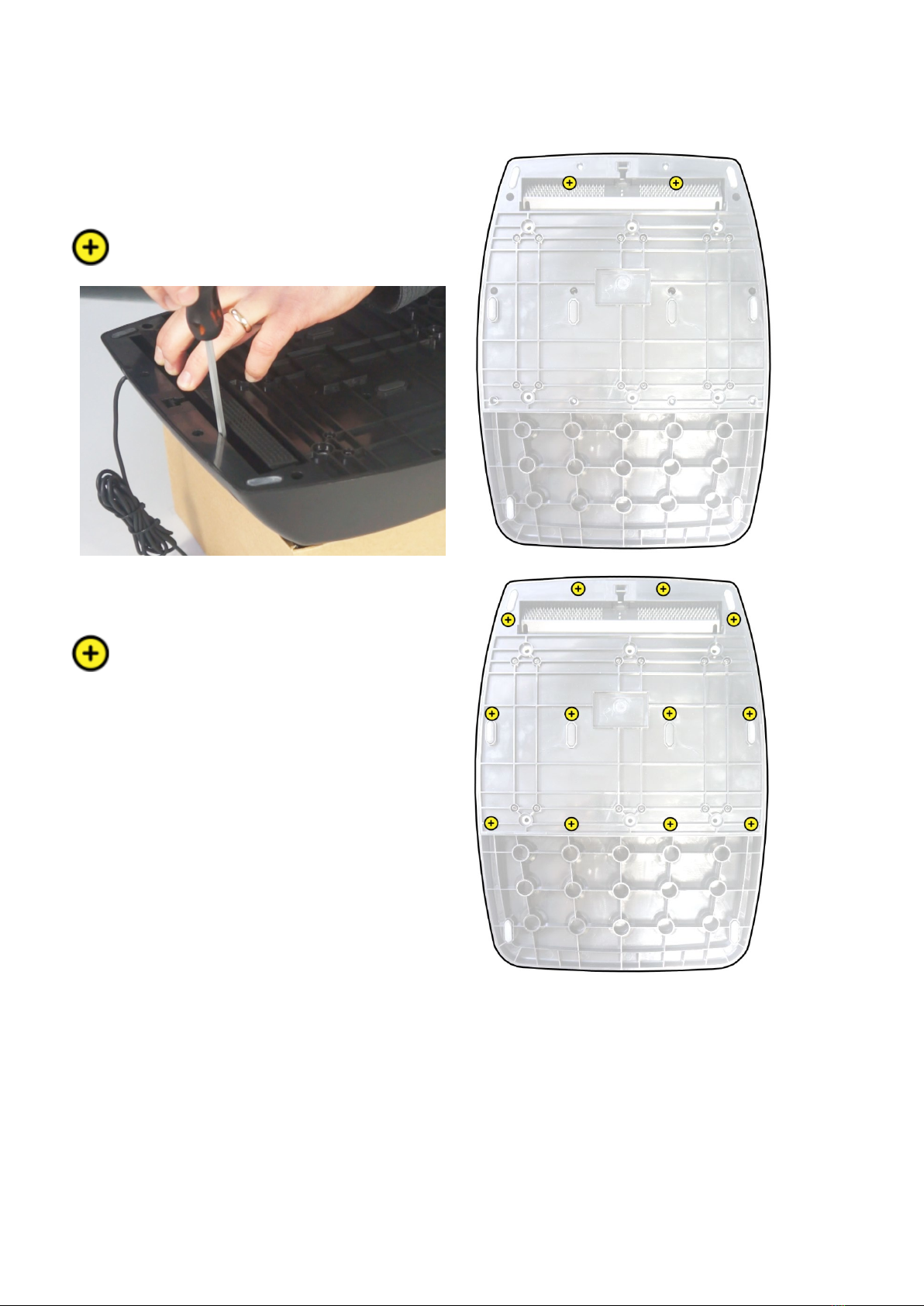
Step 3 – Remove bottom cover
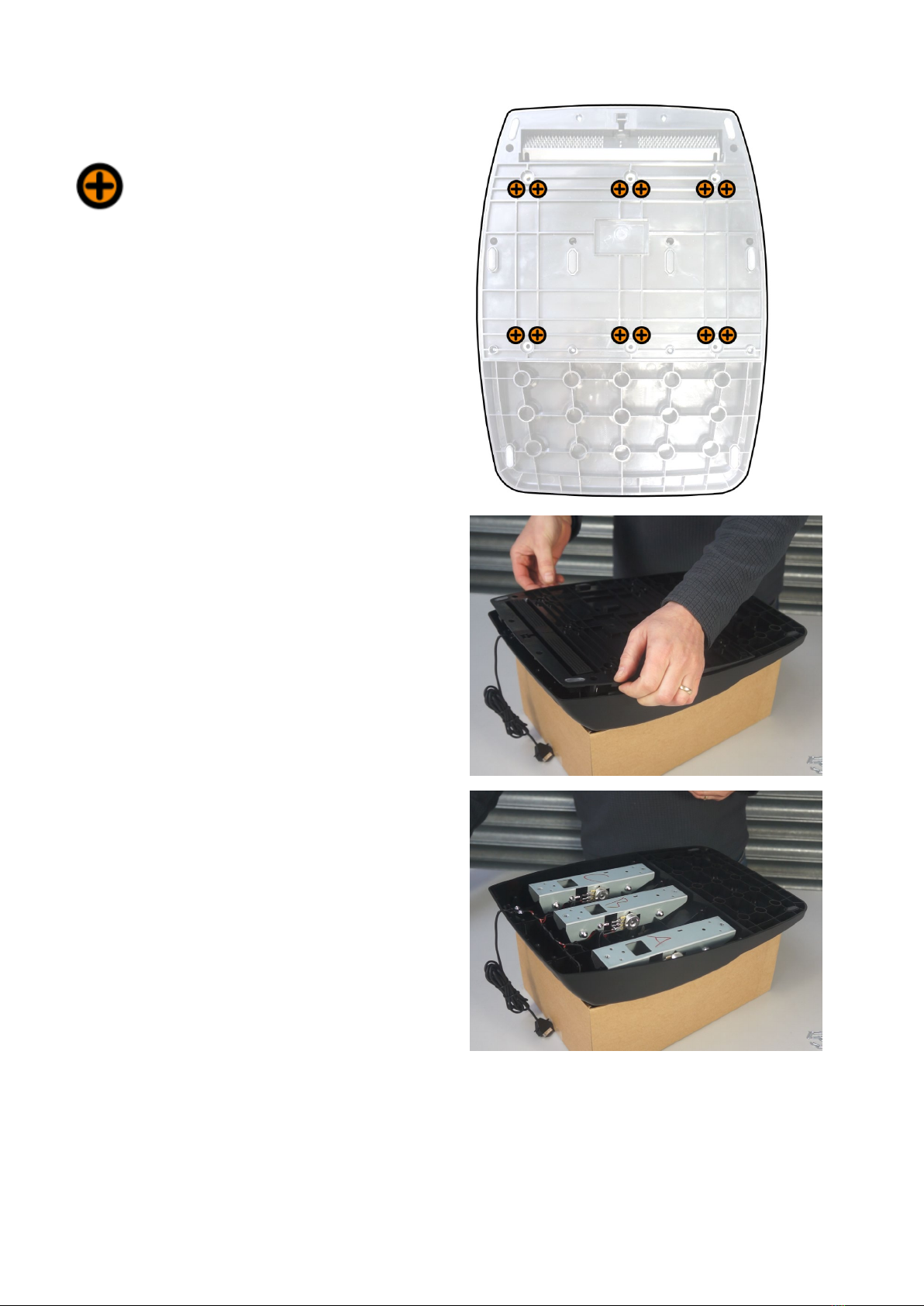
Use a Phillips No.1 screwdriver to remove the 2 small
screws that are under the carpet gripper. The positions
are shown in the diagram opposite.
Use a Phillips No.1 screwdriver to remove the 12 small
screws shown opposite.
TrueBrake Installation Manual v1.0 -November 2019
© Aeroxcraft Ltd 2019
AXC Logo is registered trademark of Aeroxcraft Ltd. Logitech the Logitech logo and other Logitech marks are owned by Logitech and may be
registered.
*Aeroxcraft Ltd will not be held responsible for any damage to your Logitech pedals or steering wheel.
Use a Phillips No.2 screwdriver to remove the 12 large
screws shown opposite.
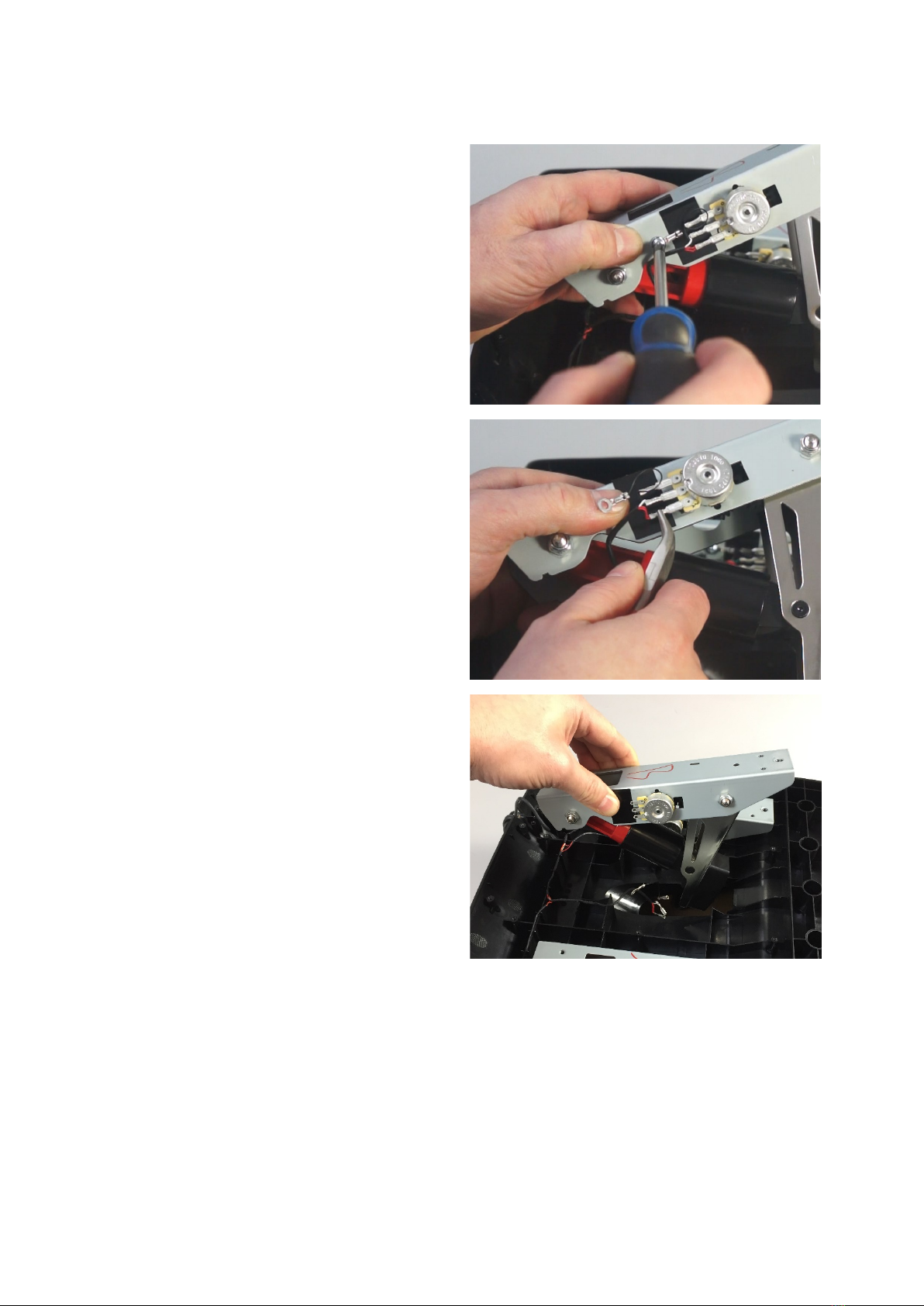
Once all the screws are removed and safely put to one
side then you can remove the bottom cover to gain
access to the inside.
Take note of how the wiring loom is arranged and
attached to the plastic moulding.
TrueBrake Installation Manual v1.0 -November 2019
© Aeroxcraft Ltd 2019
AXC Logo is registered trademark of Aeroxcraft Ltd. Logitech the Logitech logo and other Logitech marks are owned by Logitech and may be
registered.
*Aeroxcraft Ltd will not be held responsible for any damage to your Logitech pedals or steering wheel.
Step 4 – Remove brake pedal unit
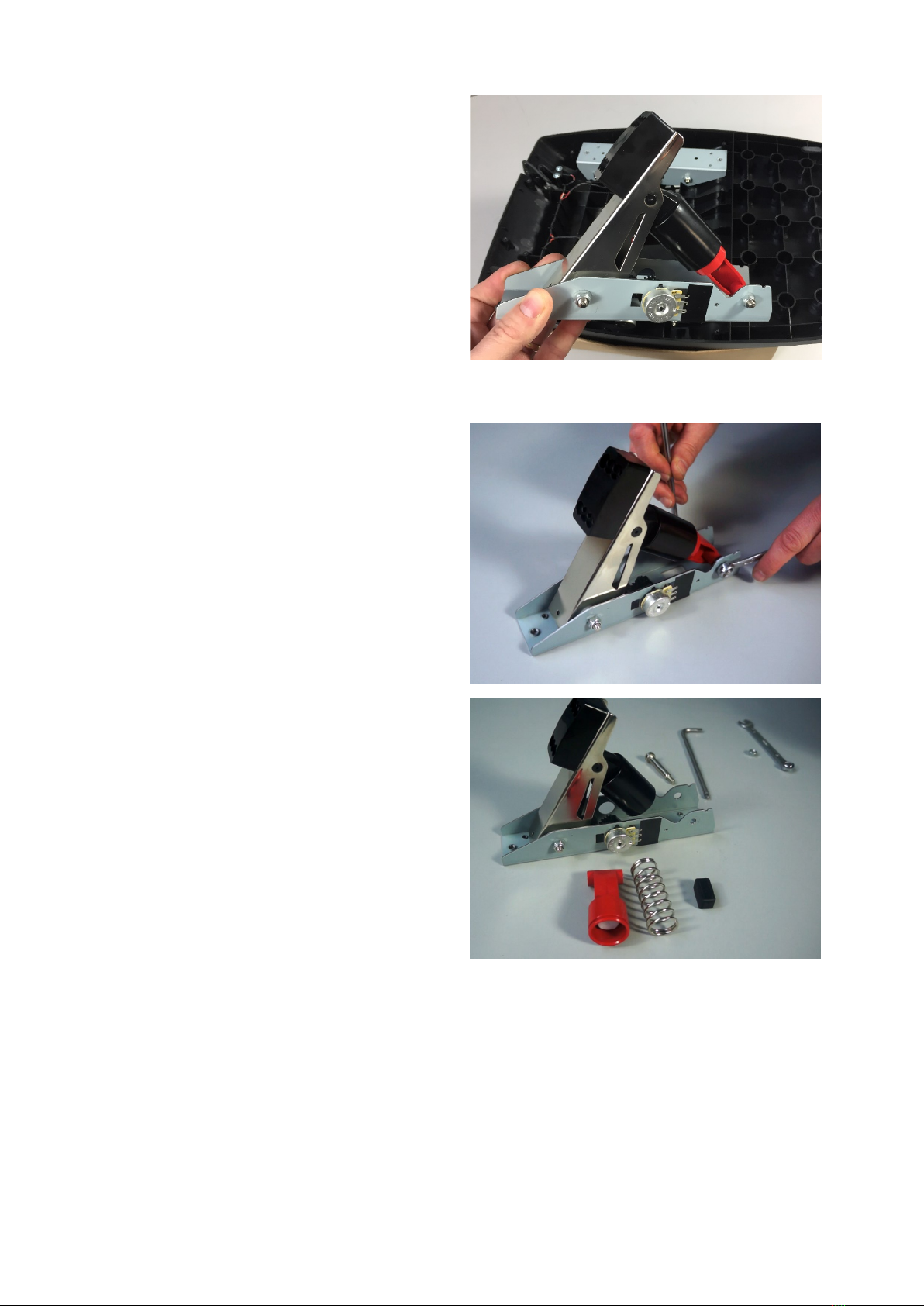
Use a No.2 Phillips screwdriver to remove the screw
that secures the black ground wire to the brake pedal
metal base.
Be careful not
to damage the wires.
Use your thin nosed pliers to disconnect the spade
connectors
from the potentiometer.
Be careful so you do not damage the wires.
(You might want to make a note of where the wires go
in case you want to revert to t
he original setup.)
You can now remove the brake pedal unit from the
main
assembly.
TrueBrake Installation Manual v1.0 -November 2019
© Aeroxcraft Ltd 2019
AXC Logo is registered trademark of Aeroxcraft Ltd. Logitech the Logitech logo and other Logitech marks are owned by Logitech and may be
registered.
*Aeroxcraft Ltd will not be held responsible for any damage to your Logitech pedals or steering wheel.
Step 5 – Remove lower spring housing
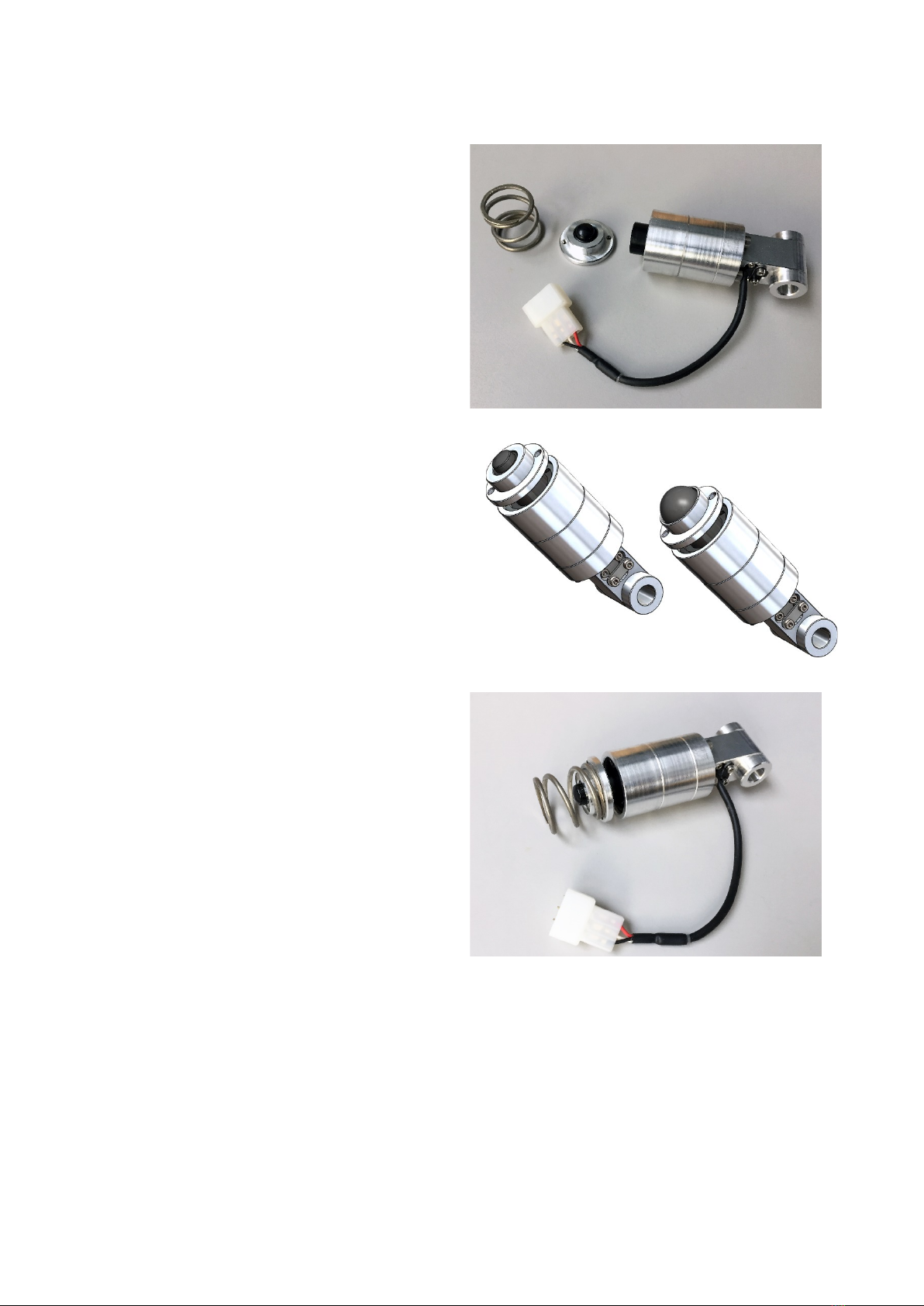
Remove the nut and bolt that secures the lower spring
housing.
Remove the lower spring housing along with the spring
and rubber bung.
Put the spring housing, spring and rubber bung
somewhere safe so you can revert your pedals back to
stock if required.
TrueBrake Installation Manual v1.0 -November 2019
© Aeroxcraft Ltd 2019
AXC Logo is registered trademark of Aeroxcraft Ltd. Logitech the Logitech logo and other Logitech marks are owned by Logitech and may be
registered.
*Aeroxcraft Ltd will not be held responsible for any damage to your Logitech pedals or steering wheel.
Step 6 - Install TrueBrake
TrueBrake consists of three parts:
•Cylinder
•Buffer (choice of 2 sizes)
•Spring
There are two sizes of buffer cap supplied with
TrueBrake.
The two sizes determine the amount of pedal
movement before the pedal engages with the
polyurethane
buffer. The small buffer cap gives 3mm
more movement than the large buffer cap.
The author
personally prefers using the small buffer
cap. This gives the pedal a little more travel before it
engages, more like a
sporty road car than a full-on
race
car.
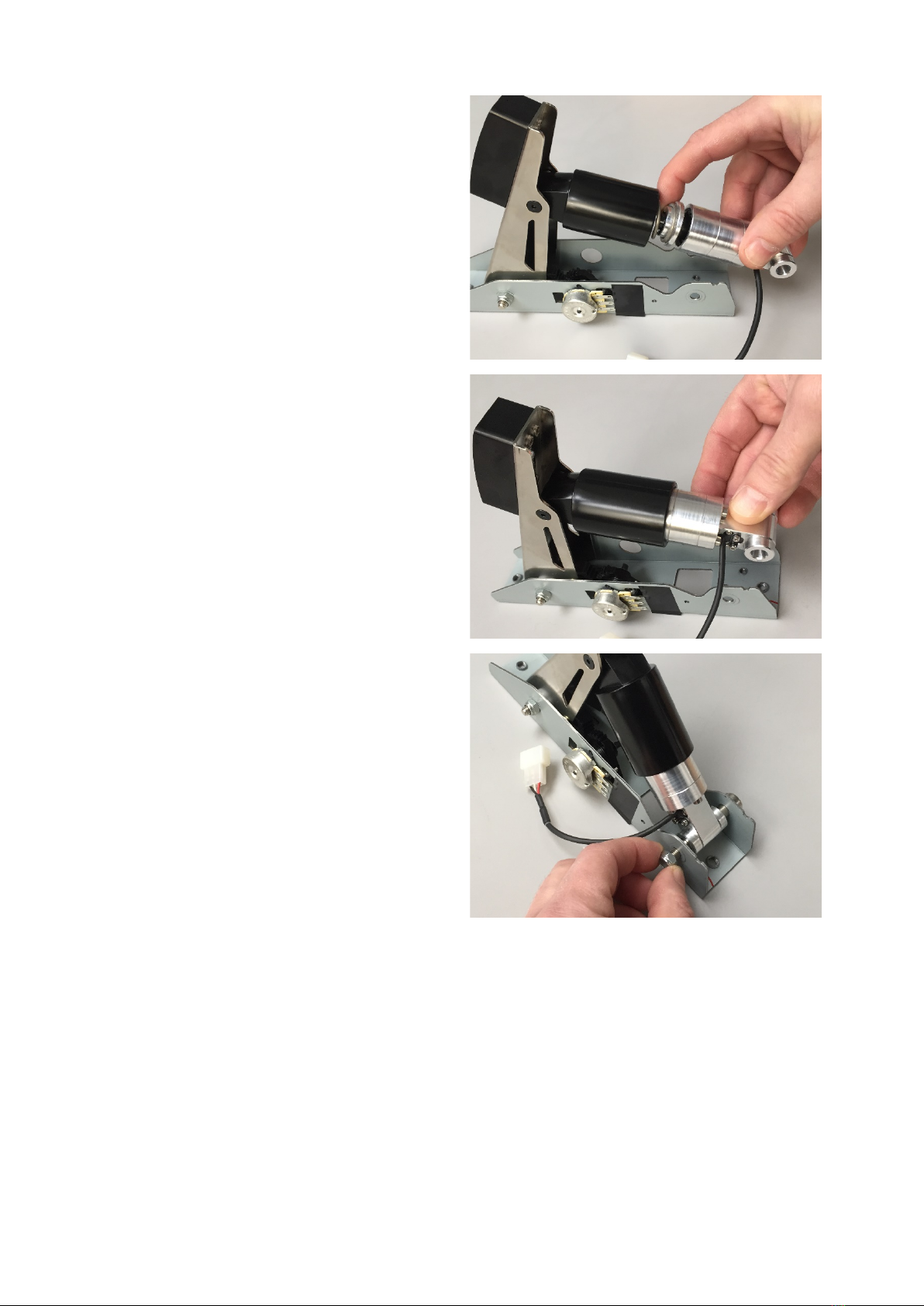
Assemble the three TrueBrake components into a
stack.
•Cylinder > Buffer > Spring
TrueBrake Installation Manual v1.0 -November 2019
© Aeroxcraft Ltd 2019
AXC Logo is registered trademark of Aeroxcraft Ltd. Logitech the Logitech logo and other Logitech marks are owned by Logitech and may be
registered.
*Aeroxcraft Ltd will not be held responsible for any damage to your Logitech pedals or steering wheel.
Insert the stack into the upper spring housing as
shown.
Re-insert the lower bolt to secure the True Brake in
place.
TrueBrake Installation Manual v1.0 -November 2019
© Aeroxcraft Ltd 2019
AXC Logo is registered trademark of Aeroxcraft Ltd. Logitech the Logitech logo and other Logitech marks are owned by Logitech and may be
registered.
*Aeroxcraft Ltd will not be held responsible for any damage to your Logitech pedals or steering wheel.
Tighten up the nut and bolt.
Now is a good time to check the feel of the pedal.
It’s easier to change your mind now
about which
buffer size to use!
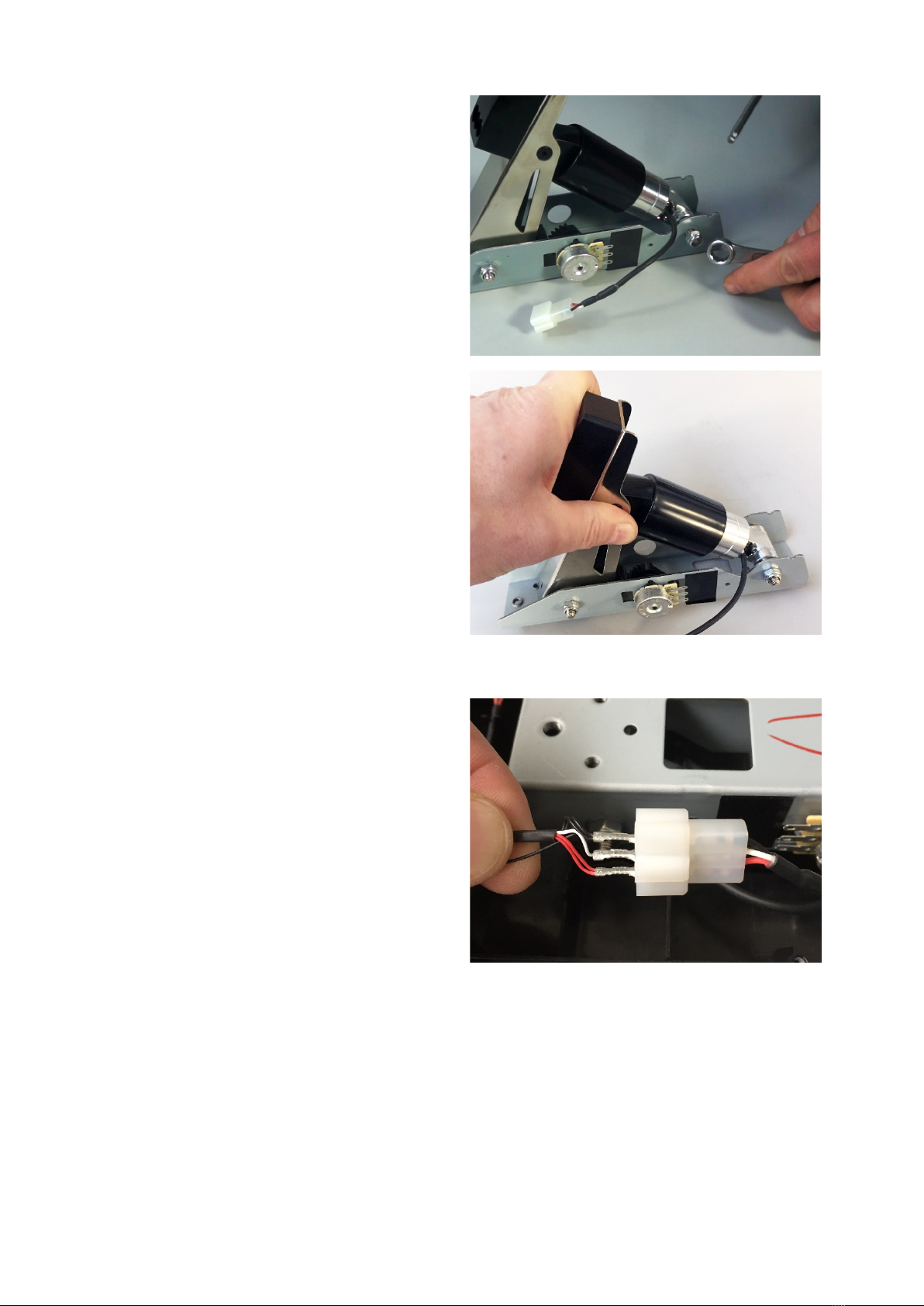
Step 7 – Re-install Brake Pedal Unit
Place the brake pedal unit back in the main pedal
assembly.
Connect the red, white and black wires to the
matching wires in the True Brake connector.
Inhaltsverzeichnis
Andere AXC Videospielzubehör Handbücher

Beliebte Videospielzubehör Handbücher anderer Marken


Sega
Sega Visual Memory Unit Bedienungsanleitung

Datel
Datel Go-tcha Expedition Bedienungsanleitung

TruGolf
TruGolf TruFlight 2 Bedienungsanleitung

CH Products
CH Products CH PRO THROTTLE Bedienungsanleitung

Thrustmaster
Thrustmaster T2PA Bedienungsanleitung

Cube Controls
Cube Controls Mercedes-AMG - GT Edition SIM Wheel Bedienungsanleitung


