
BeroNet M Bedienungsanleitung

www.beronet.com
Delivering high quality VoIP hardware since 2002.
Cloud managed & monitored
VoIP Gateways and Appliances
Made in Germany
beroNet VoIP Gateways
Quick Installation Guide
The VoIP Experts

2
Quick Installation Guide: beroNet VoIP Gateways
Getting Started
Before you start
Check the items you received and compare them with the products
you ordered to ensure that you have exactly what you need for your
installation.
1.
Review our documentation to ensure that you are fully prepared for
your installation. You can find all beroNet documentation at:
wiki.beronet.com.
2.
Getting to know your gateway
“M” Model beroNet Modular Gateways:
“L” and “XL” Model beroNet Modular Gateways:
Module port layouts
BNMO-HYB
BRI 1
BRI 2
FXS 1
FXS 2
BNMO-4XX
1
3
2
4
BNMO-PRI
1 2

3
Quick Installation Guide: beroNet VoIP Gateways
Adding additional modules
Remove the front plate by removing these four screws.
1.
If you are using a PRI module - replace a red connector with the
included black connector.
3.
Add your module, and reassemble your device.
4.
2. Remove the top cover.
Please note: always backup your device before changing the hardware.

4
Quick Installation Guide: beroNet VoIP Gateways
Initial Setup
Physical Setup
Network Setup and GUI
*LAN cable is not included.
Using a Windows or Linux computer, download and run the “BFDetect”
tool found at wiki.beronet.com, under “Tools and Downloads”
1.
Connect the power adapter to the device and plug it in.
1.
Connect a LAN cable* to the device and connect it with your network.
2.
a. Start BFdetect and select your device
b. Select “d” to switch DHCP off
c. Select “i” to change your IP address and “n” for your netmask
d. Select “g” to change your default gateway an
e. Select “m” and enter a DNS-Nameserver
f. Select “s” to save and quit - your gateway will restart
Set a static IP address using BFDetect
2.
Use a browser to navigate to the device IP address and login using
the credentials: admin / admin
3.
Connect your telephony cables.
Pinout information can be found at: wiki.beronet.com
Select “Gateways and Cards”, “Product Manual”, “Physical Setup”
3.

5
Quick Installation Guide: beroNet VoIP Gateways
Update your Gateway to the newest firmware
Hover over “Management” and select “Firmware Update”
1.
Select “Reboot in Update Mode” - wait for your device to restart
2.
Choose the most recent stable version and select “Download”
3.
When the download is completed - click install
3.
Warning: do not turn off your device or remove it from power while
the update is in process. If you are unsure if the update is complete, open
a new browser window and navigate to the VoIP Gateways IP Address.

6
Quick Installation Guide: beroNet VoIP Gateways
Device Configuration
Configuration using the beroNet Wizard
a. Gateway: connect a Legacy PBX system with a SIP Trunk or Provider
b. VoIP PBX Gateway: connect an IP-PBX with ISDN, analog or GSM
Select “Easy Configuration Wizard” to launch the wizard
1.
Choose your scenario
2.
Enter the requested information, when completed select “finish”
3.

7
Quick Installation Guide: beroNet VoIP Gateways
Manual Configuration of a beroNet VoIP Gateway
Please Note: this is a short overview of a basic configuration. For a more detailed
description, visit our online documentation at wiki.beronet.com.
Place your ISDN, Analog or GSM ports in groups
2.
Configure your hardware
1.
a. Hover over “PSTN” and select your port type (ISDN, Analog etc)
a. Navigate to “Hardware” and confirm your hardware configuration
b. Select “Add” and create a group of your ports - save when finished
b. When using PRI ports, confirm that you set the correct Type (TE or NT)
continued on the next page
8
Quick Installation Guide: beroNet VoIP Gateways
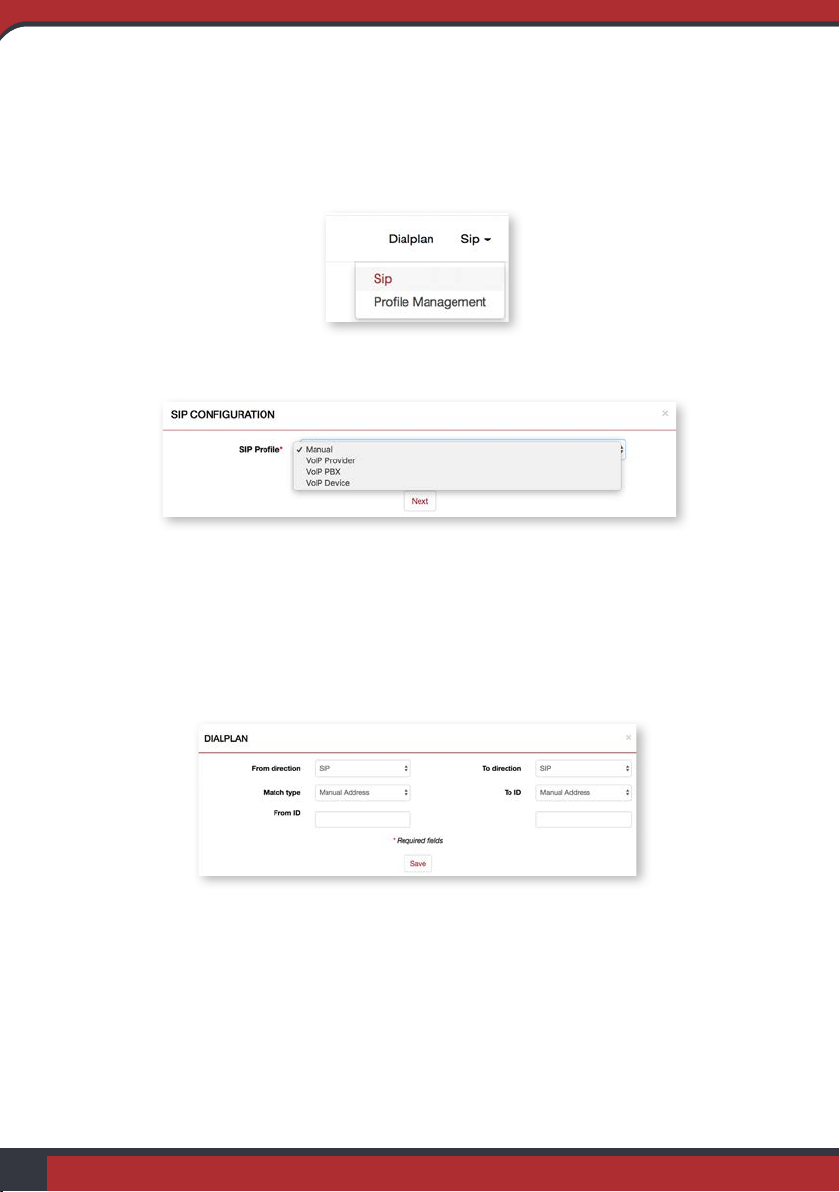
Add your SIP connections
3.
Configure your Dialplan rules
4.
Click the “Activate” and wait until the activate is finished
5.
a. Select “Dialplan” and click “Add”
c. Enter the requested information - save when finished
c. Save and repeat this process for any additional unique rules
a. Hover over “SIP” and select “SIP”
b. Select “Add” and choose manual or a predetermined profile
b. Choose the from direction and to direction and check “reverse rule”

9
Quick Installation Guide: beroNet VoIP Gateways
Use a Secure Password
beroNet VoIP Gateways come with default credentials which are “admin / admin”.
This information is well-known and written on our documentation which is available
online. It is therefore very important to change the password and to set a secure one.
Deactivate bfdetect
bfdetect enables you to find and manage the IP settings of beroNet VoIP Gateways
on your network. It should be used once and then deactivated in order to prevent
somebody from messing with it. To deactivate it, navigate to “network settings” under
“preferences+” and click on the option “Disable bfdetect”.
Use HTTPS
HTTPS is an important part of VoIP security. In order to have an encrypted
connection on your gateway, also from LAN, we advise you to use https. It is a self-
signed certificate so you need to add it to the exceptions of your browser.
If not behind a Firewall, Configure the ACL
If your beroNet VoIP Gateway is directly accessible from the Internet, set ACL to
limit the access on your device. As a general rule you should restrict outside access to
your device as much as possible.
Keep you Gateway behind a Firewall
A VoIP Gateway is more secure when it is configured behind a firewall and only
accessible from the LAN. NAT and firewall rules should then be set in order to make
sure it works properly.
Security

10
Quick Installation Guide: beroNet VoIP Gateways
Security
Limiting Gateway Access with the ACL
Restrict LAN access
Navigate to “ACL” under “Preferences”
1.
In this table you can see the services that will still be available after you
restrict access. Deselect “Allow all access from LAN” and click “Save”
2.
To finish, click “activate” and the ACL rules will be applied to your LAN
network.
3.
Dieses Handbuch passt für folgende Modelle
2
Inhaltsverzeichnis
Andere BeroNet Tor Handbücher


Beliebte Tor Handbücher anderer Marken

LST
LST M500RFE-AS Bedienungsanleitung

Kinnex
Kinnex Media Gateway Bedienungsanleitung

2N Telekomunikace
2N Telekomunikace 2N StarGate Bedienungsanleitung

Mitsubishi Heavy Industries
Mitsubishi Heavy Industries Superlink SC-WBGW256 Bedienungsanleitung

ZyXEL Communications
ZyXEL Communications ZYWALL2 ET 2WE Bedienungsanleitung

Telsey
Telsey CPVA 500 - SIP Bedienungsanleitung


