BRINTER ONE Bedienungsanleitung

BRINTER®ONE
Printing life one layer at a time!™
User Guide
July 29th, 2022

2
Contents
1Safety Information.................................................................................................................................... 5
1.1 General Safety Information ............................................................................................................ 5
1.2 Unpacking and Assembly................................................................................................................ 7
1.3 Protective Equipment ...................................................................................................................... 7
1.4 Hazardous Materials........................................................................................................................ 7
2Specifications............................................................................................................................................ 8
2.1 Product Configuration of Brinter® One, versions 1.0–1.x........................................................... 8
2.2 Product Configuration of Brinter® One, version 2.0 ..................................................................10
2.3 Technical Specifications................................................................................................................12
3Getting Started........................................................................................................................................13
3.1 Setting up the Brinter®One Platform .........................................................................................13
3.2 Setting up the Brinter®Software .................................................................................................13
3.3 Updating the Brinter®Software....................................................................................................14
3.4 Bioprinting with Your Brinter®One.............................................................................................. 14
3.4.1 Resetting the Pressure Display............................................................................................14
3.4.2 Configuring the UV Operations Parameters.......................................................................16
3.4.3 Configuring the Print Head Settings ...................................................................................17
3.4.3.1 Configuring the Pneuma Tool and Visco Tools..........................................................20
3.4.3.2 Configuring the Granu Tool ..........................................................................................21
3.4.3.3 Configuring the Pneuma Tool Pro, Pneuma Tool Cooled and Pneuma Triaxial ..22
3.4.3.4 Configuring the MicroDroplet Tools ............................................................................24
3.4.3.5 Completion of the Material Configuration.................................................................25
3.4.4 Slicing the STL Files...............................................................................................................27
3.4.4.1 Setting the Print Surface ..............................................................................................28
3.4.4.2 Importing the Objects ...................................................................................................31
3.4.4.3 Setting the Slicing Parameters for Objects ...............................................................33
3.4.4.4 Slicing the Objects.........................................................................................................35
3.4.5 Setting up the Printing Process ...........................................................................................36
3.4.6 Testing the Material Flow .....................................................................................................37
3.4.7 Calibration............................................................................................................................... 38
3.4.7.1 Manual Calibration of a Single Print Head ................................................................38
3.4.7.2 Manual Calibration of Multiple Print Heads ..............................................................40
3.4.7.3 Automatic Calibration of Multiple Print Heads .........................................................42
3.4.8 Controlling the Printing Process ..........................................................................................44
4Maintenance............................................................................................................................................48
4.1 Service Responsibilities ................................................................................................................48
4.2 Special Tools ...................................................................................................................................48

3
4.3 Recommended Cleaning Agents .................................................................................................48
4.4 Preventive Maintenance Schedule..............................................................................................49
4.5 Preventive Maintenance Procedures ..........................................................................................49
4.5.1 Cleaning Procedures .............................................................................................................49
4.5.2 Inspection Procedures...........................................................................................................49
4.5.3 Lubrication Procedures.........................................................................................................50
4.5.4 Air Preparation Unit Preventive Maintenance Procedures..............................................50
5Spare Parts..............................................................................................................................................51
5.1 Ordering Information .....................................................................................................................51
5.2 Spare Part Classes.........................................................................................................................51
6Appendix 1. Print Bed Installation .......................................................................................................52
6.1 Heated Print Bed Overview...........................................................................................................52
6.2 Getting the Heated Print Bed Ready ...........................................................................................53
6.3 Using the Heated Print Bed ..........................................................................................................53
6.4 Temperature-Controlled Print Bed Overview.............................................................................. 54
6.5 Getting the Temperature-controlled Print Bed Ready ..............................................................54
6.6 Using the Temperature-Controlled Print Bed.............................................................................56
7Appendix 2. Visco Tool Manual.............................................................................................................57
7.1 Print Head Overview.......................................................................................................................57
7.2 Getting the Print Head Ready for Printing..................................................................................59
7.2.1 Inserting the Stator................................................................................................................59
7.2.2 Connecting the Dosing Unit to the Drive Unit ....................................................................60
7.2.3 Supplying and Bleeding the Material..................................................................................60
7.3 Cleaning the Print Head ................................................................................................................62
7.3.1 Quick Cleaning Protocol for the Print Head.......................................................................62
7.3.2 Disassembly of the Print Head ............................................................................................63
7.3.3 Cleaning of the Stator ...........................................................................................................65
8Appendix 3. Pneuma Tool Manual....................................................................................................... 66
8.1 Print Head Overview.......................................................................................................................66
8.2 Getting the Print Head Ready for Printing..................................................................................68
9Appendix 4. Granu Tool Manual ...........................................................................................................69
9.1 Print Head Overview.......................................................................................................................69
9.2 Getting the Print Head Ready for Printing..................................................................................70
9.3 Cleaning the Print Head ................................................................................................................71
9.3.1 Unclogging a Clogged Nozzle ...............................................................................................71
9.3.2 Cleaning the Granu Tool with ASACLEAN™ Purging Compound ....................................71
9.3.3 Cleaning the Granu Tool Mechanically ...............................................................................72
10 Appendix 5. Pneuma Tool Cooled Manual..........................................................................................75
10.1 Print Head Overview ..................................................................................................................75

4
10.2 Getting the Print Head Ready for Printing..............................................................................75
11 Appendix 6. Pneuma Triaxial Pro Tool Manual..................................................................................77
11.1 Print Head Overview ..................................................................................................................77
11.2Getting the Print Head Ready for Printing..............................................................................78
12 Appendix 7. MicroDroplet Tool Manual............................................................................................... 80
12.1 Print Head Overview ..................................................................................................................80
12.2 Getting the Print Head Ready for Printing..............................................................................80
13 Appendix 8. Visco Tool Bio Manual......................................................................................................82
13.1 Print Head Overview ..................................................................................................................82
13.2 Getting the Print Head Ready for Printing..............................................................................84
13.2.1 Filling the Bioprinting Cap ....................................................................................................84
13.2.2 Installing the Bioprinting Cap...............................................................................................85
13.2.3 Dismantling of the Bioprinting Cap.....................................................................................86

5
1Safety Information
1.1 General Safety Information
Please review the entire Brinter®user manual, as well as the appended manuals of any relevant print
heads and modules, before you start using Brinter®bioprinter. Any misuse can lead to equipment
damage or serious injury.
Brinter®One is intended only for research use by trained professionals familiar with the 3D
(bio)printing processes and their related risks. Use Brinter®One for its intended purposes only.
Brinter®One and its print heads and modules are for indoor use only. Always keep the Brinter®One
and its accessories in a dry environment at room temperature, in a well-ventilated place, and at a
minimum distance of 50 cm from other objects.
Do not try to modify its print heads, modules, or accessories. Do not open or disassemble Brinter®
One or attempt any service other than the instructions described in the Maintenance chapter.
Brinter®platform and other optional modules, such as print heads, include
moving parts that can cause injury. Never place your fingers inside the Brinter®
or near any moving parts while the printer is in operation. Tie back long hair or
clothing that can get caught in the moving parts. Never remove any parts from
the machine or from the optional modules when using.
Never clean or service Brinter®while the machine is on. Always turn off the power
by disconnecting the external power source and air pressure before cleaning or
servicing Brinter®One.
Brinter®uses UV light for disinfection and curing. Never look directly at UV light
or expose skin to UV light. Eye or skin exposure can result in serious personal
injury. This symbol indicates the presence of UV light in the print head.
Brinter®has heated surfaces. Never touch heated surfaces (e.g., the nozzle and
the barrel of the Granu Tool) when using the heating function. The heated
surfaces can reach very high temperatures of up to 300 °C, which are harmful
to the human body. Always allow time for the print heads and print bed to cool
before handling. It can take up to 30 minutes for the heated surfaces to cool
down completely. Never remove the barrel cover of the Granu Tool, i.e. the cover

6
around the hot segment of the extruder. Never touch recently extruded plastic.
Hot plastic can stick to your skin and cause burns.
Never place or use flammable materials on or near the Brinter®when it is
powered on or in operation. Liquid acetone, alcohol, or other chemicals may
release extremely flammable vapors. When using the heated modules, take care
of the appropriate ventilation. Usage of a smoke detector connected to a fire
alarm is strongly recommended.
Plastic or other materials processed with the Brinter®can release volatile organic
compounds or toxic fumes above regulated threshold limit values. Refer to the
Safety Data Sheets of the materials being processed for more information and
use the Brinter® in a well-ventilated place. When printing with heated print heads,
the usage of a fume hood is strongly recommended.
Brinter®can radiate radio frequency energy. The operation of this equipment is
likely to cause harmful interference to radio communications, in which case the
user will be required to correct the interference at his own expense.
Always ensure that Brinter®is correctly mounted and placed before use, as
improperly mounted print beds, print heads, or modules can be dangerous. Never
tamper with any safety interlocks. Tampering risks equipment damage and
personal injury.
Never disassemble the Brinter®. All repairs must be performed by a qualified
technician. Any attempted repairs or modifications are not covered under the
warranty. Never open the switchboard, electric boxes or pneumatic box on your
own, or the warranty becomes void.
Never touch the electrical contact surfaces of the tool sockets in Brinter® One
version 2.0. There is a danger of potential electric shock and short circuits if the
contact surfaces are connected with a metal object, etc.

7
1.2 Unpacking and Assembly
The Brinter®One is heavy; always use a minimum of two people to unbox and
move it. Read how to safely unpack and set up your Brinter®One from Chapter
3.1 Setting up the Brinter®One Platform.
1.3 Protective Equipment
Always wear protective gloves and eye protection when using the Brinter®,
including UV curing and disinfection process, etc.
Always wear protective gloves and eye protection while handling hazardous
materials, including materials that are toxic, corrosive or carcinogenic.
1.4 Hazardous Materials
Consult material safety data sheets, packaging labels and the manufacturer or
distributor catalog before handling hazardous dispensing materials, such as
flammable and corrosive materials. Always use appropriate protective
equipment and clothing.
After using ethanol to disinfect Brinter®, wait at least 60 seconds before starting
the printing process to ensure that all flammable vapors have been evaporated.

8
2Specifications
2.1 Product Configuration of Brinter® One, versions 1.0–1.x
Brinter®One, versions 1.0–1.x, are equipped with four tool sockets attached to the protective door.
1. Print head / Tool socket
2. Print head
3. Print bed
4. Light gate for needle calibration
5. Positioners for the print surfaces (Petri dish/well plate)
6. Display for the pneumatic pressure
7. Protective door and hatch
1
3
4
2
7
5
6

9
8. UV & Visible LED light module (Optional)
9. Tool changer interface
10. Tool adapter
11. Robotic arm
12. Pneumatic connector
13. Ethernet connector
14. External power supply connector
15. Device type plate with the serial number
12
13
14
15
8
9
10
11

10
2.2 Product Configuration of Brinter® One, version 2.0
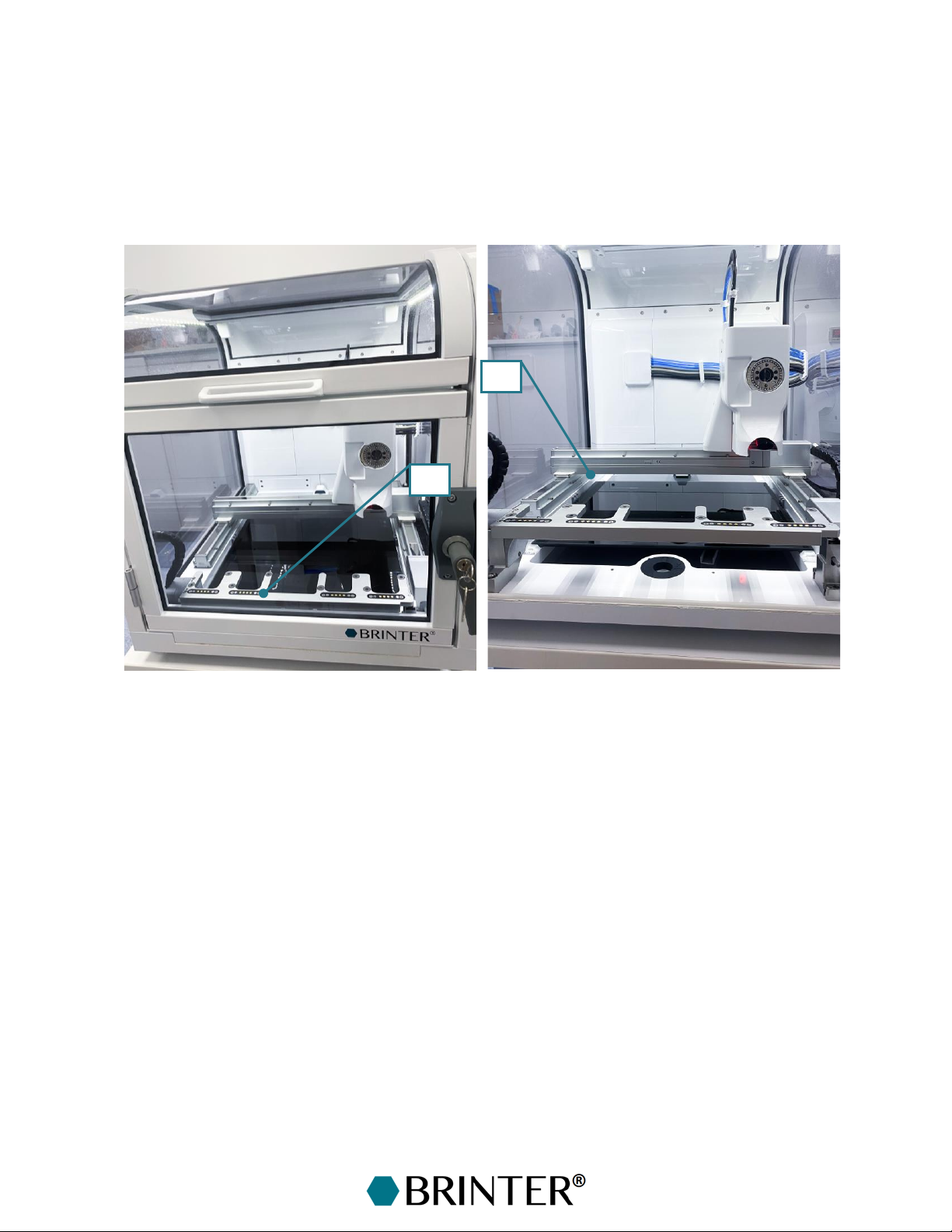
Brinter®One, version 2.0, is equipped with four tool sockets attached to the frame of the printer
instead of the door. These sockets are electrified and thus can keep the print heads at the set
temperature (heated or cooled). Furthermore, the design of the print heads for version 2.0 differ from
the print heads for version 1.x and hence cannot be used in the older Brinter®devices. Other features
of Brinter® One, version 2.0, are similar to version 1.x.
1. Tool socket rack for four print heads
2. Electrical contact surfaces of the tool sockets (NB: Never touch or put any metal objects on
the electrical contact surfaces as there is a risk of electric shock.)
The tool socket rack can be opened by pushing down the lever and turned aside to get easy
access to the print bed.
1
2
Inhaltsverzeichnis