Brivo B-ACS-SDC-E Bedienungsanleitung

Brivo Single Door
Controller (B-ACS-SDC-E)
Installation Manual
Introduction
ILegal Disclaimers ............................................................................ 2
Introduction..................................................................................... 4
Pre-Installation
II
Understand the function of the ACS-SDC-E................................. 6
Understand ACS-SDC-E product compatibility............................ 6
Verify client site is ready for installation...................................... 6
Verify shipping contents ................................................................ 7
Planning the installation ................................................................ 7
Follow safety precautions .............................................................. 8
General Assembly
III Assemble and mount ACS-SDC-E.................................................. 9
If not using PoE ............................................................................. 10
Conguration
VConnecting to the ACS-SDC-E via local area network............... 16
Verify connection of ACS-SDC-E to local area network ............ 16
Wiring
IV
Wiring the ACS-SDC-E ................................................................... 11
Grounding the ACS-SDC-E............................................................ 13
Powering the ACS-SDC-E.............................................................. 13
LED behavior for the ACS-SDC-E ................................................. 15
Resetting the ACS-SDC-E to factory default............................... 15

© 2023 Brivo Systems LLC. All rights reserved. PUB-Brivo ACS-SDC-E Installation Manual_v1.2
2
Brivo ACS-SDC-E Installation Manual
Legal Disclaimers
Federal Communications Commission (FCC) Compliancy
You are cautioned that changes or modications not expressly approved by the part responsible for compliance
could void the user’s authority to operate the equipment.
FCC 15B Class B
This equipment has been tested and found to comply with the limits for a Class B digital device, pursuant to part
15 of the FCC Rules. These limits are designed to provide reasonable protection against harmful interference
in a residential installation. This equipment can radiate radio frequency energy and, if not installed and used in
accordance with the instructions, may cause harmful interference to radio communications. However, there is
no guarantee that interference will not occur in a particular installation. If this equipment does cause harmful
interference to radio or television reception, which can be determined by turning the equipment o and on, the
user is encouraged to try to correct the interference by one or more of the following measures:
1. Reorient or relocate the receiving antenna.
2. Increase the separation between the equipment and receiver.
3. Connect the equipment into an outlet on a circuit dierent from that to which the receiver is
connected.
4. Consult the dealer or an experienced radio/TV technician for help.
This telecommunication equipment conforms to NTC technical requirements.
This device complies with Industry Canada licence-exempt RSS standard(s). Operation is subject to the following two
conditions:
(1) this device may not cause interference, and (2) this device must accept any interference, including interference
that may cause undesired operation of the device.
Le présent appareil est conforme aux CNR d’Industrie Canada applicables aux appareils radio exempts de licence.
L’exploitation est autorisée aux deux conditions suivantes:
(1) l’appareil ne doit pas produire de brouillage, et (2) l’appareil doit accepter tout brouillage radioélectrique subi,
même si le brouillage est susceptible d’en compromettre le fonctionnement.
Underwriter Laboratories (UL) Compliance
The ACS-SDC-E complies with the UL294 Standard for access control units.
Canada-Underwriters Laboratories (C-UL) Compliancy (CSA C22.2 No. 205)
For C-UL Listed applications, the unit shall be installed in accordance with Part 1 of the Canadian Electrical Code.

© 2023 Brivo Systems LLC. All rights reserved. PUB-Brivo ACS-SDC-E Installation Manual_v1.2
3
Brivo ACS-SDC-E Installation Manual
UL294/ULC Listing Compliancy
UL294 Performance Levels
Model
Number
Access Control
Line Security
Level
Destructive
Attack Level
Endurance
Level
Stand-by
Power Level Conditions
Brivo ACS-SDC-E Level 1 Level 1 Level 4 Level 1 N/A
Parts and Service
The ACS-SDC-E controller (part numbers listed below) contains no user serviceable parts.
ACS-SDC-E Part Numbers
B-ACS-SDC-E Brivo Single Door Controller
Documentation Disclaimer and Restrictions
Information in this document is subject to change without notice and does not represent a commitment on the part
of Brivo Systems LLC. For the most up-to-date information, visit www.brivo.com.
This document and the data herein shall not be duplicated, used or disclosed to others for procurement or
manufacturing, except as authorized with the written permission of Brivo Systems LLC. The information contained
within this document or within the product itself is considered the exclusive property of Brivo Systems LLC. All
information in this document or within the hardware and software product themselves is protected by the copyright
and/or other intellectual property laws of the United States.
Product Support
All support for this product is provided by the third-party dealer. Please contact the dealer who installed the product
with questions and support requests.
© 2023 Brivo Systems LLC. All rights reserved.
Brivo® is a trademark of Brivo Systems LLC. Brivo Systems LLC., 7700 Old Georgetown Road, Suite 300, Bethesda,
MD 20814

© 2023 Brivo Systems LLC. All rights reserved. PUB-Brivo ACS-SDC-E Installation Manual_v1.2
4
Brivo ACS-SDC-E Installation Manual
Introduction
Document Objectives
This installation manual provides step-by-step instructions for installing the Brivo ACS-SDC-E single door access
control device. Its primary audience is trained access control installation technicians (Installers) who are responsible
for installing the ACS-SDC-E at client sites.
The manual is also intended for IT personnel. It may be used by dealers and their sales professionals to help them
conduct pre-sales, and to provide client support during the installation process. Finally, it may be used for in-house
training purposes and ongoing support.
Document Layout
This manual is organized into a series of procedural checklists, detailing steps you must follow to ensure a safe and
eective installation. The main sections of the manual are:
Pre-Installation Procedures
General Assembly Procedures
Conguration Procedures
Wiring Procedures
Terminology
The following is a list of terms that are used throughout this document. While some of these terms may have other
meanings, the denitions provided below are the ones intended in this Installation Manual.
Control Panel: Brivo’s Single Door Controller (ACS-SDC-E) is a native Ethernet enabled access control panel in
a compact form factor. It is capable of supporting up to two readers; one primary access control card
reader and an additional reader that can be added for in/out antipassback congurations.
Reader: The ACS-SDC-E includes the connection for one access control card reader with an optional second
reader for in/out antipassback situations.
Brivo Access: Brivo’s cloud based software application which enables the end user to manage his or her
Brivo account.
Brivo Cloud Server: The o-site servers, hosted by Brivo, that are used to store an account’s database.
Conguration and maintenance of the control panel is managed through Brivo.

© 2023 Brivo Systems LLC. All rights reserved. PUB-Brivo ACS-SDC-E Installation Manual_v1.2
5
Brivo ACS-SDC-E Installation Manual
Wire Requirements
Signal Belden # or
Equivalent AWG Twisted
Pair Shielded? Conductors Max Length
Power (18 gauge) 6300FE 18 No No 2 500 ft
RJ45-Ethernet N/A Cat5 or
greater Yes No 8 328 ft
Request-to-Exit 5520FE/6300FE 22/18 No No 4 500 ft
Door Contact 5500FE 22 No No 2 500 ft
Earth Ground N/A 18 No Yes 1 (solid) 40 ft
Reader OSDP 9842 24 Yes Yes 4 500 ft
Additional Resources
The following additional resources are available for the installer as well as the client.
· ACS-SDC-E Data Sheet
· Panel Networking Guide
· Brivo ACS-SDC-E Quick Start Guide
· Technical Support: 1-866-BRIVO-4-U
· www.brivo.com
· support.brivo.com (for non-hardware specic help)

© 2023 Brivo Systems LLC. All rights reserved. PUB-Brivo ACS-SDC-E Installation Manual_v1.2
6
Brivo ACS-SDC-E Installation Manual
Pre-Installation Procedures
Before you begin installing the Brivo control panel, perform the following tasks to ensure a safe, speedy, and suc-
cessful installation.
Understand the function of the Brivo ACS-SDC-E control panel
The ACS-SDC-E is a one door control panel with a single access point. This control panel is considered a
standalone system with internet connectivity to Brivo Access. The control board has one RS485 connection
for one (or optionally two) OSDP reader connections. A second reader is supported for single door in/out
antipassback congurations.
The Brivo ACS-SDC-E uses an on-board Ethernet PoE interface to communicate via any TCP/IP networking
technology that can be connected through a hub, router or switch, including satellite communications. It is
an IP-enabled Access Control System that interacts with the Brivo cloud server via the Brivo Access
application.
Understand Brivo ACS-SDC-E product compatibility
The ACS-SDC-E control panel allows for the attachment of one primary and one additional OSDP reader
directly to the ACS-SDC-E control panel for the purposes of in/out scenarios (antipassback). As such, the
ACS-SDC-E is compatible with a large number of standard OSDP reader models. Brivo products are designed
to accommodate the latest updates in OSDP using RS485 reader formats. The ACS-SDC-E control board
is compatible with OSDP readers using RS485.
A current list of compatible readers and keypads is maintained on Brivo’s website at www.brivo.com. If you
have a specic model of reader or keypad that is not listed on the Brivo website, please contact Technical
Support at 1-866-BRIVO-4-U to determine compatibility.
Verify that the client site is ready to support the installation
1. Check with the IT department to ensure that the ACS-SDC-E to be installed is compatible with the
company’s local area network (LAN).
a) The ACS-SDC-E is equipped with a standard RJ45 socket that accepts a CAT5 cable with an
RJ45 plug on any 10/100 Ethernet network. Physically connecting the panel is the same as
plugging any computer or other device into the LAN.
b) Refer to connection instructions or in the Panel Networking Guide for instructions on
connecting to the LAN. The Panel Networking Guide also contains a complete list of
requirements regarding TCP/IP conguration parameters and information about security
considerations.
2. Download the Brivo ACS-SDC-E Quick Start Guide from the Brivo website and provide it to the
Primary Administrator. This document provides instructions for registering and conguring the
control panel in the application.
3. Make sure the account has been created and the control panel is registered through Brivo. If the
control panel has not been registered by the dealer, the installer may either contact Brivo Technical
Support for assistance or simply register the panel directly.
4. Verify that the Primary Administrator and any other employee who will be accessing the system
have Internet access on a computer equipped with a supported Web browser.

© 2023 Brivo Systems LLC. All rights reserved. PUB-Brivo ACS-SDC-E Installation Manual_v1.2
7
Brivo ACS-SDC-E Installation Manual
Verify shipping contents
1. Locate and check the contents of the Control Panel kit.
The ACS-SDC-E kit should contain the following parts:
a) 1 cardboard box containing the following:
·The B-ACS-SDC-E unit, with its identication label on the back
·An additional loose label for reference
·A quick start guide
·A bag of accessory parts containing:
· One MOV (Metal Oxide Varistor)
·Two 120 ohm RS485 bus termination resistors.
· Six 2k ohm end-of-line (EOL) tamper termination resistors
·One cover plate for a single gang electrical junction box
· One strain relief zip tie for Ethernet cable
Plan your installation and decide where to install the ACS-SDC-E
1. If not using Power over Ethernet (PoE), do not place the ACS-SDC-E more than 100 feet from the
12V DC power supply transformer. This is the maximum cable run allowed by most external power
supplies.
a) The ACS-SDC-E does not specify a maximum wiring length between the ACS-SDC-E and a
reader, but the keypad/reader manufacturer may. Follow manufacturer guidelines for wiring
type and distance between controller and reader.
b) Place the ACS-SDC-E within 500 feet of its associated electronic strike or latch.

© 2023 Brivo Systems LLC. All rights reserved. PUB-Brivo ACS-SDC-E Installation Manual_v1.2
8
Brivo ACS-SDC-E Installation Manual
Follow safety precautions
WARNING: Fire Code
Never connect a keypad/reader or lock to doors without rst consulting the applicable re code. You must consult
with, and get approval from, local re ocials before installing locks or devices on any doors that may be re exits.
Use of egress push buttons may not be legal. Single action exits may be required. Always obtain proper permits and
approvals in writing before installing equipment
WARNING: Fail Secure Mode
Do not install the system in the fail secure mode unless permitted by the local authority having jurisdiction. Doing
so may cause interference with the operation of panic hardware.
WARNING: Heat and Noise
Do not install the control panel in an area that does not comply with the listed temperatures below. Doing so can
cause damage to components within the control panel.
The ACS-SDC-E control panel is UL tested to between -35°C (-31°F) and 66°C (150°F) and EN -40°C (-40°F) to 70°C
(158°F) and 85% humidity.
Do not install the control panel near or on the same circuit with devices that produce large amounts of electrical
noise. This includes grinders, electric motors and blowers, electrical switch-gear and other electrically noisy equip-
ment. Electrical noise can interfere with panel operation. If it is not possible to install the panel away from such
sources of noise, it is advisable to isolate it by using a high-quality UPS (Uninterruptible Power Supply) between the
AC Mains and the transformer.
·Unit is primarily for indoor use. It can be used outdoors if contained in a protected water tight
enclosure.
·Power wiring attached to the ACS-SDC-E unit should be 18 AWG or larger.
·Category 5 cabling is the minimum performance category recommended.
·Do not connect to a receptacle controlled by a switch.
· Compliance with IEEE 802.3 (at or af) specications was not veried as part of UL294/B.
·If powered by 12V DC, the power supply must be a UL294 listed or UL 603 listed power supply.
Battery capacity for loss of primary power at least zero (0) hours.

© 2023 Brivo Systems LLC. All rights reserved. PUB-Brivo ACS-SDC-E Installation Manual_v1.2
9
Brivo ACS-SDC-E Installation Manual
General Assembly Procedures
Assemble and mount ACS-SDC-E
1. Mount the ACS-SDC-E unit using the method described below:
a) This Single Door Access Control Device (ACS-SDC-E) is intended to be installed within the
secure/protected area.
b) To mount the ACS-SDC-E:
i) Fully wire the ACS-SDC-E, ensure all cables have proper strain relief, and use the
provided zip tie for additional CAT5 or greater cable strain relief.
ii) Push the ACS-SDC-E into the junction box facing inwards.
iii) Attach the provided cover plate.
ACS-SDC-E Mounting Diagram

© 2023 Brivo Systems LLC. All rights reserved. PUB-Brivo ACS-SDC-E Installation Manual_v1.2
10
Brivo ACS-SDC-E Installation Manual
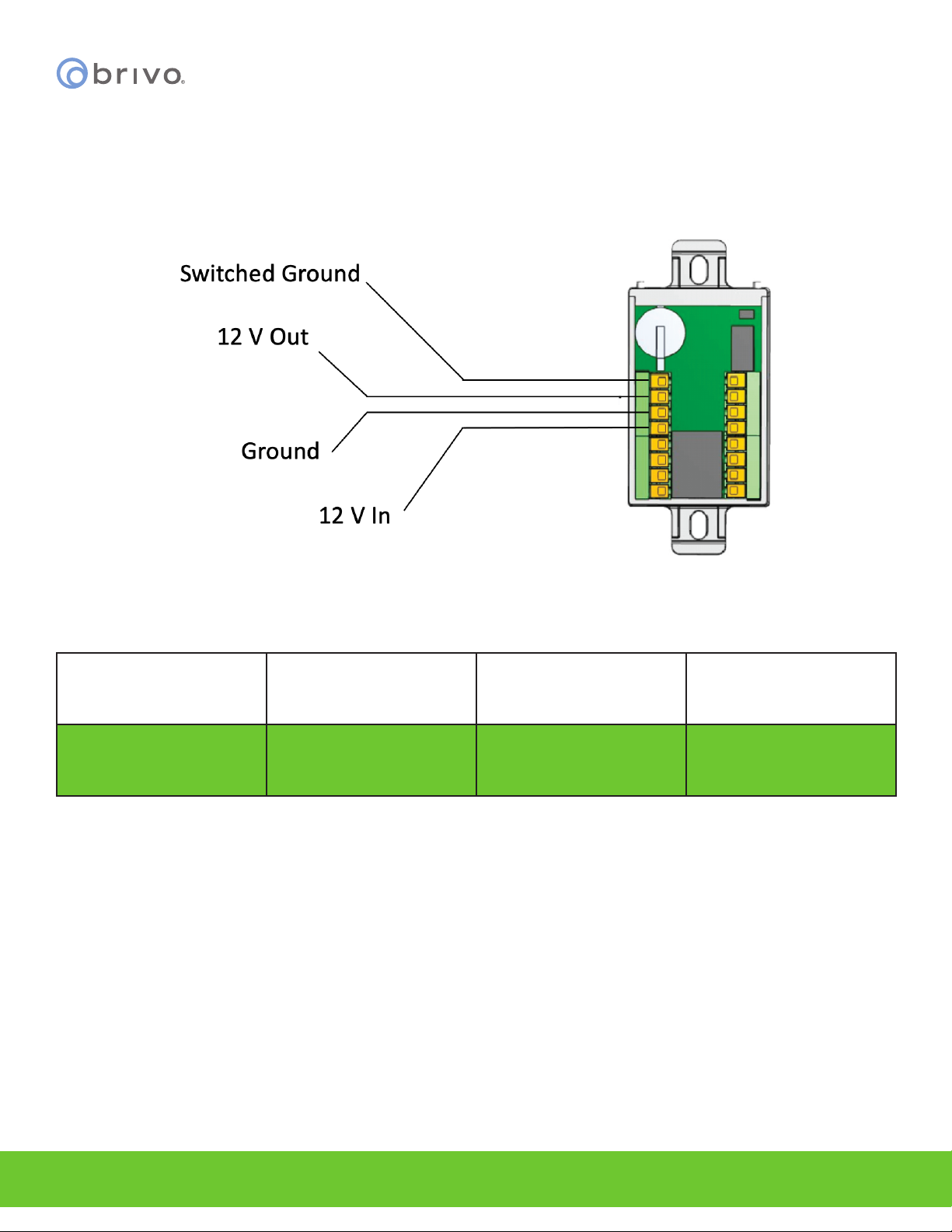
OPTIONAL: If not using Power over Ethernet, wire the 12V DC In and Ground wires to an external 12V DC Power
Supply
1. Use 18 AWG or 22 AWG wire (see table on Page 5) to connect the appropriate input power wires to
the ACS-SDC-E unit.
Connecting optional External Power to the ACS-SDC-E
Model Circuit Voltage (VDC) Current (A)
Brivo B-ACS-SDC-E Input 12VDC 800mA
Tamper
When triggered, the ACS-SDC-E will generate a tamper event to Brivo Access. It will be visible in the real time event
interface and can be congured to generate email notications. Tamper for ACS-SDC-E is motion triggered. Once
triggered, the ACS-SDC-E will stop after a period of time (10 to 15 seconds) with the reader at rest. In order for the
tamper alarm to be audible, an OSDP reader must be attached to the ACS-SDC-E unit and the tamper alarm will
sound through the attached OSDP reader.
Inhaltsverzeichnis
Andere Brivo Controller Handbücher