Brookstone Universal Dock Bedienungsanleitung

656744_INS_Universal Dock
Size:5”Wx4.75”H_Output:100%_Prints:1/1,Blk
Universal Dock
FOR USE WITH BROOKSTONE®
WIRELESS OUTDOOR SPEAKER
150-FOOT RANGE

1
Table of conTenTs
Cautions and Warnings ....................................................2
Location of Parts and Controls .............................................7
Transmitter Dock Operation ................................................9
Speaker Operation .......................................................11
Care and Maintenance....................................................13
Specifications............................................................14
Troubleshooting ..........................................................15
Warranty.................................................................17

2
caUTIon
• TO REDUCE THE RISK OF ELECTRIC SHOCK, DO NOT REMOVE COVER.
THERE ARE NO SERVICEABLE PARTS INSIDE.
• TO REDUCE THE RISK OF FIRE OR ELECTRIC SHOCK, DO NOT EXPOSE
THIS UNIT TO RAIN OR MOISTURE.
The lightning flash with arrow-head symbol within an equilateral triangle
is intended to alert the user to the presence of uninsulated “dangerous
voltage” within the unit’s enclosure that may be of sufficient magnitude
to constitute a risk of electric shock.
The exclamation point within an equilateral triangle is intended to alert
the user to the presence of important operating and maintenance
(servicing) instructions in the literature accompanying the unit.
IMPoRTanT safeTY InsTRUcTIons
All of the safety and operating instructions should be read, adhered to and followed
before the unit is operated.
save These InsTRUcTIons
656744_INS_Universal Dock
Size:5”Wx4.75”H_Output:100%_Prints:1/1,Blk

IMPoRTanT safeTY InsTRUcTIons
All the safety and operating instructions should be read, adhered to and followed
before the unit is operated.
1. Read these Instructions.
2. Keep these Instructions.
3. Heed all Warnings.
4. Follow all Instructions.
5. Do not use this apparatus near water.
6. Clean only with a dry or slightly damp cloth when first disconnected from power.
7. Do not block any ventilation openings. Use in accordance with the
manufacturer’s instructions.
8. Do not install near any heat sources such as radiators, heat registers, stoves,
or other apparatus (including amplifiers) that produce heat.
9. Do not defeat the safety purpose of the polarized or grounding – type plug.
A polarized plug has two blades with one wider than the other. A grounding type
plug has two blades and a third grounding prong. The wider blade or the third
prong is provided for your safety. When the provided plug does not fit into your
outlet, consult an electrician for replacement of the obsolete outlet.
10. Protect the power cord from being walked on or pinched particularly at plugs,
convenience receptacles, and the point where they exit from the apparatus.
11. Only use attachments/accessories specified by the manufacturer.
3

12. Use only with a cart, stand, tripod, bracket, or table specified by the
manufacturer, or sold with the apparatus. When a cart is used, use caution
when moving the cart/apparatus combination to avoid injury from tip-over.
13. Unplug this apparatus during lightning storms or when unused for long
periods of time.
14. Refer all servicing to qualified service personnel. Servicing is required
when the apparatus has been damaged in any way, such as power-supply
cord or plug is damaged, liquid has been spilled or objects have fallen into
the apparatus, the apparatus has been exposed to rain or moisture,
does not operate normally, or has been dropped.
oTheR safeTY InsTRUcTIons
1. This unit is connected to power with the AC/DC adaptor. To completely
disconnect the power input, pull out the AC/DC adaptor from the power.
2. The unit and the AC/DC adaptor should not be obstructed or should
be easily accessible during intended use.
3. An appliance with a protective ground terminal should be connected
to a mains outlet with a protective ground connection.
4. Avoid using or storing the unit at extreme temperatures. Only use the unit
in moderate climates.
5. Avoid placing on top of stereo equipment that radiates heat.
6. The ventilation should not be impeded by covering the ventilation openings
with items such as newspaper, tablecloths, curtains etc.
656744_INS_Universal Dock
Size:5”Wx4.75”H_Output:100%_Prints:1/1,Blk
4

5
baTTeRY PRecaUTIons
• Dispose of the old batteries properly. Do not dispose of the old batteries
in a fire.
• Do not leave the batteries where a child or pet could play with or swallow
them. If the batteries are swallowed, contact a physician immediately.
• The batteries may explode if mistreated. Do not attempt to recharge or
disassemble the batteries.
• Use only fresh batteries of the required size and type. Do not mix old and
new batteries, different types of batteries, or rechargeable batteries of
different capacities.

6
fcc InfoRMaTIon
This equipment has been tested and found to comply with the limits for a Class B
digital device, pursuant to Part 15 of the FCC Rules. These limits are designed to
provide reasonable protection against harmful interference in a residential installation.
This equipment generates, uses, and can radiate radio frequency energy and, if
not installed and used in accordance with the instructions, may cause harmful
interference to radio communications.
However, there is no guarantee that interference will not occur in a particular
installation. If this equipment does cause harmful interference to radio or television
reception, which can be determined by turning the equipment off and on, the user is
encouraged to try to correct the interference by one or more of the following measures:
• Reorient or relocate the receiving antenna.
• Increase the distance between the equipment and receiver.
• Connect the equipment to an outlet on a circuit different from that to which
the receiver is connected.
• Consult the dealer or an experienced radio/TV technician for help.
This equipment complies with part 15 of the FCC Rules. Operation is subject
to the following two conditions:
1. This equipment may not cause harmful interference.
2. This equipment must accept any interference received, including interference
that may cause undesired operation.
Warning: Changes or modifications to this unit not expressly approved
by the party responsible for compliance could void the user’s authority
to operate this device. Shielded cables must be used with this unit to
ensure compliance with the Class B FCC limits.
656744_INS_Universal Dock
Size:5”Wx4.75”H_Output:100%_Prints:1/1,Blk

TRANSMITTER DOCK
1. Dock Area
2. Power on LED
3. Low battery LED
4. Channel Off, 1, 2, 3
5. Battery Compartment
6. 3.5mm Line in 2
7. RCA R/L Line In 1
8. DC 9V
SPEAKER
1. Volume
2. Power
3. Speaker
Power Indicator
4. Bass
5. Bass Indicator
6. Lights
locaTIon of PaRTs and conTRols
Speaker Control Panel
Transmitter
1
2
3
45
6
7
5
4
8
7
6
3
2
1

locaTIon of PaRTs and conTRols
1. Channel 1, 2, 3
2. MP3 Player Aux In
3. Screws
4. DC 9V
5. Battery Compartment Cover
POWER ADAPTERS/CABLES
1. Transmitter Dock Power Adapter
2. Speaker Power Adapter
3. Dual RCA Cable
4. 3.5mm Right Angle Cable
Speaker Bottom
1
2
4
32
1
5
4
3
8
656744_INS_Universal Dock
Size:5”Wx4.75”H_Output:100%_Prints:1/1,Blk

TRansMITTeR dock oPeRaTIon
INSTALLING THE TRANSMITTER DOCK BATTERIES
You may insert batteries into the transmitter as backup or if you prefer not to use
the TRANSMITTER DOCK POWER ADAPTER.
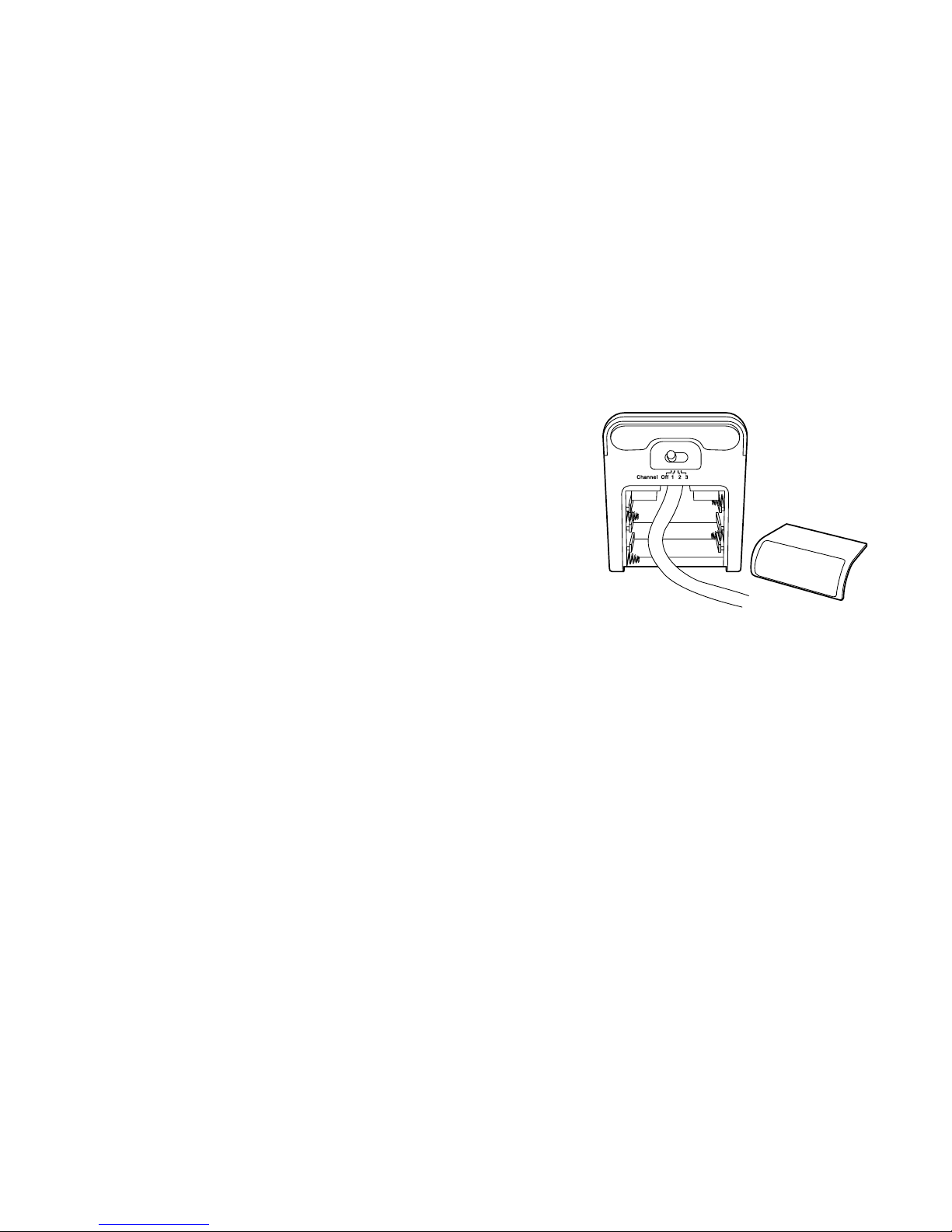
1. Open the BATTERY COMPARTMENT DOOR
on the bottom of the transmitter by sliding
the down (see compartment at right).
2. Insert 6 AA batteries (not included)
according to the polarity indicators inside
the compartment.
3. Close the BATTERY COMPARTMENT
COVER securely.
Note: The LOW BATTERY LED illuminates when the battery level is low.
CONNECTING THE TRANSMITTER DOCK TO AN AUDIO SOURCE
The TRANSMITTER DOCK may be connected two ways depending on your
audio source.
• If your audio source has left and right RCA output jacks, you will only use the
DUAL RCA CABLE.
• If your audio source does not have left and right RCA output jacks, but rather
a stereo headphone jack, you will use the 3.5MM RIGHT ANGLE CABLE.
9
Dieses Handbuch passt für folgende Modelle
1
Inhaltsverzeichnis
Andere Brookstone Dockingstation Handbücher

Brookstone
Brookstone Flip Speaker Dock Bedienungsanleitung

Brookstone
Brookstone Bluetooth Tablet Station Bedienungsanleitung

Brookstone
Brookstone iDesign Power Speaker Bedienungsanleitung

Brookstone
Brookstone Big BlueT 804336 Bedienungsanleitung

Brookstone
Brookstone Boombox Bedienungsanleitung

Brookstone
Brookstone 324628 Bedienungsanleitung