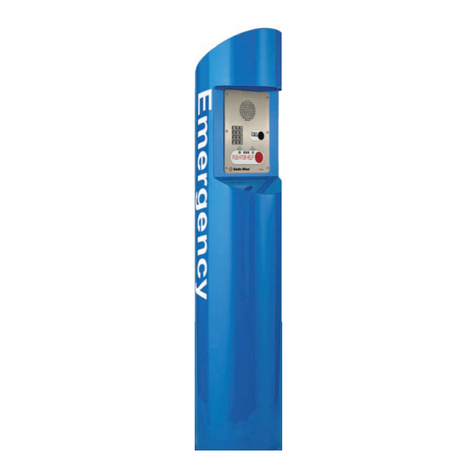
Code Blue CB RT Series Handbuch


page 2 of 25
GU-163-D
CB RT Series
Administrator Guide
WARNING
ONLY QUALIFIED PERSONNEL SHOULD INSTALL THESE UNITS. THE INSTALLATION
SHOULD CONFORM TO ALL LOCAL CODES. IN SOME COUNTRIES, A CERTIFIED
ELECTRICIAN MAY BE REQUIRED.
NOTICE TO USERS
Copyright © Code Blue Corporation. All rights reserved. This guide or software
described herein, in whole or part, shall not be reproduced, translated or reduced to any
machine-readable form without prior written approval from Code Blue Corporation.
CODE BLUE CORPORATION PROVIDES NO WARRANTY WITH REGARD TO THIS
GUIDE, THE SOFTWARE OR OTHER INFORMATION CONTAINED HEREIN AND HEREBY
EXPRESSLY DISCLAIMS ANY IMPLIED WARRANTIES OF MERCHANTABILITY OR
FITNESS FOR ANY PARTICULAR PURPOSE WITH REGARD TO THIS GUIDE, THE
SOFTWARE OR SUCH OTHER INFORMATION. IN NO EVENT SHALL CODE BLUE
CORPORATION BE LIABLE FOR ANY INCIDENTAL, CONSEQUENTIAL, OR SPECIAL
DAMAGES, WHETHER BASED ON TORT, CONTRACT, OR OTHERWISE, ARISING OUT
OF OR IN CONNECTIONS WITH THIS GUIDE, THE SOFTWARE OR OTHER
INFORMATION CONTAINED HEREIN OR THE USE THEREOF.
Code Blue Corporation reserves the right to make any modifications to this guide or the
information contained herein at any time without notice. The software described herein
may also be governed by the terms of a separate user license agreement.
Code Blue® is a registered trademark of Code Blue Corporation. The names of actual
companies and products mentioned herein may be the trademarks of their respective
owners.
Code Blue • 259 Hedcor Street • Holland, MI 49423 USA • 800.205.7186 • www.codeblue.com

Section
Section Title
Page #
2
Introduction
4
CB RT Model Photo
4
3
Dimensions
5
3
Safety Information
6
4
Installation Instructions
7
Getting Started
7
Tools Needed
7
CBRT Installation Instructions
8
Anchor Bolt Installation
8
Set the Unit
9
Install Combination Beacon/Strobe
9
Incoming Power Wiring
9
Overhead Camera Mount Installation
10
Line Power Installation
11
S-1000 & S-1050 Strobe Operation
12
S-1000 & S-1050 Strobe Programming
13
5
Power Requirements
14
6
Wiring Diagrams
18
CB RT 24-277V AC DIN Rail Power System
18
CB RT PoE DIN Rail Power System
19
7
Locating Unit Serial Numbers
20
8
Maintenance Schedule
21
9
Warranty
23
10
Download Information
24
11
Legal & Regulatory Information
25
page 3 of 25
Table of Contents
GU-163-D
CB RT Series
Administrator Guide
Code Blue • 259 Hedcor Street • Holland, MI 49423 USA • 800.205.7186 • www.codeblue.com

page 4 of 25
This guide contains all of the CB RT tower information. This
manual contains a general overview of the Code Blue CB RT
Tower options and its application, installation and wiring.
IP and analog phones
Overhead Camera Mount
Thank you for choosing the CB RT for your Code Blue application.
The CB RT is an economical pedestal Help Point® highlighted by a high intensity LED
beacon/strobe light that provides exceptional visibility and acts as a deterrent to
potential crime. This blue light emergency tower provides direct communication with first
responders and can extend security efforts to walkways, parking lots, open campus areas
and more.
CB RT towers are easily recognized throughout a full 360-degree area. The user
friendly lighted faceplate and the integral LED combo strobe ensures rapid location in
an open environment and easily identifiable by security when activated.
The exclusive analog InterAct and VoIP speakerphones are designed for maximum
reliability, vandal resistance, auxiliary functions, mass notification control, and fault
monitoring and reporting capability. (See IA4100 or LS1000 guides for more informat
guides for more information.)
Our unmistakable craftsmanship makes our Help Points® the most rugged on the market,
withstanding the punishment of natural and man-made disasters. With durable
construction, our pedestal units can meet any requirement or purpose. CB RT tower units
have a rugged steel construction, engineering grade reflective graphics and weather, UV
and graffiti resistant paint. Lighting with a high-powered, 270 lumens / 92 candela LED
blue beacon/strobe.
Other options include:
2 Introduction
CB RT
GU-163-D
CB RT Series
Administrator Guide
Code Blue • 259 Hedcor Street • Holland, MI 49423 USA • 800.205.7186 • www.codeblue.com

page 5 of 25
3 Dimensions
GU-163-D
CB RT Series
Administrator Guide
Code Blue • 259 Hedcor Street • Holland, MI 49423 USA • 800.205.7186 • www.codeblue.com
CB RT

page 6 of 25
GU-163-D
CB RT Series
Administrator Guide
Code Blue • 259 Hedcor Street • Holland, MI 49423 USA • 800.205.7186 • www.codeblue.com
Indicates a hazardous situation which, if not avoided, will result in
death or serious injury.
Indicates a hazardous situation which, if not avoided, could result in
death or serious injury.
CAUTION
Indicates a hazardous situation which, if not avoided, could result in
minor or moderate injury.
NOTICE
Indicates a situation which, if not avoided, could result in damage to
property.
IMPORTANT
Indicates significant information that is essential for proper product
functionality.
NOTE
Indicates useful information that helps get the most out of a
product.
4 Safety Information
HAZARD LEVELS LEGEND
WARNING
DANGER
Safety Instructions
Code Blue products shall be installed by trained professionals. The installation should
conform to all local codes. In some countries, a certified electrician may be required.
When transporting a Code Blue product, use the original packaging or equivalent to
prevent damage to the product.
Code Blue products shall be used in compliance with local laws and regulations.
Store the Code Blue product in a dry and ventilated environment.
Do not install the product on unstable brackets, surfaces or walls.
Use only applicable tools when installing Code Blue products.
Do not use chemicals, caustic agents, steel wool or aerosol cleaners other than those
tested and recommended by Code Blue.
Use only accessories that comply with technical specifications of the product. These
can be provided by Code Blue or a third party.
Use only spare/replacement parts provided by or recommended by Code Blue.
Transportation
When transporting a Code Blue product, use the original packaging or equivalent to
prevent damage to the product.
WARNING
NOTICE
NOTICE

page 7 of 25
GU-163-D
CB RT Series
Administrator Guide
Code Blue • 259 Hedcor Street • Holland, MI 49423 USA • 800.205.7186 • www.codeblue.com
5 Installation Instructions
Important Notes:
Getting Started
EIA/TIA, ANSI, CSA and BICSI cabling or similar standards shall be adhered to
for proper operation of Code Blue communication devices connected to
copper or fiber infrastructures communications cable and electrical cable in
the same conduit is not an acceptable installation and shall not be supported.
Analog phones require a minimum of 23mA for proper operation (26-29mA
recommended).
Each analog speakerphone requires its own phone line or PBX extension.
Multiple units shall not be supported.
Speakerphones require programming before operation. Consult the
speakerphone’s Administrator Guide for instructions.
If you are installing IP speakerphones, please read the appropriate manuals
and consult with your Network Administrator.
Size electrical wiring based on length of run.
Tools Needed
Ladder to reach the top of the unit.
Drill & Security Bit for removing & inserting security screws on
phone, dome top, & access door.
1-1/8” Socket set & extension
Phillips and flat head screwdrivers
All CB RT Units Require:

page 8 of 25
GU-163-D
CB RT Series
Administrator Guide
Code Blue • 259 Hedcor Street • Holland, MI 49423 USA • 800.205.7186 • www.codeblue.com
FOUNDATION - ANCHOR BOLT INSTALLATION INSTRUCTIONS
Conduit – Electrical and communication line conduit should be run through the
center of the foundation hole with a maximum combined diameter of three
inches. A minimum of four inches and a maximum of six inches of conduit is
required above the finished grade level. To ensure proper grounding, a ½-inch x
8-foot copper rod should be inserted in the center of the foundation and tied to
the steel enclosure. (Note: Follow all national and local codes governing this
installation.)
Pour the foundation – The foundation should be at least 18 inches in diameter
and the correct depth for the frost line in your area, with a minimum depth of at
least three feet. (Follow your local building codes for foundations.)
Set the anchor bolts in the wet foundation – Four 24-inch L-shaped anchor
bolts and an aligning template are supplied for anchoring the unit. The bolts
should be set into the foundation so that six inches are showing above the
finished grade level. The anchor bolts should be aligned using the supplied
template so the faceplate on the unit will face the desired direction.
Wiring – Pull power and phone line up through the conduits. A minimum of two
feet of wire must be available from the conduit for electrical and
communications wiring.
CBRT Installation Instructions

page 9 of 25
All wiring must be installed and connected by experienced and certified personnel to meet local
and national electrical codes, and will include a service disconnect.
GU-163-D
CB RT Series
Administrator Guide
Code Blue • 259 Hedcor Street • Holland, MI 49423 USA • 800.205.7186 • www.codeblue.com
SET THE UNIT
Screw one set of nuts and washers onto the anchor bolts – After the foundation
has set, screw one set of nuts followed by one set of washers onto the anchor bolts.
Set the nuts so the lowest washer is about 2½ inches above the concrete and at an
even height. To accomplish this, use a small level and check all three directions.
These nuts are not adjustable after the unit is in place. The bottom edge of the unit
will be ½-inch above the concrete when installed.
Set the unit on the anchor bolts – Align the faceplate in the desired direction, then
lift the unit over the anchor bolts. Note that the unit weighs approximately 225
pounds. Use appropriate lifting materials and methods to avoid possible injury
and/or damage.
Secure the unit – Access the mounting studs through the door on the side of the
unit and tighten the mounting nuts onto the anchor bolts. This may be more
convenient if a long socket, extension and universal joint is used to tighten the
hardware.
INSTALL COMBINATION BEACON/STROBE
Gasket – Place the strobe gasket on top of the enclosure.
Connect the cords – Plug the wires from the beacon-strobe into the mating plug at
the top of the enclosure.
Fasten the beacon/strobe – Using the supplied screws, fasten the beacon-strobe to
the top of the enclosure.
WIRING
Ground – The ground (green) wire should be stripped and fastened to the supplied
grounding lug.
24V AC supply – Using the proper crimping tool, attach a #8 fork to each of the
incoming power wires and fasten them to the terminal screws labeled “24V AC.”
120/240V AC supply – Using the proper crimping tool, attach a #8 fork to each of
the incoming power wires and fasten them to the correct terminals as labeled on
the transformer. After completing the wire connections, install the supplied terminal
covers.
IMPORTANT: The leveling of the bottom nuts is crucial to the leveling of the unit. A small
error will be magnified after installation.
IMPORTANT: A ½-inch air gap is required between the foundation and the unit. Moisture
problems may result if this condition is not complied with
CBRT Installation Instructions (continued)

page 10 of 25
DRILL ONE
2” DIA HOLE
FOR WIRING
IN LINE WITH PIPE
Camera and wiring (supplied by others) is installed into the male 1½ NPT.
Place the bracket over the mounting holes and insert the four 3/8-16 X 1 stainless
bolts. (The 3/8” stainless steel bolts should have one stainless steel washer and one
rubber washer.)
Verify the camera mount is evenly positioned to ensure the gasket seal is properly
seated.
Tighten the bolts with your 3/8” wrench in a crisscross pattern to ensure even
pressure until it is snug against the outside of the enclosure.
The camera mount will come with a gasket already mounted to the bracket on the arm.
Overhead Camera Mount Installation
Installing the Camera
All wiring must be installed and connected by experienced and certified personnel to meet local and national
electrical codes, and will include a service disconnect.
GU-163-D
CB RT Series
Administrator Guide
Code Blue • 259 Hedcor Street • Holland, MI 49423 USA • 800.205.7186 • www.codeblue.com
All CB RT Overhead Camera Mounts Require:
• Ladder to reach the top of the unit.
• 3/8" Wrench
Installing the Overhead Camera Mount
Dieses Handbuch passt für folgende Modelle
1
Inhaltsverzeichnis
Andere Code Blue Industrieanlagen Handbücher