
Crystal Acoustics ?ppStreamer Bedienungsanleitung
Gigabit Media Player with web applications
ΑppStreamer
User Manual

2CRYSTALACOUSTICS
INDEX
1. Introduction 3
1.1 Preface 3
1.2 Package contents 4
1.3 Precautions 4
1.4 Connecting the device with your A/V equipment 4
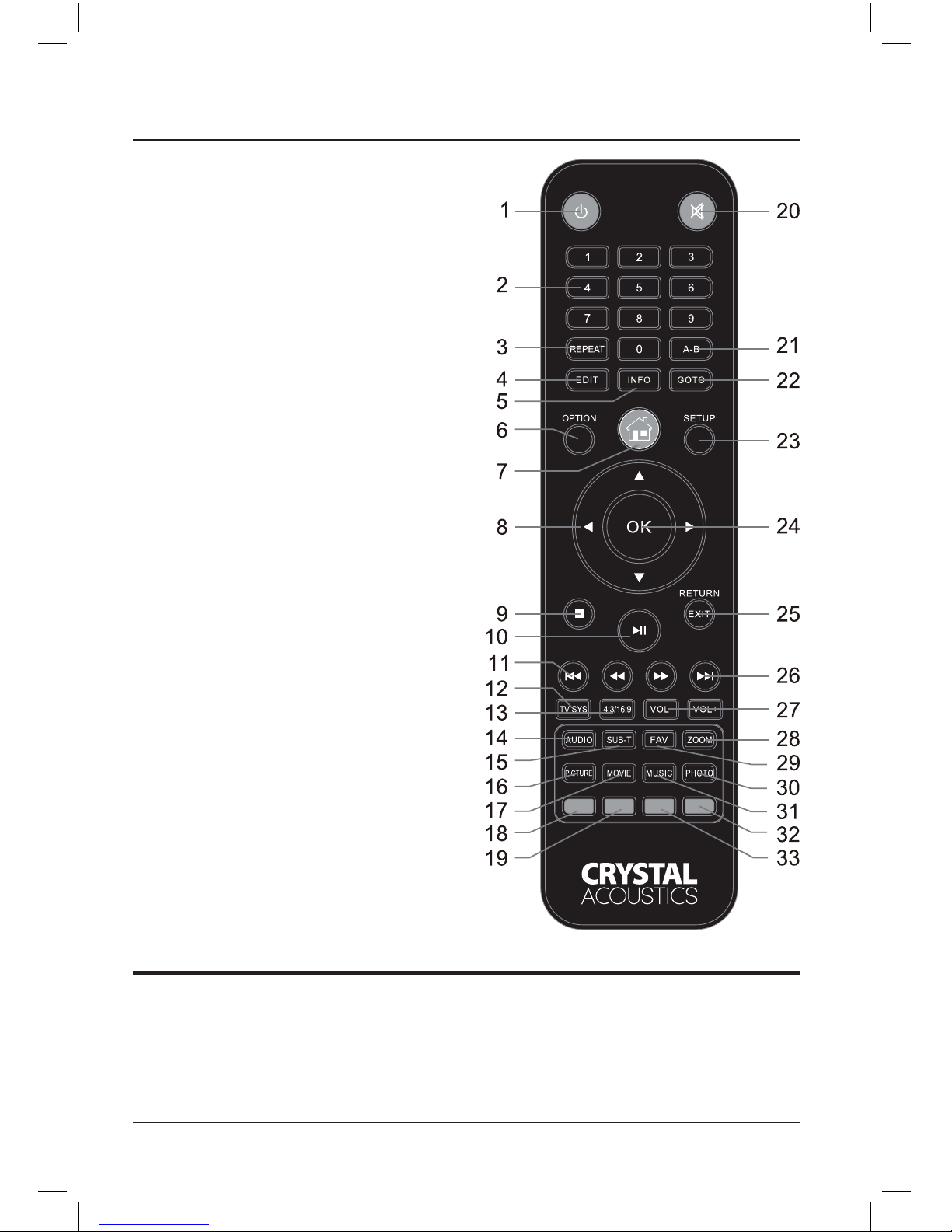
2. Remote Controller 6
3. Main Menu 7
3.1 Playback History 7
3.2 File Manager 7
3.2.1 File Browsing 7
3.2.2 File Management 7
3.2.3 Creation of “Favorites” list (movies/music/photos) 8
3.3 Movies 8
3.3.1 File Browsing 8
3.3.2 Options during movie playback 9
3.4 Music 10
3.4.1 File Browsing 10
3.4.2 Advanced controls during music playback 11
3.5 Photo 11
3.6 App 11
3.6.1 Internet Explorer 11
3.6.2 Muzze (Internet Radio & TV) 12
3.6.3 RSS 12
3.6.4 YouTubeXL 12
3.6.5 YouTube 12
3.6.6 Dailymotion 12
3.6.7 Mediay 12
3.6.8 Video Podcast 12
3.6.9 Audio Podcast 12
3.6.10 Flickr 12
3.6.11 Picasa 12
3.6.12 Yahoo Weather 13
3.6.13 Yahoo Finance 13
3.6.14 Buddy Link 13
3.7 BT 13
3.8 Setup 13
3.8.1 System 13
3.8.2 Sound 14
3.8.3 Video 14
3.8.4 Network 15
3.8.5 Subtitles 15
3.8.6 Various 15
4. Play les from your local network 16
5. Play les through UPNP 16
6. Technical Specications 17
Warranty 18
3APPSTREAMER
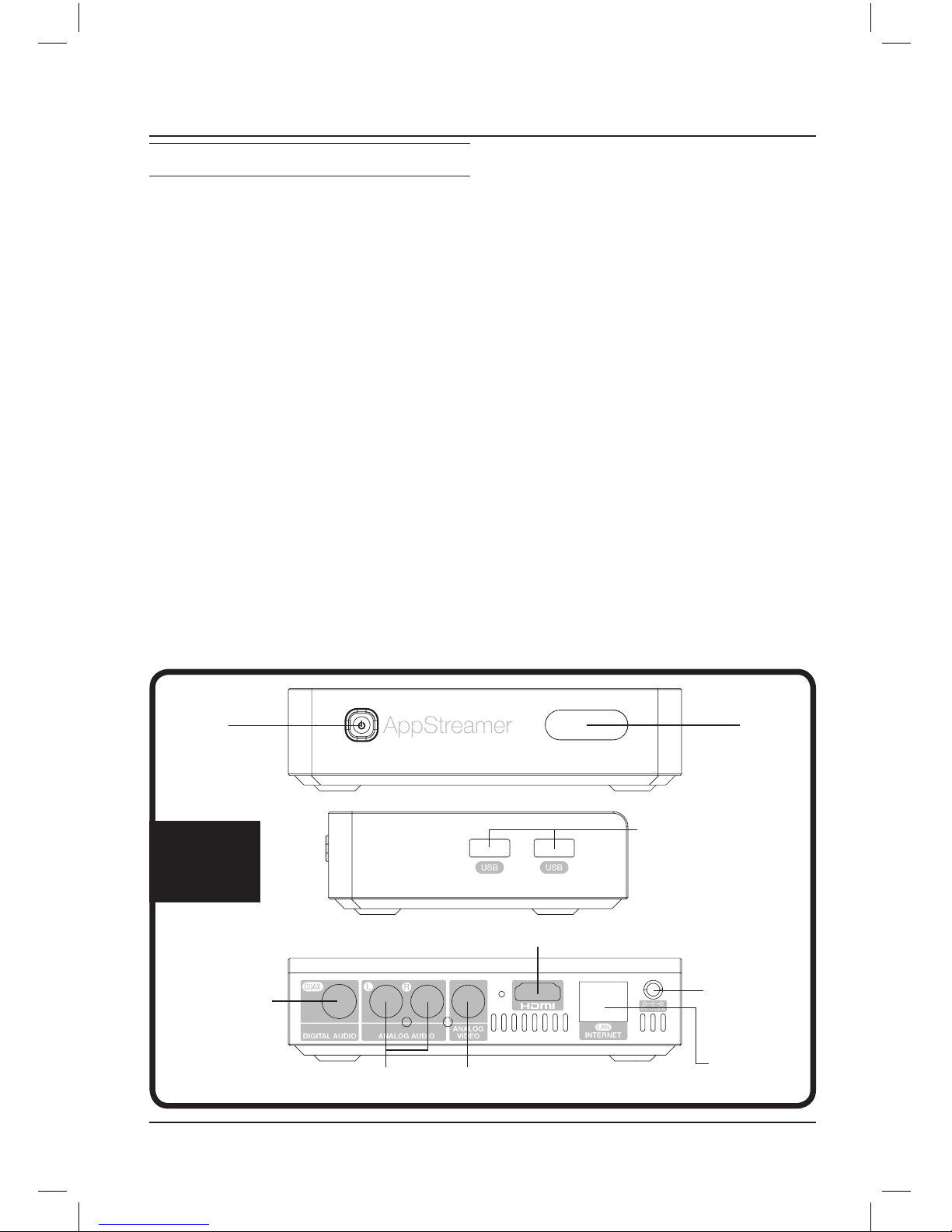
2 USB ports for
peripherals and storage
media connection
ΟΝ/ΟFF
Switch Infrared
Receiver
HDMI 1.3 output for High Definition video and audio
Composite out for analog videoLine-out (L&R) for analog audio out
Coaxial out for
digital audio
Ethernet port
for Local Area
Connection
5V/2A
power supply
Inputs
Outputs
1. INTRODUCTION
1.1 Preface
Congratulations for choosing CRYSTAL
ACOUSTICS AppStreamer for your all-in-
one digital entertainment!
This powerful Media Player with enhanced
Networking features and Web Applications will
offer you unlimited entertainment options from
your movies, music and photos digital collec-
tion! And all of this, with the acclaimed crystal
clear quality of CRYSTAL ACOUSTICS.
Features and benefits
Realtek 1185 processor
Enjoy top performance, flawless HD video
and audio reproduction, even from the most
demanding files in your digital library
Gbit Ethernet
Stream movies and music from your local net-
work, with artifact-free, crystal clear quality
DLNA Client
Enjoy streaming audio, movies and music
on your TV, from your DLNA enabled mobile,
laptop, gadget or other appliances
DTS Master Audio / Dolby TrueHD
Immerse yourself into the outmost sonic qual-
ity of modern, uncompressed soundtracks
Multimedia files support
AppStreamer supports all popular video and
audio file formats (1080p HD decoding):
Video Files:
AVI, MKV, TS, TP, MPG, MP4, M4V, MOV,
VOB, ISO, AVC, DAT, WMV, ASF, RM, RMVB,
FLV
Music Files:
MP3, OGG , WAV, AAC, FLAC
Photo Files:
JPEG, BMP, GIF, TIFF, PNG
Photo slide-show with music background
DVD menu functionality
4CRYSTALACOUSTICS
ΚΙΤΡΙΝΟAΣΠΡΟ
KITPINO
KOKKINO
KOKKINO
AΣΠΡΟ
KITPINO
KOKKINO
AΣΠΡΟ
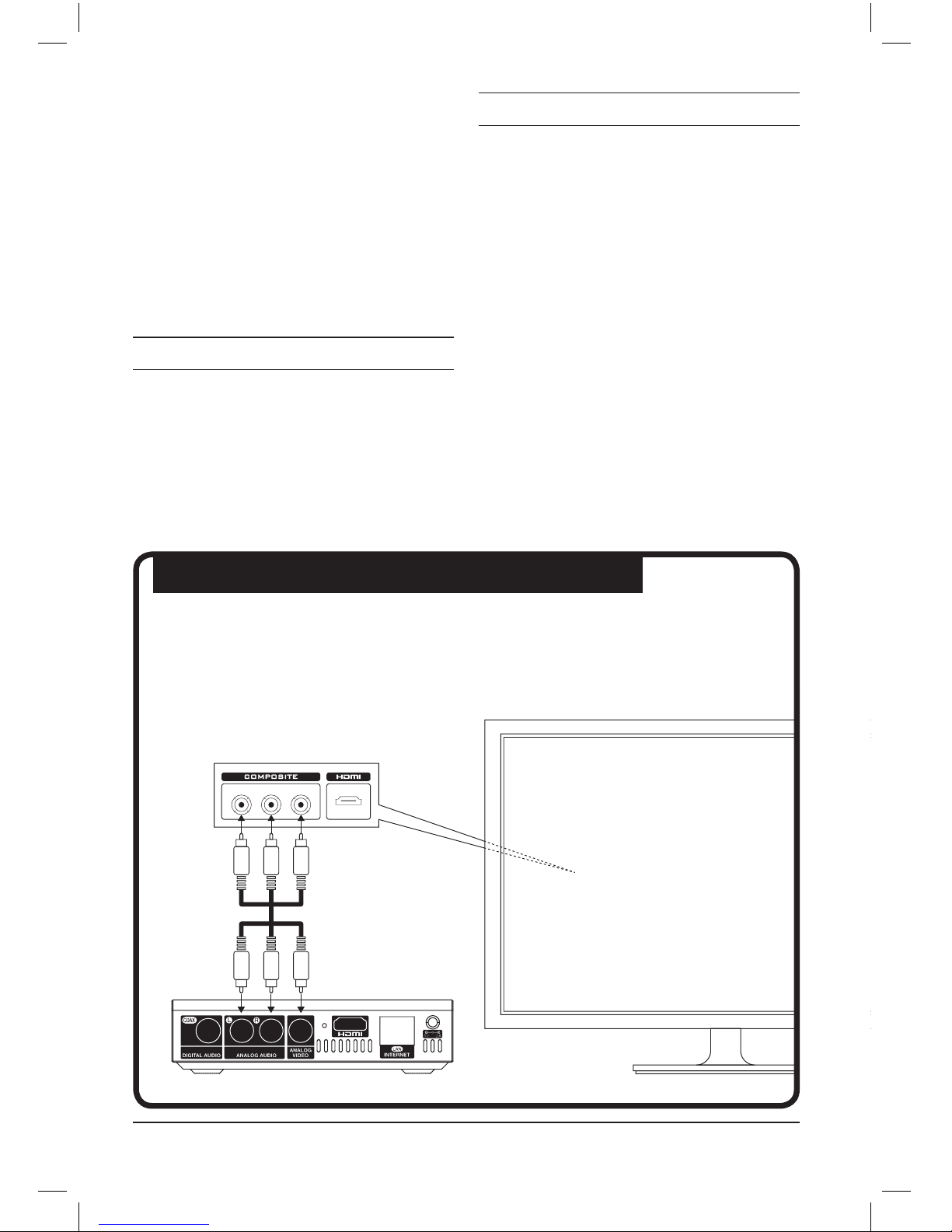
1.4 Connecting device with your A/V equipment
Analog A/V connection
Connect the Appstreamer to your TV, using the analog video and audio cable.
This allows you to enjoy your movies in Standard Definition and stereo audio.
Network functionality
AppStreamer comes with the following ap-
plications:
Web Browser
Internet TV & Radio
BitTorrent Client
YouTube
Files Management
AppStreamer allows you to perform Copy,
Paste and Delete operations for files.
1.2 Package contents
Item Quantity
AppStreamer 1
Remote controller 1
Power Supply (5V) 1
User Manual 1
Καλώδιο σύνδεσης AV 1
1.3 Precautions
The correct setup, use and maintenance of the
Appstreamer is essential in order to minimise
the chance of severe damage, injury or even
death from electrocution or fire.
Please, carefully read these instructions,
which provide important information, in
order to ensure a safe use of the device.
• Select the correct power input for the device
• Avoid damaging the power cable or power
supply
• Do not damage the device with heavy or
sharp objects
• Avoid exposing the device in humid environ-
ments or in direct contact with water
• Protect the device’s cables from accidental
foot stomps
• Avoid exposing the device in extremely hot
environments
WHITEWHITE
WHITE
REDRED
RED
YELLOWYELLOW
YELLOW
5APPSTREAMER
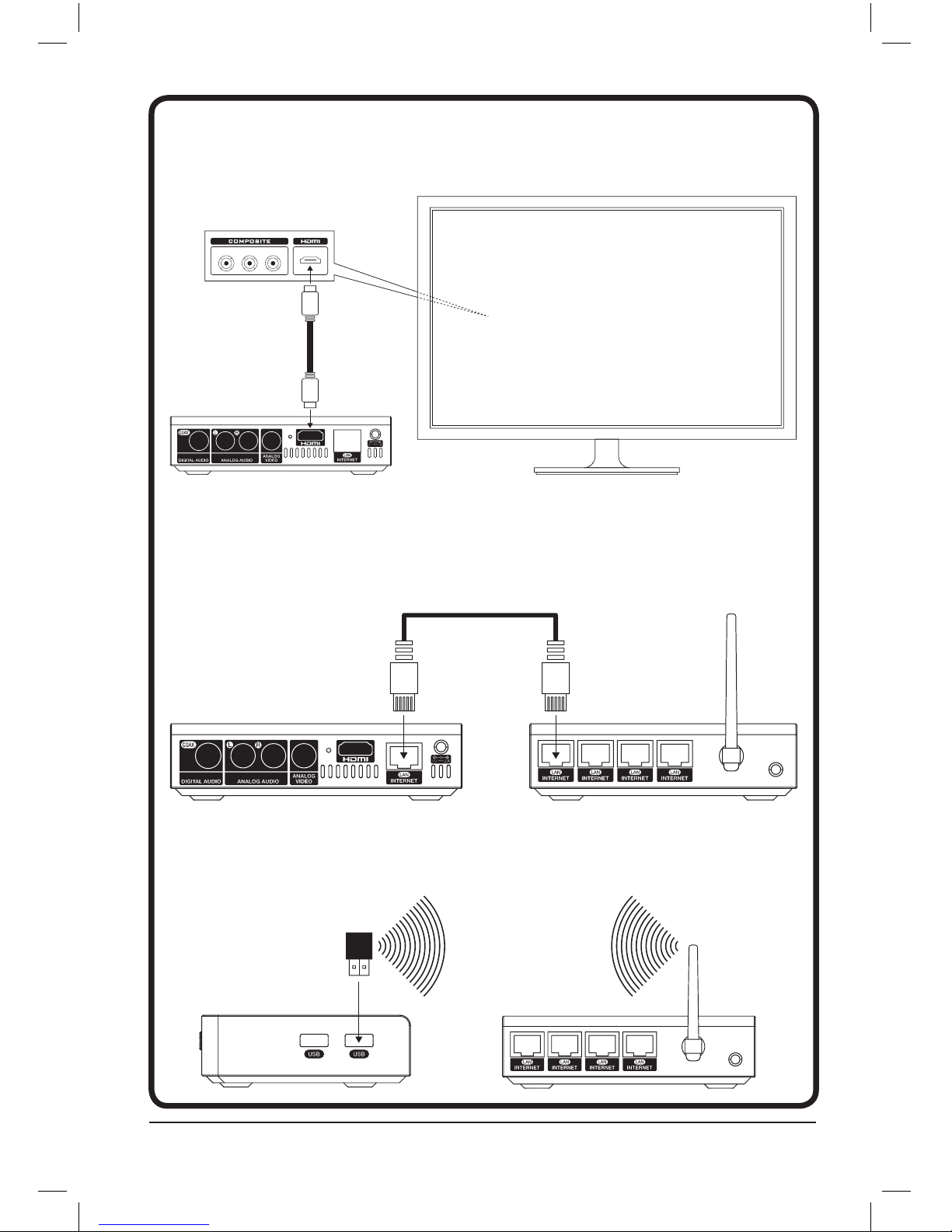
HDMI
Connect the AppStreamer with a HDMI cable to enjoy High Definition video up to 1080p,
and HD stereo or multichannel audio.
Wired network connection
Use a Cat-5 cable (or better, like Cat-6 or Cat-7), to enjoy the AppStreamer’s network functions.
Notice: in order to achieve maximum network speeds, all of your networking equipment
must be compatible with 1000BASE-T (Gigabit Ethernet)
Wireless network connection
Use the optional USB dongle CA-Wi-Fi, connect it to one of the available USB inputs and enjoy
the benefits of wireless network functionality.
ΚΙΤΡΙΝΟAΣΠΡΟ KOKKINO
HDMI HDMI
Router
AppStreamer
AppStreamer
Router
6CRYSTALACOUSTICS
2. Remote controller
Control all of the AppStreamer’s functions
from a distance, using the remote controller
Button
1 Turn the AppStreamer ON / OFF
2 Numeric Buttons
3 Select the desired repeat mode
4 Rename / Copy / Move / Delete
5 Display file information
6 Display the available menu choices
7 Enter the main menu
8 Select menu items and files
9 Stop the playback
10 Play and Pause the current file
11 1. Play the previous file
2. Scroll-up through the files list
12 Select TV System
13 Select video type and resolution
14 Select audio format (DTS, AC3 κ.α.)
15 Select the desired subtitles
16 Access the picture settings
17 Access the movie list
18 Change the web navigation preset
(next link / page scrolling)
19 Scan for storage / Navigation Bookmarks
20 Mute the audio
21 Set a file to repeat from point A to point B
22 Jump to a specific time moment during a movie
23 Access the settings menu
24 Confirmation
25 Return to the previous screen
26 1. Play the next file
2. Scroll-down through the files list
27 Increase/Decrease the audio volume
28 Zoom-in / Zoom-out
(for pictures, photos and video)
29 Add files to the favourites list
30 Access the photos list
31 Access the music list
32 Eject USB storage
33 Not used
Notice
• To ensure the best possible operation of the
remote control, use it within a 5 meter radius from
the front of device and an angle of 30 degrees (hori-
zontal and vertical axis).
• Ensure that the optical contact between the
remote and the device is unobstructed.
• After every firmware update, the AppStream-
er’s video output returns to its factory presets
(HDMI Auto).
• After updating your AppStreamer’s firmware, read
the accompanying change-log carefully.

7APPSTREAMER
When you connect your AppStreamer to its power
supply for the first time, it will turn ON automati-
cally. The main menu will come up on your display.
Press the navigation buttons on the remote
control, to select “Playback History”, “Files”,
“Movies”, “Music”, “Photo”, “Applications”, “BT”
or “Settings”.
Notice: After permanently connecting the App-
Streamer to its power supply, you can turn the
device ON and OFF by using the “Power” button
on the remote, or on the front of the device.
3.1 Playback history
Browse the movies you have seen recently.
This option is especially useful in case you
have stopped watching a movie some hours or
days ago and want to continue watching, from
the point you stopped.
3.2 File Manager
Browse and enjoy movie, music and photo
files from storage media and local servers or
UPNP devices.
To enter the file browser, select “Files”.
3.2.1 File browsing
Press the “Option” button to see the quick
selections menu.
The following choices are available:
• Thumbnails
• Preview
• List
• All media
• Movies
• Photo
• Music
Use the “up” / “down” buttons to select “OK”
for confirmation.
Thumbnails
Display you files and storage media as thumbnails.
From here you can use the following buttons:
• “Up”, “Down”, “Right”, “Left” and “ΟΚ” to
browse the files of the selected storage
media.
• “Page Down/Next” or “Page Up/Previous” to
go to the next page.
• “Exit” to return to the previous file / list.
List
Browse your files in list view.
All media
Display on-screen all of the available files in
your storage device.
Preview
View folders and files in preview mode, with
additional info on the left side of the screen.
Movies
Display movie files only.
Photo
Display photo files only.
Music
Display music and audio files only.
3.2.2 File management
Press the “Edit” button to access the following
commands.
Execute file management operations, like:
• Copy
• Delete
• Move
• Rename
• Edit playlist
• Edit photo album
• Multiple select
3. Main menu

8CRYSTALACOUSTICS
3.2.3 Creation of “Favorites” list
(movies/music/photos)
Create a playback list with your favorite
movies, music tracks and photos.
Press “Fav” while browsing a movies music or
photos folder.
After adding the tracks in the list (files will be
visible on the right side of the interface), press
the “Edit” button and select “Save List” (for
movies or music) and “Save photo album” (for
photos).
To access the list of favorite movies,
press the “Option” button while in the “Music”
menu and select “Search”. Next, input the list’s
name and from the results, select the v3u file.
Press “OK” for playback.
To start listening to your favorite tracks,
press the “Option” button while in “Movies”
and choose “List”. Select the desired m3u file
and press “ΟΚ” for playback.
To watch a slideshow of your favorite
photos, press “Option” while in the “Photo”
menu. Choose “Album” and then select the alb
file. Press “ΟΚ” for playback.
3.3 Movies
Watch any movie file in your storage devices.
Press “ΟΚ” or “Play” to start playing the
selected file.
While watching a movie file, you can execute
various commands like FF, FR, Zoom, Play /
Pause, Info e.t.c. using the corresponding but-
tons on the remote.
3.3.1 File browsing
Press the “Option” button to display the quick
selection menu. The following options are
available:
• Search
• Thumbnails
• List
• Preview
• All movies
• Video files
• BD/DVD
• Flash Animation
• Jump to folder
• Name
• Size
• Most viewed
• Recently added
Use the “UP” and “DOWN” buttons to select
“ΟΚ” for confirmation.
Search
Search for a specific movie, based on its title.
To search for a movie, you do not need to input
it’s full name . For example, if you write the
word “UP”, you will get a list of all the movies
that contain “UP” in their title.
Thumbnails
Browse all of your files and storage devices in
thumbnail view.
The available button commands include:
• “UP”, “DOWN”, “RIGHT”, “LEFT” and “ΟΚ”
to browse through the files of the selected
storage device.
• “Page Down/Next” or “Page Up/Previous” to
jump to the next page.
• “Exit” to return to the previous folder/ list.
List
Browse your files in list view.
Preview
Browse your files and folders in preview mode,
with additional info on the left side of the
screen.
All movies
View all of the available movies.
Video files
View the available video files only.

9APPSTREAMER
BD / DVD
View the available Blu-ray and DVD ISO files.
Flash Animation
View the available Flash files.
Go to folder
Jump to the selected movie’s folder.
Name
Sort your movies by title.
Size
Sort your movies according to file size (from
larger to smaller).
Most viewed
Sort your movies by number of views (from
most to less viewed).
Recently added
Sort your movies by date of file creation (new-
est files display first).
3.3.2 Options during movie playback
Gain access to the following options by press-
ing the “Options” button during playback.
Subtitles
Select the desired subtitles from the selection menu.
To quickly access the selection menu, you
can press “SUB-T” during movie playback.
Select the subtitles type, size, sync and cod-
ing, as well as their color.
Select the desired setting by using the “left / right”
buttons and change the values with the “up /
down” buttons. Press “exit” to close the menu.
Audio
Select the desired audio band from the selec-
tion menu.
To quickly access the selection menu, you can
press “AUDIO” during movie playback.
Go To
Select the desired time moment of a movie, in
which you want to instantly “jump” to.
Quickly access this menu by pressing “GOTO”
during a movie playback.
You can use three transition modes: by time,
by chapter and by section.
Use the “left / right” keys on your remote con-
trol, to choose the transition and then use the
“up / down” keys to set the time point.
Press “ΟΚ” to “jump” to the desired time point.
If the “GOTO” menu is still displayed on your
screen, press “Exit” to close it.
Repeat Title
Repeat the current track, after the end of its
playback.
Quickly access this function by pressing “RE-
PEAT” during a movie’s playback until “Repeat
Title” is displayed.
Repeat All
Repeat all files in the same folder.
Quickly access this function by pressing “RE-
PEAT” during a movie’s playback until “Repeat
All” is displayed.
Repeat Off
Choose this option to de-activate the current
repeat mode.
Quickly access this function by pressing “RE-
PEAT” during a movie’s playback until “Repeat
Off” is displayed.
Picture Settings
Modify the picture settings, according to your
liking.
You can access the following settings: Bright-
ness, Contrast, Saturation and Hue.
Confirm your choice by pressing “OK”.
Quickly access these options by pressing
“PICTURE” during a movie’s playback.

10 CRYSTALACOUSTICS
3.4 Music
Browse and listen to all of your music files,
located on your external storage media.
Listen to a track by selecting it and press-
ing “ΟΚ” or “Play”. During playback you can
perform various functions like FF, FR, Play /
Pause, Info e.t.c. using the expropriate the
keys on the remote.
Press “Vol+” or “Vol-” to increase or decrease
the audio volume.
Press “Exit” to close the music files selection
screen. Music will continue playing in the
background.
3.4.1 File Browsing
Press “Option” to display a quick-selection
menu with these options:
• Search
• Now playing
• Thumbnails
• List
• Preview
• Go to folder
• All songs
• Album
• Artists
• Genre
• Year
•Playlists
• Recently played
• Recently added
• Name
Use “up” and “down” to select “ΟΚ” for confir-
mation.
Search
Use the virtual keyboard to search for any
music track.
You do not need to input the full name of a
track. For example, if you input “UP”, all of the
music tracks containing “UP” will be displayed
in the results.
Now playing
Jump to to the currently playing track.
Thumbnails
Display your files and storage devices as
thumbnails.
You can use the following buttons:
• “Up”, “Down”, “Right”, “Left” and “ΟΚ” to
browse the files in a storage media.
• “Page Down/Next” or “Page Up/Previous” to
jump to the next page.
• “Exit” to return to the previous folder / list.
List
Browse all your files in list view. You can use
the same keys as in 3.4.1.3
Preview
Browse files and folder in preview mode, with
additional info on the left side of the screen.
Go to folder
Jump to the folder of the currently playing
track.
All songs
Browse all of your music tracks.
Album
Browse all tracks in a music album.
Artists
Browse all the music tracks of a specific artist.
Genres
Browse all the music tracks of a specific genre.
Years
Browse music tracks by year.
Playlists
Browse all of your “favorites” lists.
Recently played
Sort the tracks according by playback fre-
quency (how many times you have listened to
each track).
Dieses Handbuch passt für folgende Modelle
1
Inhaltsverzeichnis


