Custom Engineering ?Player Bedienungsanleitung

USER’S GUIDE
GUIDA OPERATIVA
POS
Commands manual
77200000000100
Player

GB
This manual is referred to the following release:
Player ......................................1.00
MicroPlaylist Manager ...............1.00
I
Questa manuale si riferisce alle seguenti versioni:
Player ......................................1.00
MicroPlaylistManager ................1.00

The format used for this manual improves use of natural resources reducing the quantity of necessary paper to print this
copy.
GB
CUSTOM ENGINEERING S.p.A.
Str. Berettine 2
43010 Fontevivo (PARMA) - Italy
Tel. : +39 0521-680111
Fax : +39 0521-610701
http: www.custom.biz
Customer Service Department:
© 2011 CUSTOM ENGINEERING S.p.A. –
Italy. All rights reserved. Total or partial re-
production of this manual in whatever form,
whether by printed or electronic means, is
forbidden. While guaranteeing that the in-
formation contained in it has been carefully
checked, CUSTOM ENGINEERING S.p.A.
and other entities utilized in the realization
of this manual bear no responsibility for
how the manual is used.
Information regarding any errors found in it
or suggestions on how it could be improved
are appreciated. Since products are sub-
ject to continuous check and improvement,
CUSTOM ENGINEERING S.p.A. reserves
the right to make changes in information
contained in this manual without prior
notification.
The pre-installed multimedia contents
are protected from Copyright CUSTOM
ENGINEERING. Other company and
product names mentioned herein may be
trademarks of their respective companies.
Mention of third-party products is for infor-
mational purposes only and constitutes
neither an endorsement nor a recom-
mendation. CUSTOM ENGINEERING as-
sumes no responsibility with regard to the
performance or use of these products.
THE IMAGES USED IN THIS MAN-
UAL ARE USED AS AN ILLUSTRA-
TIVE EXAMPLES. THEY COULDN’T
REPRODUCE THE DESCRIBED
MODEL FAITHFULLY.
UNLESS OTHERWISE SPECIFIED,
THE INFORMATION GIVEN IN THIS
MANUAL
ARE REFERRED TO ALL MODELS
IN PRODUCTION AT THE ISSUE
DATE OF THIS DOCUMENT.
GENERAL SAFETY INFORMATION
Your attention is drawn to the following
actions that could compromise the char-
acteristics of the product:
Read and retain the instructions which•
follow.
Follow all indications and instructions•
given on the device.
Make sure that the surface on which•
the device rests is stable. If it is not, the
device could fall, seriously damaging it.
Make sure that the device rests on a hard•
(non-padded) surface and that there is
sufficient ventilation.
When positioning the device, make sure•
cables do not get damaged.
Use the type of electrical power supply•
indicated on the device label. If uncer-
tain, contact your dealer.
Make sure the electrical system that•
supplies power to the device is equipped
with a ground wire and is protected by a
differential switch.
Do not block the ventilation openings.•
Do not insert objects inside the device as•
this could cause short-circuiting or dam-
age components that could jeopardize
printer functioning.
Do not carry out repairs on the device•
yourself, except for the normal main-
tenance operations given in the user
manual.
Make sure that there is an easily-acces-•
sible outlet with a capacity of no less than
15A in the vicinity of where the device is
to be installed.
Periodically perform scheduled mainte-•
nance on the device to avoid dirt build-up
that could compromise the correct, safe
operation of the unit.
Before any type of work is done on the•
machine, disconnect the battery pack.
Do not touch the head heating line with•
bare hands or metal objects. Do not
perform any operation inside the printer
immediately after printing because the
head and motor tend to become very
hot.
GENERAL INSTRUCTIONS
CUSTOM ENGINEERING S.p.A. declines
all responsibility for accidents or damage
to persons or property occurring as a re-
sult of tampering, structural or functional
modifications, unsuitable or incorrect in-
stallations, environments not in keeping
with the equipment’s protection degree or
with the required temperature and humidity
conditions, failure to carry out maintenance
and periodical inspections and poor repair
work.
THE CE MARK AFFIXED TO
THE PRODUCT CERTIFY
THAT THE PRODUCT SAT-
ISFIES THE BASIC SAFETY
REQUIREMENTS.
The device is in conformity with the es-
sential Electromagnetic Compatibility and
Electric Safety requirements laid down in
Directives 2006/95/CE and 2004/108/CE
inasmuch as it was designed in conformity
with the provisions laid down in the follow-
ing Standards:
EN 55022 Class B• (Limits and methods
of measurements of radio disturbance
characteristics of Information Technol-
ogy Equipment)
EN 55024• (Information Technology
Equipment – Immunity characteristics –
Limits and methods of measurement)
EN 60950• (Safety of information equip-
ment including electrical business
equipment)
GUIDELINES FOR
THE DISPOSAL OF
THE PRODUCT
The crossed-out rubbish bin logo means
that used electrical and electronic products
shall NOT be mixed with unsorted munici-
pal waste. For more detailed information
about recycling of this product, refer to the
instructions of your country for the disposal
of these products.
Do not dispose of this equipment as•
miscellaneous solid municipal waste, but
arrange to have it collected separately.
The re-use or correct recycling of the•
electronic and electrical equipment
(EEE) is important in order to protect
the environment and the wellbeing of
humans.
In accordance with European Directive•
WEEE 2002/96/EC, special collection
points are available to which to deliver
waste electrical and electronic equip-
ment and the equipment can also be
handed over to a distributor at the mo-
ment of purchasing a new equivalent
type.
The public administration and producers•
of electrical and electronic equipment
are involved in facilitating the processes
of the re-use and recovery of waste elec-
trical and electronic equipment through
the organisation of collection activities
and the use of appropriate planning ar-
rangements.
Unauthorised disposal of waste electrical•
and electronic equipment is punishable
by law with the appropriate penalties.

Il formato usato per questo manuale migliora l’uso di risorse naturali riducendola quantità di carta necessaria per stampare
questa copia.
I
CUSTOM ENGINEERING S.p.A.
Str. Berettine 2
43010 Fontevivo (PARMA) - Italy
Tel. : +39 0521-680111
Fax : +39 0521-610701
http: www.custom.biz
Assistenza Tecnica Clienti :
© 2011 CUSTOM ENGINEERING S.p.A.
– Italy. Tutti i diritti riservati. È vietata la
riproduzione totale o parziale del presen-
te manuale in qualsiasi forma, sia essa
cartacea o informatica. La CUSTOM EN-
GINEERING S.p.A. e le risorse impiegate
nella realizzazione del manuale, non si
assumono nessuna responsabilità deri-
vante dall’utilizzo dello stesso, garantendo
che le informazioni contenute nel manuale
sono state accuratamente verificate. Ogni
suggerimento riguardo ad eventuali errori
riscontrati o a possibili miglioramenti sarà
particolarmente apprezzato. I prodotti
sono soggetti ad un continuo controllo e
miglioramento, pertanto la CUSTOM EN-
GINEERING S.p.A. si riserva di modificare
le informazioni contenute nel manuale
senza preavviso.
I contenuti multimediali pre/installati sono
coperti da Copyright CUSTOM ENGINEE-
RING. Altre società e altri nomi di prodotti
qui menzionati sono marchi delle rispettive
società.
La citazione di prodotti di terze parti è a
solo scopo informativo e non costituisce
alcun impegno o raccomandazione. CU-
STOM ENGINEERING declina ogni re-
sponsabilità riguardo l’uso e le prestazioni
di questi prodotti.
LE IMMAGINI UTILIZZATE NEL
PRESENTE MANUALE RIVESTONO
PURO SCOPO ESEMPLIFICATIVO E
POTREBBERO NON RIPRODURRE
FEDELMENTE IL MODELLO DE-
SCRITTO.
SE NON DIVERSAMENTE SPECIFI-
CATO, LE INFORMAZIONI FORNITE
NEL PRESENTE MANUALE SONO
VALIDE PER TUTTI I MODELLI
IN PRODUZIONE AL MOMENTO
DELL’EMISSIONE DI QUESTO DO-
CUMENTO.
INFORMAZIONI GENERALI
SULLA SICUREZZA
Si richiama l’attenzione sulle seguenti
azioni che possono compromettere la con-
formità e le caratteristiche del prodotto:
Leggete e conservate le istruzioni se-•
guenti;
Seguite tutti gli avvisi e le istruzioni indi-•
cate sul dispositivo.
Non collocate il dispositivo su una super-•
ficie instabile perché potrebbe cadere e
danneggiarsi seriamente.
Non collocate il dispositivo su superfici•
morbide o in ambienti che non garanti-
scono la necessaria ventilazione.
Collocate il dispositivo in modo da evita-•
re che i cavi ad esso collegati possano
essere danneggiati.
Utilizzate il tipo di alimentazione elettrica•
indicato sull’etichetta del dispositivo.
Assicuratevi che l’impianto elettrico che•
alimenta il dispositivo sia provvisto del
conduttore di terra e che sia protetto da
interruttore differenziale.
Non ostruite le aperture per la ventila-•
zione.
Non introducete oggetti all’interno del•
dispositivo in quanto essi possono
cortocircuitare o danneggiare parti che
potrebbero comprometterne il funzio-
namento.
Non intervenite personalmente sul di-•
spositivo, eccetto che per le operazioni
di ordinaria manutenzione, espressa-
mente riportate nel manuale utente.
Assicurarsi che nel luogo in cui si vuole•
installare il dispositivo, vi sia una presa
di corrente facilmente accessibile e di
capacità non inferiore ai 10A.
Eseguire periodicamente la manuten-•
zione ordinaria del dispositivo al fine di
evitare che accumuli di sporcizia pos-
sano compromettere il corretto e sicuro
funzionamento dell’unità.
Prima di ogni operazione di manutenzio-•
ne scollegare il cavo alimentazione.
Non toccare la linea di riscaldamento•
della testina a mani nude o con oggetti
metallici. Non eseguire operazioni all’in-
terno della stampante subito dopo la
stampa, perché la testina ed il motore
possono raggiungere temperature molto
elevate.
AVVERTENZE GENERALI
La CUSTOM ENGINEERING S.p.A. declina
ogni responsabilità per sinistri od ogni qual-
sivoglia inconveniente, a persone o cose,
derivanti da manomissioni, modifiche strut-
turali o funzionali, installazione non idonea o
non correttamente eseguita, ambientazione
non idonea alle protezioni o climatizzazioni
richieste, carenze di manutenzione o di
verifiche periodiche o di riparazioni in ogni
caso non correttamente eseguite.
IL MARCHIO CE APPLICATO
AL PRODOTTO CERTIFICA
CHE IL PRODOTTO STES-
SO SODDISFA I REQUISITI
BASE DI SICUREZZA.
Il dispositivo soddisfa i requisiti essenziali
di Compatibilità Elettromagnetica e di
Sicurezza Elettrica previsti dalle direttive
2006/95/CE e 2004/108/CE in quanto
progettata in conformità alle prescrizioni
delle seguenti Norme:
EN 55022 Classe B• (Apparecchi per la
tecnologia dell’informazione - Caratteri-
stiche di radiodisturbo - Limiti e metodi
di misura)
EN 55024• (Apparecchiature per la tecno-
logia dell’informazione Caratteristiche di
immunità Limiti e metodi di misura)
EN 60950• (Apparecchiature per la tecno-
logia dell’informazione Caratteristiche di
immunità Limiti e metodi di misura)
INDICAZIONI PER LO
SMALTIMENTO DEL
PRODOTTO
Il simbolo del bidone barrato sta ad indica-
re che lo smaltimento del dispositivo NON
deve essere eseguito attraverso il normale
ciclo di smaltimento dei rifiuti. Per informa-
zioni maggiormente dettagliate sul riciclag-
gio di questo prodotto, fare riferimento alle
indicazioni dell’autorità del vostro Paese
per lo smaltimento di questi prodotti.
Non smaltire queste apparecchiature•
come rifiuto municipale solido misto ma
effettuare una raccolta separata.
Il reimpiego o il corretto riciclaggio delle•
AEE è utile a preservare l’ambiente e la
salute umana stessa.
Secondo la Direttiva europea WEEE•
2002/96/EC sono disponibili specifici
centri di raccolta a cui consegnare i rifiuti
di apparecchiature elettriche ed elettroni-
che, ed è altresì possibile riconsegnare
l’apparecchiatura al distributore all’atto
dell’acquisto di una nuova equivalente.
La pubblica amministrazione ed i produt-•
tori di AEE sono impegnati ad agevolare
i processi di reimpiego e recupero dei
RAEE attraverso l’organizzazione delle
attività di raccolta e attraverso l’utilizzo di
opportuni accorgimenti progettuali.
La legge punisce con opportune sanzioni•
chi smaltisce abusivamente i RAEE.

TABLE OF CONTENTS
Indice
Table des matières
Inhaltsverzeichnis
Indice
DESCRIPTION
FIRST INSTALLATION
USE OF MicroPlaylistManager
TECHNICAL SPECIFICATIONS
CONTACTS
GLOSSARY
ADVANCED FUNCTIONS
TROUBLESHOOTING
CONSUMABLES AND ACCESSORIES

6

7
DESCRIPTION
GB
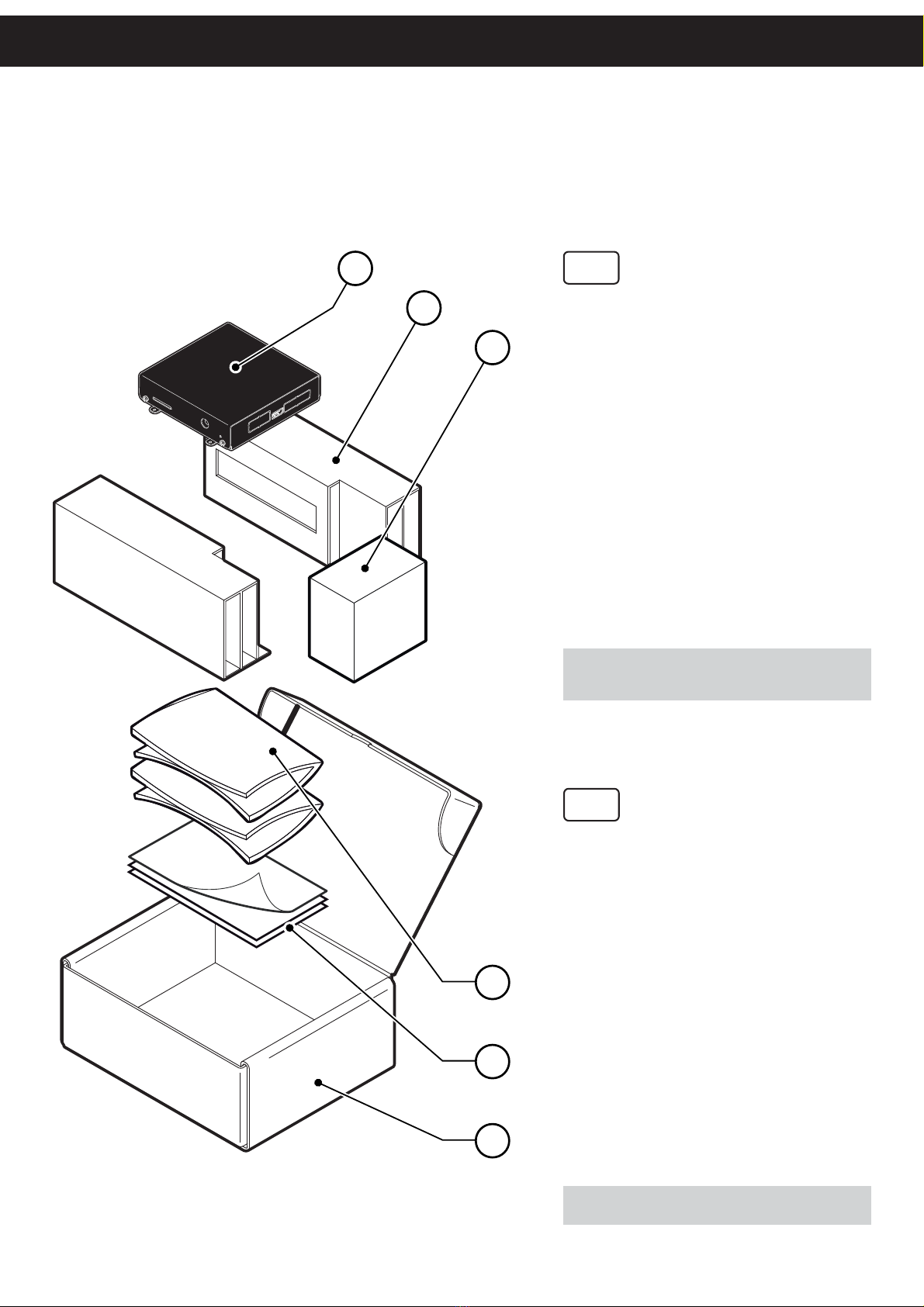
Remove the device from its carton be-
ing careful not to damage the packing
material so that it may be re-used if
the device is to be transported in the
future. Make sure that all the compo-
nents illustrated below are present and
that there are no signs of damage. If
there are, contact Customer Service.
Device1.
Packing shell (left/right)2.
Power supply3.
User manual4.
Guarantee sheet5.
Box6.
NOTE: Keep the box, trays and packing materials in
the event the device must be transported/shipped in
the future.
I
Rimuovete il dispositivo dal cartone,
facendo attenzione a non danneggiare
il materiale di imballaggio al fine di uti-
lizzarlo per trasporti futuri. Assicuratevi
che vi siano i componenti illustrati in
seguito e che essi non siano danneg-
giati. In caso contrario contattate il
servizio di assistenza.
Dispositivo1.
Imballo di protezione (dx/sx)2.
Alimentatore3.
Manuale utente4.
Foglio garanzia5.
Scatola6.
NOTA: Conservare la scatola, i vassoi e gli imballi per
eventuali trasporti in altre destinazioni.
UNPACKING THE DEVICE
Disimballo dispositivo
6
5
4
1
2
3

8
DEVICE DESCRIPTION
Descrizione dispositivo
1
2
3
4
5
6
7 8
GB
ETHERNET 1 port1.
ETHERNET 2 port2.
USB port3.
AUDIO port4.
Slot for SD card5.
Power supply port6.
Status led7.
HDMI video port8.
I
Porta ETHERNET 11.
Porta ETHERNET 22.
Porta USB3.
Porta AUDIO4.
Alloggiamento per SD card5.
Porta alimentazione6.
Led di stato7.
Porta video HDMI8.

9
DESCRIPTION
GB
Switch on the device by connecting the power
supply to electrical outlet and the Power In port
as shown.
NOTE:
Use the type of electrical power supply indicated on the label (device
and/or power supply).
I
Accendere il dispositivo collegando l’alimentatore
alla presa elettrica e alla porta Power In.
NOTA:
Utilizzate il tipo di alimentazione elettrica indicato sull’etichetta del
dispositivo e/o alimentatore.
SWITCH THE DEVICE ON/OFF
Accendere / Spegnere il dispositivo
SD Card Power In
DEVICE OFF
DESCRIPTION
BOOT
LED
OFF
ON
READY
BLINKING

10
LAN1
LAN2LAN2
Video out
Card reader
Alternative storage for multimedia content
(SD CARD NOT INCLUDED)
Memoria alternativa per i contenuti multimediali
(SD CARD NON INCLUSA)
HD TV / MONITOR
MicroPlaylistManager
software
Playlist
Internet connection required
Richiesta connessione a Internet
Internal storage for multimedia content
Memoria interna per contenuti multimediali
Inhaltsverzeichnis