
DeFelsko PosiTector IRT Bedienungsanleitung

Instruction Manual v. 1.0
Infrared Thermometer

1
Introduction
Introduction
The PosiTector Infrared Thermometer (IRT) is a hand-held,
electronic instrument that measures surface temperature quickly
and accurately. t consists of a body (Standard or Advanced) and
probe (pg. 2).
This Quick Guide summarizes the basic functions of the Gage.
Download the full instruction manual at:
www.defelsko.com/manuals.
The PosiTector IRT powers-up when the center navigation button
is pressed. Readings are updated automatically each second.
To preserve battery life, the instrument powers down after
approximately 5 minutes of no activity. All settings are retained.
Basic Operation
Basic Operation
1.Remove the protective rubber cap from the probe.
2.Power-up Gage by pressing the center navigation button.
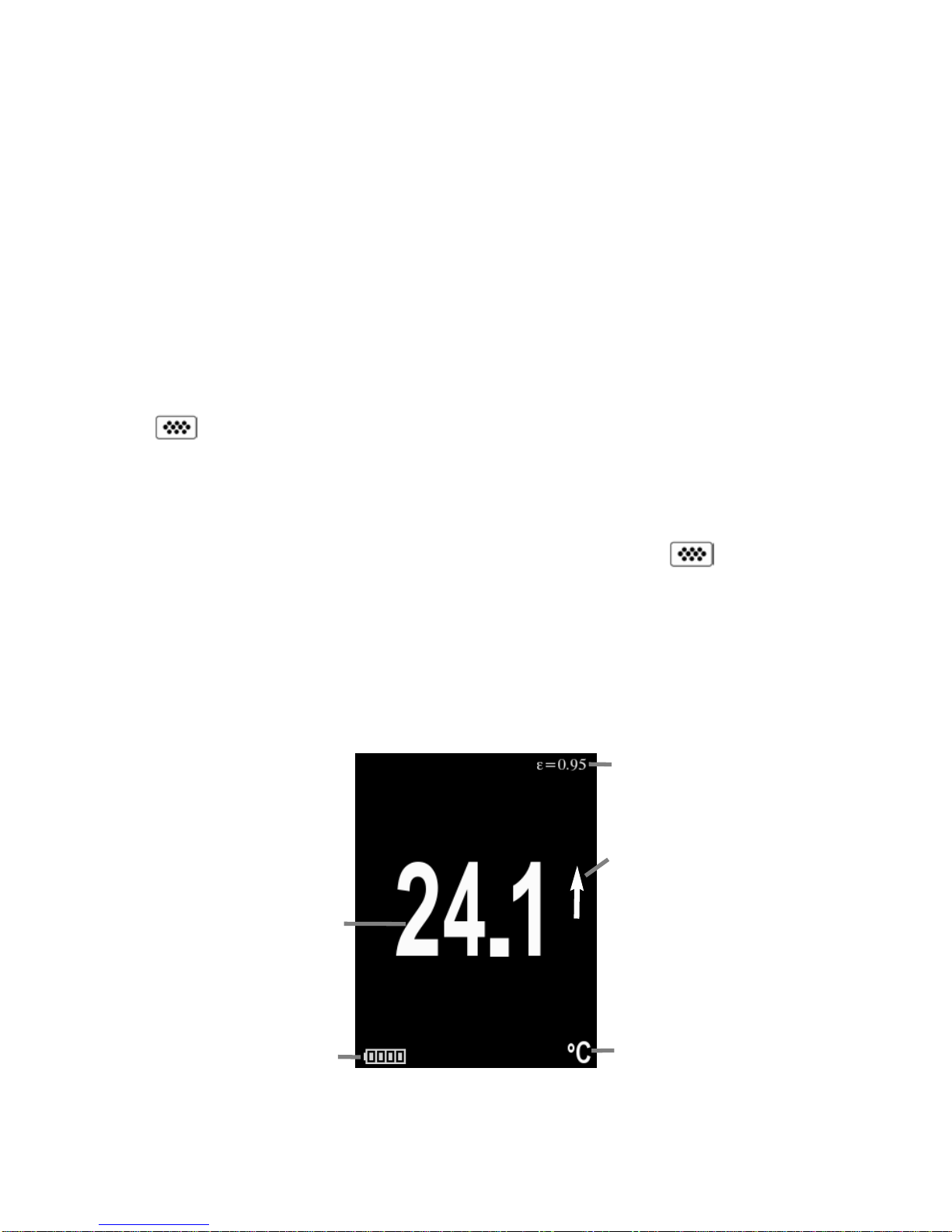
Typical Display
The infrared temperature sensor immediately begins measuring.
Press the (+) button to pause the measurement. Press (+) again to
resume.
SmartTrend Indicator -
Appears when surface
temperature is rising or
falling. Does not appear
when measurement is
stable.
Emissivity (pg.5)
Battery Indicator
Surface
Temperature
Temperature Unit

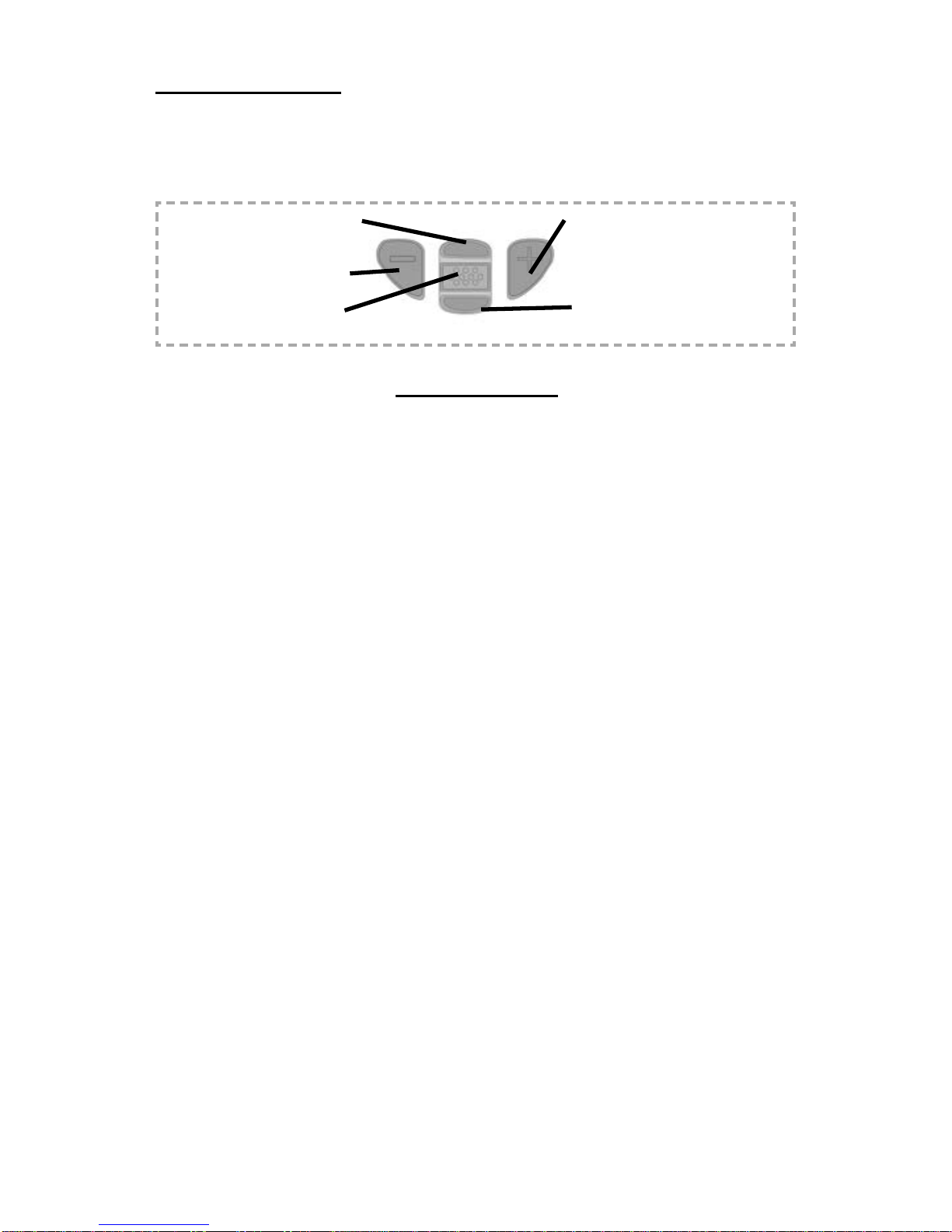
Scroll through
Trend Charts
(Advanced only)
Access the Menu
Pause / Resume
Activate Laser Pointer
(Down Button)
Button Functions — Normal Operation
Laser Pointer
Press and hold the Down button to activate the laser pointer. The
laser helps aim the infrared temperature sensor. Release the but-
ton to deactivate laser. The symbol is displayed on the screen
when the laser is active.
2
Laser Active
Laser Radiation. Do not stare into beam. Class 2 laser product.
Laser Parameters:
Wavelength: 652 nm
Laser power for classification: <1.0 mW
Beam diameter: <2mm at aperture
Divergence: 1 mRad
Mode of operation: CW
EN/ EC 60825-1:2014 (2007 USA)

3
When powered-up, the PosiTector automatically
determines which probe is attached and does a self-
check.
To disconnect a probe from a body, slide the plastic
probe connector horizontally (in the direction of the
arrow) away from the body. Reverse these steps to
attach a different probe. t is not necessary to power-
down the Gage when switching probes.
The PosiTector gage body accepts a wide variety of probe types
including magnetic, eddy current and ultrasonic coating thickness,
environmental, surface profile, shore hardness durometer, salt
contamination and ultrasonic wall thickness probes. See
www.defelsko.com/probes
Probes
Probes
Menu Operation
Menu Operation
Gage functions are menu controlled. To access the Menu, power-up
the Gage, then press the center navigation button.
To navigate, use the Up and Down buttons to scroll vertically and
to SELECT.
Press the (+)button to switch
pages in a multipage menu.
Press the (
-
)button to return to
the previous menu or page.
Select Exit to exit from any menu.
Previous Page
(Exit) Up Next Page
Access the Menu
(Center/Select)
Down

4
Emissivity refers to a material’s ability to emit infrared energy,
compared to an ideal black surface at the same temperature. The
ratio varies from 0 to 1, and each material has a specific emissivity
associated with it. The PosiTector IRT has built in emissivity
settings for certain materials as well as a user-adjustable
emissivity option (pg. 6).
Most organic and painted surfaces have an emissivity of around
0.95, and are ideal surfaces for accurate infrared temperature
readings. Shiny or reflective surfaces can be difficult to measure
with an infrared thermometer, as they tend to reflect ambient
infrared energy instead of their own. To compensate for this, cover
such surfaces with flat paint or a piece of electrical tape. Allow the
paint or tape to acclimate to the surface’s temperature, and take a
measurement over the paint or tape.
Emissivity
Emissivity
Distance to Spot atio (D:S)
Distance to Spot atio (D:S)
The distance to spot ratio refers
to the relationship between the
diameter of the area being
measured compared to the
instrument’s distance from the
area. As the distance (D) from
the target increases, the spot
size (S) of the area being
measured by the unit becomes
larger. The D:S ratio of the
PosiTector IRT is 5.7:1. For
example, when the instrument is
100 cm (40 inches) from the
target, the spot size will be about
18 cm (7 inches) in diameter.
Distance
Spot Size

5
Setup Menu
Setup Menu
eset
eset (menu reset) restores factory settings and returns the Gage
to a known condition. The following occurs:
- All batches and stored readings, batch names and screen
captures are erased.
- Menu settings are returned to the following:
Memory = OFF
Statistics = OFF
HiLo Alarm = OFF
Trend Chart = None
Auto Dim = ON
Bluetooth & Stream = OFF
WiFi & Access Point = OFF
Display = None
Units
Converts the displayed units for temperature. Celsius (°C) or
Fahrenheit (°F)
Perform a more thorough Hard eset as follows:
1 Power down the Gage and wait 5 seconds.
2 Simultaneously press and hold the (+) and center
buttons until the eset symbol appears.
This returns the Gage to a known, “out-of-the-box” condition.
t performs the same function as a menu eset with the addition of:
- Bluetooth pairing info is cleared.
- Alarm settings are set to defaults.
- Menu settings are returned to the following:
NOTE:
Units = Celsius
Flip Lock = OFF
Auto Sync .net = ON
Sound = ON
Language = English
Emissivity = 0.95
Battery Type = Alkaline
Backlight = Normal
Bluetooth Smart = OFF
USB Drive= ON
Date, Time and WiFi settings are not affected by either eset.

6
Emissivity
Select to disable the auto rotate display feature.
Flip Lock
Turns the trend chart on. The trend chart can also be turned on by
pressing the Up navigation button from the main screen.
Trend Chart
Displays information on the gage body and attached probe.
Gage Info
Sets the emissivity ratio for the PosiTector IRT infrared
temperature sensor.
Select Custom to manually adjust the emissivity value or to adjust
to a known temperature. Emissivity is automatically calculated
when adjusting to a temperature. See NOTE below.
Alternatively, use one of the following preset options:
Aluminum (rough) = 0.07 Plastics = 0.94
Zinc (Galvanized) = 0.25 Steel (Oxidized) = 0.95
Concrete = 0.54 Wood = 0.95
Paint = 0.96
NOTE:
Depending on surface treatment, metals such as blasted steel can
have a broad range of emissivity values. Adjusting to a known
temperature (measured by a direct contact surface temperature
probe) on a representative sample will assist in obtaining an
accurate emissivity value.
Zinc Galv. 0.25
Steel Ox. 0.95
Al ough 0.07
Concrete 0.54
Wood 0.95
Paint 0.96
Plastics 0.94
Custom
Exit
Emissivity

7
Memory Management
Memory Management
The PosiTector IRT has internal memory storage for recording
measurement data. Stored readings can be reviewed on-screen or
accessed via computers, tablets and smart phones. Each reading
is date and time-stamped. Press the (+) button to store a
measurement.
The symbol appears when the Gage is set to store readings.
Standard models store up to 250 readings in one batch.
Selects the type of batteries used in the Gage from a choice of
“Alkaline”, “Lithium” or “NiMH” (Nickel-metal hydride
rechargeable). f NiMH is selected, the gage will trickle charge the
batteries while connected via USB to a PC or optional AC charger.
The battery state indicator icon is calibrated for the selected
battery type. No damage will occur if the wrong battery type is
selected.
Battery Type
A statistical summary will appear on the
display. Reset Statistics by pressing the
(
-
)
button. Press (+)to pause statistics.
Statistics
HiLo Alarm
Allows Gage to visibly and audibly alert the
user when readings exceed user-specified
limits.
–Average
–Maximum Value
–Standard Deviation
–Minimum Value
X
X
Statistics Mode
Statistics Mode
8
Accessing Stored Measurements Data
Accessing Stored Measurements Data
DeFelsko offers the following free solutions for viewing, analyzing
and reporting data:
PosiSoft USB Drive - Connect the Gage to a PC/Mac using the
supplied USB cable. View and print readings and graphs using
universal PC/Mac web browsers or file explorers. No software or
internet connection required. USB Drive must be selected in the
Gage’s “Connect > USB” menu (pg. 9).
PosiSoft Desktop - Powerful desktop software (PC/Mac) for
downloading, viewing, printing and storing measurement data.
ncludes a customizable, templated PDF Report Generator. No
internet connection required.
PosiSoft.net - Web-based application offering secure, centralized
storage of measurement data. Access your data from any web
connected device.
PosiTector App - (Advanced models only, s/n 784000+) App for
compatible iOS and Android smart devices. Permits users to create,
save and share professional PDF reports. Add images and notes
using the smart device’s camera and keyboard.
Advanced models store 100,000 readings in up to 1,000 batches.
“New Batch” closes any open batch and creates a new batch name
using the lowest available number. New batch names are date
stamped when they are created.
Screen Capture
Press both (-)(+) buttons at any time to capture and save an image
copy of the current display. The last 10 screen captures are stored
in memory and can be accessed when connected to a computer
(see PosiSoft USB Drive below).
Scroll through display
modes (Advanced only)
Delete last reading
Access the Menu
Store a reading in memory
(Advanced only)
Activate Laser Pointer
(pg. 2)
Andere Handbücher für PosiTector IRT
4
Inhaltsverzeichnis
Sprachen:
Andere DeFelsko Thermometer Handbücher


