
DET V1 Bedienungsanleitung

1
DET
Ultra Short-Throw Laser Projector
USER MANUAL

2
Table of Contents
Table of Contents..............................................................................................................................2
Usage Notice.....................................................................................................................................3
Safety Information............................................................................................................................3
Usage Notice.....................................................................................................................................4
Precautions.......................................................................................................................................4
Package Overview ............................................................................................................................6
Introduction ......................................................................................................................................7
Product Overview.............................................................................................................................7
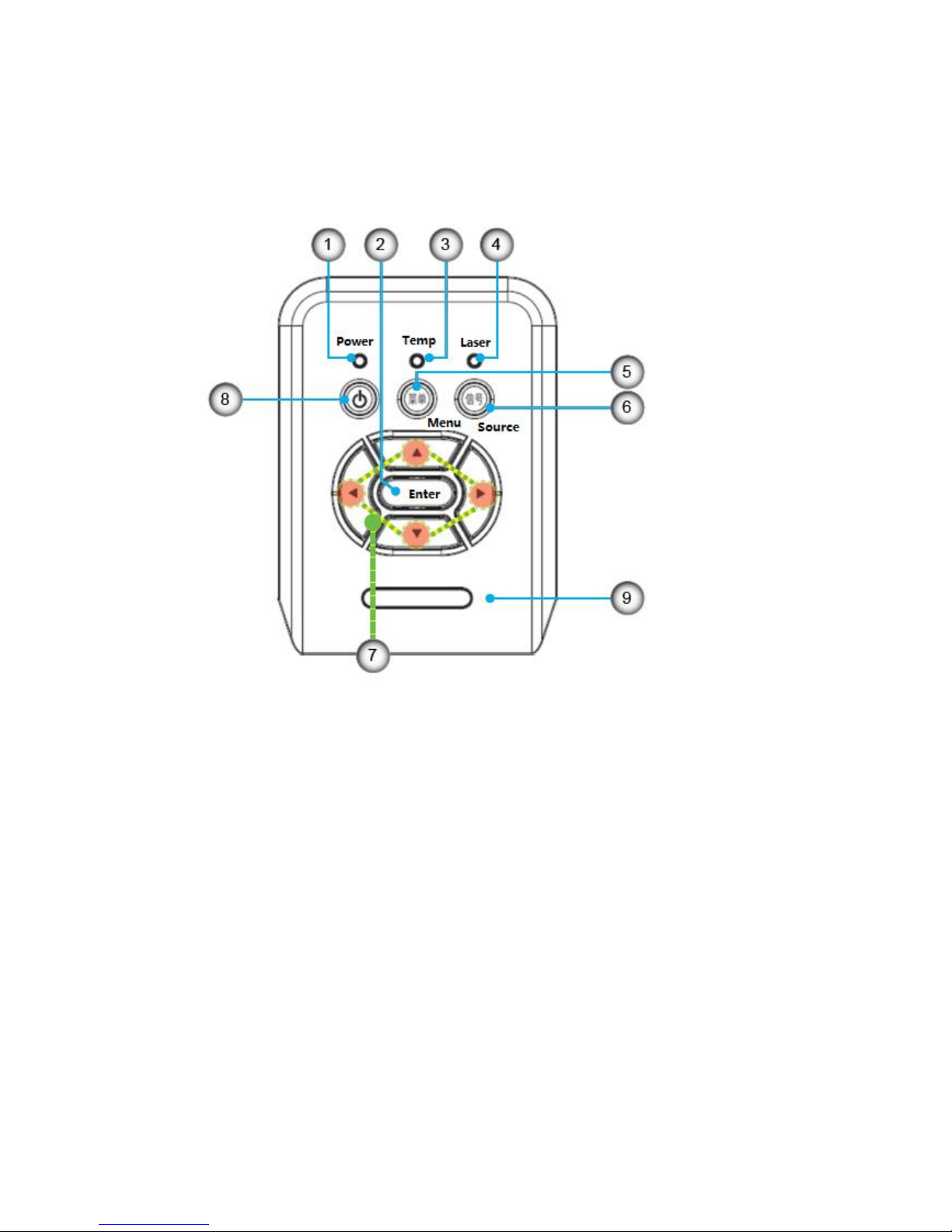
Control Panel ....................................................................................................................................8
Input/Output Connections...............................................................................................................9
Connecting the Projector ...............................................................................................................11
Powering the projector On / Off .............................................................................................13
Adjusting the Projected Image...............................................................................................15
Control Panel & Remote Control............................................................................................18
Control Panel...............................................................................................................................18
Menu Tree.....................................................................................................................................20
On-screen Display Menus...............................................................................................................21
Picture...........................................................................................................................................22
Screen...........................................................................................................................................24
Setting...........................................................................................................................................26
Volume..........................................................................................................................................28
Options .........................................................................................................................................29
3D...................................................................................................................................................32
Interact..........................................................................................................................................33
Network.........................................................................................................................................34
How to use web browser to control your projector..........................................................35
Crestron RoomView Control Tool..........................................................................................40
How to view multimedia file.....................................................................................................42
Install and Clear Filter...............................................................................................................48
Remark............................................................................................................................................48
Compatibility mode....................................................................................................................49
VGA compatibility mode...........................................................................................................49
HDMI digital compatibility mode............................................................................................51
RS232 Commands and Protocol Function List..................................................................53
RS232 Commands Function List ...........................................................................................54
Regulation & Safety Notices ...................................................................................................56
Wall Mount Installation .................................................................................................................58
Troubleshooting..............................................................................................................................59

3
Usage Notice
Safety Information
WARNING: TO REDUCE THE RISK OF FIRE OR ELECTRIC SHOCK, DO NOT
EXPOSE THIS APPLIANCE TO RAIN OR MOISTURE. DANGEROUS HIGH
VOLTAGES ARE PRESENT INSIDE THE ENCLOSURE. DO NOT OPEN THE
CABINET. REFER SERVICING TO QUALIFIED PERSONNEL ONLY.
Class B emissions limits
This Class B digital apparatus meets all requirements of the Canadian
Interference-Causing Equipment Regulations.
Important Safety Instruction
1. Do not block any ventilation openings. To ensure reliable operation of the projector and
to protect from over heating, it is recommended to install the projector in a location that
does not block ventilation. As an example, do not place the projector on a crowded
coffee table, sofa, bed, etc. Do not put the projector in an enclosure such as a book
case or a cabinet that restricts air flow.
2. Do not use the projector near water or moisture. To reduce the risk of fire and/or electric
shock, do not expose the projector to rain or moisture.
3. Do not install near heat sources such as radiators, heaters, stoves or any other
apparatus such as amplifiers that emits heat.
4. Clean only with dry cloth.
5. Only use attachments/accessories specified by the manufacturer.
6. Do not use the unit if it has been physically damaged or abused. Physical
damage/abuse would be (but not limited to):
Unit has been dropped.
Power supply cord or plug has been damaged.
Liquid has been spilled on to the projector.
Projector has been exposed to rain or moisture.
Something has fallen in the projector or something is loose inside.
Do not attempt to service the unit yourself. Opening or removing covers may expose
you to dangerous voltages or other hazards. Please call Optoma before you send the
unit for repair.
7. Do not let objects or liquids enter the projector. They may touch dangerous voltage
points and short out parts that could result in fire or electric shock.
8. See projector enclosure for safety related markings.
9. The unit should only be repaired by appropriate service personnel.

4
Usage Notice
Precautions
Please follow all warnings, precautions and maintenance as
recommended in this user’s guide.
▀■ Warning- Do not look into the projector’s lens when the laser is on. The bright light
may hurt and damage your eyes.
▀■ Warning- To reduce the risk of fire or electric shock, do not expose this projector to
rain or moisture.
▀■ Warning- Please do not open or disassemble the projector as this may cause electric
shock.

5
Usage Notice
Do:
Turn off and unplug the power plug from the AC outlet before cleaning the product.
Use a soft dry cloth with mild detergent to clean the display housing.
Disconnect the power plug from AC outlet if the product is not being used for a long
period of time.
Do not:
Block the slots and openings on the unit provided for ventilation.
Use abrasive cleaners, waxes or solvents to clean the unit.
Use under the following conditions:
- In extremely hot, cold or humid environments.
Ensure that the ambient room temperature is within 5 - 40°C.
Relative Humidity is 5 - 40°C, 80% (Max.), non-condensing.
- In areas susceptible to excessive dust and dirt.
- Near any appliance generating a strong magnetic field.
- In direct sunlight.
Eye Safety Warnings
▀■Avoid staring/facing directly into the projector beam at all times. Keep your back to
the beam as much as possible.
▀■When projector is used in a classroom, adequately supervise students when they
are asked to point out something on the screen.
▀■In order to minimize the laser power, use room blinds to reduce ambient light levels.
Product Features
▀■XGA (1024x768) / WXGA(1280X800) Native resolution
▀■HD compatible –720p and 1080p supported
▀■VGA /WXGA monitor loop through(works on standby mode > 0.5W)
▀■▀■Security Bar and Kensington Lock
▀■RS232 control
▀■Rapid shutdown
▀■Built-in speakers
▀■Quick Resume and Eco+ mode
▀■Support HDMI interface

6
Introduction
Package Overview
Unpack and inspect the box contents to ensure all parts listed below are in the box. If
something is missing, please contact your nearest customer service center.
Documentation :
User’s Manual
Warranty Card
Quick Start Card
Due to different applications in each country, some regions may have different
accessories.

7
Introduction
Product Overview
Main Unit
1. Control Panel
2. Focus Ring
3. Ventilation (inlet)
4. IR Receiver
5. Ventilation (inlet)
6. Speaker
7. Power Socket
8. Input / Output Connections
9. Lens
8
Control Panel
1. Power LED
2. Enter
3. Temp LED
4. Laser LED
5. Menu
6. Source
7. Four Directional Select Keys
8. Power/Standby button
9. IR Receiver

9
Input/Output Connections
1. VGA1-In/YPbPr Connector (PC Analog Signal/Component Video Input/HDTV/YPbPr)
2. HDMI2 Connector
3. HDMI1 Connector
4. USB Connector (Connect to PC for Remote Mouse function)
5. RJ45
6.USB-A port
7.Power Socket
8.interactConnector (3.5 mm Minit)
9. VGA-Out Connector (Monitor Loop-through Output)
10. RS-232 Connector (9-pin DIN Type)
11 Composite Video Input Connector
12 Audio Input connector (R)
13. Audio Output Connector (L)
14. Audio Input connector (3.5mm mini jack)
15. Audio Output Connector (3.5mm Mini Jack)
16.Mircrophone in
17. KensingtonTM Lock Port

10
Remote Control
The interface is subject to model’s specifications.
Dieses Handbuch passt für folgende Modelle
22
Inhaltsverzeichnis
Andere DET Projektor Handbücher

Beliebte Projektor Handbücher anderer Marken


Panasonic
Panasonic PTL735NTU - LCD PROJECTOR-NETWORK IB Bedienungsanleitung

NEC
NEC NP600S EDU Bedienungsanleitung

BenQ
BenQ SH753P Bedienungsanleitung

Eiki
Eiki EK-623U series Bedienungsanleitung

Epson
Epson PowerLite Pro Cinema 6020UB Bedienungsanleitung

Epson
Epson PowerLite Home Cinema 705HD Bedienungsanleitung


