Devantech ETH8020 Leitfaden

ETH8020 - 20 Relays at 16A, 8 Analogue Inputs
Technical Documentation
Overview
The ETH8020 provides 20 volt free contact relay outputs with a current rating of up to 16Amp each and 8 analogue
inputs The module is powered from a 12vdc supply which can be regulated or unregulated The DC input jack is
2 1mm with positive core polarity, DC supplies are required to supply at least 1A at 12vdc The relays are SPCO
(Single Pole Change Over) types The normally open, normally closed and common pins are all available on the screw
terminals The Relays on the ETH8020 can be controlled from the inputs on the ETH484 or another ETH8020 This
offers the opportunity to construct a system where an input can control an output anywhere on the earth provided both
locations are connected to the network/internet
Operating temperature
-40C to +70C
LED indication
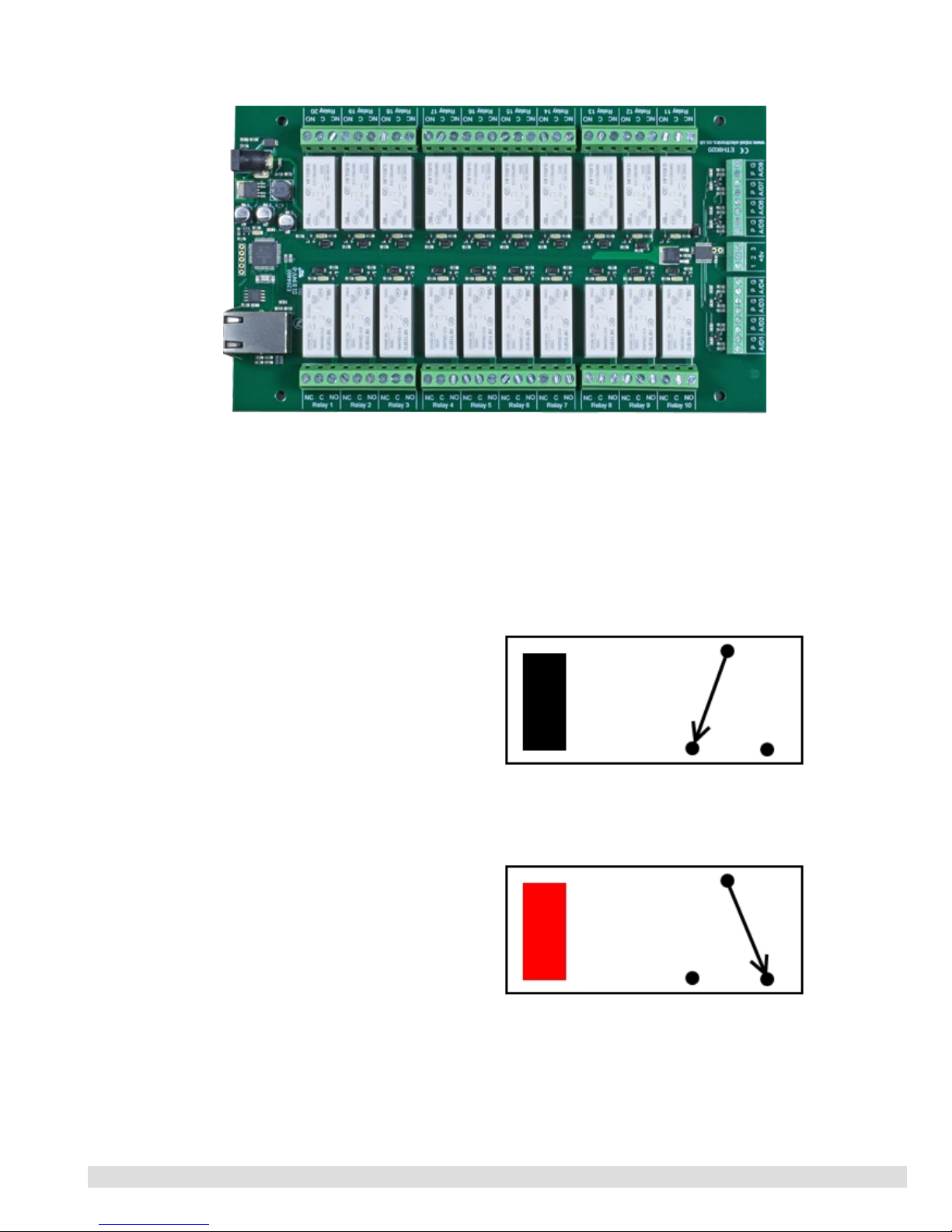
The ETH8020 provides a red LED mounted immediately next to each relay to indicate whether it is in a powered state
(LED on), there is also two LED's mounted in the Ethernet connector which will flash with Ethernet traffic Finally
there is a green power LED next to the processor
Relay power rating
If the contact load voltage and current of the relay are in the region enclosed by the solid and dotted lines in the figure
below, the relay can perform stable switching operation If the relay is used at a voltage or current exceeding this
region, the life of the contacts may be significantly shortened
load
type Typical applications Rating Max DC load capacity
AC1 Non inductive or
slightly inductive loads 16A @ 250V AC
AC15
Control of
electromagnetic load
(>72VA)
3A @ 120V AC
1 5A @ 240V AC
AC3 Control of motor 750W
DC1 Non inductive or
slightly inductive loads 16A @ 24V DC
DC13
Control of
electromagnetic
loads
0 22A @ 120V DC
0 1A @ 250V DC
A full datasheet for the relays used on the ETH8020 is here: HF115FD datasheet
© Devantech Ltd 02/07/19 ETH8020 Documentation 1/17

Conne tions
16A VFC (Volt Free Contacts) NC = normally connected, C = common, NO = normally open
12v dc output
Direct from
2 1mm jack
Analogue
inputs
P = Analogue
Input (0-5v)
G = 0v ground
RJ45
Ethernet
16A VFC (Volt Free Contacts) NC = normally connected, C = common, NO = normally open
Power relays
Four 16A volt free contact relays are provided for switching a common input between a normally closed output and a
normally open output The relay coil is powered by the 12vdc incoming supply on user command
Coil C
Relay in passive state
NC NO
Coil C
Relay in powered state
NC NO
© Devantech Ltd 02/07/19 ETH8020 Documentation 2/17

Analogue Inputs
Eight (8) analogue inputs of 0v-5V at 10-bit resolution are provided The conversion is performed when you send the
"Get Analogue Voltage" command 0x32 and the channel number The resulting 16 bit integer will be transmitted back
in two bytes (high byte first), combine these for the result The 10-bit conversion will be in the lower 10 bits of the 16
bit integer with the upper 6 bits being 0 There is a 5v supply available on the 3-pin terminal block between the
analogue inputs
Examples
Example input - connecting a potentiometer
Connecting a potentiometer should be the simplest of
tasks, either end of the pot should be wired to the 5v and
0v respectively, the output pin of the pot is then wired into
the analogue (A) pin
Representative Analogue Schematic
© Devantech Ltd 02/07/19 ETH8020 Documentation 3/17

Network onne tion and Http a ess
IP Addresses DHCP Servers
The easiest way to use the ETH8020 is to connect it to a network with a DHCP server In this case the ETH8020 will
have its IP address assigned automatically by the DHCP server
If there is no DHCP server on the network, then a fixed IP address of 192 168 0 200 is used To control the ETH8020
using this fixed IP address your computer MUST be on the same subnet
The next step is to set your computers IP address to 192 168 0 x where x is in the range of 1 to 255 but not 200 (the
ETH8020 is there!) or any other used IP addresses on the network
The subnet mask dictates what IP addresses the PC can communicate with, we set this to 255 255 255 0 so the PC can
talk to any module with an IP address of 192 168 0 x
The default gateway is likely to be the IP address that the internet connection is located at and the DNS server can be
either your router address or Google provide a DNS service at 8 8 8 8
This image is for a PC running Windows 10
To get to the TCP/IP properties screen, go to:
Control Panel->Network and Sharing Center-
>Local Area Connection->Properties
Select Internet Protocol Version 4(TCP/IPv4) from
the scroll box and click Properties
That gets you to the dialog box shown left
© Devantech Ltd 02/07/19 ETH8020 Documentation 4/17

Accessing the ETH8020 from your browser
Having plugged in your 12vdc power supply and Ethernet connection the board will power up and request an IP
address from the DHCP server, if no server is present then the board will default to IP address 192 168 0 200
Now please start up your web browser and type http://ETH8020 into the address bar, please note this only works in
windows You will be prompted for a password as shown below:
The default login is:
Username: admin
Password: password
The ability to change these
settings is shown in the
configuration section
You should now see the following web page:
This web page will allow you to switch the relays on and off by clicking the relay buttons (the red/gray circles) It also
contains a links to this technical documentation page, the network configuration and mapped inputs
© Devantech Ltd 02/07/19 ETH8020 Documentation 5/17

Configuration
By clicking the configuration link it's possible to configure the ETH8020 IP address and subnet mask together with the
ability to set a password for entry to control screens Gateway address and DNS address is configurable and is used
with mapped inputs which are described in section below The configuration page also offers the option to set a
password that will be required to change any of the relay states or digital outputs using TCP IP commands, this is
explained in the TCP/IP password section All settings are saved to memory so be careful to remember the username
and password! Default password settings are shown in the picture below Version 2 now offers a latched outputs option,
this will automatically save any permanent output changes (not pulsed) and restore them following power loss
© Devantech Ltd 02/07/19 ETH8020 Documentation 6/17

Mapped inputs
Digital inputs are able to be configured to remotely control outputs on ETH008,ETH8020 or ETH8020, this offers
simple linking and versatile usage An input in one country can control a output in another, or across a small network
There are eight independent inputs that can be mapped to eight different relays (on the same or different boards)
The "Address of target board" field accepts an IP address or hostname (which will be converted to an IP address by the
DNS server supplied in the board configuration above) If the module is on the local network then you can use the
assigned IP address, if the target is over the internet then you need to supply the gateway in the configuration (internet
source IP like your router) and the "Address of target board" is the IP address of the targets internet connection (to
point at the router) Accessing the target via a router is dealt with in the section "Access from the Internet"
© Devantech Ltd 02/07/19 ETH8020 Documentation 7/17

Mapping inputs to custom devices
Sometimes it is useful to have a message sent on input change without the need for polling, you can use the input
mapping for sending messages to an IP address The transactions are described below along with an example of the
custom device needing a password of “apple” and setting output number 1 active:
•The ETH8020 sends a TCP packet with 0x79 (password entry) in the first byte, then the following bytes will be
the password supplied above
So it would send 6 bytes: 0x79, 'a','p','p','l','e'
•To acknowledge a password match, respond with 1, else send 2
You reply with 1 byte 0x01
•The ETH8020 sends then sends digital active (0x20) or digital inactive (0x21) followed by the output number
So it would send 2 bytes 0x20, 0x01
•Reply with a 0 for success, else send 1
You reply with 1 byte 0x00
Note that the complete sequence must be followed, even if the password fails If no password is supplied in the input
mapping configuration the sequence will be followed with the absence of ''a','p','p','l','e' bytes
Input monitoring example and source code
We have an example of mapping the inputs to a PC, it operates on the default port of 17494, the default password of
"password" (although both are easily changed in the source code) and requires the ETH8020 input mapping to be
pointed at the host PC IP address As it's having to constantly listen it's a multi thread program
The input monitor program is available as Visual C# express ready built installation files here, or as project with source
files here Visual studio express is provided free from Microsoft: http://www microsoft com/exPress/download/
HTML commands DOAx and DOIx (V5+ firmware needed)
A customer requested feature, allowing the digital outputs to be switched by the Http get function such as used in some
voice over ip phones (VOIP) You can use the Http get function to write to the io cgi file with the following syntax:
192.168.0.200/io.cgi?DOA2=10
This would use the default address (192 168 0 200) and make output 2 active for 1 second
Another example would be to set output 1 inactive for 10 seconds:
192.168.0.200/io.cgi?DOI1=10
You can test these functions by typing them directly into the address bar of most internet browsers Also be aware that
you may need to disable Http authentication in the Http configuration if your control device does not support it
© Devantech Ltd 02/07/19 ETH8020 Documentation 8/17

TCP a ess and ommands
The command set designed to provide consistent expansion and new features, they are sent over TCP/IP on port 17494
(0x4456) This is the default port, it can be changed in the configuration settings
Five connections are allowed at any one time, these are independently protected but all using the same password as
defined in the board configuration
Command Action
dec hex
16 0x10 Get Module Info - returns 3 bytes Module Id (21 for ETH8020), Hardware version, Firmware
version
32 0x20 Digital Active - follow with 1-20 to set relay on then a time for pulsed output from 1-255 (100ms
resolution) or 0 for permanent Board will return 0 for success, 1 for failure
33 0x21 Digital Inactive - follow with 1-20 to turn relay off then a time for pulsed output from 1-255 (100ms
resolution) or 0 for permanent Board will return 0 for success, 1 for failure
35 0x23 Digital Set Outputs - follow 3 bytes, first byte will set relays 1-8, All on = 255 (0xFF), All off = 0,
2nd byte for relays 9-16, 3rd byte for relays 17-20, Board will return 0 for success, 1 for failure
36 0x24 Digital Get Outputs - returns 3 bytes, the first corresponds with relays 1-8, 2nd byte for relays 9-16,
3rd byte for relays 17-20
37 0x25 Digital Get Inputs - returns 4 bytes, the first three bytes are always 0, the 4th bytes bits correspond
with the 8 digital inputs, a high bit meaning input is active (driven low)
50 0x32 Get Analogue Voltage - follow with 1-8 for channel and ETH8020 will respond with 2 bytes to form
an 16-bit integer (high byte first)
58 0x3A ASCII text commands - allows a text string to switch outputs, see section below
119 0x77 Get Serial Number - Returns the unique 6 byte MAC address of the module
120 0x78 Get Volts - returns relay supply voltage as byte, 125 being 12 5V DC
121 0x79 Password Entry - see TCP/IP password, board will return 1 for success or 2 for failure
122 0x7A Get Unlock Time - see section below
123 0x7B Log Out - immediately re-enables password protection, board will return 0 for success
Digital Active/Inactive Commands
These are 3 byte commands, The first byte is the command, 32 (active means on) or 33 (inactive)
Second byte is the output number, 1-4 for the relays, or 9 - 16 for digital outputs (marked I/O1 to I/O8 on the board)
Third byte is the on time Set this to zero for non pulsed mode, or 1-255 for a pulse in 100mS intervals (100mS to 25 5
seconds)
For example:
0x20 - turn the relay on command
0x03 - relay 3
0x32 (50) - 5 seconds (50 * 100ms)
Board will return 0 for success, 1 for failure
Note - All bytes in a command must be sent in one TCP/IP packet Digital outputs pull the output pin down to 0v when
active and pull up to 12v via a 10k resistor when inactive
Analogue input read
Four analogue inputs of 0v-5v at 10-bit resolution are provided, the conversion is performed when you send the "Get
Analogue Voltage" command 0x32 and the channel number The resulting 16 bit integer will be transmitted back in two
bytes (high byte first), combine these for the result The 10-bit conversion will be in the lower 10 bits of the 16 bit
integer with the upper 6 bits being 0
© Devantech Ltd 02/07/19 ETH8020 Documentation 9/17

TCP/IP Password
If this option is enabled in the Http configuration page then a password will be required to be entered before relay
states can be changed In the following example the password was set to "apple":
0x79 - 1st byte in frame sent to ETH8020 to indicate password entry
'a' (0x61) - 2nd byte in frame (ASCII hex equivalent in brackets http://www asciitable com/)
'p' (0x70) - 3rd byte in frame
'p' (0x70) - 4th byte in frame
'l' (0x6C) - 5th byte in frame
'e' (0x65) - 6th byte in frame
These 6 bytes are then transmitted in the same transaction to the ETH8020 and if the password is correct then 1 will
transmitted back, a failure will send 2
The board will now accept changes from the device that entered the password If communication becomes idle for
more than 30 seconds then the password protection is re-enabled There is also a log-out command of 0x7B to enable
the protection immediately
Get Unlock Time
Returns TCP/IP password protection status:
0 - password protection is enabled and password entry is required before changes can be made
1 30 - seconds until TCP/IP password protection is re-enabled All authorised commands set the timer back to 30
seconds (including this one)
255 - TCP/IP password is not enabled
ASCII text commands DOA and DOI (V5+ firmware needed)
Following customer request we have added a feature that allows the outputs to be switched using an ASCII string,
devices like a Mobotix camera can now switch relays with simple strings
The string for activating output1 for 5 seconds is formatted using comma separated variables with the following
syntax:
":DOA,1,50,password"
To break this down ":" (0x3A) at the start of the string indicates that there is an ASCII message to follow, "DOA" is
digital output active, "1" is the output number, then "50" for 5 seconds (50 * 100ms) and finally the TCP password (if
applicable) If I wanted to make output 2 inactive for 3 seconds I would use:
":DOI,2,30,password"
To break this down ":" (0x3A) at the start of the string indicates that there is an ASCII message to follow, "DOI" is
digital output inactive, "2" is the output number, then "30" for 3 seconds (30 * 100ms) and finally the TCP password (if
applicable) Assuming no password is used the previous command would simply be:
":DOI,2,30 "
© Devantech Ltd 02/07/19 ETH8020 Documentation 10/17
Dieses Handbuch passt für folgende Modelle
1
Inhaltsverzeichnis
Andere Devantech Relais Handbücher

Devantech
Devantech tcp184 Bedienungsanleitung

Devantech
Devantech dS2824 Bedienungsanleitung

Devantech
Devantech dS378 Bedienungsanleitung

Devantech
Devantech ESP32LR88 Bedienungsanleitung

Devantech
Devantech ESP32SR88 Bedienungsanleitung

Devantech
Devantech dS3484 Bedienungsanleitung

Devantech
Devantech ESP32LR42 Bedienungsanleitung

Devantech
Devantech dS2824 Bedienungsanleitung

Devantech
Devantech ESP32LR20 Bedienungsanleitung

Devantech
Devantech dS2832 Bedienungsanleitung