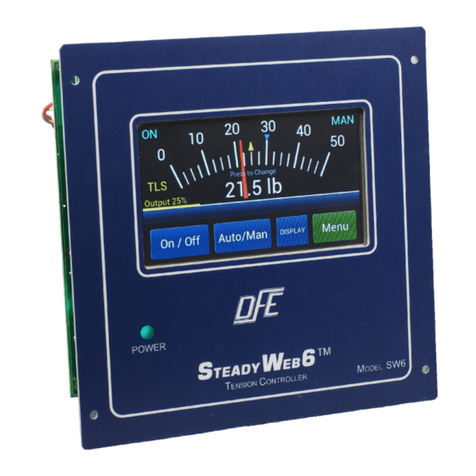
DFE SteadyWeb Bedienungsanleitung

INSTRUCTION MANUAL
STEADYWEB™
AUTOMATIC TENSION CONTROLLER
DOC 801-0783

217 Pickering Road
Rochester, NH 03867-4630 U.S.A.
For assistance, please call:
TECHNICAL SERVICE - Installations, Start-Up, Troubleshooting, Repairs, Field
Service, Returns: call 603-332-6150 and ask for Technical
CUSTOMER SERVICE - Replacement Parts, Individual Products, Questions about
Orders, Manuals: call 603-332-6150 and ask for Customer
SALES - Product Information, Systems Application Questions, and
placing orders for standard products and special systems.
Please call 603-332-6150 and ask for Sales or email to us at
Telephone: (603) 332-6150 Fax: (603) 332-3758
©1999 Dover Flexo Electronics, Inc. All rights reserved. Dover Flexo Electronics has made reasonable effort to ensure accuracy of this document.
However NO WARRANTY, whether expressed or implied, is given regarding the completeness or correctness of information in this document.
Dover Flexo Electronics shall not be liable for damages of any kind arising from the use or misuse of this document. Dover Flexo Electronics
reserves the right to make changes, additions, and deletions to this document without notice and without obligation.

READ THIS!
Your SteadyWeb™Controller has been properly configured at our factory. To install
it and start it up, it should only be necessary to use these sections of this manual:
Section 2 - Installation
Section 4 - Calibration the Tension Meter
Section 7 - Tuning for Running Stability
The other sections are for reference and for instruction if you wish to change the
configuration at some later time.

TABLE OF CONTENTS
SECTION ONE DESCRIPTION PAGE
1.0 General Description 1
1.1 Output Modules, Version of Controller 1
Pneumatic Output Module (12P) 1
High Voltage Output Module (12V) 1
0-10 Volt Compensated Output Module (12D) 1
1.2 SteadyWeb Controller Exploded View 2
1.3 Specifications 3
1.4 Standard Features
0-10 Volt Tension Output 4
4-20mA Tension Output 4
Automatic Control Mode 4
Control Voltage Selection 4
Emergency Stop 4
Manual Control Mode 4
Meter Correlation Adjustment 4
Meter Damping 4
Output Direction Selection (normal/reverse) 4
Output Meter 4
Power Voltage Selection 4
Ratio 5
Remote Tension On/Off 5
Remote Tension Set 5
Sample & Hold 5
Soft Start 5
Speed Follow 5
Speed Match 5
Status Lights 5
Tension Display 5
Transducer Voltage Selection 5
1.5 Options
220 Volt Power 6
24 Volt Output 6
45 Volt Output 6
Chassis Configuration (CC) 6
DC Tahometer Card 6
Digital Meter 6
Dual Calibration 6
Dual Transducer Input 6
Extended Range 6
Metric Air Tubing 6
Nonstandard Meter Scale 6
Pulse Tachometer Card 6
Remote Operator Devices (H6) 7
Remote Pneumatic Module 7
Remote Tension Amplifier 7
Reverse Output 7
Taper Adjustment on Front Panel 7
Taper Tension 7
Tension Limit Switch 7
1.6 Front Panel & Operator Devices 8

SECTION TWO INSTALLATION OF STANDARD UNIT
2.0 Dimensions 9
2.1 Installing the Enclosure 10
2.2 Electrical Connections 11
2.3 Electrical Connections for Options 12
SECTION THREE INSTALLATION OF H6 AND CC
CONFIGURATIONS
3.0 H6 Configuration 13
Dimensions 14
3.1 CC Configuration 15
Dimensions 15
Electrical Connections 16
SECTION FOUR CALIBRATING THE TENSION METER
4.0 Mechanical Zero 18
4.1 Calibration 18
SECTION FIVE SET-UP AND ADJUSTMENTS OF
STANDARD UNIT
5.0 Tension Zones 20
5.1 The Control Board 21
5.2 The Power Board 22
5.3 Power Voltage Selection 23
5.4 Control Voltage Selection 23
5.5 4-20mA or 0-20mA Output 24
5.6 Emergency Stop 25
5.7 High Voltage Output Module (12V only) 26
5.8 Meter Correlation 27
5.9 Meter Damping 27
5.10 Output Direction 27
5.11 Output Meter 28
5.12 Pneumatic Output Module (12P only) 28
5.13 Ratio Up/Down 29
5.14 Remote Tension Amplifier Installed? 30
5.15 Remote Tension On/Off 30
5.16 Remote Tension Set 30
5.17 Sample and Hold 31
5.18 Soft Start 31
5.19 Speed Follow 33
5.20 Tachometer Card Installed? 34
5.21 TLS Card Installed? 34
5.22 Transducer Voltage Selection 34
SECTION SIX SET-UP AND ADJUSTMENTS OF OPTIONS
6.0 220 Volt Power Input 36
6.1 24 Volt Output 36
6.2 45 Volt Output 36
6.3 DC Tachometer Card 36
6.4 Digital Meter 38
6.5 Dual Calibration 40
6.6 Dual Transducer Input 40
6.7 Extended Range 40
6.8 Pulse Tachometer Card 40
6.9 Remote Tension Amplifier 42
6.10 Taper Adjustment of Front Panel 43

6.11 Taper Tension 43
Taper by Diameter Computer 43
Taper by Rider Roll or Voltage Source 44
6.12 Tension Limit Switch (TLS) 46
SECTION SEVEN TUNING FOR RUNNING STABILITY
7.0 Introduction 49
7.1 Description of Adjustments 49
7.2 Tuning Procedure 50
7.3 Tuning the Speed Follow Function 50
SECTION EIGHT REPLACEMENT PARTS
8.0 Standard Circuit Boards 52
8.1 Optional Circuit Boards 52
8.2 Operator Devices 52
8.3 Output Modules 52
8.4 Fuses 52
8.5 Ribbon Cables 52
8.6 Relays 53
8.7 Miscellaneous 53
APPENDICES
ALocations of Standard Adjustments 54
BDIP Switch Settings 55
CBasic Set-up 58
DElectrical Connections of Standard SteadyWeb 60
EElectrical Connections of Options 61
FTransducer Electrical Connections 62
GTypical Tensions 66
HFront Board 67
ITroubleshooting 68
TERMS AND CONDITIONS OF SALE 69
INDEX 70,71

LIST OF ILLUSTRATIONS
FIGURE DESCRIPTION PAGE
1 SteadyWeb Controller - Exploded View 2
2 Front Panel and Operator Devices 8
3 Dimensions 9
4 Mounting Screw Locations 10
5 Cover Removal 10
6 Electrical Connections 11
7 Electrical Connections of Options 12
8 Remote Operator Device Configuration 13
9 Dimensions of H6 14
10 Chassis Configuration (CC) 15
11 Dimensions of CC Configuration 15
12 Electrical Connections of CC 16,17
13 Meter Access Holes 18
14 Web Path for Meter Calibration 19
15 Tension Zones 20
16 Control Board 21
17 Power Board 22
18 Power Switch 23
19 E-Stop Electrical Connections 25
20 V-OUT Module 26
21 Ratio Contact Electrical Connections 29
22 Remote Tension On/Off Button Connections 30
23 Sample & Hold Contact 31
24 Soft Start Connections 32
25 Transducer Voltage Switch 35
26 DC Tach Option Card 36
27 DC Tachometer Connections 37
28 Digital Meter Display 39
29 Digital Meter Card 39
30 Pulse Tach Option Card 41
31 Pulse tachometer Connections 41
32 Remote Tension Amplifier Electrical Connections 43
33 Taper Dia/Calc Option Card 43
34 Taper RIDER Option Card 45
35 Rider Pot. Connections 45
36 10 Volt Source Connections 45
37 TLS Option Card 46
38 TLS Reset Button Connections 47
39 TLS Relay Connections 48
40 Tuning Pots. 49
41 Standard Adjustments - Control Board 54
42 Standard Adjustments - Power Board 54
43 Standard Electrical Connections 60
44 Optional Electrical Connections 61
45 Model C, UPB Transducer Wiring 62
46 RF Transducer Wiring 63
47 TR, NW Transducer Wiring 64
48 LT Transducer Wiring 65
49 Front Board 67


1
SECTION 1 DESCRIPTION
1.0 GENERAL DESCRIPTION
The SteadyWeb tension controller automatically maintains tension of any continuous material at the
value selected by the machine operator. It consists of three basic functions:
The first function is performed by the tension amplifier. It supports all of Dover Flexo Electronics
tension transducers. (The transducers measure the actual tension in the web). It includes a regulated
power supply to excite the transducers, an amplifier to boost the transducer output signal, and a
calibration circuit to adjust the tension readout to display actual tension.
The second function is the tension regulator. It compares the output signal from the transducers with
the signal from the AUTO Set potentiometer on the front of the SteadyWeb enclosure. If there is a
difference, the regulator will either increase or decrease tension to equalize them. The tension
amplifier and the tension regulator are both located on the Control board. (See Figure 1)
The third function is performed by the output module. It accepts the output from the tension regulator
and actuates a brake, clutch, or variable speed drive system which actually creates the tension in the
web.
1.1 OUTPUT MODULES, VERSION OF CONTROLLER
Three output modules are available for the SteadyWeb controller.
A) Pneumatic output module. This is used to actuate any air operated brake or clutch. It includes a
servo valve, a pressure regulator, and an air filter. These items are fitted together into a compact
assembly which is normally installed inside the controller enclosure or optionally located remotely.
The output range is .5 to 75 psi. SteadyWeb controllers having this module are designated
"Version 12P".
B) High Voltage output module. This module uses SCR's to produce a variable voltage of up to 90
volts DC to operate any electric brake or clutch, including eddy current clutches. 45 volt and 24 volt
outputs are optional. This module is also known as the VOUT Card. SteadyWeb controllers having
this output module are designated "Version 12V".
C)0 to 10 Volt DC compensated output module. This module is in the form of a 16 pin DIP Integrated
Circuit that plugs into the Power board near the top center. It is designated U203. See Figure 17.
This output is used to control DC drives or other variable speed drive systems, usually in
intermediate tension zones. This output is isolated from ground to make it compatible with all
drives. SteadyWeb controllers having this output are designated "Version 12D".
All SteadyWeb controllers may be easily converted from one output to another if desired. There are
five locations for plug-in cards for optional features, three on the Control board and two on the
Power board. See Figures 16, 17.

2
1.2 STEADYWEB CONTROLLER EXPLODED VIEW
Figure 1 - STEADYWEB CONTROLLER - EXPLODED VIEW
Inhaltsverzeichnis
Andere DFE Controller Handbücher