Dish Network PocketDISH Bedienungsanleitung

i
SAFETY ............................................... III
PORTABLE MEDIA RECORDER......... 1
OVERVIEW .................................... 2
CONTROLS AND INDICATORS.......... 3
CONNECTORS - POCKETDISH....... 4
CONNECTORS - DOCKING STATION 4
GETTING STARTED............................. 5
UNPACK THE POCKETDISH........... 6
FIRST TIME USE............................ 7
BASIC OPERATION......................... 8
CONNECT ADISH NETWORK DVR 9
CONNECT ACOMPUTER............... 10
CONNECT ATV........................... 11
CONNECT AN AUDIO DEVICE........ 12
CONNECT THE DOCKING STATION 13
CONNECT AUSB MASS
STORAGE DEVICE .................... 14
MENU STRUCTURE...................... 15
REMOTE CONTROL (RCU)........... 16
DISH NETWORK AUDIO/VIDEO........ 17
INTRODUCTION............................ 18
SEND MYRECORDINGS FROM
THE DISH NETWORK DVR....... 19
PLAYBACK THE DISH NETWORK
RECORDINGS............................20
ADDITIONAL OPTIONS...................21
SECOND SOURCE AUDIO/VIDEO.... 23
INTRODUCTION.............................24
INTERNET LINKS...........................24
TRANSFER AUDIO/VIDEO FILES ....25
PLAY BACK ACOMPATIBLE
VIDEO FILE...............................26
PLAY BACK ACOMPATIBLE
SONG.......................................30
CREATE PLAYLISTS......................33
PLAY BACK PLAYLISTS.................33
INSTALL THE MPEG-4
TRANSLATOR............................35
THE PHOTO ALBUM ......................... 37
INTRODUCTION.............................38
TRANSFER DIGITAL PHOTOS/
IMAGES FROM THE COMPUTER ..39
TRANSFER DIGITAL PHOTOS FROM
YOUR CAMERA..........................40
VIEW ACOMPATIBLE PHOTO OR
IMAGE ......................................41
VIEW ASLIDESHOW .....................42

ii
Table of contents
THE BROWSER.................................. 45
DESCRIPTION.............................. 46
HOW TO USE THE BROWSER ....... 47
THE VIDEOCORDER.......................... 49
DESCRIPTION.............................. 50
OPERATION................................. 51
THE VIDEOCORDER
SETTINGS MENU ...................... 52
VIDEO EDITING............................ 53
THE SCHEDULER.............................. 55
DESCRIPTION.............................. 56
OPERATION................................. 57
THE AUDIOCORDER......................... 59
DESCRIPTION.............................. 60
OPERATION................................. 61
INCREMENTAL RECORDING........... 62
EDITING...................................... 63
SYSTEM SETUP................................. 65
DESCRIPTION.............................. 67
DISPLAY MENU ........................... 67
APPEARANCE MENU.................... 67
SOUND MENU ............................. 68
PLAYMODE MENU....................... 68
CLOCK MENU.............................. 69
POWER MENU............................. 69
LOCKS MENU.............................. 70
SYSTEM MENU.............................70
INSTALL APERSONAL
WALLPAPER..............................71
SOFTWARE UPGRADES
FROM THE INTERNET.................72
TROUBLESHOOTING........................ 73
APPENDIX ........................................A-1

iii
SAFETY
SAFETY CONVENTIONS
Throughout this user guide, there may be blocks of text indicated by symbols and printed in a
different way than the surrounding text. These blocks of text require the attention of the reader to
avoid hazardous situations. The hazard levels are indicated as:
BATTERY SAFETY
Your PocketDISH has a rechargeable Lithium Ion (Li-Ion) battery.
This warning indicates a hazardous situation which, if not avoided, could result in serious injury.
This caution indicates a situation which, if not avoided, could damage the equipment or other properties.
This note indicates additional information to make you aware of possible problems and information of
any importance to help you to understand, to use and to maintain the PocketDISH.
The Li-Ion battery is a high capacity power source.
For your safety:
•To charge the Li-Ion battery, only use the AC/DC adapter that came with the PocketDISH.
•Never leave the PocketDISH in a hot environment like your car. Ambient temperature may not exceed
140F/60 OC.
Failing to do so can cause permanent damage to equipment and can result in serious personal injury.
Important Safety Precautions

iv
Safety
GENERAL SAFETY
1Carefully read and understand the warranty terms in the back of this manual.
2Heed all warnings and follow all instructions.
3Do not use this product near water or in extreme cold.
4Clean only with a dry cloth.
5Do not install near any heat sources such as radiators, heat registers, stoves, or other
equipment (including amplifiers) that produce heat.
6Protect the power cord from being walked on or pinched, particularly at plugs,
convenience receptacles, and the point where they exit from this product.
7Use only attachments/accessories specified by the manufacturer.
8Disconnect the AC/DC adapter from the power during lightning storms or when unused
for long periods of time.
9To help avoid possible damage to the PocketDISH electronics, do not expose the
PocketDISH to excessive vibration, or any magnetic objects, such as speakers, electric
motors, transformers, etc.
10 Refer all servicing to qualified service personnel. Servicing is required when this product
or its accessories have been damaged in any way, such as the power cord or plug is
damaged, liquid has been spilled or objects have fallen into the product, the product has
been exposed to rain, or to moisture, does not operate normally, or has been dropped.
Do not expose the AC/DC adapter to rain or excessive moisture to avoid the risk of shock or permanent
damage.

v
Safety
AVOID HEARING DAMAGE
SAFE USE
SAFE BATTERY HANDLING
SAFE DISPOSAL
Your PocketDISH respects the current regulations for limiting the output volume of consumer audio
devices to a safe level while using the headphones that came with the PocketDISH. Permanent damage
to your ears will occur if headphones or ear buds are used at a high volume level. Over time you might
get used to a higher volume level that may sound normal, but the risk of permanent damage to your ears
is still present. Set the volume level of your PocketDISH to a safe level before permanent damage to
your ears has occurred. If you start to hear ringing in your ears, reduce the volume level or stop using
the headphones or ear buds.
Do not use headphones or ear buds while you drive. The use of headphones or ear buds can be
disruptive or distracting when you have to pay attention. Therefore the use of headphones or ear buds is
not recommended while you drive or even if you are just a pedestrian. Please note that in some areas
the use of headphones or ear buds is considered to be illegal.
•Never leave loose Li-Ion batteries in a hot environment like your car.
•Do not put loose Li-Ion batteries in a pocket, bag, or drawer where they could short-circuit against
other items. Prevent battery tabs for short circuit.
•Do not place loose Li-Ion batteries on any conductive surface, such as a metal-topped table.
•Keep loose Li-Ion batteries WELL out of reach of children and pets!
•Only buy original replacement or extra batteries.
Your PocketDISH has a rechargeable Lithium Ion (Li-Ion) battery. Dispose of the PocketDISH and its
batteries in accordance with local regulations. Make sure the Li-Ion battery is fully discharged before
disposal to avoid the possibility of a short-induced fire after disposal.

vi
Safety
NOTES

1
PORTABLE MEDIA RECORDER
This chapter gives you an overview and a description of your Portable Media
Recorder.
•OVERVIEW
•CONTROLS AND INDICATORS
•CONNECTORS - POCKETDISH
•CONNECTORS - DOCKING STATION
Portable Media Recorder
About Your PocketDISH

2
Chapter 1
OVERVIEW
Features include the following:
•Video Recorder & Player:
DISH Network content,
and MPEG-4.
•Music Recorder & Player:
DISH Network content,
MP3, WMA and WAV.
•Photo Viewer/Slideshow:
JPG, JPEG, BMP.
•Scheduler:
to set your timers for
scheduled recording.
•Built-in Help:
Additional on-screen
information.
•Built-in Microphone:
To make digital (voice)
recordings
•Built-in Hard Drive:
USB Mass Storage Device
for any file type.

3
Portable Media Recorder
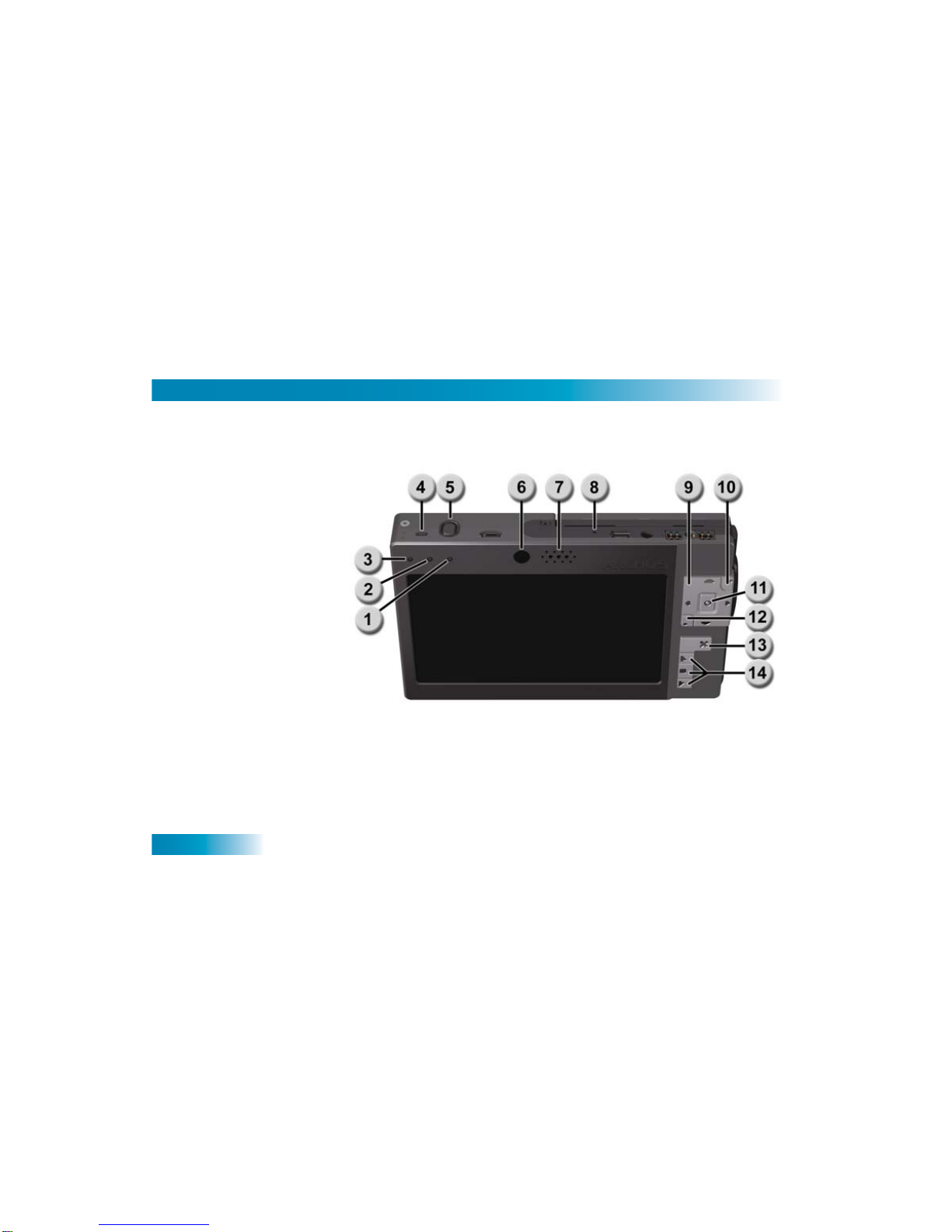
CONTROLS AND INDICATORS
1CHG: a solid light
indicates
that the PocketDISH is connected to the battery
charger. If charging is complete, the light flashes.
2HDD:
indicates
that the hard drive is active.
3ON: indicates that the PocketDISH is turned on.
4TV OUT: shows that the screen content is displayed on a TV.
5TV/LCD key: switches between the PocketDISH screen and a TV.
6Remote control eye: receives the commands from the remote control.
7Speaker: reproduces the audio.
8MIC: to make digital (voice) recordings.
9: moves the cursor left or right.
Previous, Next: makes a selection, advances or reverses quickly through a file.
:moves the cursor up or down or increases/decreases the volume (+/-).
10 Page Up: moves the cursor up one page. Skips video and music ahead 30
seconds.
11 ON: press and hold to turn on PocketDISH.
Play: starts the playback of a selection.
Enter: acknowledges a selection.
12 Page Down: moves the cursor down one page. Skips video and music back
30 seconds.
13 OFF: press and hold to turn off PocketDISH.
Stop: stops the playback of a selection.
Escape: quits a selection without saving.
14 Upper, Center and Bottom Setup keys:to open and navigate through the Setup
menus, sub-menus and options to personalize your settings.

4
Chapter 1
CONNECTORS - POCKETDISH
CONNECTORS - DOCKING STATION
The USB Host and Device connector types used on the PocketDISH are: USB Mini Type A (USB-A) and
USB Mini Type B (USB-B).
USB-A (Host): connect USB (mass storage device) compatible equipment, like a
camcorder, digital photo camera or a USB flash drive.
USB-B (Device): connect to a DISH Network DVR or computer.
DC IN (Power): connect to the AC/DC power adapter that came with the PocketDISH.
Headphones/AV: connect to the headphones that came with the PocketDISH.
Multi-connection: install the multi-connector for use with other multimedia devices or
connect to the Archos FM Radio & Remote Control (not included).
DC IN (Power): connect to the AC/DC power adapter that came with the PocketDISH.
Video: record video only from any S-Video source. For recording the audio, also connect
the analog AV-cable to the AV in connector.
AV out: send the audio and video from the PocketDISH to a TV.
AV in: record audio and video from any audio or video device onto the PocketDISH.
Andere Handbücher für PocketDISH
3
Inhaltsverzeichnis
Andere Dish Network Medienplayer Handbücher