Displays2go DGTEMPSCN Bedienungsanleitung

1/ 15
User Manual V21.01
Model: DGTEMPSCN
Description: 7 inch indoor wrist temperature scanner and hand sanitizer dispenser
Scan QR code to visit the product page:
Operating Instructions for Digital Signage
Note: Before using the product, please read the instructions carefully!
Do not attempt to disassemble this product. If the product does not work properly, please call
our Customer Service Department at 1-844-221-3393.

2/ 15
Contents
Features................................................................................................................................ 3
Safety Warnings and Precautions ........................................................................................... 3
Assembly and Connection...................................................................................................... 5
Packing List....................................................................................................................................5
Interfaces ......................................................................................................................................6
Steps for Assembly........................................................................................................................6
Description of Basic Operation ............................................................................................... 7
Power on/off.................................................................................................................................7
Launch Screen...............................................................................................................................7
Screen displays after power..........................................................................................................7
Temperature measuring interface.................................................................................................8
Data interface................................................................................................................................8
Parameter setting interface ..........................................................................................................9
Automatic Hand Sanitizer Dispenser……….……….……………………………………………………………………10
Open the front cover...................................................................................................................10
Part name....................................................................................................................................10
Battery installation......................................................................................................................11
Replace hand sanitizer ................................................................................................................11
lndicator status prompt .............................................................................................................12
Technical Specifications…………………………………………………………………………………………………………13
Troubleshooting……………………………………………………………….……………………………………………………14
Cleaning and Maintenance……………………………………………….……………………………………………………14
Names and Contents of Toxic and Hazardous Substances or Elements in the Product…….………15

3/ 15
Features
1. Embedded Linux operating system and unique UI design bring you more convenient operation.
2. Accurate temperature measurement, high temperature alarm, voice broadcast, non-contact design.
3. Intelligent counting function can automatically count the number of people passing through and the
number of alarms.
4. Integrated hand sanitizer dispenser provides the essential cleansing solution to your guests and
employees.
Safety Warnings and Precautions
Thank you for purchasing the wrist temperature scanner + hand sanitizer dispenser from Displays2go. We
have considered the factors to ensure personal safety in product design and have tested rigorously at the
factory.
In order to safely use, maximize performance of the unit and extend the life of the product, please read
and follow all instructions carefully before using the product.
Keep the instructions for future reference.
We strongly recommend using a surge protector, or a power strip with internal circuit breaker to
prevent damages to the device.
Symbol Legends:
Warning: May cause personal injury or death
The operation is prohibited
Caution: May cause damage or property loss
The operation must be executed
If any of the following occurs:
Power outage or instable voltage.
Abnormal sound or smell from the unit.
AC power cord is damaged.
Device is damaged due to drop, knock or impact.
Any liquid or foreign matters fall into the enclosure.
Turn off the Device immediately, pull out the plug from the power outlet, and ask the
authorized personnel for maintenance timely.
If coal gas or other flammable gas leaks, do not pull out the plug of the device or other electrical
appliances; instead, turn off the gas valve immediately, and open the doors and windows quickly.

4/ 15
⚫Do not use power supply other than AC 110V, 60Hz.
⚫Cut off the power supply before connecting or disconnecting any cables.
⚫Do not place the device on any instable positions, or else it may be damaged or cause fire.
⚫Do not place the device in the positions such as:
1. The environment subject to direct strong sunlight, moisture, extreme temperature or too
much dust;
2. The environment with flammable or explosive materials;
3. The environment with flammable or corrosive gases;
⚫Do not use damaged or inappropriate power outlets, and ensure that the plugs and outlets
contact properly.
⚫Do not let dust or metal deposits adhere to the plugs and outlets.
⚫Do not damage the power cords:
1. Do not modify the power cords;
2. Do not place heavy objects on the power cords;
3. Keep the power cords away from heat source;
4. Do not pull the cord to remove the plug.
⚫Do not connect too many plugs to one outlet in parallel, or else it may cause fire due to excessive
power consumption.
⚫Do not approach the device with open flame (e.g. a lighted candle), or else it may cause electric
shock or fire.
⚫Do not put any sharp objects, metal or liquid into the vents or let them touch the signal terminals
to avoid short circuit, product damage, and electric shock.
Do not touch the plugs with wet fingers, or else it will cause electric shock.
Do not use the Digital Signage in stormy weather, especially when there is lightning; instead, please
disconnect the power and antenna plugs to avoid lightning strike.
Do not disassemble the device without permission, or else it may cause electric shock or fire. Please
ask qualified technician for repair.
WARNING

5/ 15
⚫Keep the small parts away from children to prevent them from swallowing.
⚫If the device won’t be used for a long time, please turn it off and pull out the power plug.
⚫To adjust the position of the device, please disconnect all power cords and move slowly to avoid
tip over.
⚫Do not scratch or knock the LCD with hard object, or twist and squeeze the LCD.
⚫Do not turn on the unit immediately when it is moved from a place with low temperature to high
temperature, or else it will cause condensation and malfunction.
⚫Before cleaning the device, please pull out the power plug; wipe with soft cloth; do not use
industrial chemicals; prevent foreign matters from entering the machine. Improper cleaning (such
as cleaning solution, water) may damage the product, erase the printed information, and even
cause damage of the components if fluid flows in, resulting in machine failure.
⚫If the unit displays the same screen for a long time or the moving picture has fixed text or icon, it
will leave ghosting on the screen and won’t disappear when the unit is turned off; it is normal and
isn’t covered by the warranty.
⚫The power of the device can be cut off by pulling out the plug.
⚫If the LCD screen ruptures and the liquid splashes on the skin, please rinse for 15 minutes with
clean water immediately, and consult your doctor.
⚫When the plug or coupler is used as disconnection device, it should be easy to operate the device.
⚫Insert the plug into the outlet properly, or else it may cause sparks and fire.
⚫The technical specifications printed herein and on the packaging are subject to change without
prior notice. The Manual may be slightly different from actual operation, and the latter is
applicable.
Assembly and Connection
Packing List
Name
Name
1 Device
⚫
1 Power Cord
⚫
1 Operation Manual
⚫
1 key (Hand Sanitizer Dispenser)
⚫
Note:
Contact local dealer if you have questions about the operation, debugging and connection of the unit; if
the unit doesn’t work normally, please cut off the power immediately and consult the dealer. The unit is
class-A product, which may cause radio interference in living environment. In this case, please take
feasible measures, and use power plug as the disconnection device.
CAUTION

6/ 15
Interfaces
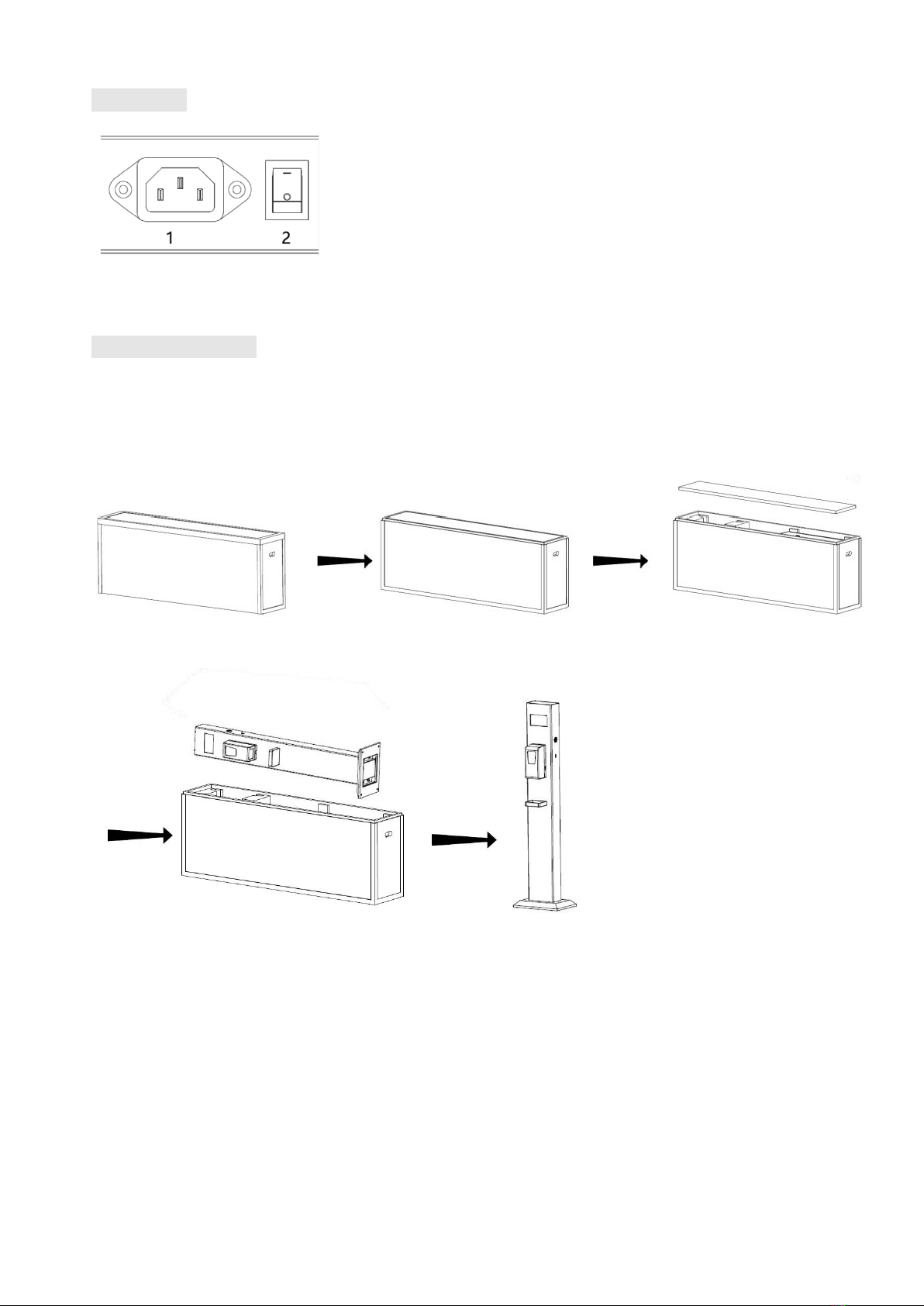
1. Power Cord Socket; 2. On/Off Switch;
Note: Please pull out the power plug before installing or disassembling the unit!
Steps for Assembly
1. Open the top cover as shown in Fig. 2;
2. As shown in Figure 3, the EPE is removed;
3. Carefully lift out the unit as shown in Fig. 4;
4. Stand the machine upright, as shown in Figure 5.
(Fig. 1) (Fig. 2) (Fig. 3)
(Fig. 4) (Fig. 5)

7/ 15
Description of Basic Operation
Power on/ off
Insert the power plug into the outlet. Press the ON/OFF switch to “I” to turn the unit on;
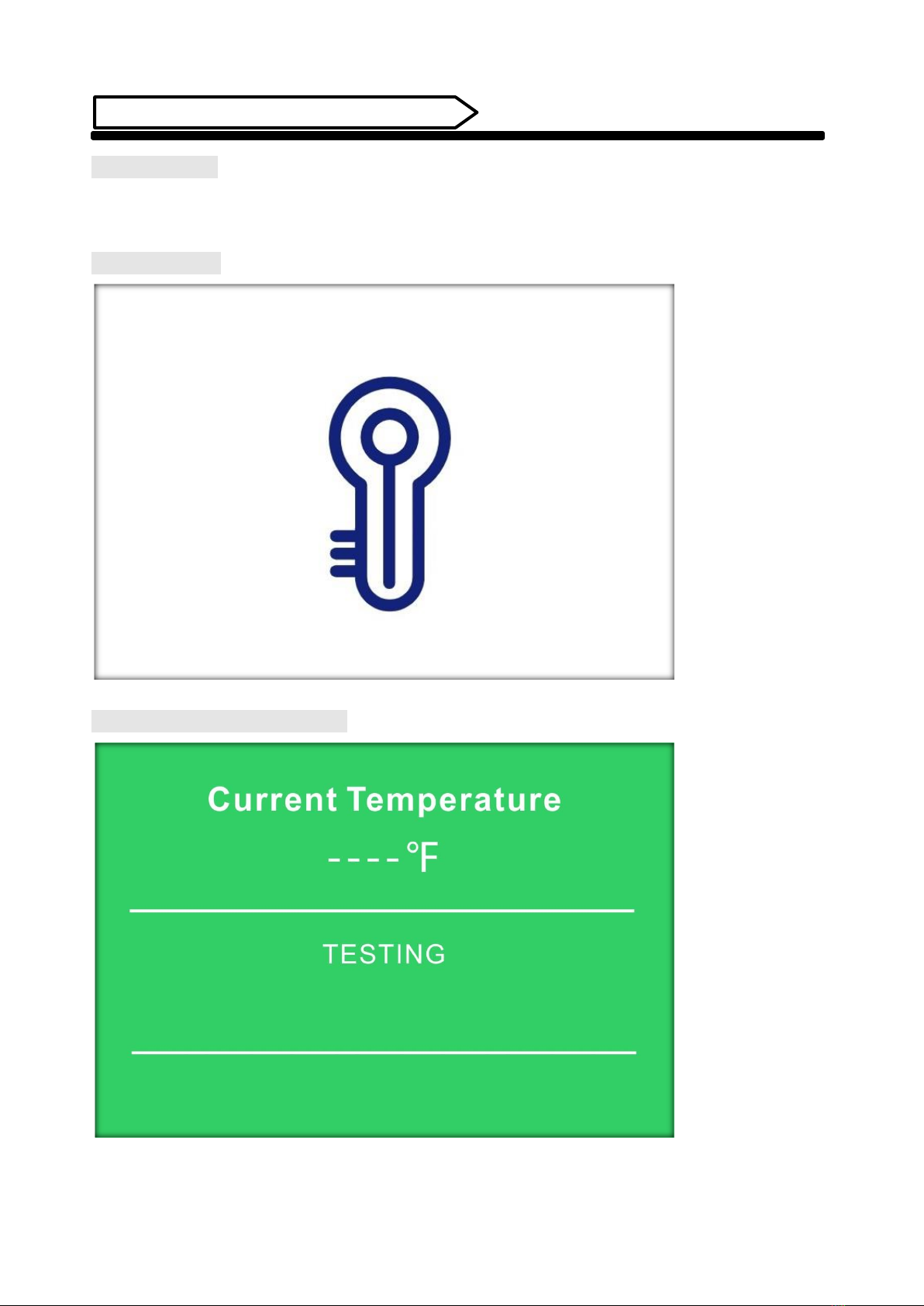
Launch Screen
Screen displays after power on

8/ 15
Temperature measuring interface
1. When measuring the temperature, please measure the temperature within 3cm from the temperature
sensor on the side, and align your wrist with the temperature sensor;
2. When body temperature is normal, it will be displayed in green with voice and text prompts, as shown in
Figure 1;
3. When the body temperature is abnormal, it will be displayed in red, with voice and text prompts, as shown
in Figure 2;
(Fig. 1) (Fig. 2)
Data interface
1. After power on, the measured data resets to "0", as shown in the figure below;
2. After the device is turned off, all traffic data will be cleared automatically.
Total number of
people tested.
Number of people
test with a normal
body temperature.
Number of people
test with an abnormal
body temperature.

9/ 15
Parameter setting interface
Temperature Unit:
"°C" is the Centigrade option;
"°F" is the Fahrenheit option, and the following image interface is
the Fahrenheit interface state;
Screen Brightness:
Screen brightness setting, minimum brightness: 1; maximum
brightness: 10;
Volume:
Volume Setting
Measurement Sensitivity:
Sensor sensitivity setting
Temperature Compensation (0.1):
Temperature compensation setting
Alarm Temperature:
Maximum temperature setting
Temperature test min:
Minimum temperature setting

10 / 15
Automatic Hand Sanitizer Dispenser
Open the front cover
Use the key in the accessory bag. Insert into the keyhole on the top of the unit and slightly press downward to
open the cover. See below:
Part name
Inhaltsverzeichnis
Andere Displays2go Spender Handbücher