
DXG DXG DXG-568 Bedienungsanleitung

Digital Camera DXG-568
User’s Manual

1
Getting Started
■ ATTENTION .....................................................................................4
Safety Precautions..................................................................................................4
Before Use...............................................................................................4
Important Notices......................................................................................5
■ Package Contents.............................................................................6
Getting Ready
■ Getting to Know Your Camera
Names of Parts ......................................................................................................7
Operation Buttons..................................................................................................8
■Using Batteries
Loading/Replacing Batteries....................................................................................9
■Memory Card and Internal Memory
Loading/Removing the Memory Card.....................................................................10
Using the Internal Memory....................................................................................13
■Attaching the Strap ........................................................................14
■ Turning on the Camera and LED Indicators..................................15
■Setting the Date/Time and Language...........................................17
Basic Operations
■ LCD Screen, Menu, and Button Icons............................................18
■ Taking a Picture..............................................................................28
■ Transfering Pictures From the Camera to Your PC.......................48
Mode Description
■ Setup Mode
■ Image Settings
Image Resolution.................................................................................................19
Image Quality......................................................................................................19
White Balance......................................................................................................19
Contents

2
EV Compensation.................................................................................................20
Volume................................................................................................................20
■System
Language Options................................................................................................20
Date/Time ...........................................................................................................20
TV-Out Options....................................................................................................20
Lighting Options...................................................................................................20
■ System 2
LCD Screen Contrast.............................................................................................20
LCD Screen Brightness .........................................................................................20
Shutter Effect.......................................................................................................20
Format Memory....................................................................................................21
Default Settings ...................................................................................................21
Firmware Update..................................................................................................21
File Copy .............................................................................................................21
Menu Index .........................................................................................................22
■ Picture Mode
LCD Screen Icons.................................................................................................27
Taking Pictures.....................................................................................................28
LCD Screen Display ..............................................................................................28
Macro / Normal....................................................................................................29
Digital Zoom........................................................................................................29
Self-timer Mode....................................................................................................29
Flash...................................................................................................................30
Menu...................................................................................................................30
Menu Index .........................................................................................................31
■ Movie/Video Mode
LCD Screen Icons.................................................................................................33
Recording Video...................................................................................................34
LCD Screen Display ..............................................................................................34
Digital Zoom........................................................................................................35
Menu...................................................................................................................35
Image Resolution.................................................................................................35
Numbers of Image per Second..............................................................................35
Image Quality......................................................................................................35
EV Compensation.................................................................................................35
Menu Index .........................................................................................................36

3
■ Playback Mode
LCD Screen Icons.................................................................................................37
Thumbnail Display and File Selection.....................................................................39
Image Enlargement Mode.....................................................................................40
Play Video............................................................................................................41
Play Audio File .....................................................................................................41
Menu...................................................................................................................42
■ Delete
Delete One ..........................................................................................................42
Delete All.............................................................................................................42
Exit .....................................................................................................................42
■ Function
Auto Play.............................................................................................................42
Exit .....................................................................................................................42
■ Printing Setup
Set to All .............................................................................................................42
Set to One...........................................................................................................42
Date....................................................................................................................42
Exit .....................................................................................................................42
Menu Index .........................................................................................................43
■ Voice Mode
LCD Screen Icons.................................................................................................46
Audio ..................................................................................................................46
■USB Mode
Transferring Pictures to Your PC (Mass Storage).....................................................48
File Structure of Memory Card...............................................................................49
PC Camera (Webcam) ..........................................................................................50
■Printing Directly Mode
Print One.............................................................................................................51
Print All ...............................................................................................................51
Menu Index .........................................................................................................52
■ TV-Out Options .........................................................................................53
■ Software Driver Installation.................................................................54
■Installing Mr. Photo / VideoWorks 6..................................................56
Appendix
■Specifications............................................................................................60
■System Requirements.............................................................................61

4
Safety Precautions
The Software CD packaged with this camera is designed for a PC only. Playing
it on an audio CD player may damage the device. This camera is a precision
electronic device. Do not attempt to service this camera yourself, as opening or
removing covers may expose you to dangerous voltage points or other risks.
To reduce the risk of fire, do not store this product under direct sunlight.
Before Use
Take some test shots before formal recording.
Before using this camera for any important occasions (such as a wedding
ceremony or an overseas trip), test the camera beforehand to ensure that it
functions well. Any supplemental cost caused by the malfunction of this product
(such as cost of photography or the loss of photography income) is not the
responsibility of DXG and no compensation will be provided for it.
Copyright information
Any pictures taken with this digital camera must be in accordance with
copyright law. When "No Photography" signs are posted, it is illegal to record
any live performance, improvisation or exhibits even for personal purpose. Any
transfer of memory card data must also be conducted under the provisions of
copyright law.
Notes on the LCD (Liquid Crystal Display) screen
Be extra careful if the LCD screen is damaged; if the LCD gets cracked do the
following:
1. If the liquid touches the skin: wipe the skin dry with a cloth and rinse
immediately with plenty of water.
2. If the liquid comes in contact with the eyes: rinse immediately with plenty of
water for at least 15 minutes and seek medical advice as soon as possible.
3. In case the liquid is accidentally ingested: rinse the mouth with water, drink
plenty of water and induce vomiting. Seek medical advice as soon as
possible.
ATTENTION

5
Important Notices
This product consists of intricate electrical parts. To ensure optimal
performance, do not drop the camera.
Avoid storing the camera in the following locations:
1. In damp or dusty places.
2. In sealed vehicles, under direct sunlight, or in places with high
temperatures.
3. In areas where there is a lot of vibration.
4. In locations full of smoke, fumes or steam.
5. In locations subject to strong magnetic fields.
6. In rainy or snowy locations.
Do not open the battery cover when the power is on.
If water has entered the camera, turn the power OFF and
remove the batteries immediately.
Camera Maintenance
1. If the lens, LCD screen, or viewfinder surface is dirty, use a lens brush or soft
cloth to wipe it clean. Do not touch the lens with you fingers.
2. To avoid scratching the lens, LCD screen, or viewfinder surface, do not use
any solid object to clean the camera.
3. Do not use any detergent or volatile solution. This could damage the paint or
lens. Use a soft cloth only.
ATTENTION (con.)
6
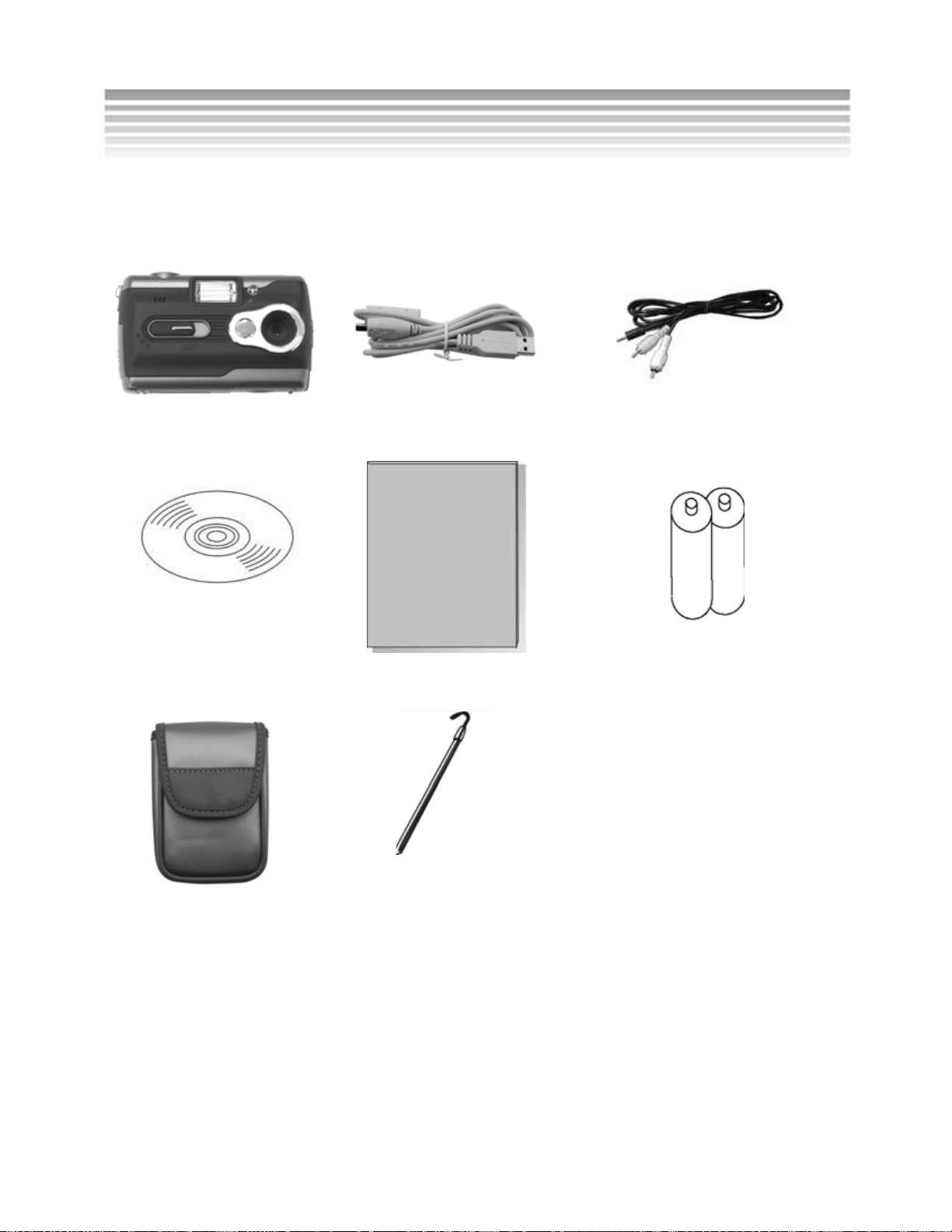
Carefully unpack your camera and make sure that you have the following items.
If an item is missing or damaged, please contact the vendor immediately.
Digital Camera USB Cable TV-Out Cable
Software CD User's Manual AA alkaline batteries x 2
Pouch Strap
Package Contents
7
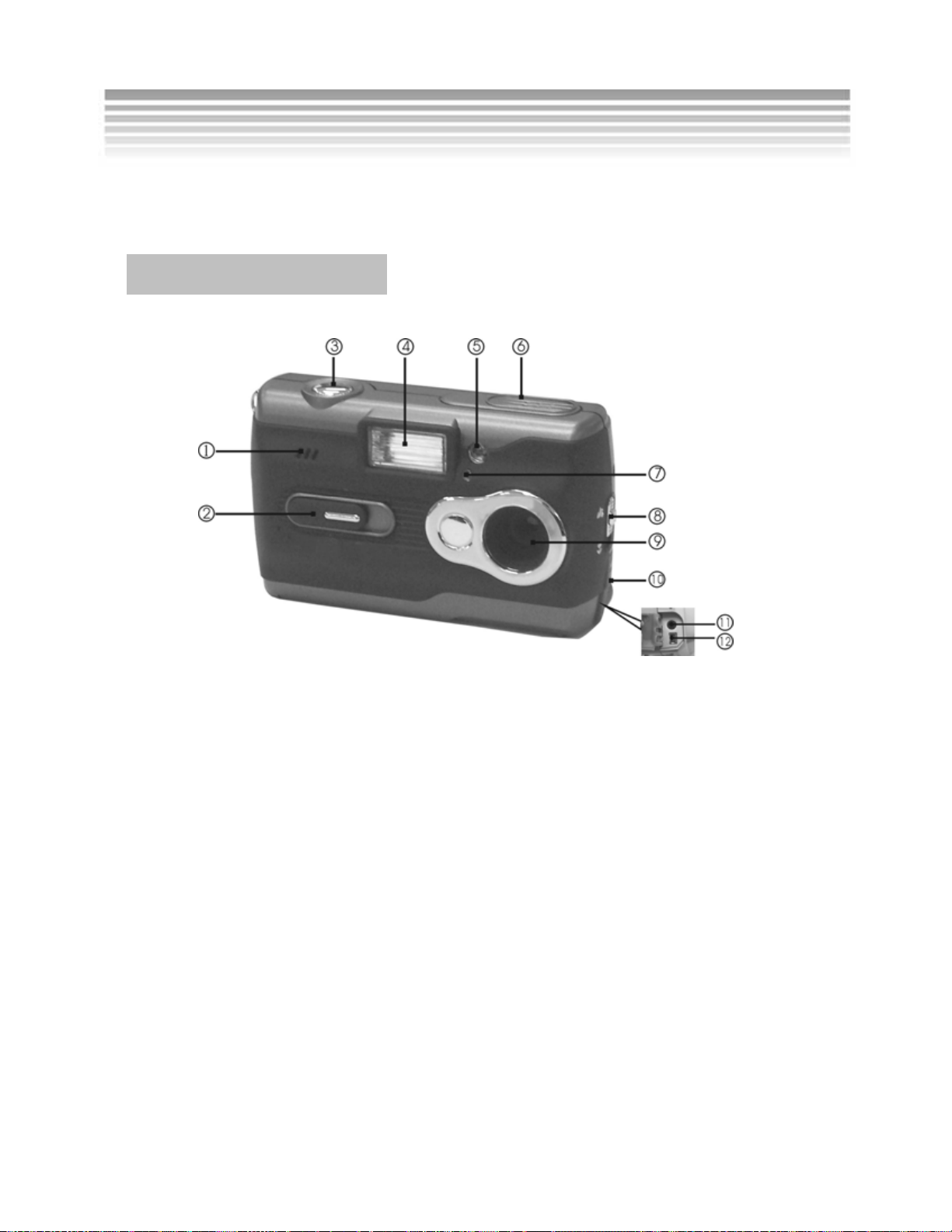
Names of Parts
1. Speaker 2. Lens Cover/Power Switch 3. Shutter Button
4. Flash 5. Red-eye Reduction Device 6. Microphone
7. Self-timer LED 8. Macro Switch Button 9. Lens
10. Connector Cover 11. TV-Out Port 12. USB Port
Shutter Button
The Shutter button is used to take pictures in the Picture Mode or start
recording video or Movie/Video Mode.
Lens Cover
The lens cover when slid open will turn the camera’s power on automatically. To
turn the power off, slide the lens cover back.
USB Cover
Open the USB cover to find the USB and TV-Out ports.
Getting to Know Your Camera
Front View
8
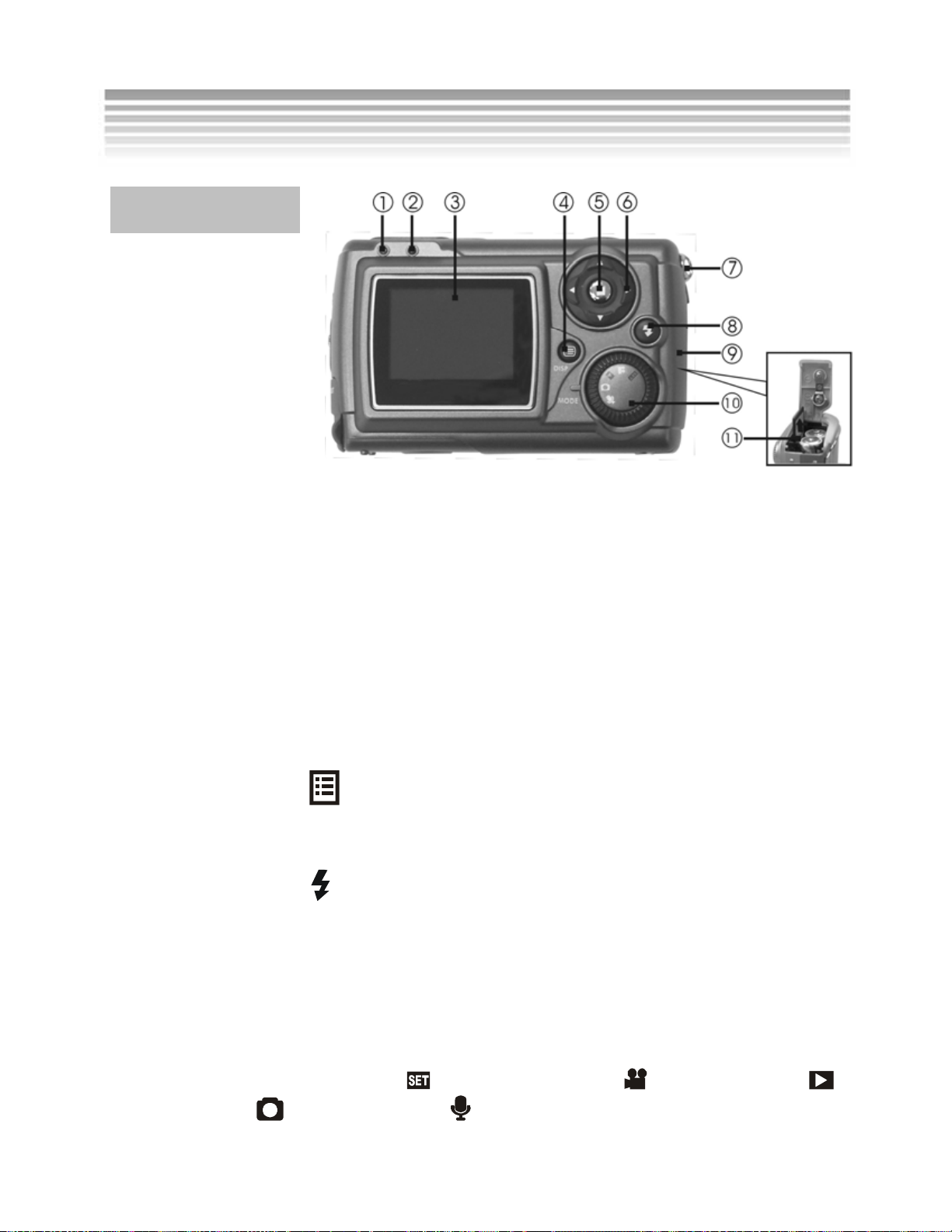
1. Status LED 2. Macro LED 3. LCD Screen
4. Display Button 5. Menu Button 6. 4-way Scroll Button
7. Strap Holder 8. Flash Button 9. Battery Cover
10. Mode Dial 11. Memory Card Slot
Operation Buttons
Macro switch
Toggles between the Macro and Normal Modes; refer to page 29 for details.
Disp. Button
Changes the display of the icons on the screen; refer to the LCD Screen Icons
in each mode for details.
Flash Button
Toggles between the Flash Modes; refer to page 30 for details.
4-way Scroll Button
The 4-way scroll button is used to navigate the menus and to operate the zoom.
Mode Dial
Toggles between Setup Mode , Movie/Video Mode , Playback Mode ,
Picture Mode and Voice Mode .
Rear View
Getting to Know Your Camera (con.)

9
Loading/Replacing Batteries
Turn the digital camera off and follow the instructions below:
Slide the battery cover open in the direction indicated by the arrow.
Insert the batteries according to the diagram on the inside of the cover.
Close and lock the battery cover.
Note: Using rechargeable Nickel-Metal Hydride (Ni-MH) batteries can greatly
extend battery life and are available online at: www.dxgusa.com/shop
Using Batteries
Open and close the battery cover gently to
avoid damaging it.
Dieses Handbuch passt für folgende Modelle
1
Inhaltsverzeichnis
Andere DXG Digitalkamera Handbücher

DXG
DXG DXG-328 Bedienungsanleitung

DXG
DXG DXG-528 Bedienungsanleitung

DXG
DXG DXG-228 Bedienungsanleitung

DXG
DXG DXG-110 Bedienungsanleitung

DXG
DXG DXG-409 Bedienungsanleitung

DXG
DXG DXG DXG-518 Bedienungsanleitung

DXG
DXG DXG DXG-608 Bedienungsanleitung

DXG
DXG DXG DXG-308 Bedienungsanleitung

DXG
DXG DXG-110 Bedienungsanleitung

DXG
DXG DXG DXG-538 Bedienungsanleitung


