Ebyte NB1A1 Bedienungsanleitung

Copyright ©2012–2023,成都亿佰特电子科技有限公司
NB1A1
16 Serial Server User Manual

Chengdu Ebyte Electronic Technology Co., Ltd. NB1A1User Manual
Copyright ©2012–2023,Chengdu Ebyte Electronic Technology Co., Ltd.
Catalog
Chapter1 Introduction ............................................................................................................................ 1
1.1 Features ........................................................................................................................................1
Chapter 2 Quick Start ............................................................................................................................ 2
2.1 Hardware preparation .................................................................................................................. 2
2.2 Sotware preparation ..................................................................................................................... 2
2.3 Device Test Procedure ................................................................................................................. 3
2.3.1 Connect hardware ............................................................................................................. 3
2.3.2 Device parameters settings ............................................................................................... 4
2.3.3 Open the serial debugging assistant ..................................................................................5
2.3.4 Opening the Network Assistant ........................................................................................ 6
2.3.5 Sending and receiving data test ........................................................................................ 7
Chapter 3 Product Overview
3.1 Technical parameters ................................................................................................................... 7
3.2 Interface description .................................................................................................................... 9
3.3 Indicator Description ................................................................................................................. 11
3.4 Size .............................................................................................................................................15
Chapter 4 Basic function ......................................................................................................................16
4.1 Mapping between Channels and serial ports ............................................................................. 16
4.2 Local network parameter ........................................................................................................... 16
4.2.1 Local IP address .............................................................................................................. 16
4.2.2 DNS(Domain name resolution) ...................................................................................... 17
4.2.3 Disconnection and reconnection period ..........................................................................17
4.2.4 Timeout restart (restart without data) ..............................................................................17
4.3 Hardware factory recovery ........................................................................................................ 17
4.4 Device Working Mode ............................................................................................................... 18
4.4.1 TCP Server ...................................................................................................................... 18
4.4.2 TCP Client .......................................................................................................................18
4.4.3 UDP Server ..................................................................................................................... 18
4.4.4 UDP Client ......................................................................................................................19
4.4.5 HTTP client ..................................................................................................................19
4.4.6 MQTT Client .................................................................................................................. 20
4.4.7 Port Mapping .................................................................................................................. 22
4.5 Channel terminal ........................................................................................................................22
Chapter 5 Advanced functions .............................................................................................................23
5.1 Heartbeat packet and registration packet ................................................................................... 23
5.1.1 Heartbeat packet ............................................................................................................. 23
5.1.2 registration packet ...........................................................................................................23
5.2 Short connection ........................................................................................................................ 24
5.3 Serial cache clearing .................................................................................................................. 24
5.4 Modbus Gateway ....................................................................................................................... 25
5.4.1 Protocal conversion .........................................................................................................25
5.4.2 Simple Protocol Conversion ........................................................................................... 25
5.4.3 Multi-Host Mode ............................................................................................................ 27

Chengdu Ebyte Electronic Technology Co., Ltd. NB1A1User Manual
Copyright ©2012–2023,Chengdu Ebyte Electronic Technology Co., Ltd.
5.4.4 Storage Gateway ............................................................................................................. 28
5.4.5 Configurable gateway ..................................................................................................... 29
5.4.6 Upload Automatically ..................................................................................................... 30
5.5 Firmware upgrade ...................................................................................................................... 31
Revise History ......................................................................................................................................33
About Us .............................................................................................................................................. 33

Chengdu Ebyte Electronic Technology Co., Ltd. NB1A1User Manual
Copyright ©2012–2023,Chengdu Ebyte Electronic Technology Co., Ltd.
1
Chapter1 Introduction
NB1A1 is a series of serial port server products independently developed by EBAite, which can
realize bi-directional transparent transmission of data from 16 serial ports to Ethernet ports. Support
Modbus protocol conversion, multi-host gateway, storage gateway and other data conversion
functions. At the same time, it also supports the upload of on-site data to the cloud server to achieve
cloud monitoring. The equipment adopts industrial design standards to ensure stability in harsh
working environments.
It supports the fast configuration of host computer and AT command, which can realize the fast
debugging and installation of equipment.
Widely used in computer room monitoring, environmental monitoring, intelligent traffic, road
gate control, intelligent express cabinets and other industries.
1.1 Features
Industrial design is stable and reliable, port isolation protection design;
16 independent RS485 ports are supported.
Support a variety of Modbus gateway modes, multi-host, storage, configurable gateway;
Supports active ModBus data reporting.
Supports two network ports and switch cascading.
Supports POE power supply;
Support access standard MQTT, OneNET, Baidu Cloud, Huawei Cloud, Alibaba Cloud;
Rich LED status indicator, real-time indication of equipment working status;
Support host computer, AT command configuration and other configuration methods;
Support terminal or DC head power supply, 8-28V DC wide voltage input, support reverse
protection;
The baud rate ranges from 1200 to 460800bps;
Supports serial heartbeat packets, network heartbeat packets, and registration packets.
Each way supports working modes: TCP client, TCP server, UDP client, UDP server, MQTT
client, HTTP client;
16 servers can be enabled at the same time, and each server supports eight clients.
supports HTTP client mode;
Support remote upgrade, easy customization and optimization;
Supports virtual serial port software.

Chengdu Ebyte Electronic Technology Co., Ltd. NB1A1User Manual
Copyright ©2012–2023,Chengdu Ebyte Electronic Technology Co., Ltd.
2
Chapter 2 Quick Start
2.1 Hardware preparation
A laptop with RJ45 network port and USB interface;
NB1A1 serial server one;
DC12V 1A power adapter;
A network cable;
One USB to RS485 converter;
The following figure shows the hardware devices to be prepared:
Computer
Net cable
NB1A1
DC 12V1A
USB to RS45
Conductor cables
Note: The Quick Start shows only one RS485 port.
2.2 Sotware preparation
Serial Debugging Assistant (XCOM), Network Debugging Assistant (NetAssist), EBAite network
configuration tool (configure the host computer), official website address:
www.ebyte.com,
Product
details provides a download interface.

Chengdu Ebyte Electronic Technology Co., Ltd. NB1A1User Manual
Copyright ©2012–2023,Chengdu Ebyte Electronic Technology Co., Ltd.
3
Network Assistant
XCOM
Ebyte configuration software
[Note] The version of the host computer shown in the manual may be different from that provided by
the official website. The host computer provided by the official website shall prevail.
2.3 Device Test Procedure
This quick Start guide uses RS485 channel 1 as an example to describe how to configure other
channels.
2.3.1 Connect hardware
1. Connect serial port server network port and computer network port with network cable;
2, use the USB to RS485 converter to connect the USB port of the computer and the RS485 interface
of the serial port server (A to A, B to B); (If the serial port cannot be identified, install the
corresponding driver.)
3. Use a power adapter (DC 8-28V) to power on the serial port server device. After powering on the
device, observe whether the indicator is normal.
4. Confirm that the status is correct and proceed to the next configuration;
Note: The power-on and power-on process is expected to take about 50 seconds. Wait for the NET
indicator to blink quickly, indicating that the device is powered on.

Chengdu Ebyte Electronic Technology Co., Ltd. NB1A1User Manual
Copyright ©2012–2023,Chengdu Ebyte Electronic Technology Co., Ltd.
4
2.3.2 Device parameters settings
We tested transparent data transfer using the default parameters of the serial server. Open the
configuration software, click Search device, select the device, and check the following parameters:
Change the computer IP address as follows: 192.167.3.100.
Ensure that the PC IP address and serial port server IP address are in the same network segment,
and the IP address must be different. The method is shown in the following figure.

Chengdu Ebyte Electronic Technology Co., Ltd. NB1A1User Manual
Copyright ©2012–2023,Chengdu Ebyte Electronic Technology Co., Ltd.
5
Note: If the communication is not successful, the user can try to close the firewall of the
computer and try again, as shown in the following figure:
2.3.3 Open the serial debugging assistant
Start the XCOM V2.6 software, select the correct serial port number, set the current serial port
parameters of the device (the default value is 115200-8N1), and open the serial port, as shown in the
following figure:

Chengdu Ebyte Electronic Technology Co., Ltd. NB1A1User Manual
Copyright ©2012–2023,Chengdu Ebyte Electronic Technology Co., Ltd.
6
2.3.4 Opening the Network Assistant
Open the Network assistant software, select the "TCP Client" mode, set the remote IP address to
"192.168.3.7" and the remote port to "8001", and click the Connect button, as shown in the following
figure:

Chengdu Ebyte Electronic Technology Co., Ltd. NB1A1User Manual
Copyright ©2012–2023,Chengdu Ebyte Electronic Technology Co., Ltd.
7
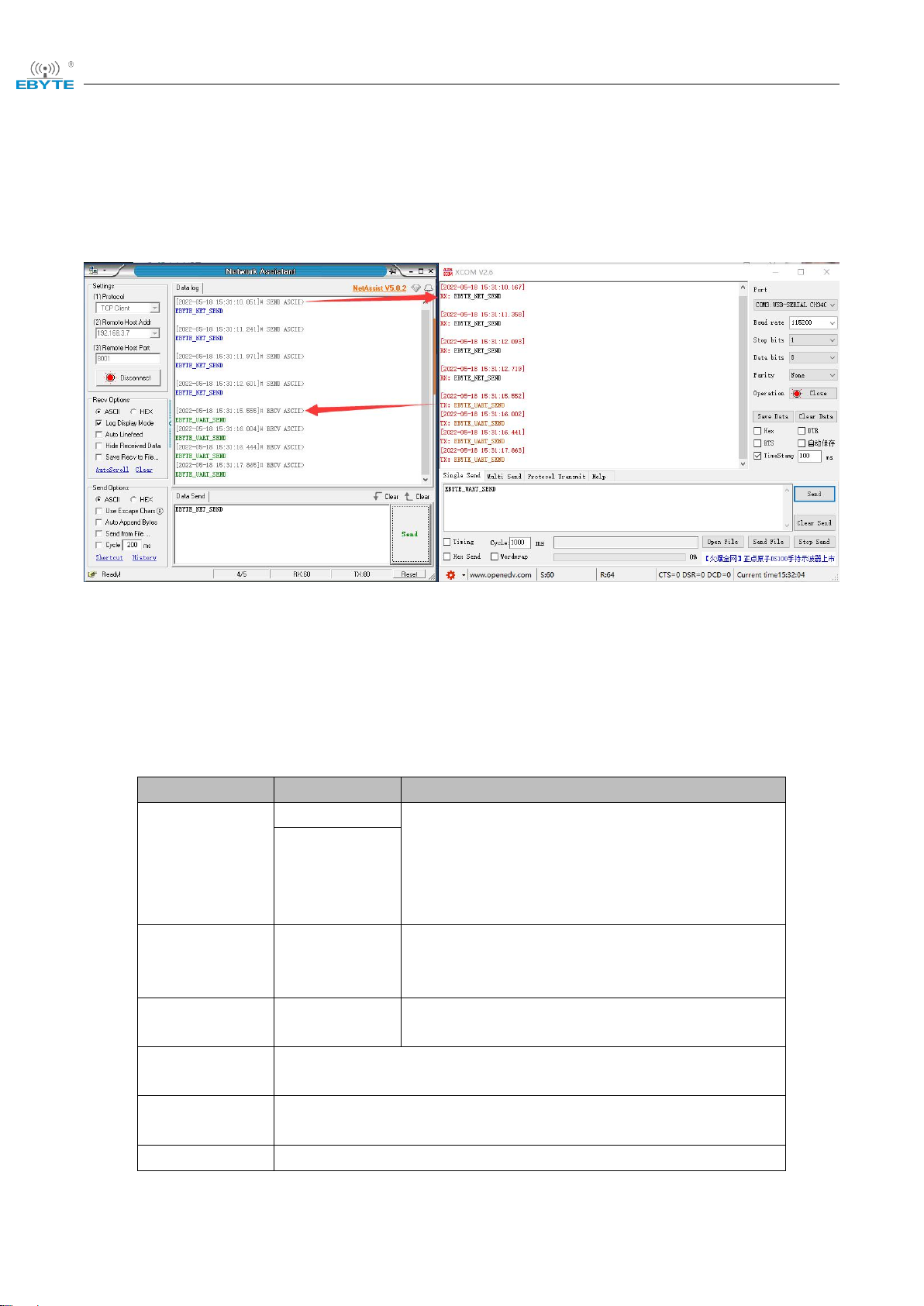
2.3.5 Sending and receiving data test
Click the "Send" button on "Network Debugging Assistant" and "Serial Debugging Assistant"
respectively to realize the transparent transmission of network and serial data, as shown in the figure
below.
Chapter 3 Product Overview
3.1 Technical parameters
Items
Innterface
Description
power
terminal
Dc 8 ~ 28 V, the two interfaces cannot supply
power at the same time;
Wire terminal: 2pin phoenix terminal;
DC seat: straight insert round hole, outer
diameter 5.5mm, inner diameter 2.0mm;
DC block
Net interface
RJ45
100/10M adaptive network port
Support switch function
Ethernet 1 supports POE power supply
Serial port
Channel 1 to
channel 16
RS485, 3.81mm Phoenix terminal, support
isolation
Working mode
TCP Server、TCP Client、UDP Server、UDP Client、HTTP Client、
MQTT Client(Default TCP Server)
Internet
protocal
IP、TCP/UDP、IPv4、ICMP、APR、DHCP、DNS、HTTP、
MQTT
IP acquisition
DHCP, Static IP (default static IP)
Inhaltsverzeichnis
Andere Ebyte Server Handbücher

Ebyte
Ebyte E840-DTU Bedienungsanleitung

Ebyte
Ebyte NB124E Bedienungsanleitung

Ebyte
Ebyte E840-DTU Bedienungsanleitung

Ebyte
Ebyte E840-DTU Bedienungsanleitung

Ebyte
Ebyte E810-DTU Bedienungsanleitung

Ebyte
Ebyte NB144S Bedienungsanleitung

Ebyte
Ebyte E103-W02DTU Bedienungsanleitung

Ebyte
Ebyte NB144E Bedienungsanleitung

Ebyte
Ebyte E810-DTU Bedienungsanleitung
Beliebte Server Handbücher anderer Marken

iRobo
iRobo IPC2U Bedienungsanleitung

Nortel
Nortel 1000 Con?guration guide Bedienungsanleitung

Asus
Asus AP7500 Bedienungs- und Wartungshandbuch

Avid Technology
Avid Technology AirSpeed 5000 Bedienungsanleitung

HP
HP Integrity rx2600 Installationsanleitung

Milestone
Milestone Husky IVO 350T Bedienungsanleitung