
EC-PACK EC-JET ECH200Pro Series Bedienungsanleitung

Guangzhou EC-PACK CO.LTD
EC-JET High Resolution Inkjet Printer
User Manual ECH200Pro Series Rev 1.01
1
Handheld High Resolution Inkjet Printing System
ECH200Pro Series
User Manual

Guangzhou EC-PACK CO.LTD
EC-JET High Resolution Inkjet Printer
User Manual ECH200Pro Series Rev 1.01
2
Copyright Notice
This publication may not be reproduced, stored in a retrieval system, or transmitted
in whole or in part, in any form or by any means, electronic, mechanical, photocopying,
recording, or otherwise, for any purpose without the written permission of Guangzhou
EC-Pack Co. Ltd.
Neither whole nor part of the product described in this manual may be adapted or
reproduced in any material form without prior written permission of Guangzhou
EC-Pack Co. ltd.
Disclaimer
Information of operation nature and particulars of the product and its use are given by
EC-Pack in good faith. However, it is acknowledged that there may be errors or omissions in
this manual.
EC-Pack shall not be liable for any loss or damage arising from the use of any
information, particulars or errors in this manual, or maintenance carried out by unauthorized
personnel, or any incorrect use of the product, whatsoever.
At all times the printer must be operated with EC-JET approved spares and
consumables.
About This Manual
The purpose of this manual is to provide the operator with sufficient information to
carry out operation tasks on the EC-JET High Resolution Inkjet Printer ECH200Pro Series.
Products described in this manual are subject to continuous development, and reviews
of this manual will be made accordingly in subsequent amendments or reissues.

Guangzhou EC-PACK CO.LTD
EC-JET High Resolution Inkjet Printer
User Manual ECH200Pro Series Rev 1.01
3
Content
User Manual...................................................................................................................1
Copyright Notice............................................................................................................2
Disclaimer......................................................................................................................2
About This Manual ........................................................................................................2
1. Chapter 1 Introduction of EC-JET High Resolution Inkjet Printer ........................4
1.1 Specifications............................................................................................4
1.2 Gentle Reminder.......................................................................................5
1.3 Product Photo............................................................................................5
2. Chapter 2 Installation..............................................................................................6
2.1 External I/O:...........................................................................................6
3. Chapter 3 ECH200Pro Printer User Interface............................................................7
3.1 User Interface Introduction.......................................................................7
3.1.1 Editing Message................................................................................................8
3.2 Main Interface Parameter........................................................................16
3.3 Printer Setting .........................................................................................18
3.3.1 Print Setup.......................................................................................................19
3.3.2 System Setup...................................................................................................25
3.3.3 Diagnostic menu..............................................................................................26
3.3.4 Disk Management ...........................................................................................26
3.4 Start printing ...........................................................................................27
4. Chapter 4 Precaution................................................................................................29
4.1 Printer Precaution....................................................................................29
4.2 Cartridge Precaution ...............................................................................29
4.3 Precautions for battery charging and use................................................30
4.4 Printhead Cleaning Method ....................................................................31
Appendix Machine Dimensions.................................................................................32

Guangzhou EC-PACK CO.LTD
EC-JET High Resolution Inkjet Printer
User Manual ECH200Pro Series Rev 1.01
4
1. Chapter 1 Introduction of EC-JET High
Resolution Inkjet Printer
1.1 Specifications
Model:ECH200Pro
Print lines: Arbitrary lines in the printing area
Print Height :0-12.7mm
Support font :Windows fonts
Support message type: Text, LOGO, Linear Barcode, 2D Barcode, Time/Date,
Sequential/Serial Number.
Printing Speed: 120m/min (150DPI)
Variable Data: Date, Time, Serial Number,
Message Length:500mm (extendable as option)
Message Storage:Unlimited(2GB Storage)
Supported Cartridge:EC Cartridge only.
External I/O :Standard USB Host,
Power Supply :110V-240VAC,50/60Hz
Battery: 16.8V (Use batteries supplied by the manufacturer)
Power Consumption:<30W
Working Environment:Temperature 0˚C~+70 ˚C
EMI Compliance: EN55011:2009+A1:2010, EN61326-1:2013,
EN61000-3-2:2014, EN61000-3-3:2013
Consumable life time: 1500 million dots maximum( 42ml cartridge), approximately 385
thousands character in 12.7mm height, according to the gray level of the character.
Substrate :Wood, Carton box, building materials, Porous and Semi Porous Surface.
Optional:
1. Encoder: to make the printer automatically adapt to the speed change of the production
line.
2. Sensor: Object induction, trigger printing information.

Guangzhou EC-PACK CO.LTD
EC-JET High Resolution Inkjet Printer
User Manual ECH200Pro Series Rev 1.01
5
1.2 Gentle Reminder
1. This is precision equipment, do not attempt to dismantle unless you are fully trained.
2. Please read and understand the operation manual before operating this printer.
3. Please connect the printing system correctly, and check the instructions when wiring.
1.3 Product Photo

Guangzhou EC-PACK CO.LTD
EC-JET High Resolution Inkjet Printer
User Manual ECH200Pro Series Rev 1.01
6
2. Chapter 2 Installation
2.1 External I/O:
φ5 Power Port :24V Power Supply(30W)
USB Port :Standard USB Host.

Guangzhou EC-PACK CO.LTD
EC-JET High Resolution Inkjet Printer
User Manual ECH200Pro Series Rev 1.01
7
3. Chapter 3 ECH200Pro Printer User Interface
3.1 User Interface Introduction
Turn on the machine power switch, wait for about 30s machine boot into the main interface:
Install EC Cartridge,System will recognize ink type automatically:
Guangzhou EC-PACK CO.LTD
EC-JET High Resolution Inkjet Printer
User Manual ECH200Pro Series Rev 1.01
8
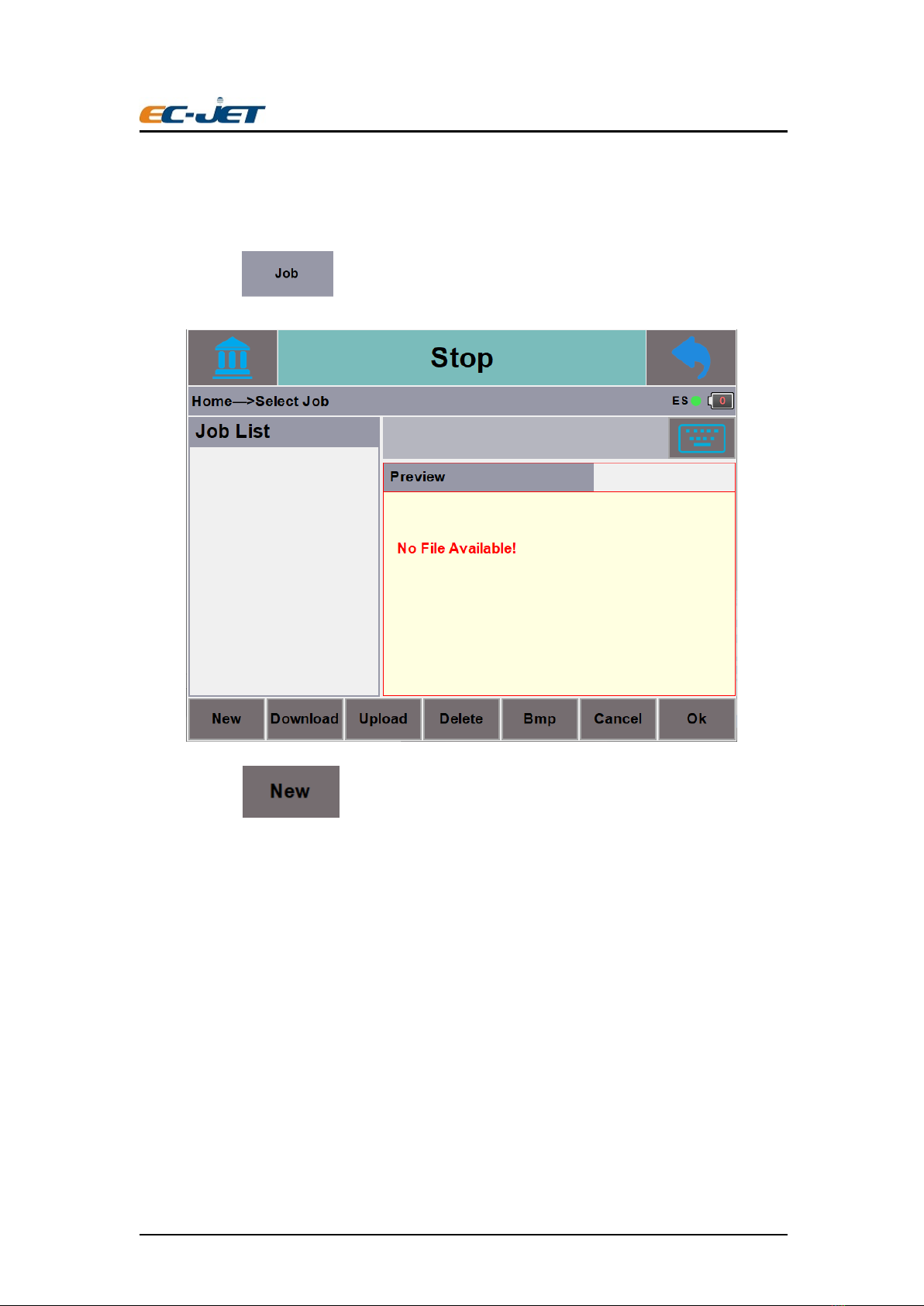
3.1.1Editing Message
Step 1:Click will lead to Message Selection interface:
Step 2:Click will lead to Message Name inputting interface, and input the new
message name:

Guangzhou EC-PACK CO.LTD
EC-JET High Resolution Inkjet Printer
User Manual ECH200Pro Series Rev 1.01
9
Keyboard:ECH200Pro Preloaded with English and Chinese Keyboard, click to
switch between Chinese, English or other Keyboard, click for symbols and numeric,
click for Capital Letter. Chinese Simplified PinYin Input is supported.
click Enter after naming your message will lead to Message Editing Interface.
Step3: Click to enter into the Message Editing Interface.

Guangzhou EC-PACK CO.LTD
EC-JET High Resolution Inkjet Printer
User Manual ECH200Pro Series Rev 1.01
10
Click to enter into the message adding interface, the printing message can be added in
this interface.
Select the field type needed, user can add desire field type in message editing area.
Example:Add text field
Dieses Handbuch passt für folgende Modelle
1
Inhaltsverzeichnis
Andere EC-PACK Drucker Handbücher


