Englaon 24M80 Bedienungsanleitung

24’’ SMART FHD LED DVD Combo TV (24M80)
Please Read this manual carefully before operating the device
and retain it for future reference.

1/55
Contents
Important Safety Precautions…………………………………...……….….2
Power Supply………………………………………………………………………..4
Installation…………………………………………………………………………...5
Use and Maintenance………………………………………………………………..7
Disposal……………………………………………………………………………...8
Assemble and Connections…………………………………………………...9
Overview…………………………………………………………………………….9
Installing the Stand…………………………………………………………………..9
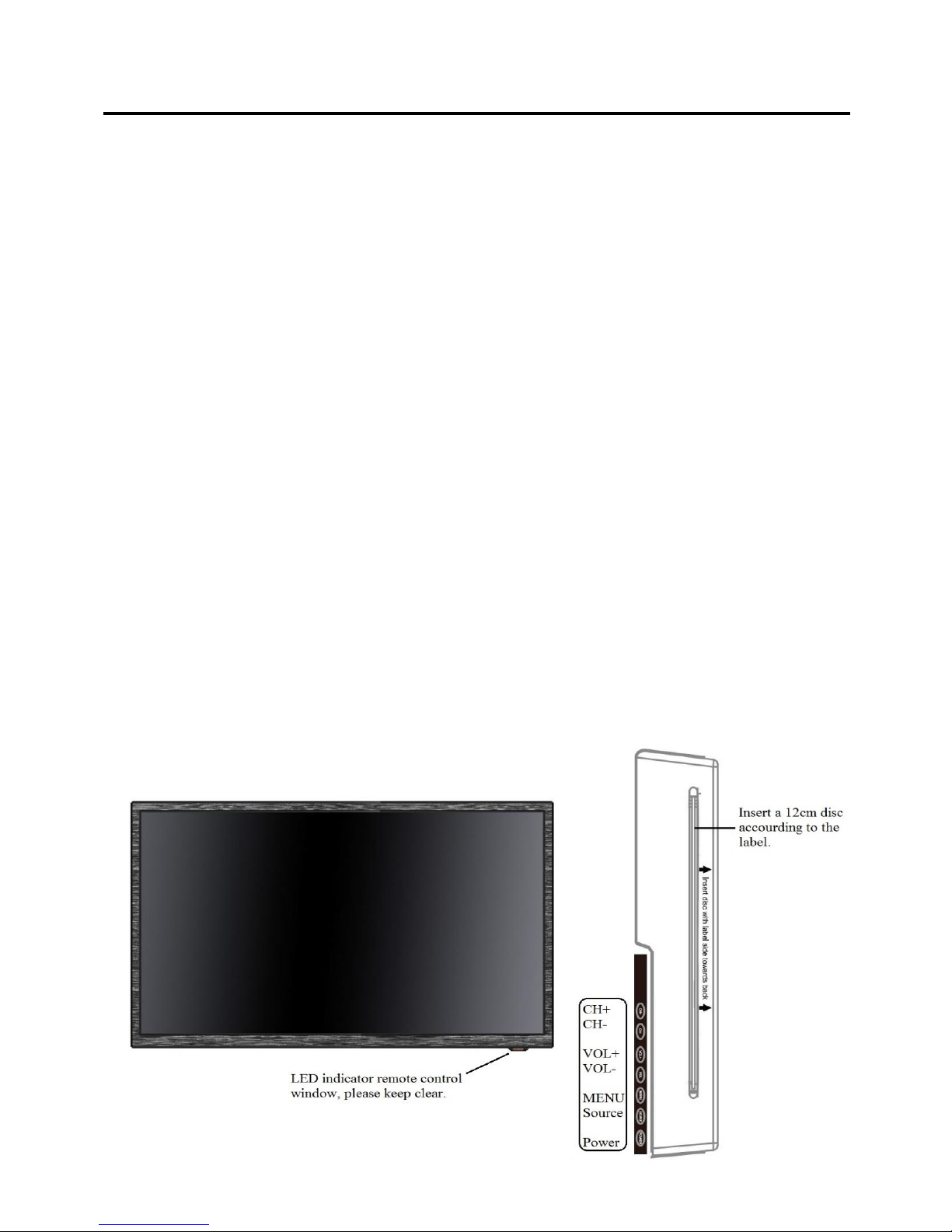
Front Panel…………………………………………………………………………..9
Rear Panel…………………………………………………………………………..10
Connections………………………………………………………………………...11
Remote Control…………………………………………………………………….13
Quick Setup Guide……………………………………………………………..15
Main Menu………………………………………………………………………..17
Picture……………………………………………………….……………………..17
Sound………………………………………………………………………………18
Channel………………………………………………………………………….…19
Feature……………………………………………………………………………...23
Setup………………………………………………………………………………..29
Multi Media……………………………………………………………………….31
Photo………………………………………………..…..………………………….31
Music………………………………………………..…..………………………….32
Movie……………………………………………..…..……………………………35
eBook……………………………………………..…..……………………………37
PVR………………………………………………..…..…………………………...37
DVD………………………………………………..…..…………………………..44
Smart Android System Setup………………………………………………46
Trouble Shooting………………………………………………………………...50
Warranty Terms and Conditions………………………………….……...52

2/55
Important Safety Instructions
Warnings and Precautions
To prevent any injuries, the following safety precautions should be observed in the
installation, use, servicing and maintenance of this equipment.
Before operating this equipment, please read this manual completely, and keep it nearby
for future reference.
1) Read these instructions.
2) Keep these instructions.
3) Heed all warnings.
4) Follow all instructions.
5) Do not use this apparatus near water.
6) Clean only with a dry cloth.
7) Do not block any of the ventilation openings. Install in accordance with the
manufacturer’s instructions.
8) Do not install near any heat sources such as radiators, heat registers, stoves, or other
apparatus (including amplifiers) that produce heat.
9) Do not defeat the safety purpose of the polarized or grounding type plug. A polarized
plug has two blades with one wider than the other. A grounding type plug has two
blades and a third grounding prong. The wide blade or the third prong is provided for
your safety. When the provided plug does not fit into your outlet, consult an
electrician for replacement of the obsolete outlet.
10) Protect the power cord from being walked on or pinched particularly at plugs,
convenience receptacles, and the point where they exit from the apparatus.
11) Only use the attachments/accessories specified by the manufacturer.
12) Use only with a cart, stand, tripod, bracket, or table specified by the manufacturer, or
sold with the apparatus. When a cart is used, use caution when moving the
cart/apparatus combination to avoid injury from tip-over.
13) Unplug this apparatus during lightning storms or when unused for long periods of
time.
14) Refer all servicing to qualified service personnel. Servicing is required when the
apparatus has been damaged in any way, such as power supply cord or plug is
damaged, the liquid has been spilled or objects have fallen into the apparatus, the
apparatus has been exposed to rain or moisture, does not operate normally, or has
been dropped.
•Apparatus shall not be exposed to dripping or splashing and no objects filled with
liquids, such as vases, shall be placed on the apparatus.

3/55
•Apparatus with Class I construction shall be connected to a Mains Socket Outlet with
a protective earthing connection.
WARNING
TO PREVENT DAMAGE WHICH MAY RESULT IN FIRE OR ELECTRIC
SHOCK HAZARD, DO NOT EXPOSE THIS APPLIANCE TO RAIN OR
MOISTURE.
Caution:
•These servicing instructions are for use by qualified service personnel only.
To reduce the risk of electric shock, do not perform any servicing other than that
contained in the operating instructions unless you are qualified to do so.
•Any changes or modifications not expressly approved by the party responsible for
compliance could void the user’s authority to operate the equipment.
The Lightning flash with an arrowhead
symbol, within an equilateral tringle is
intended to alert the user to the presence
of uninsulated “dangerous voltage” within
the product’s enclosure that may be of
sufficient magnitude to constitute a risk of
electric shock to persons.
CAUTION: TO REDUCE THE RISK OF
ELECTRIC SHOCK, DO NOT REMOVE COVER
(OR BACK), NO USER-SERVICEABLE PARTS
INSIDE. REFER SERVICING TO QUALIFIED
SERVICE PERSONEL.
The exclamation point within an
equilateral triangle is intended to alert the
user to the presence of important operating
and maintenance (service) instructions in
the literature accompanying the appliance.

4/55
Power Supply
Warnings
Do not touch the power
plug wet hands.
Do not use a damaged
power cord or plug or a
loose outlet.
Do not plug several
devices into the same
outlet.
Insert the power plug
fully into the outlet.
Doing so may result in
electric shock.
Doing so may result in
fire or electric shock.
Doing so may cause
the outlet to overheat
and start a fire.
A loose or improperly
inserted power plug
may result in a fire.
Do not bend the power
cord excessively or
place heavy objects on
it.
Be sure to ground the unit.
Doing so may result in
fire or electric shock.
Failing to do so may lead to electric shock when a short circuit or overload
occurs. If necessary, install a ground fault circuit breaker. Never ground to a
telephone line, lightning rod, or metal gas pipe. (Doing so may result in fire,
electric shock, or other hazards.)
Cautions
When disconnecting
the power cord from an
AC outlet, always
grasp it by the plug.
Always unplug the unit
before cleaning.
Pulling on the cord can
damage the internal
wire and may result in
a fire.
Not doing so may
result in fire or electric
shock.

5/55
Installation
Warnings
Do not place containers
with liquids, or
medicine bottles or
small metallic objects
on top of the unit.
Do not place the unit
where it is exposed to
rain, excessive
moisture or grease.
Do not use or store
flammable or
combustible materials
near the unit.
Do not place the unit
on an unstable surface,
or any surface whose
area is smaller than the
bottom area of the unit.
If liquid enters the unit
or any metal object
falls into the unit, it
may result in short-
circuit, fire, or electric
shock.
Doing so may result in
fire or electric shock,
malfunction, or
deformation.
Doing so may result in
fire or explosion.
Doing so may damage
the unit or injury
people.
Do not place a burning
object on top of the
unit. Do not place the
unit near any heat
source.
Do not place the unit in
a poorly ventilated
enclosure, such as a
cabinet.
Do not run power cords
near heat-producing
appliances such as
radiators, stoves, or
irons.
Install the antenna
away from high-
voltage power lines and
communication cables
and make sure it is
installed securely.
Doing so poses a
serious risk of fire.
Doing so poses a
serious risk of fire.
The heat could melt the
insulation and expose
live wires, resulting in
fire or electric shock.
If the antenna touches a
power line, contact
with the antenna could
result in fire, electric
shock, serious injury, or
death.

6/55
Cautions
Install the unit at an
adequate distance from
the wall to ensure
sufficient ventilation.
Do not cover the unit
with a tablecloth, curtain,
or other material.
WARNING
Form a drip loop where the coaxial antenna
cable enters your building to prevent rainwater
from traveling along the cable and contacting the
antenna input terminal.
Not doing so may raise
the temperature inside
and result in a fire.
Cover the unit may raise
the temperature inside
and result in a fire.
If rainwater finds its way inside the unit,
it may result in fire or electric shock.
Child Safe
Be sure to place the unit on a
level surface.
Do not allow children to climb
or hang on the unit.
WARNING
When removing the batteries
from the remote control, make
sure children do not swallow
them. Keep the batteries out of
the reach of infants and children.
Use the VESA mount holes at
the back of the TV to secure the
TV to a wall. (brackets, bolts
and ropes are not provided)
The unit could topple over onto
a child and result in serious
injury.
If a child has swallowed a
battery, seek medical attention
immediately.

7/55
Use and Maintenance
Warnings
Disconnect the power cord from
the wall outlet during an
electrical storm.
Do not insert any metal objects
into the ventilation openings or
A/V terminals.
Never disassemble or modify the
unit in any way. Do not attempt
to service the unknit yourself.
Not doing so may result in fire
or electric shock.
Doing so poses a serious risk of
fire or electric shock
Doing so may result in fire or
electric shock.
Cautions
When not using the unit for long
periods of time, disconnect the
power cord from the wall outlet.
When moving the unit, be sure
to turn off the unit and unplug
the power cord. Always use two
or more people to move the unit.
If you notice any unusual odors
or smoke around the unit,
immediately disconnect the unit
and contact the service center.
Not doing so may cause damage
to the cord or the unit, resulting
in fire or electric shock.
Failure to do so may result in
fire or electric shock.
Wipe off any moisture, dirt or
dust on the power plug pins with
a clean dry cloth.
Always turn off the unit and
unplug the power cord when
cleaning the unit. Use a soft dry
cloth to clean the unit
Clean the screen with a soft
cloth dipped in a small amount
of screen cleaner.
Failure to do so may result in
fire or electric shock.
Do not use any liquid cleaners
or harsh chemicals.
Do not spray directly onto the
unit or use a flammable liquid.

8/55
Disposal (used Electrical and Electronic Equipment)
Packing and electrical goods should be recycled appropriately, and
not treated as household waste. Please dispose of this equipment at
your applicable collection point for the recycling of electrical and
electronic equipment waste. By ensuring the correct disposal of this
product, you will help prevent potentially hazardous to the
environment and to human health, which could otherwise be caused
by unsuitable waste handling of this product. The recycling of materials will help conserve
natural resources. Please do not dispose of your old electrical and electronic equipment
with your household waste. There may be penalties in your state or territory for dumping
these products, including outside collection sites and charity bins.
For more detailed information about recycling of this product, please contact your local
city office, your household waste disposal service or the shop where you purchased the
product.
National Television and Computer Recycling Scheme
The National Television and Computer Recycling Scheme was established in 2011 to
provide Australian householders and small business with access to industry-funded
collection and recycling services for televisions and computers. To date, more than 1,800
collection services have been made available to the public and more than 130,000 tons of
TV and computer e-waste has been collected and recycled under the scheme. This has
diverted hazardous materials away from landfill and enabled the reuse of valuable
resources contained in e-waste. The scheme has also created employment opportunities
within the recycling sector and assisted local government manages e-waste by providing
alternative collection services.
Englaon has joined this Scheme for years, and we are doing our best to protect both
environment and human health. We encourage our users to do the right things to help us
protect our environment and human health by recycling our products.
Ways to safely dispose of unwanted televisions:
•Using recycling services such as those provided by local councils or other providers.
(a fee may apply)
•Passing them on to friends or family.
•Asking second-hand shops or a charity if they will take them if they are still in
working order.
•Storing them out of the weather until they can be disposed of appropriately.

9/55
Assemble and Connections
Overview
Accessories List: TV Console, Base Stand, User Manual, Remote Control, Batteries x2,
Screws for Stand x2, Power Cord, Power Adapter, 12v Car Lead, (computer mouse ONLY
in Smart TV).
Installing the Stand
1. Carefully place your TV face up on a soft and flat surface to prevent damage to the
TV or scratching to the LED screen.
2. Remove the stand(s) from the box and then insert the stands into the bottom slot(s) of
the TV.
3. Secure the BASE STAND to the TV with the screws in a box tightly.
CAUTION:
⚫Be sure to disconnect the power before installing stands or Wall-mount brackets.
⚫The LED display is very fragile and must be protected at all times when installing the
base stand. Be sure that no hard or sharp object or anything that could scratch or
damage the LED display get in contact with it.
⚫DO NOT exert pressure on the front of the TV at any time. It may crack the screen.
Front Panel
Dieses Handbuch passt für folgende Modelle
1
Inhaltsverzeichnis
Andere Englaon TV-DVD-Kombination Handbücher