ESTechnical T962 Kurzanleitung

ESTechnical Reflow Oven Controller Upgrade T962
1 of 2
Table of Contents
Instructions for fitting ESTechnical Reflow Oven Controller to T962 1 ..........................................
Installation procedure 1 ............................................................................................................
Reflow Controller Installation Troubleshooting 18 .....................................................................
ESTechnical Reflow Oven Controller Operating Instructions 19 ....................................................
Initial Set Up 19 .........................................................................................................................
Overview of Operation 20 .........................................................................................................
Initial Set Up for new PCB designs 20 .......................................................................................
Production of PCBs 20 ...............................................................................................................
Menu Layout & navigation 20 ...................................................................................................
Reflow Profile Testing 21 ...........................................................................................................
Data Logging – ReflowViewer Software 24 ................................................................................
Operating Instructions 24 .........................................................................................................
Starting a reflow cycle 24 .........................................................................................................
Stopping a cycle 24 ...................................................................................................................
Saving an edited profile 24 .......................................................................................................
Loading a saved reflow profile 25 .............................................................................................
Editing the active profile 25 ......................................................................................................
Fan Idle Speed Adjustment Procedure 25 .................................................................................
Profile tuning tips 26 .................................................................................................................
Care and Maintenance 27 .........................................................................................................
Before every use 27 ..................................................................................................................
After every 50-100 reflow cycles 27 .........................................................................................
Packing list 28 ..............................................................................................................................
What you will need (not supplied): 28 ..........................................................................................

ESTechnical Reflow Oven Controller Upgrade T962
2 of 2

ESTechnical Reflow Oven Controller Upgrade T962
1 of 29
ESTechnical Reflow Oven Controller Upgrade T962
Reflow Controller hardware
Instructions for fitting ESTechnical Reflow Oven Controller to T962
www.estechnical.co.uk
Thank you for your purchase of ESTechnical products. If you have any questions or comments please
let us know, we are always keen to hear feedback about our products.
Optional parts
NB: The USB connection and external thermocouple
connector referred to in the operating instructions are
optional and not included with this kit.
Please see Reflow Oven Accessories Package for more information.
The items included in this package are also available separately, see
Components and Consumables .
Packing List
What you will need (not supplied)
Installation procedure
Warning
IMPORTANT – mains electrical wiring is involved in the
installation of this controller, but no mains voltages are
connected directly to the controller. If you are in any doubt
please consult a qualified electrician.
Auto Reset Jumper
The ESTechnical reflow controller v4 PCB and onwards has a jumper
for enabling or disabling the auto-reset behaviour of the MCU. With
the jumper connecting the two pins it is possible to easily upload new
firmware to the controller via USB to serial connection from a

ESTechnical Reflow Oven Controller Upgrade T962
2 of 29
computer. With the jumper open, the MCU will not automatically
reset when the serial port is opened by a computer - this is more
convenient in normal operation and we suggest that you operate the
controller with the jumper open.
Unplug the power cable from the reflow oven.<1.
Turn the oven upside-down.2.
Remove the drawer from the unit (pull forwards until it stops, then remove the four screws from3.
the underside of the drawer runners and set aside, also set the drawer aside.<
Remove the screws that are under the front edge of the lid, there are two screws in the drawer4.
opening, keep these safe.
Remove the screws in the drawer opening
<
Turn the unit around so you are looking at the back, remove the screws that hold the lid on the5.
case, keep these safe.

ESTechnical Reflow Oven Controller Upgrade T962
3 of 29
Remove the marked screws
<
Being very careful not to pull on any cables, carefully lift the back of the lid a little, then gently6.
slide the lid forwards a little, lift off the oven, turn over and place it next to the bottom half of
the oven.<
Gently pick off the hot glue that's covering the connectors on the control board. A small pair of7.
pointed pliers is helpful here, only try to remove a small amount at a time.
Remove all the glue from screws and connectors (note that the oven shown in the photo is the
larger T962A)
<
Disconnect all the cables that attach to the control board. Do not pull on cables, pull the8.
connectors apart gently and without twisting.

ESTechnical Reflow Oven Controller Upgrade T962
4 of 29
All connections unplugged (note that the oven shown in the photo is the larger T962A)
<
Completely remove the control board and display and set aside – these items are no longer9.
needed.
Original controller and display removed (note that the oven shown in the photo is the larger
T962A)
<
At this point, take a moment to familiarise yourself with the wiring that is present. You need to10.
be able to identify the following cables in order to proceed with the installation:
Low voltage AC power cable from the small transformer, has a plug that fits onto two

ESTechnical Reflow Oven Controller Upgrade T962
5 of 29
pins.<
Small signal cable to the heater solid state relay, fitted with two pin JST connector.<
Mains cable that was used to supply the power for the oven cooling fan to the controller,
this has a three pin connector with only two terminals populated.<
One cable that goes into the back of the oven, this is the oven cooling fan cable and has a
two pin connector fitted.<
2x thermocouples with coloured crimp ferrules to indicate polarity.<
Keypad ribbon cable.<
One cable that goes to the two panel LEDs, this has a 4 pole JST connector.<
One cable that goes to the small DC cooling fan, with a 2 pole JST connector.<
Carefully un-crimp the tubes that hold the thermocouples using a pair of pliers. Gently pull out11.
the thermocouple.<
Inspect the thermocouples and if necessary untwist the wires so that the wires only touch when12.
meeting the bead, the wires should not be twisted together leading to the tip. A small pair of
pliers is needed – be careful the thermocouple is fragile. This reduces the mass of the
thermocouple junction and improves the response time to temperature changes.
Thermocouple tip prepared for refitting
<
In order to fit the ESTechnical Reflow Oven Controller to the case, one of the four fan mounting13.
bolts may need to be removed (two or more designs of T962 lid exist) as it may foul on the
edge of the LCD display.

ESTechnical Reflow Oven Controller Upgrade T962
7 of 29
Prepare a bare metal area around a screw hole for good earth continuity in the case
<
The matching area on the rear panel of the oven also needs to be prepared in the same way so15.
good metal on metal contact will be achieved when the oven is reassembled.<
Screw the supplied stand-off posts into the four screw posts at the corners of the display16.
window.<
Identify the oven thermocouple. The thermocouple that will be mounted in the oven drawer17.
needs to be connected to the A input (thermocouple connector closest to the ESTechnical
Reflow Controller's power connector) – this is important for the correct function of the
ESTechnical Reflow Controller. Make sure you observe the polarity of the thermocouple, it has
one lead marked red (this is positive, marked + on the board) and the other is blue (-).<
Screw down the ESTechnical Reflow Controller using the supplied M3 x6mm bolts – do not over18.
tighten.<
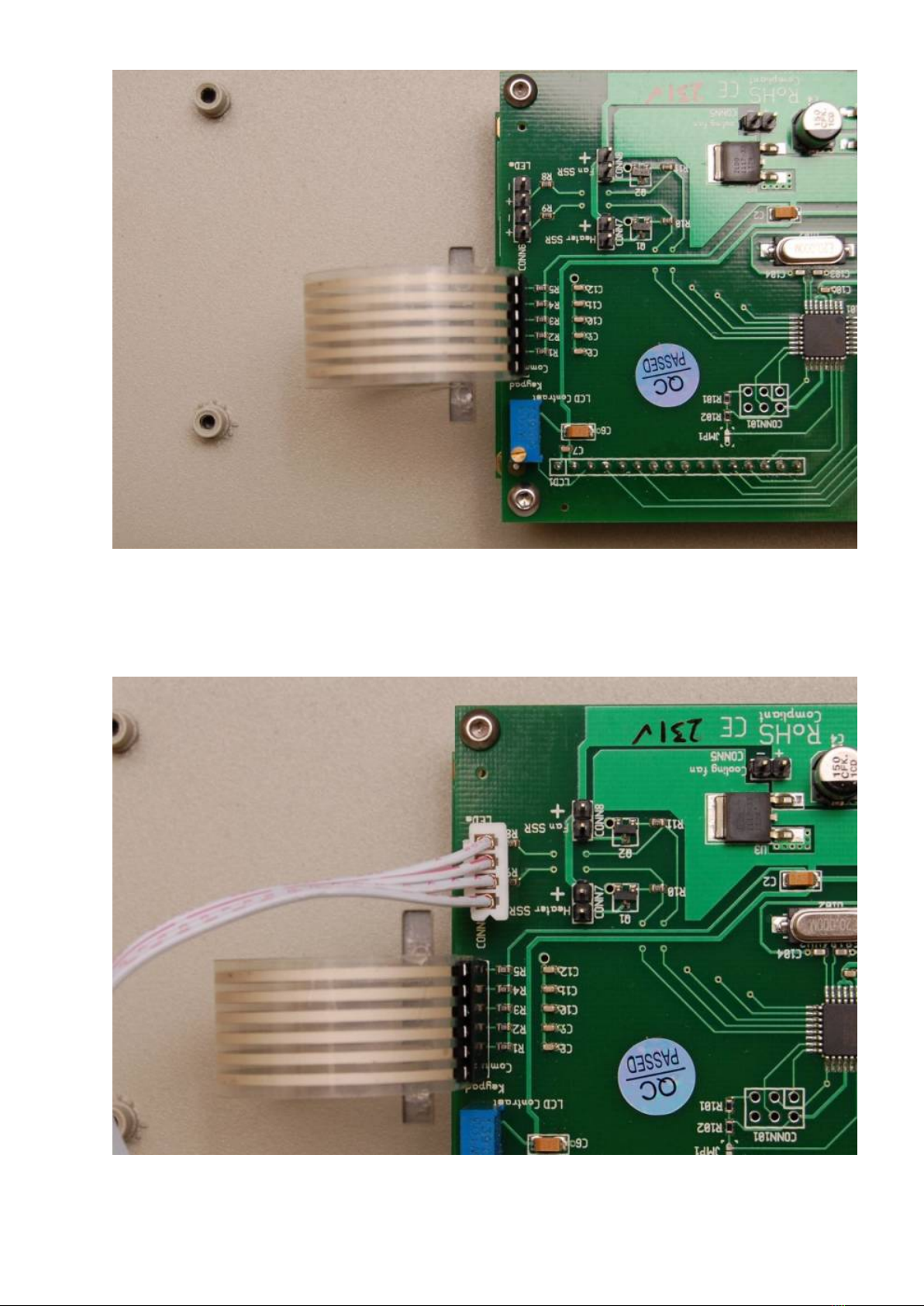
Plug in the thin ribbon cable for the keypad, the connector is labeled 'Keypad'.19.
Inhaltsverzeichnis
Andere ESTechnical Controller Handbücher