EVAPCO eco-Air Series Bedienungsanleitung

AIR COOLED · ADIABATIC · FLUID COOLERS · CO2GAS COOLERS · REFRIGERANT CONDENSERS
EVAPCO Controller User’s Manual
For EVAPCO authorized parts and
service, contact your local EVAPCO
representative today!

2
Controller User Manual
Table of Contents
Introduction ............................................................................................................................................................................................... 3
EVAPCO Controller ............................................................................................................................................................................ 3
Installation and Wiring .............................................................................................................................................................................. 3
Safety .................................................................................................................................................................................................. 3
Panel Installation Considerations ........................................................................................................................................................ 4
Temperature/Pressure Sensor Installation ......................................................................................................................................... 4
Wiring Considerations ......................................................................................................................................................................... 6
Operation and Servicing ..................................................................................................................................................................... 6
Screen Navigation .................................................................................................................................................................................... 7
Navigating the Display ........................................................................................................................................................................ 7
Modifying a Value ............................................................................................................................................................................... 8
Navigating the Scheduler .................................................................................................................................................................... 8
Operator Interface Screens .................................................................................................................................................................... 10
Welcome Screen ............................................................................................................................................................................... 10
Home Screen .................................................................................................................................................................................... 10
Status Screen ................................................................................................................................................................................... 12
Alarms Screen .................................................................................................................................................................................. 13
Main Menu Screen ............................................................................................................................................................................ 14
On/Off Unit Screen ............................................................................................................................................................................ 15
View Setpoints Screen ...................................................................................................................................................................... 16
Scheduler Screens ............................................................................................................................................................................ 17
Input/Output Screens ........................................................................................................................................................................ 19
Service Screens ................................................................................................................................................................................ 19
Manufacturer Screens ....................................................................................................................................................................... 33
Terminology ............................................................................................................................................................................................ 34
Alarm Event Description ......................................................................................................................................................................... 35
Cover page image: HVAC cooling application, Maryland, USA

3
Controller User Manual
Introduction
EVAPCO Controller
Congratulations on the purchase of your eco-Air unit with the EVAPCO Controller. The EVAPCO Controller will ensure your eco-Air
unit is operating in the most efficient manner possible while using minimal resources. Along with proper eco-Air unit maintenance,
the EVAPCO Controller will ensure that your eco-Air unit provide years of service at peak efficiency.
The EVAPCO Controller serves as a single connection point for the eco-Air unit and contains all of the protection and logic devices
required to run the eco-Air unit in the most efficient manner possible.
In order to reduce downtime, Evapco recommends keeping a stock of spare fuses. Consult the wiring diagram for the quantity, type,
and fuse size required. Contact your local EVAPCO representative for replacement or spare parts.
This bulletin includes a description of the screens and parameters that are available through the display located on the front of the
EVAPCO Controller. Also included in this bulletin are the functions of the EVAPCO Controller. Please note that the screens displayed
on your EVAPCO Controller display may vary slightly from the images shown in this document.
Become familiar with the EVAPCO Controller by thoroughly reading and understanding the content of this bulletin. A detailed wiring
diagram can be found in the data pocket inside of the EVAPCO Controller.
If you should require any additional information about the operation or maintenance of this equipment, contact your local EVAPCO
representative. You may also visit www.evapco.com for more information.
Installation and Wiring
Safety
Qualified personnel should use proper care, procedures, and tools when operating, maintaining, or repairing this equipment or any
other connected equipment in order to prevent personal injury and/or property damage. The warnings listed below are to be used
as guidelines only.
Warning: EVAPCO eco-Air units should never be operated without fan screens and access doors properly secured and in
place.
Warning: Avoid working on electrical circuits while they are live. Proper lock-out/tag-out and all applicable safety practices
must be followed prior to servicing any equipment.
Warning: Before opening the panel door, allow sufficient time for VFD’s to discharge after removing power. VFD’s contain
capacitive circuits which maintain a charge even after power is removed.
Warning: The three-position selector switch is not intended to replace or act as a disconnect to disable the EVAPCO ecoAir
unit and/or de-energize the EVAPCO Controller. Be sure to follow lock-out/tag-out and all applicable electrical
safety practices before servicing any equipment.
Warning: Do not attempt to service or enter the eco-Air unit even if the unit status is indicated as being off. Unless power is
completely removed from the eco-Air unit, it may be possible for the eco-Air unit to start at any time without notice.
Be sure to follow lock-out/tag-out and all applicable electrical safety practices before servicing any equipment.

4
Controller User Manual
The following safety issues need to be addressed by those responsible for the installation, maintenance, and repair of the EVAPCO
Controller:
• Access to the control panel (including the disconnect switch(es)).
• Sizing and protection of electrical circuits feeding the control panel(s) and branch circuits feeding the controlled equipment.
• Proper grounding of electrical circuits.
• Qualification of persons who will install, maintain, and service the electrical equipment.
Panel Installation Considerations
When the EVAPCO Controller does not ship factory mounted on the eco-Air unit, the EVAPCO Controller should be placed in close
proximity to the eco-Air unit to reduce the wire lengths required. If the EVAPCO Controller is within sight of or mounted on the eco-
Air unit, the EVAPCO Controller may be used as the main electrical disconnect for the eco-Air unit. Otherwise, separate electrical
disconnects may be required. Consult applicable electrical codes to make this determination. Avoid mounting the EVAPCO Controller
with a southern exposure. This will minimize the amount of solar heat gain the system will experience and will make it easier to view
the operator interface.
Temperature/Pressure Sensor Installation
EVAPCO eco-Air fluid coolers are supplied with a thermowell (1/2” NPT threads) and a RTD temperature sensor. The thermowell and
temperature sensor should be installed in the common return pipework of the eco-Air fluid cooler unit. Thermowells must be installed
in the horizontal sections of the coil piping. A small amount of thermal paste should be added to the thermowell before the RTD sensor
is inserted to ensure a more accurate fluid temperature measurement.
Figure 1
The suggested temperature sensor location for fluid coolers. Piping shown by dashed lines provided and installed by others.

5
Controller User Manual
EVAPCO eco-Air condensers are supplied with a pressure transducer (1/4” NPT threads). The pressure transducer should be located
in the common compressor hot gas discharge pipework. It is recommended that a shut-off valve be located between the pipework
and the pressure transducer to allow the transducer to be more easily replaced should it become damaged.
Figure 2
The suggested pressure sensor location for condensers. Piping shown by dashed lines provided and installed by others.
When the EVAPCO Controller ships factory mounted to the eco-Air unit, the supplied temperature or pressure sensor must be wired
to the junction box location on the connection end of the eco-Air unit (Figure 3). If the EVAPCO Controller does not ship factory
mounted, the supplied temperature or pressure sensor must be wired to the EVAPCO Controller. Consult the supplied wiring
diagram for a determination if the junction box is supplied.
The junction box is highlighted and circled.
Each EVAPCO Controller is supplied with one ambient air sensor that is located near the Controller enclosure. Should the
EVAPCO Controller not be factory mounted, the ambient temperature probe will need to be wired to the remote location of the
Controller. Consult the supplied wiring diagram for proper termination of the ambient air sensor.
Figure 3

6
Controller User Manual
Wiring Considerations
Consult the supplied wiring diagram for detailed wiring information. All field wiring is indicated by dashed lines on the wiring diagram.
All wiring in and out of the EVAPCO Controller should be with copper conductors and wire lengths must be kept as short as
possible. Consult the detailed wiring diagram for field wiring connections of each device. Applicable electrical codes for the location
should be followed during the sizing and installation of the field wiring. All fittings attached to the EVAPCO Controller must be
Type 4. All wiring must be through the bottom of the EVAPCO Controller. Top entry into the EVAPCO Controller is not
permitted. Any damage caused to any component within or connected to the EVAPCO Controller due to a top entry
connection is not warrantable!
For wiring the EVAPCO Controller to each NEMA fan motor, Belden® VFD cable 295XX (XX denotes gauge) or equivalent should be
used. The shield of the VFD cable needs to be bonded to ground at both ends of the cable.
While the EVAPCO Controller does provide provisions for connection to a BAS (Building Automation System), this connection is not
required for the EVAPCO Controller to operate.
Operation and Servicing
On eco-Air units equipped with NEMA fan motor(s), the EVAPCO Controller contains a three-position selector switch (Bypass-Off-
Auto) located behind the HMI door. The operation of each position is as follows:
Auto: The Auto position allows the EVAPCO Controller to operate the eco-Air unit based on the logic programmed into the
Controller. Note that the unit must be switched on before the eco-Air unit will begin to operate. Please see the On/Off Unit
Screen section of this document for more information.
Off: In the Off position, the EVAPCO Controller will be powered; however, output commands will not be sent to any of the
attached equipment. This position is used for programming the VFD.
Bypass: In the Bypass position, the logic program is bypassed which allows the fan motor(s) to energize independent of sensor
temperature or setpoints. Power is routed around the VFD and thus the fan motor(s) will operate at full power, across- the-line.
The VFD will still be energized when the selector switch is in the Bypass position.
The door protecting the HMI must be shut unless an operator is using the HMI interface. This will protect the HMI interface from
contamination and increase the life of the HMI.
The EVAPCO Controller is supplied with air filters that must be inspected every 90 days. Depending on the installation environment,
more frequent inspection and/or replacement may be required. A dirty filter can cause the internal panel temperature to increase and
may cause component failure. Permanently removing the filter will allow dirt and particulates to enter the enclosure and may cause
premature failure.
Please consult the proper Operation and Maintenance Instructions for start-up and maintenance guides for the eco-Air unit attached
to the EVAPCO Controller.

7
Controller User Manual
Screen Navigation
Navigating the Display
The operator interface contains a 7” touch screen LCD display that allows the user to navigate the various screens as well as view
and modify several setpoints that affect the operation of the eco-Air unit.
The operator interface of the EVAPCO Controller.
Figure 5 provides an overview of the various screens and menus of the EVAPCO Controller. Pressing the Back button will return to
the previous screen. The status button is only present for units equipped with either precooling or EC type fans.
Figure 5
Controller screen flowchart.
Figure 4

8
Controller User Manual
Modifying a Value
To change a parameter on a given screen, first navigate to the desired screen. In this example, the setpoint temperature will be
modified. Once at the desired screen, press the value associated with the parameter and enter the value in the number pad that
appears.
Figure 6
The number pad to change a parameter for the setpoint temperature.
Navigating the Scheduler
Several functions of the EVAPCO Controller can be scheduled to operate during certain periods of the year or at certain times of the
day. In this example, consider a noise restriction from 8:00pm to 5:30am starting Friday night and ending Saturday morning. During
the noise restriction hours, the fan speed will be limited via the Quiet Mode. After navigating to the proper scheduler, the screen shown
in Figure 7 will be displayed.
The Scheduler Screen.
Figure 7

9
Controller User Manual
Each block represents a half hour increment of time. By touching a block, the P icon will appear, and the function will be activated for
that timeframe. Note that the first block represents 12:00am to 12:30am.
The 8:00pm to 12:00am blocks are selected.
Proceed to Saturday by pressing the Next button. Continue to press the blocks to extend the timeframe to 5:30am.
Figure 8
Figure 9
Quiet Mode is active from 12:00am to 5:30am on Sunday.

10
Controller User Manual
Operator Interface Screens
Welcome Screen
When the EVAPCO Controller is first energized, the system will do a self-diagnostic test and load all the interface screens. While the
screens are loading, the EVAPCO logo (Figure 10) appears. After the screens have loaded, the HMI will transition to the Main Home
Screen. If there is no interaction with the HMI for more than fifteen minutes, the EVAPCO logo will reappear. Touching the HMI will
return the screen to the Main Home Screen.
The EVAPCO Controller Welcome Screen.
Home Screen
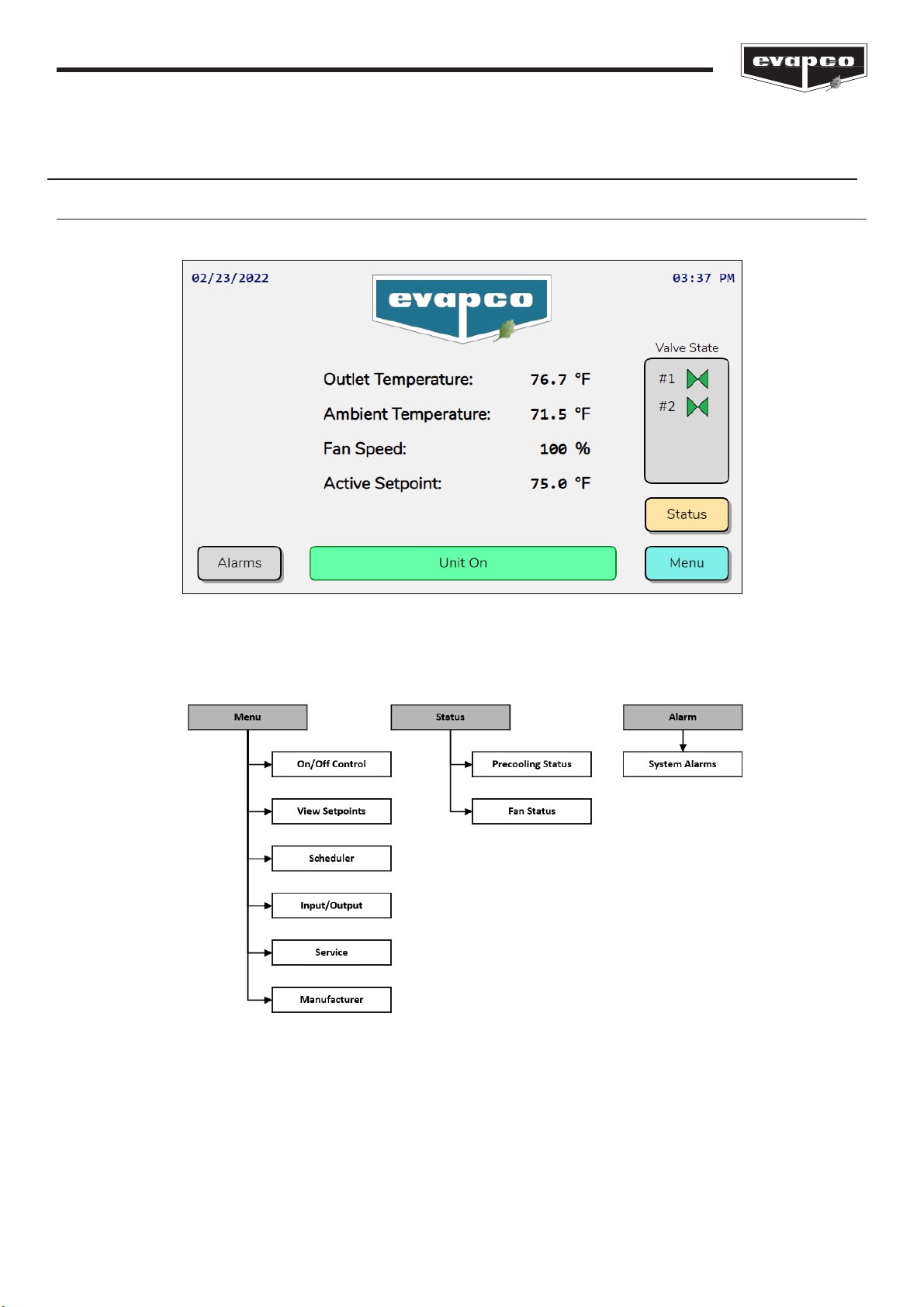
The Main Home Screen shown in Figure 11 displays the process temperature, ambient temperature, command fan speed, active
setpoint, and the inlet pressure. The inlet pressure is only shown if the eco-Air unit is a condenser. Note, if the eco- Air unit is a
condenser, the process temperature is the saturated condensing temperature derived from the temperature versus pressure
relationship of the refrigerant (see the Service Screens section for more information).
Figure 10
Figure 11
The Main Home Screen.
Inhaltsverzeichnis
Andere EVAPCO Controller Handbücher