
Event Lighting DIM4 Bedienungsanleitung
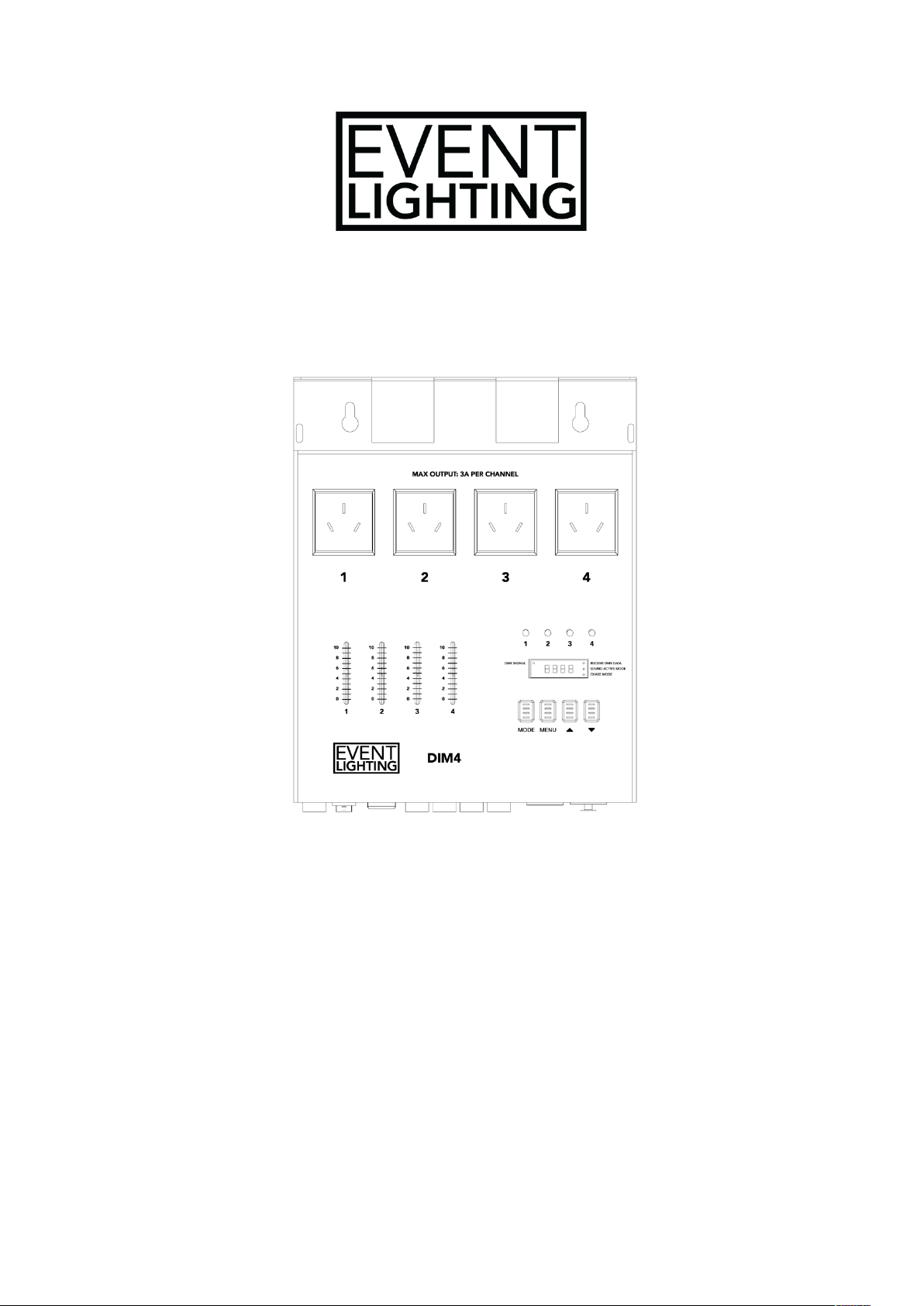
DIM4
4 Channel Dimming Pack
USER MANUAL
For your safety, please read this user manual carefully before initial use.
Event Lighting reserves the right to revise the manual at any time. Information and specifications
within this manual are subject to change without notice. Event Lighting assumes no liability or
responsibility for any errors or omissions. Please consult Event Lighting for any clarification or
information regarding this item.
Version: 1

www.event-lighting.com.au
2
Safety Instructions
Warning
• Do not open this device, there are no user serviceable parts inside. Risk of electric
shock.
• CAUTION: This unit’s housing may become hot during and after operation.
• Install this device in a location with adequate ventilation, at least 20 inches (50 cm) from
adjacent surfaces.
• Do not leave any flammable material within 20 inches (50 cm) of this unit while operating
or connected to power.
• Use a safety chain when mounting the device overhead.
• Do not operate this device outdoors or in any location where dust, excessive heat, water
or humidity may affect it.
• Do not operate this device if the housing, lenses, or cables appear damaged.
• Only connect this device to a grounded and protected circuit.
• Only use the hanging bracket to carry this device.
• In case of a serious problem, stop using this device immediately.
• Do not operate this device at ambient temperatures higher than 40° C (104° F).

www.event-lighting.com.au
3
Product Overview
The DIM4 is a dimming pack with four output channels, each of which can be loaded up to 3A.
The DIM4 can be controlled using its built-in chaser and sound control functions, or by using
DMX.
1 – 4x Outputs
2 – 4x Channel Faders
3 – Mode Button
4 – Menu Button
5 – Up Button
6 – Down Button
7 – Display
8 – Channel LED Indicators
9 – Fuse 8A/250V
10 – Power Switch
11 – Power Input 230V/50
Hz AC
12 – 4x Fuse 3A/250V
13 – 3-pin DMX in
14 – 3-pin DMX out

www.event-lighting.com.au
4
Menu
Menu
Values
Description
DMX Address
A001-A512
Set the DMX Address
Channel Mode
CH01/CH02/CH04
Select between 1/2/4 channel mode
Output 1 Dimmer/Switch
S1OF/S1ON
Toggle Output 1 dimmer or switch
mode
Output 2 Dimmer/Switch
S2OF/S2ON
Toggle Output 2 dimmer or switch
mode
Output 3 Dimmer/Switch
S3OF/S3ON
Toggle Output 3 dimmer or switch
mode
Output 4 Dimmer/Switch
S4OF/S4ON
Toggle Output 4 dimmer or switch
mode
Programs
P01-P17
Select between the 17 built in
programs
Program Speed
SP01-SP99
Set the speed of the built in program
Sound Mode
So01-So17
Select between the 17 sound
programs
DMX Mode
DMX Address
The device can be set to 512 different DMX addresses, between [A001] and [A512]. Set the
address using the Up/Down buttons. The set DMX address will persist after a reboot.
DMX Channel Mode
Press Menu to enter the DMX configuration menu. There are three DMX modes, which can be
selected with Up/Down:
• [CH:01] 1 Channel Mode: control all four outputs together
• [CH:02] 2 Channel Mode: control two groups of two outputs
• [CH:04] 4 Channel Mode: control each output separately
Controlling Output
You can toggle each output between a switch or dimmer channel. Each of the four outputs on the
device correspond to one pair of [SNOF] and [SNON], where Nis the number labelled below
each output.
• Select [S1ON] to use the output as a switch. Between 0-127, the channel is off and
between 128-255 the channel is on.
• Select [S1OF] to use the output as a dimmer channel.
Control Mode
Built-in Programs
This allows you to use the built-in chase programs of the device. Press Mode until the display
shows [P:01]. Use Up/Down to select between the built-in chases [P:01] to [P:17]. Use the
channel faders to activate the chase and set dimmer intensity of the channel output.
• If you use [P:17], the fader will only control the dimmer intensity.

www.event-lighting.com.au
5
Speed of Built-in Programs
This allows you to set the speed of the built-in programs. Press Menu until the display shows
[SP:01], then use Up/Down to select the speed between [SP:01] and [SP:99]. This has no effect
if [P:17] is selected.
Sound Mode
This allows you to select a sound program to control the device. Press Menu until the display
shows [So:01], then use Up/Down to select between the available sound modes [So:01] to
[So:17]. The device will react to the music with different functionality depending on the selected
mode. The faders have the same function as in Built-in Programs.
DMX Chart
These DMX functions only apply when the output is used as a dimmer channel. Refer to the
Controlling Output section for further detail.
1 Channel Mode
Channel
Value
Function
1
0-255
All outputs, 0-100%
2 Channel Mode
Channel
Value
Function
1
0-255
Outputs 1 and 2, 0-100%
2
0-255
Outputs 3 and 4, 0-100%
4 Channel Mode
Channel
Value
Function
1
0-255
Output 1, 0-100%
2
0-255
Output 2, 0-100%
3
0-255
Output 3, 0-100%
4
0-255
Output 4, 0-100%
Technical Specifications
Power
• Input Voltage: 230 V AC, 50 Hz
• Fuse: 8A/250V
• Fuse Per Channel: 3A/250V
• Channel Output: Maximum of 3A per channel, maximum 8A total across all 4 channels.
• Connections: 4x power sockets
Control
• Operation Modes: DMX512, stand alone, sound active, local control
• DMX Channels: 1/2/4
• Interface: 3-pin XLR in/out
• Mode: Dimmer or Switch
Housing
• Dimensions: 220*82*275 mm
• Weight: 3.5 kg
Inhaltsverzeichnis


