
EZ Read 800 Plus Bedienungsanleitung

1
EZ Read 800 Plus Microplate Reader
User Manual
Biochrom Ltd
22 Cambridge Science Park
Cambridge
UK
CB4 0FJ
Tel.: +44/1223 423723

2
Table of Contents
1. INTRODUCTION AND INTENDED USE......................................................................................... .4
1.1 WHAT TO EXPECT FROM THE USER’S MANUAL..........................................................................................4
1.2INTRODUCTION................................................................................................................................... 4
2. INSTRUMENT USE ..................................................................................................................... 5
3. INSTRUMENT CONNECTION AND SOFTWARE INSTALLATION AND USE......................................... 6
3.1 INSTRUMENT CONNECTION .................................................................................................................. 6
3.2 SOFTWARE INSTALLATION..................................................................................................................... 6
3.3 QUICK MEASUREMENT.........................................................................................................................7
3.4 KINETIC MEASUREMENT ..................................................................................................................... 12
3.5 MULTI-WAVELENGTH MEASUREMENT .................................................................................................. 17
3.6 CALIBRATING THE INSTRUMENT ..........................................................................................................20
3.7 USING THE USER INTERFACE ON THE EZ READ 800 PLUS.........................................................................20
4. TECHNICAL INFORMATION ...................................................................................................... 39
5. GENERAL FEATURES ............................................................................................................... 39
5.1 MEASUREMENT MODES .....................................................................................................................39
5.2 INTEGRATED QUALITY CONTROL...........................................................................................................39
5.3 SCOPE OF SUPPLY..............................................................................................................................40
5.4 LIABILITY .........................................................................................................................................40
6. MAINTENANCE ...................................................................................................................... 40
6.1 APPROVED PARTS..............................................................................................................................40
6.2 CLEANING AND DISINFECTION .............................................................................................................40

3
6.3 INSTRUMENT CLEANING .....................................................................................................................41
6.4 ADDITIONAL MAINTENANCE TIPS .........................................................................................................41
7. WARRANTY AND RETURN TO BASE .......................................................................................... 41
7.1 WARRANTY TERMS AND CONDITIONS ...................................................................................................41
7.2 RETURNS TERMS AND CONDITIONS ......................................................................................................42
7.3 RETURNS PROCEDURE........................................................................................................................ 43
8. ORDERING INFORMATION AND ACCESSORIES .......................................................................... 45
9. CONTACT INFORMATION ........................................................................................................ 45
9.1 TABLE 2CONTACT INFORMATION ........................................................................................................46
10. APPENDIX ............................................................................................................................ 46
10.1 HELPFUL HINTS FOR SUCCESSFUL MICROPLATE ASSAYS...........................................................................46
10.2 TROUBLESHOOTING AND FREQUENTLY ASKED QUESTIONS ......................................................................46
11. DECLARATION OF CONFORMITY ............................................................................................ 49

4
1Introduction and Intended Use
1.1 What to expect from the user’s manual
Instrument use
Software installation
Quick start guides for operational use (to perform a quick measurement, kinetics and
multi-wavelength measurements).
A technical explanation of how the instrument operates
General features
Helpful hints for obtaining the best measurements using the instrument.
Maintenance
1.2 Introduction
What is a microplate reader?
A microplate reader is a used to measure the absorbance of liquid samples in a 96-welll plate.
What do microplate readers measure?
Microplate readers measure the amount of specific wavelengths of light that is absorbed by
molecules within a solution.
Why is this useful and how do microplate readers measure sample absorbance?
The amount of light absorbed by molecules within a sample is proportional to the sample
concentration as described by Beer-Lambert’s Law:
A = e c b
A= absorbance
e = molar absorptivity (Lmol-1 cm-1)
c = molar concentration (mol dm-3)
b = pathlength (cm)

5
It is important to note that when measuring absorbance in a microplate well, the pathlength is
determined by the volume. In a microplate assay, it is very important that all wells have the same
volume and that all solutions are dispensed with an accurate liquid handler like an 8-channel pipette.
Common applications of absorbance-based microplate readers are ELISA, total protein (like Bradford
or BCA) and cell proliferation assays.
2Instrument Use
The Biochrom EZ Read 800 Plus Microplate Reader is used for microplate-based applications
requiring endpoint or kinetic absorbance measurements from 400-750 nm in optically clear 96-well
plates with a standard SBS/ANSI footprint.
Only trained laboratory personnel should operate the Biochrom EZ Read 800 Plus Microplate
Reader. The Biochrom EZ Read 800 Plus Microplate Reader is intended for general laboratory and
research use only.

6
3. Instrument Connection and Software Installation and Use
3.1 Instrument connection
1. Connect the USB cable from the PC to the instrument.
2. Connect unit using only the supplied power cords to a power outlet.
Please Note:Keep the area around the instrument free from clutter to allow for easy
access to the standard mains plug. This is also important to allow an adequate flow of air
around the instrument.
3. Switch on main switch (back of the instrument).
4. The power indicator light at the front of the unit will be illuminated when the instrument
is switched on.
3.2 Software installation
Galapagos is supplied with all EZ Read 800 Plus instruments. The software can be used to
control the microplate reader to measure all endpoint, kinetic and multi-wavelength assays.
1. To connect the instrument to a PC: Connect to the PC via the supplied USB cable.
2. To connect the instrument to Galapagos software: Insert the CD or USB supplied with
the instrument into a PC. Galapagos software includes pre-requisite files (dot.NET
Framework 4, Windows Installer and Microsoft SQL Express 2008) which allow installation
to occur. Insert the CD or USB and run the setup file. A pop-up menu will appear and
guide you through automatic installation.
Users can save results and templates to a Database. Galapagos uses a database to store
data in one place. This is useful for preventing data override and can allow easy data
transfer through communication with external laboratory database systems such as LIMS.
To create a Database, click ‘Setup’>’Select Database’>’Galapagos’. Alternatively users can
click on ‘Add Database’ and enter a new database.
Connect the instrument to a computer or
laptop. Connect by clicking the Galapagos
icon and click on the ‘Find Instruments’
icon which detects the connected
instrument. For subsequent use, users can
click the ‘Connect’ icon for recognition:

7
3. Click ‘Quick Measurement’:
4. The microplate reader is now ready for use.
3.3 Quick Measurement:
Performing a Quick Measurement on Galapagos:
1. Click the ‘Quick Measurement’ icon on the main menu screen:
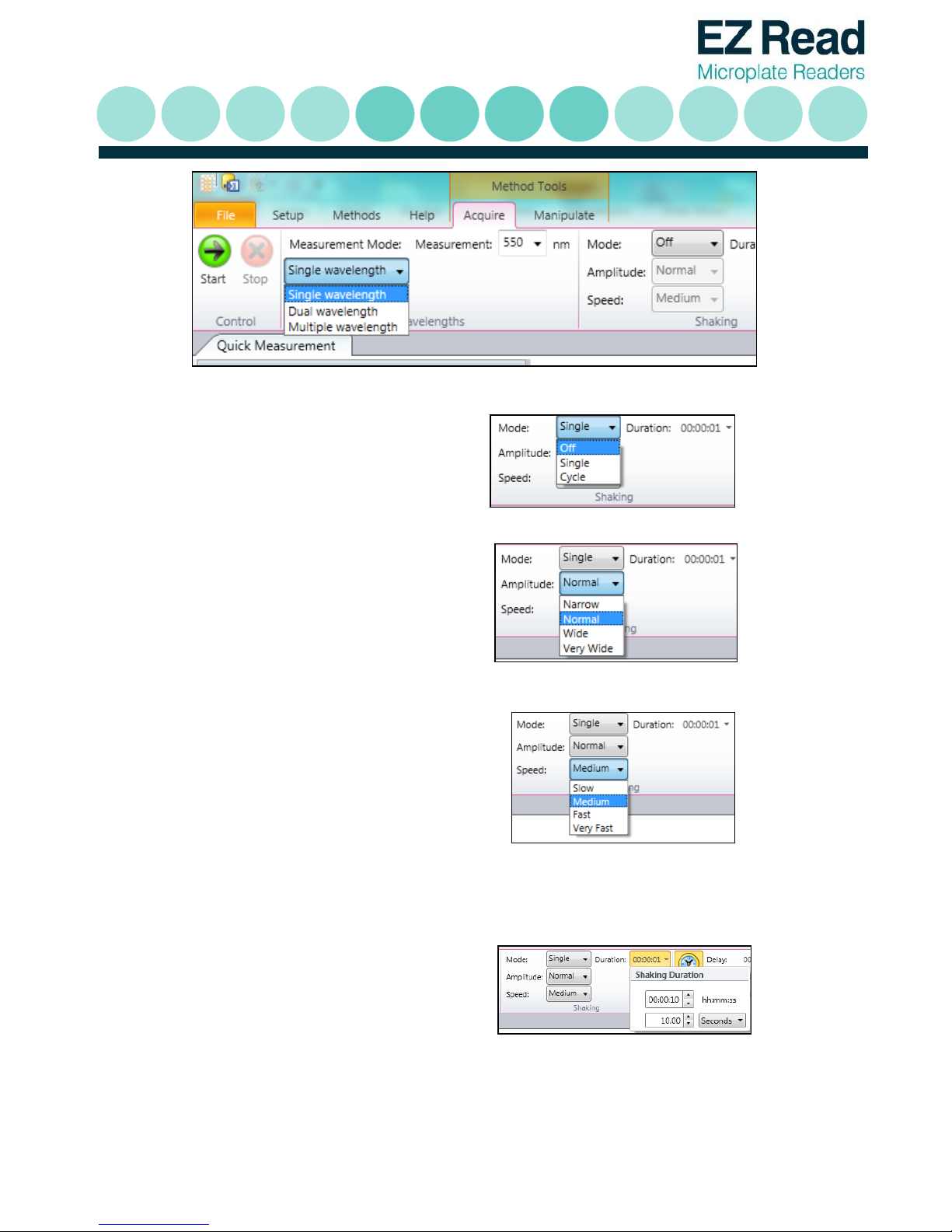
2. Select the appropriate measurement mode (Single, Dual or Multi-wavelength):
a.
b. Single wavelength refers to absorbance measurement at one wavelength.
c. Dual wavelength refers to the measurement of a sample at two wavelengths. The first
wavelength is where the sample of interest absorbs. The second wavelength is used as
a reference and will be subtracted from the first wavelength. The absorbance
measurement is then subtracted from a measurement at a different wavelength.
Multiple wavelength refers to a series of absorbance measurements at different
wavelengths. In this mode, absorbance measurements are not subtracted from one
another.
8
d.
3. Users can also select to shake the
microplate. Users can select shaking to
be a single event or in timed cycles.
4. Select the amplitude (degree of linear
shaking).
5. Select the speed for linear shaking.
6. Users can select the duration of
shaking.

9
7. Click ‘Start’ to begin acquisition.
8. Raw absorbance values for dual wavelengths measurements are displayed in the wells. Details
of corresponding wavelengths can be displayed when clicking on the individual well.

10
9. When users click onto a well, it is highlighted (dashed lines). In regards to dual wavelength
measurements, three absorbance values are displayed.
The bold value refers to the absorbance
measurement after wavelength
subtraction of the absorbance at the
measurement wavelength from the
absorbance at the reference wavelength.
The second value is the absorbance at
the measurement wavelength
The third value is the absorbance at the
reference wavelength.
Inhaltsverzeichnis
Beliebte Kartenleser Handbücher anderer Marken


Rosslare
Rosslare DR-6255 Bedienungsanleitung

Lindy
Lindy 51541 Bedienungsanleitung

Diapro T?bbi Ürünler
Diapro T?bbi Ürünler Across System Bedienungsanleitung

Johnson Controls
Johnson Controls Kantech tyco ioSmart Bedienungsanleitung

ACS
ACS ACR122L Bedienungsanleitung

Secukey
Secukey S2-MF Bedienungsanleitung


