
Fasttel WIZARD ELITE IP Bedienungsanleitung

Edition2.1pg.1
InstructionManual
WizardEliteIP
(fromsoftwareversion1.2.0)
Fasttelreservestherighttochangethecontentofthismanualwithoutpriornotice.
FasttelBelgium,Klipsenstraat18A,9160Lokeren,Belgium.Tel.+32(0)92446520[email protected]

Edition2.1pg.2
Contents
1.ConnectionDiagram............................................................................................................................3
2.FindtheWizardintheNetwork..........................................................................................................3
3.Configuration.......................................................................................................................................4
3.1LoggingIn.......................................................................................................................................4
3.2Status.............................................................................................................................................4
3.3Networkandtimesettings............................................................................................................4
3.4Phonedirectory.............................................................................................................................4
3.5Sipconnectionsettings..................................................................................................................6
3.6QuickDialButtonSettings.............................................................................................................7
3.7TimingSettings...............................................................................................................................7
3.8Timeprofiles..................................................................................................................................8
3.9Devicesettings...............................................................................................................................8
3.10Relaysettings..............................................................................................................................9
3.11AudioSettings............................................................................................................................10
3.12VideoSettings............................................................................................................................10
3.13CameraSettings.........................................................................................................................11
3.14Backup,factoryreset&Logs.....................................................................................................11
3.15AccountSettings........................................................................................................................12
3.16Softwareupdate........................................................................................................................12
3.17Autoprovisioning.......................................................................................................................12

Edition2.1pg.3
1.ConnectionDiagram
TheonlywaytopowertheWizardIPisoveraPoEnetworkconnection.Iftheavailablenetwork
switchdoesnothaveaPoE,itisrecommendedtoordertheFasttelPoEinjector(FTPoE).
Pin1:GNDWiegand/externalbutton
Pin2:WiegandD1
Pin3:WiegandD0
Pin4:connectionexternalbutton(simulatesbutton1)/reset
Pin5:normallyclosedcontactrelay2
Pin6:normallyopencontactrelay2
Pin7:sharedcontactrelay2
Pin8:normallyclosedcontactrelay1
Pin9:normallyopencontactrelay1
Pin10:sharedcontactrelay1
Pin11:Notused
Pin12:Notused
2.FindtheWizardintheNetwork
1. ViaDHCPserver:
Duringstart‐up,theIPaddressobtainedisshownintheWizard’sdisplay.
Orsearchforthedeviceusingthe“AdvancedIPscanner”(http://www.advanced‐ip‐
scanner.com/)program(orsimilarsoftware).Thenameisalwaysformattedas
Fasttel0005510xxxx.ThennavigatetotheIPaddressinabrowserandmakethe
configuration.TheMacaddressalwaysbeginsas00:05:51:
2. WithoutDHCPserver:
ConnecttheWizardthroughaPoEinjectortoalaptopordesktopandsearchforthedevice
usingthe“AdvancedIPScanner”program(orsimilarsoftware).Thenameisalways
formattedasFasttel0005510xxxx.ThennavigatetotheIPaddressinabrowserandmakethe
configuration.
Attention:afterperformingafactoryresettheWizardobtainsipaddress192.168.222.123!
123 45678 9 10 1112

Edition2.1pg.4
3.Configuration
Allthesettingsareconfiguredon1webpage.
Nexttoeachitemyoufind .Movethemousecursoronitandsomeexplanationoftheitemwill
appear.
3.1LoggingIn
NavigatetotheaddressoftheWizardandenterthedefaultUsernameandPassword.Bothare
admin.Asecondloginisuser/user.Changebothinsection“Account”.
Changethelanguageifdesired.
Youwillseetheconfigurationmenuontheleft.
3.2Status
Anoverviewofthedefaultvaluesofwhatyouwillhavetoconfigureisgivenhere.Nothingcanbe
editedinthispageitself.
Apreviewofthecameraisalsoshownhere.
Note:ifyouhaveenteredauserandpasswordunderVideosettings,thispreviewcanonlybeseenin
Firefox.
3.3Networkandtimesettings
IP
ThedevicecomesinDHCPmodeupondelivery.Withaprogramsuchas“AdvancedIPScanner”
(http://www.advanced‐ip‐scanner.com/),youcanscanthenetworkandifaDHCPserverisactive,
youwillfindthedevicewiththenameFasttel000551XXX,andyouwillseetheIPaddressobtained
(seepoint2.FindtheWizardintheNetwork)
YoucanalsogivethedeviceastaticIPaddress.
Attention:afterperformingafactoryresettheWizardobtainsipaddress192.168.222.123!
Dateandtime:
WithinEurope,yougenerallydonotneedtochangeanythinghere.Thedateandtimecanbe
enteredmanuallyhere.
However,itisbettertousethedefaultNTPserver.
3.4Phonedirectory
Thefollowingiscreatedhere:
1. Therecipientswhomustbeabletobecalled.

Edition2.1pg.5
2. Andthepeoplewhomustgainaccesswiththeoptionalaccesscontrolkeypadand/orbadge
reader.
Displayname:
1. Thisnameisshowninthedisplayifthisrecipientisassignedtoabutton.
2. 2.Ifyouwishtocreateaccesscodesforegstaffmembers,youcanentertheirnamehere
withouttelephonenumberbutupto2codes.
Phonenumber:thisisthenumberthatthedoorintercommustcalltobeabletoreachthisrecipient.
Withthegreenandredbuttonsyoucanmakeatestcalltothisnumber.
Accesscoderelay1andrelay2:theoptionalaccesskeyboardcanbeoperatedwiththese2codes.
Youcanchooseforbothcodesfromthe2internalrelaysorfrom8relaysofamaximumof2optional
I/Oswitches.(seefurther3.10relaysettings)
Dooropenanimation+voice:ifchecked,aspokenmessageandanimationwillbeplayedinthe
displaywhenarelayisactivated.
Timeprofile:youcanassignatimeprofiletoarecipient.Ifacallisplacedtothisrecipientoutside
thetimeprofile,thedoorintercomwillnotlaunchacalloritwillcallthenextrecipientwhodoesfall
withinthetimeprofile.
Forinstance,youcanprogram3shiftteamsunder1button,eachwithadifferenttimeprofileof8
workhours.Thecorrectshiftteamwillthenalwaysbecalledatthecorrecttime.Seethefollowing
twopoints:3.6QuickdialButtonSettingsand3.8TimeProfiles.
Callandenter:ifarelayischosenhere,thisrelaywillbeactivateddirectlywhencallingthisrecipient.
ShortenRingTimeto(sec)::ifthesquareistickedandavalueisenteredhere,thecallduringCall
andEnterwillonlyringthetelephonewiththatvalue.
Thisfunctionisusefulfor,e.g.dentists.Whencalling,thedoorisconcretelyopeneddirectlyandthe
telephonerings,e.g.1or2timesasnotificationthatsomeoneisentering.
TheCallandEnterfunctioncanalsobeusedtoprovidecontactwhencalling,e.g.toaninputofa
homeautomationsystem.Ifthisisthecase,disabletheDooropenanimation.

Edition2.1pg.6
Recipientscanthereforebecreateddoubly:firstwithoutCallandEnterandthenwithCallandEnter
activated.Youcanlinkadifferenttimeprofiletosetautomaticopeningofthedoorbytimes.The
doublerecipientisthenprogrammedunderthesamebuttonandmayormaynotbecalled
dependingonthetimeofday.TheCallandEnterfunctionthencomeswiththerecipient.
RFIDNumber:iftheoptionalbadgereaderwasactivated,youcanreadouttheUIDherebyholding
thecardovertheFasttellogoonthedoorintercom.
StopforwardingwithDTMFandstopForewardingtimeout:Whenacallgoestovoicemail,the
Wizardwillseethisasananswerandthereforenotcallthesubsequentrecipients.Thiscanbe
resolvedbyrequiringtherecipienttosendbackacodeaftertheyhaveansweredthecall.
When,e.g.*isenteredinthisfield,thenthepersonwhoansweredthecallmustenter*withina
pre‐settime(stopforewardingtimeout).Theconversationthenremainsopen.If*wasnotentered,
thenthecallisinterruptedandthenextnumberfromthememoryisdialled.
3.5Sipconnectionsettings
Screenname:enteralogicalnameforthedevice.Thedevice’slocationisusefulwhenyouhave
multipledoorintercomsin1project.
ThetelephonenumberisthenumberofthedoorintercomontheexternalSIPserver.
Edition2.1pg.7
Domain:ifempty,theSIPserverfieldwillbeused.
AuthenticationIDandPasswordmustmatchthosegivenintheSIPserver.
Serveraddressandserverport:enterthedatafortheexternalSIPserverwithwhichthedoor
intercomistobeintegrated.
Registrationstatus:Hereyoucanseewhetherthedoorphonehasbeenregisteredsuccessfullyor
not.Attention:donotrefreshitselfafterchangingdata!PushF5andcontinueforpagerefresh.
DetectDTMF:formaximumcompatibility,leaveallthesecheck‐marked.
Echosuppressionoptions:itisbesttoleavethisunchanged.
Clickapplytoconfirmthechanges.
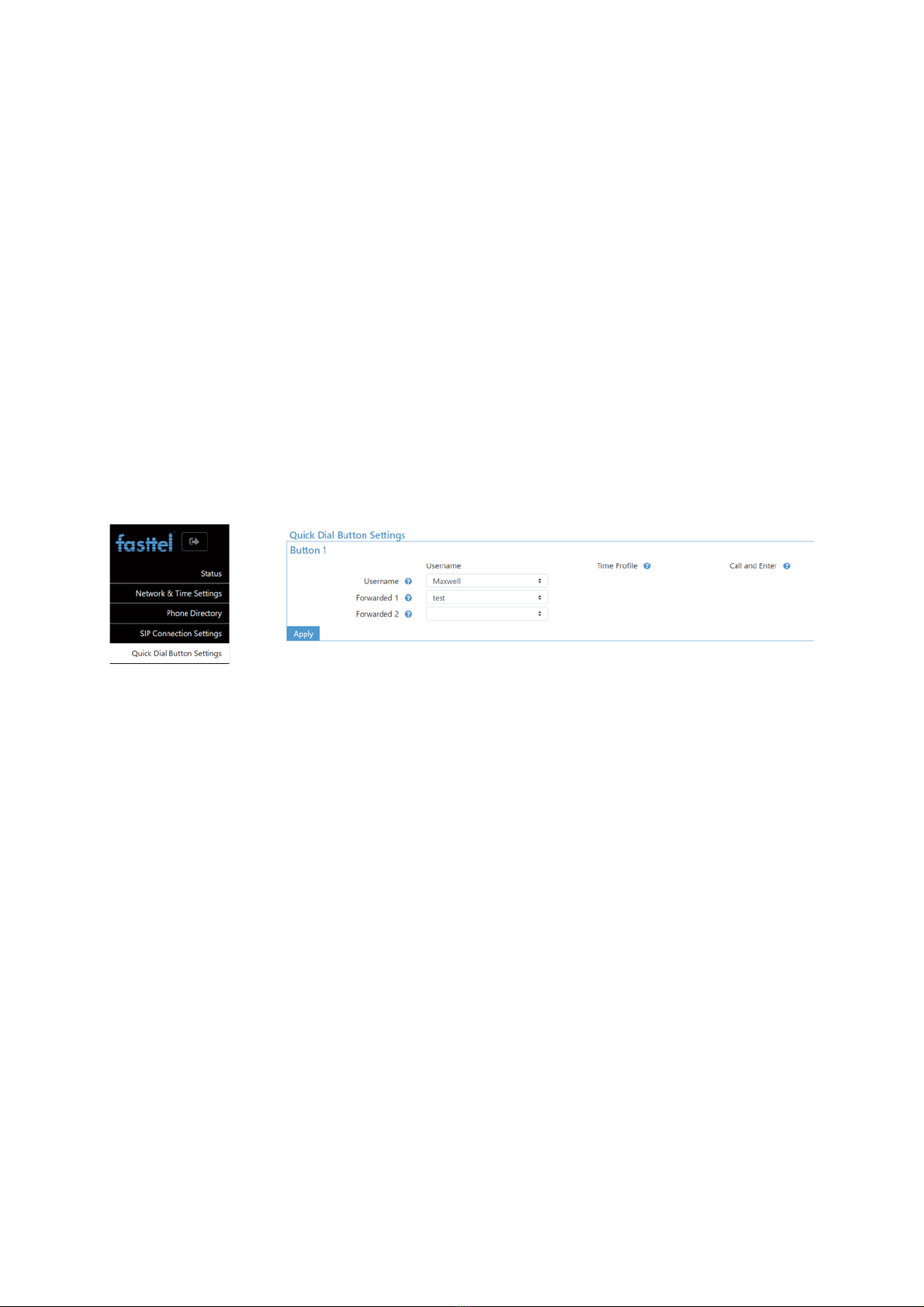
3.6QuickDialButtonSettings
ThisisusedtodeterminewhichoftherecipientsyoujustcreatedinthePhonedirectorymustbe
calledwhenabuttonispressed.
Thispageislicence‐related:only1buttonisvisibleherebecauseadoorintercomwith1buttonwas
purchased.
Username:choosetherecipientwhoistobecalledfirsthere.ThismustbecreatedunderPhone
Directory.Upto10numbersarepossible.
Whenarecipientdoesnotanswerthecall,thenextrecipientwillbecalled.
Whenacallislaunchedoutsidethetimeprofilethatislinkedtoarecipient,thenextrecipientthat
doesfallwithinthetimeprofileischosenautomatically.
Thenumberofbuttonsthatappearsdependsonthelicencethatwaspurchased.
3.7TimingSettings
Forwardtimeout:indicatesthetimewhenasubsequentrecipientiscalledafterthepreviousone
doesnotanswerthecall.
MaxCallduration:Enterhereinsecondsthemaximumdurationofaconversation.
DTMFhangup:thiscodewillforcethecalltoend.

Edition2.1pg.8
3.8Timeprofiles
AtimeprofilecanbecreatedherethatcanbelinkedtoarecipientunderPhoneDirectory.
Recipientsareonlycalledwhenthecallfallswithinthetimeprofile.Ifnotimeprofileislinkedtoa
recipient,thecallwillalwaysbelaunched.
Twotimeprofileshavealreadybeenpre‐programmed:4/5andfulltime(fullworkweek).
3.9Devicesettings
LCDMode:ifyouchoosetext,thenameswillappearthatyoucreatedinthePhoneDirectoryand
havelinkedtoabutton.
Youcanmodifythecolourofthistextandtheoverallbackgroundcolourofthedisplay.
LCDbacklight:adjuststheintensityofthedisplay.
YoucanalsoshowyourownimageintheDisplay.ChooseImageforthisandsearchforyourown
.pngimage.Thedevicewilldisplaythisimageinthecorrectformatautomatically.Thebestformatis
240x320.
Usebackgroundcolortosetthecolourofthebuttonsandtheoptionalaccesscontrolkeypad.
Choosethedifferentgrayscaleforlessbrightwhitelight.
Keypad
Keypadmode:
Keypadasaccesscontrol:withthisoption,entercode#onthekeypadtoactivatetherelay.Codesare
createdunderPhoneDirectory.
Keypadasaccesscontrolandphone:withthischoiceyouentercode#onthekeypadtoactivatethe
relays.Youcancallanumberwith*number#.
Keypadasquickdialnumberandaccesscontrol:whenyouselectthismode,2fieldswillbeadded
underPhoneDirectory:ForwardnumberandQuickdialnumber.Enterathree‐digitvalueinQuick

Edition2.1pg.9
dialnumber,eg105.When105issubsequentlydialledonthekeypad,thetelephonenumberunder
thatusernamewillbecalledandthenumberunderForwardnumberassecond.Therelaycanbe
activatedwith*code#.
ThisfunctionisusefulwhentheWizardisusedinanapartmentblock,forexample,andneedstocall
mobilenumbersdirectlyviaasiptrunk.Thenthisshortenednumberingismoreconvenientthan
enteringafullmobilenumber.
Senddtmfduringacall:allowsthekeypadtobeusedtosenddtmftonesduringacall.Thisisuseful
when,forexample,aconversationcomesuponamenu.
KeypadCodemode:
1. Internalverification:thekeypadisusedtoactivatethecodesenteredunderthePhone
directory.
2. Withexternalverification,theWizardonlysendstheprotocolyouselecthereoverthe
wiegandbus(pin1,2and3connecttothegreenconnector).Youthenneedanexternal
accesscontrolsystem.Fasttelcanhelpyoumaketherightchoiceforthis.
NFCmode:ThisoptionalNFCMifairbadgereaderisofferedasalicensethatyoucanactivateduring
orafterpurchase.
Ininternalverificationthesecondinternalcontactisalwaysactivated(lock2).Withexternalcontrol,
26bits(4‐6digitsHex)areoutput.
Autoreboot:Youcanhavethedevicerebootautomaticallyatthreedifferenttimes.
3.10Relaysettings
Internalrelays:ThetwointernalrelaysoftheWizardIPareconfiguredhere.
Theycanbedisabledandthetimedurationinmillisecondscanbeadjusted.
Thismeansthatadutycycleof2000equalsa2‐secondpulse.
DTMF:Thisisthecodethatmustbeenteredtoopentherelaywiththetelephone.
Externalrelays:

Edition2.1pg.10
Ifyouprefertoswitchtherelaysindoorsforsafetyreasons,youcanpurchaseupto2FT4SWIPs.This
isanetworkmodulewith8inputsand4outputs.Theoutputscanbeactivatedherebyanhttp
command.
Inthisexample,theipaddressofthefirstFT4SWIP=192.168.10.119andthedefaultlogindetails
adminandpasswordareused.BesuretochangeitintheFT4SWIP.DOA1=50atthebackofthe
commandrepresentsrelay1pulsefor5seconds.
TheIPaddressofthesecondFT4SWIPis192.168.10.176.Thiscommandswitchesrelay2for2
seconds.
Dooropenanimation+voice:ifchecked,aspokenmessageandanimationwillbeplayedinthe
displaywhenacontactisactivated.
IfthesameDTMFcodeischosenformultiplerelaystherelayswillbeactivatedalltogether
3.11AudioSettings
Thedefaultvaluesforthespeakerandmicrophonearegenerallycorrectat50%.Ifyoudowantto
makeadjustmentsupward,itisrecommendedtodothisinsmallstepstoavoidoscillation.
Youcanalsosetthevolumeofthespokenmessagesforcalling,endingcall,opendoorandincorrect
code.
Youcanmakechangesasrequiredunderaudiocodecs.
EnableAuditivefeedback:whenringingthebell,openingthedoor,endingthecallandenteringan
incorrectcode,aspokenmessagecanbeplayedtogetherwiththeanimation.
Fourlanguages+neutraltonesarepre‐programmed,butyoucanalsopersonalizethesetexts.
Choosecustomanduploadyourownfiles.
3.12VideoSettings
Andere Handbücher für WIZARD ELITE IP
1
Inhaltsverzeichnis
Andere Fasttel Gegensprechanlage Handbücher

Fasttel
Fasttel FT600W Bedienungsanleitung

Fasttel
Fasttel FT600KSIP Bedienungsanleitung

Fasttel
Fasttel WIZARD CLASSIC IP Bedienungsanleitung

Fasttel
Fasttel WIZARD ELITE IP Bedienungsanleitung

Fasttel
Fasttel FT600VKK Bedienungsanleitung

Fasttel
Fasttel FT600(K)SIP(VC) Bedienungsanleitung

Fasttel
Fasttel FT20CC Bedienungsanleitung

Fasttel
Fasttel Wizard Bronze Bedienungsanleitung

Fasttel
Fasttel FLEXITALK Bedienungsanleitung

Fasttel
Fasttel WIZARD ELEGANCE IP Bedienungsanleitung


