
Fennec Watch One Bedienungsanleitung

Fennec
FennecFennec
Fennec®
®®
®Watch One
Watch One Watch One
Watch One
Smartwatch FW001
User Manual
Version 1.2

Please find the latest version of this user manual at
htt s://www.fennec.me/user-manual/FW001EN/

1. Package Contents
1. Package Contents1. Package Contents
1. Package Contents
Check to make sure your ackage contains the following:
•Fennec Watch One
•User manual
•USB cable for charging and data transfer
•SIM card cover tool
•Screwdriver
•Extra screws for the SIM card cover

2. Com onents and A earance
2. Com onents and A earance2. Com onents and A earance
2. Com onents and A earance
Power & Android
home button*
(Long ress to
ower on/off)
Front
FrontFront
Front Back
BackBack
Back
Mic
Android back
button
Rotatable camera
(rotates 90
°
)
S eaker
1.39” AMOLED
color screen
Contact oint
for charging /
data transmission
Micro SIM card slot
(under cover)
* Press and hold the Power button for 10 secs to reboot if the watch sto s res onding

Phone / Bluetooth /
Wi-Fi / GPS antennas
(inside stra )
Do not bend the stra outward;
this may damage the built-in antennas.
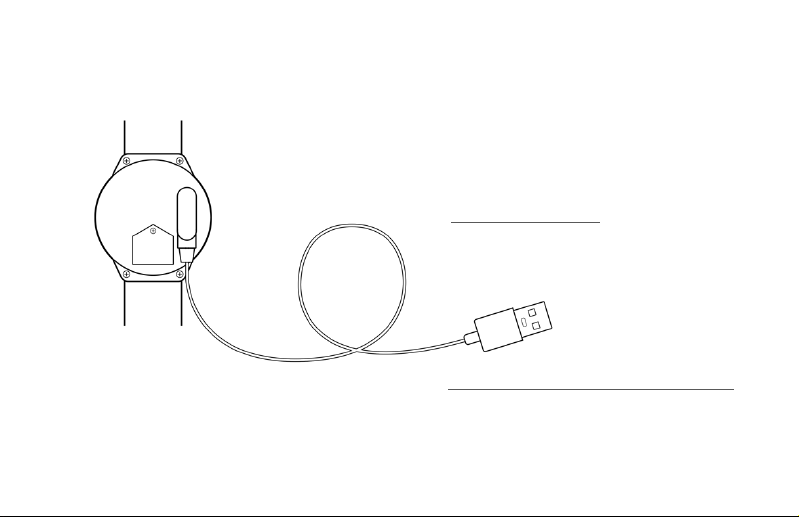
Charging the watch
Charging the watchCharging the watch
Charging the watch
Connect the USB cable to the watch as shown,
then lug the cable into a USB ada ter to
charge the watch.
Accessing the watch’s internal storage
Accessing the watch’s internal storageAccessing the watch’s internal storage
Accessing the watch’s internal storage
Connect the USB cable to a PC or Mac
to access the watch’s internal storage.
The watch will also charge when connected.
3. Charging the Watch /
3. Charging the Watch / 3. Charging the Watch /
3. Charging the Watch /
Accessing the watch’s internal storage from a com uter
Accessing the watch’s internal storage from a com uterAccessing the watch’s internal storage from a com uter
Accessing the watch’s internal storage from a com uter

4. Installing a SIM card
4. Installing a SIM card4. Installing a SIM card
4. Installing a SIM card
1. Unscrew the SIM card cover screw.
Unscrew this
2. Use the included tool or a in to lift off the cover.
3. Insert a micro SIM card into the slot, then ut the
SIM card cover and screw back into lace. Tighten
the screw until snug.
* The watch su orts a 4G or 3G micro SIM card.
Is a SIM card necessary?
Is a SIM card necessary?Is a SIM card necessary?
Is a SIM card necessary?
If you don’t need hone calling or always-on
connectivity, you may not need a SIM card. The
watch works like a normal watch without a SIM card.
Without a SIM card:
•The watch can still connect to the Internet via Wi-Fi.
However, to conserve ower, the watch will not
actively scan or connect to a Wi-Fi network. You
need to manually connect to a Wi-Fi network. For
more details, refer to Section 9: Best Practices for
Best Practices for Best Practices for
Best Practices for
Using the Fennec Watch
Using the Fennec WatchUsing the Fennec Watch
Using the Fennec Watch.
•You will not be able to manage the watch from a
hone if the watch is not connected to the Internet.
•Locating the watch from a arent’s hone may be
unres onsive or less accurate, as the watch relies
on cellular signal to im rove triangulation accuracy.
If the watch is not connected to the Internet, a
arent will not be able to locate the watch.

5. Setting U the Fennec Watch
5. Setting U the Fennec Watch5. Setting U the Fennec Watch
5. Setting U the Fennec Watch
The Fennec Watch needs a arent’s hel to set it
u .
On the arent’s hone:
On the arent’s hone:On the arent’s hone:
On the arent’s hone:
If you have not yet installed Fennec
If you have not yet installed Fennec If you have not yet installed Fennec
If you have not yet installed Fennec
Messenger on your hone:
Messenger on your hone:Messenger on your hone:
Messenger on your hone:
You can scan this QR code to
install the Fennec Messenger
a , or just search for Fennec
Fennec Fennec
Fennec
Messenger
MessengerMessenger
Messenger on Google Play or
the A Store.
After downloading it, launch the Fennec
Messenger a and follow the instructions that
a ear to create your account, your child’s
account, and set u the watch.
A QR code of your child’s account will a ear on
A QR code of your child’s account will a ear on A QR code of your child’s account will a ear on
A QR code of your child’s account will a ear on
the screen
the screen the screen
the screen for you to link to the watch.
If you have installed Fennec Messenger on
If you have installed Fennec Messenger on If you have installed Fennec Messenger on
If you have installed Fennec Messenger on
your hone, but have not yet created a
your hone, but have not yet created a your hone, but have not yet created a
your hone, but have not yet created a
child account:
child account:child account:
child account:
Please go to the
Settings tab in
Fennec Messenger
and create a child
account.
After creating a child
account, follow the
instructions to set u
the watch.
A QR code of your
A QR code of your A QR code of your
A QR code of your
child’s account will
child’s account will child’s account will
child’s account will
a ear on the
a ear on the a ear on the
a ear on the
screen
screen screen
screen for you to link
to the watch. 1.
2.

If you have installed Fennec
If you have installed Fennec If you have installed Fennec
If you have installed Fennec
Messenger and have created a
Messenger and have created a Messenger and have created a
Messenger and have created a
child account, but have not yet
child account, but have not yet child account, but have not yet
child account, but have not yet
linked the child account to the
linked the child account to the linked the child account to the
linked the child account to the
watch:
watch:watch:
watch:
In Fennec Messenger, go to the
Settings tab, select the child
account, then ta Add watch
Add watch Add watch
Add watch
(iPhone) or Bind a watch
Bind a watchBind a watch
Bind a watch
(Android).
A QR code of your child’s
A QR code of your child’s A QR code of your child’s
A QR code of your child’s
account will a ear on the
account will a ear on the account will a ear on the
account will a ear on the
screen
screen screen
screen for you to link to the
watch.
iPhone Android hone

On the Fennec Watch
On the Fennec WatchOn the Fennec Watch
On the Fennec Watch
•Please charge the watch for at least 3 hours
before setting it u .
•The watch needs an Internet connection
(through cellular data or Wi-Fi) to com lete
the initial setu .
1. Press and hold the ower button to turn it
on.
2. If you have inserted a SIM card, the setu
wizard will check for an Internet connection
automatically.
3. If the Internet is not available even with a SIM
card installed, or if there is no SIM card in the
watch, the setu wizard will guide you
through connecting to a Wi-Fi network.
4. If the Internet is available, the setu wizard
will ask you to scan your hone for the QR
code of your child’s
your child’s your child’s
your child’s Fennec Messenger
account.
NOTE
NOTENOTE
NOTE: Please scan the QR code of your child’s
child’s child’s
child’s
account
accountaccount
account,
not
the QR code of a arent account. If
you don’t know where to find the QR code for your
child’s account, lease follow the instructions in
On the arent’s hone
On the arent’s honeOn the arent’s hone
On the arent’s hone in the revious ages.
5. After using the watch to scan the QR code of
your child’s account, the child account should be
linked to the watch.
Having trouble setting u the watch?
Having trouble setting u the watch?Having trouble setting u the watch?
Having trouble setting u the watch?
Try moving to a lace where you have better
cellular or Wi-Fi signal, ress and hold the ower
button to reboot the watch, then try again.
Dieses Handbuch passt für folgende Modelle
1
Inhaltsverzeichnis


