Firecom FHW50X Bedienungsanleitung


Table of Contents
Overview 1
Model Matrix 1
Replacement Parts 1
Contents in Box 1
Accessories (not included) 1
Features 2
Common Features, All Models 2
Common Features, Communication Headsets 3
Wireless Bluetooth® Technology 3
Wireless DECT7 Communications 3
Configuring the Headset 4
Headband Removal 4
Headband Installation 4
Headstrap Installation 5
Replacing the Ruggedizer 5
Connecting a Two-way Radio 5
Fitting 6
Overhead Fitment 6
Behind Head Fitment 6
Fitment Warnings 7
Charging 8
Battery Replacement 9
LED Indications 9
Settings & Operation 10
Buttons 10
Advanced Menu 11
Wireless Bluetooth® 12
Wireless DECT7 12
DECT Signal Strength 12
Quick Launch 13
PC Programming 13
Locating the USB Port 13
Installation of Sonetics Configurator Software for Windows 13
Care and Maintenance 14
Mic Muff Replacement 14
Ear Seal Replacement 14
Troubleshooting 15
Service Contact: 15
General Connection Issues 15
Wired Auxiliary 15
Wireless Bluetooth 15
Wireless DECT 15
Glossary 16
Specifications 17
Headset 17
Regulatory 17
Bluetooth® Specifications 18
DECT Specifications 18
Important Safety Information 19
General Warning for Sensitive Electronic Devices 19
General Communication Privacy Notice 19
Industry Canada (I.C.) Notice (UHW503/5/7, FHW507, DW501B) 19
FCC Part 15 Information (UHW503/505/507, FHW507, DW501B) 20
FCC/IC RF Exposure Warning 20
Rechargeable Battery Information 20
Important NRR Information 21
Firecom Standard Limited Warranty 22

1 | P a g e
Overview
The Firecom FHW and UHW series Electronic Headsets protect you from dangerous
noise while keeping other audio at a comfortable listening level. It protects your
hearing without sacrificing your safety or situational awareness. You can hear
alarms, music, or even have a face-to-face conversation while still being protected.
Simultaneous integration with two-way radios, cell phones, and MP3 players is
available via wired and optional Bluetooth inputs. DECT7 models extend conference
call like team communication up to 1,600 feet (line of sight). The rugged and
comfortable design ensures this headset is ready for tough work environments.
Model Matrix
FHW507
UHW507
UHW505
FHW505
UHW503
DW501
BT
DW501
Boom
Microphone
Listen Through
Wired AUX
Radio
Transmit
Wireless
Bluetooth
Wireless
DECT7
= Included
= Not Available
Replacement Parts
Silicone Ruggedizers
Earseals
Mic Muffs
Head Bands and Head Straps
Batteries
Speaker Covers
Contents in Box
Headset
1 ea x Firecom Headset
Manual and Reference
1 ea x Quick Reference Guide
1 ea x Manual (online at: www.firecom.com)
1 ea x FCC / IC / NRR compliance sheet
1 ea x Warranty Card
1 ea x Accessory Sheet
Charging
1 ea x AC Wall Adaptor
1 ea x Heavy Duty DC Charging Adaptor
Accessories
1 ea x USB Cable
1 pair x Black Ruggedizers (installed)
1 pair x ComLeather Earseals
Tools
1 ea x Headband/Battery Removal Tool
(Sonetics Screw Driver)
Accessories (not included)
Hard Hat Adaptors (FHW & DW only)
PR Radio Interface - Connect to any portable two-way-radio and many
other devices
Silicone Ruggedizers in a variety of colors to meet your team’s needs
Earseals to enhance comfort
Worldwide Power Adaptor
DC Cigarette Adaptor
DC Fuse Assembly

2 | P a g e
Features
Common Features, All Models
Adjustable Volume Control
The Headset has a user adjustable volume control. The Headset will remember the
last setting at each power up for convenience.
Automatic Loud Noise Suppression
The Headset will limit high impulse sounds, such as gun shots, from being
transmitted to the user when using the Stereo Listen Through.
Convertible Headband (FHW, DW models only)
The Headset is user configurable for overhead, behind-head, or hard hat (with hard
hat accessory). This gives the user the ability to change the way they use the
Headset over time without needing to invest in a new one.
Multi-Color Ruggedizers
The ruggedizers offer additional abrasion and impact protection. They are available
in many colors (sold separately) to give the user the ability to define teams, roles, or
enhance safety.
Extreme Environmental Design
The Headset has an IP-66 dust and water egress rating. Even when worn in heavy
rain, the Headset will still be useable. Operation has been verified to -22F / -30C for
extreme cold weather environments.
Flexible Charging
An AC adaptor and DC automotive charging cable are included to allow charging in
most environments.
Hearing Protection
The Headset conforms to many hearing protection standards, keeping the user safe
from harmful noise.
In Headset Charging
The Headset has charging circuitry built in allowing it to be charged from multiple
sources. These include the supplied AC wall adaptor and multiple DC charging
options from a variety of sources including most cars, trucks, and aircraft. Refer to
specification for charging voltages and power requirements.
Light Weight
Through the use of the latest weight saving technologies, Firecom is able to deliver
a wireless headset that is lighter than many wired headsets.
Listen Through Situational Awareness
The Headset has two listen through microphones to give the user stereo situational
awareness. The microphones are placed on the forward edge of the headset to give
the user the perception of sounds in the front versus from the rear. The listen
through has a programmable volume level and limits all sounds the user hears to
82dB.
Long Battery Life
With over 24 hours of battery life on DECT7 Headsets, and 44 hours of battery life
on those without, the Headset works whenever the user needs it.
Multimode Auto Shutdown
To extend the life of the batteries, the Headset will automatically shut down.
Bluetooth and DECT7 Wireless Shutdown: If a DECT wireless connection has been
established, the Headset will power down after 5 minutes if the connection is lost.
Non-Activity Shutdown: Headsets shut down after 1 hour if not used.
The headset will announce when it is about to shut down. Shutdown may be
cancelled by pressing any button.
Two Stage Low Battery Alert
The Electronic Headset has a two stage low battery alert system to notify the user
of a depleted battery before communications are lost.
USB Programmable
Using its USB port, a Headset can be configured using a Windows PC. Many of the
features may be customized and saved. Refer to the Sonetics Headset Software for
details.
User Replaceable Battery
The Electronic Headset uses a replaceable battery. This allows the user to replace
the battery at end-of-life and have spares in the field for extended operation times.
Only Sonetics batteries should be used.
Voice Prompts
Voice prompts allows the user to make all adjustments without removing the
headset. There is no need to look for lights, text, or knob positions. The voice
prompts automatically adjust volume to ensure intelligibility in changing
environments.

3 | P a g e
Wired Line-in
The wired line-in is used to interface with cell phones and hand held radios. This
gives the user more flexibility in their communication needs. The wired connection
features a mono input and mono PTT output. See your Sonetics dealer for
accessories to match your equipment.
Common Features, Communication Headsets
Auto-Leveling Microphone
The Headset automatically detects the voice of the user against noise in the
background. This gives the headset an automatic VOX (noise gate or squelch) that
needs no adjustment when transitioning from areas of differing noise levels.
Noise Cancelling Microphone
Noise cancelling microphones remove background noise right at the mic element.
This lets listeners hear the person talking and not the background noise.
Radio PTT
The Headset interfaces with any two-way portable radio using the wired AUX input
or wireless DECT connection. When there is a wireless DECT connection, the PTT
signal is passed to the wireless DECT7 Wireless Base Station and onto the Digital
Intercom. Otherwise, the PTT signal is passed to the wired AUX input.
Wireless Bluetooth® Technology
Available on the FHW507, UHW507, & DW501BT headsets.
Bluetooth enabled Wireless Headsets can connect with other wireless Bluetooth
enabled devices. This lets you connect an additional audio or communications
device. Cell phones, mp3 players, mobile radios, computers, etc. expand your
communications potential.
A2DP Audio Streaming
The Headset features integrated A2DP streaming audio functionality, so you can
listen to music or podcasts, and hear turn-by-turn direction information from a GPS
application on your phone. You can also use this feature to stream audio from a
Bluetooth-enabled computer to the headset.
Wireless DECT7 Communications
Available on the FHW507, UHW507, UHW505, & UHW503 headsets
The Sonetics Wireless DECT7 Headsets enable full duplex, conference call like
communications to others on the same channel. The Headsets will connect to
standalone Sonetics Wireless Base Stations or Sonetics IP-DECT7 wireless systems. A
DECT7 network gives up to 1600ft of range (line of sight) from its wireless base,
with interference free, digitally encrypted communications.
Backwards Compatibility
Firecom Wireless Headsets are backwards compatible with Firecom first generation
wireless DECT, and DECT6 Wireless Base Stations with minimal loss in functionality.
Broadcast Mode
The Headset may be paired into a listen only mode of operation, reducing power
consumption considerably. This also allows many more headsets to be connected to
a Wireless Base Station simultaneously. Pressing the Radio PTT button allows the
headset to momentarily talk on any available slot. A tone will let the user know
when they can talk. After talking, there will be a slight delay when other users
cannot be heard. Refer to the Wireless Base Station manual for details.
Dual Dome Antenna Design
Each dome has a separate DECT7 antenna using diversity switching to lock onto the
best signal. The user never needs to worry about head position relative to the
wireless base. The best possible connection is delivered at all times.
Radio PTT or Intercom Only Selection
The Headset may be configured to send a transmit signal to radios connected via a
DECT7 Wireless Base Station or Intercom. The user can transmit over multiple
radios depending on the configuration.
Out of Range Warning
The user is notified when DECT7 signal is weak, or when it goes out of range.
Proximity Pairing
To enhance security, the Wireless Base Station will only pair to wireless DECT7 units
in close proximity. This adds another layer of protection for users.
Signal Strength Reporting
The Headset may be placed into a field diagnostic mode to detect signal strength at
The Headset. This can be used to optimize placement of Comhubs or Base Stations.
Wide Band Audio
Wireless DECT7 communications are transmitted in a high definition wide band
audio format. This gives better sound quality, greater intelligibility, and improves
with voice activated control systems. The Headset can also be used in narrow band
if necessary.

4 | P a g e
Configuring the Headset
The Firecom 500 Series Electronic Headset may be set up for use in overhead,
under-helmet, or hard hat (sold separately) configurations. Different headbands are
attached through a secure snap joint on the side of the ear domes. It keeps the ear
dome correctly oriented while providing full freedom of movement, allowing the
dome to seat comfortably against the users head.
Headband Removal
Tools Required: Sonetics Screwdriver
1. Place the handle of your Sonetics Screwdriver between the headband and the
dome. Make sure the handle is behind the notch on the inside of the
headband.
2. Use one hand to hold the dome on a flat surface
3. Gently push with the headband with the other hand.
4. Route the headband cable through the headband as shown.
Headband Installation
Tools Required: None
1. Align the headband with the domes as shown.
Over
Head
Behind
Head
2. Place the Dome onto a flat surface.
3. Press Down on the headband until the ball joint snaps into place.

5 | P a g e
Headstrap Installation
Tools Required: None
1. Insert the strap at dome opening.
2. Affix the strap using the hook and loop.
Replacing the Ruggedizer
Tools Required: None
1. Remove the headband
2. Peel back the ruggedizer
Replace the ruggedizer. Note the left and right.
Connecting a Two-way Radio
Tools Required: Scissors, Firecom screwdriver
1. Remove the left dome ruggedizer. (with the microphone boom attached)
2. Cut the along the groove on the underside of the ruggedizer.
3. Replace the ruggedizer.
4. Open the Radio Cover and plug in the Firecom PR Radio Adaptor.
5. Screw the adaptor into place.
6. Connect the Sonetics PR Radio Adaptor to the Radio.

6 | P a g e
Fitting
Proper fitment is required to achieve the rated hearing protection levels.
Overhead Fitment
1. Inspect
Ensure no damage to
the earseals or the
Headset
2. Expand
3. Place
4. Adjust
5. Seal
Behind Head Fitment
1. Inspect
Ensure no damage to the
earseals or the Headset
2. Expand
3. Place
4. Adjust
5. Seal

7 | P a g e
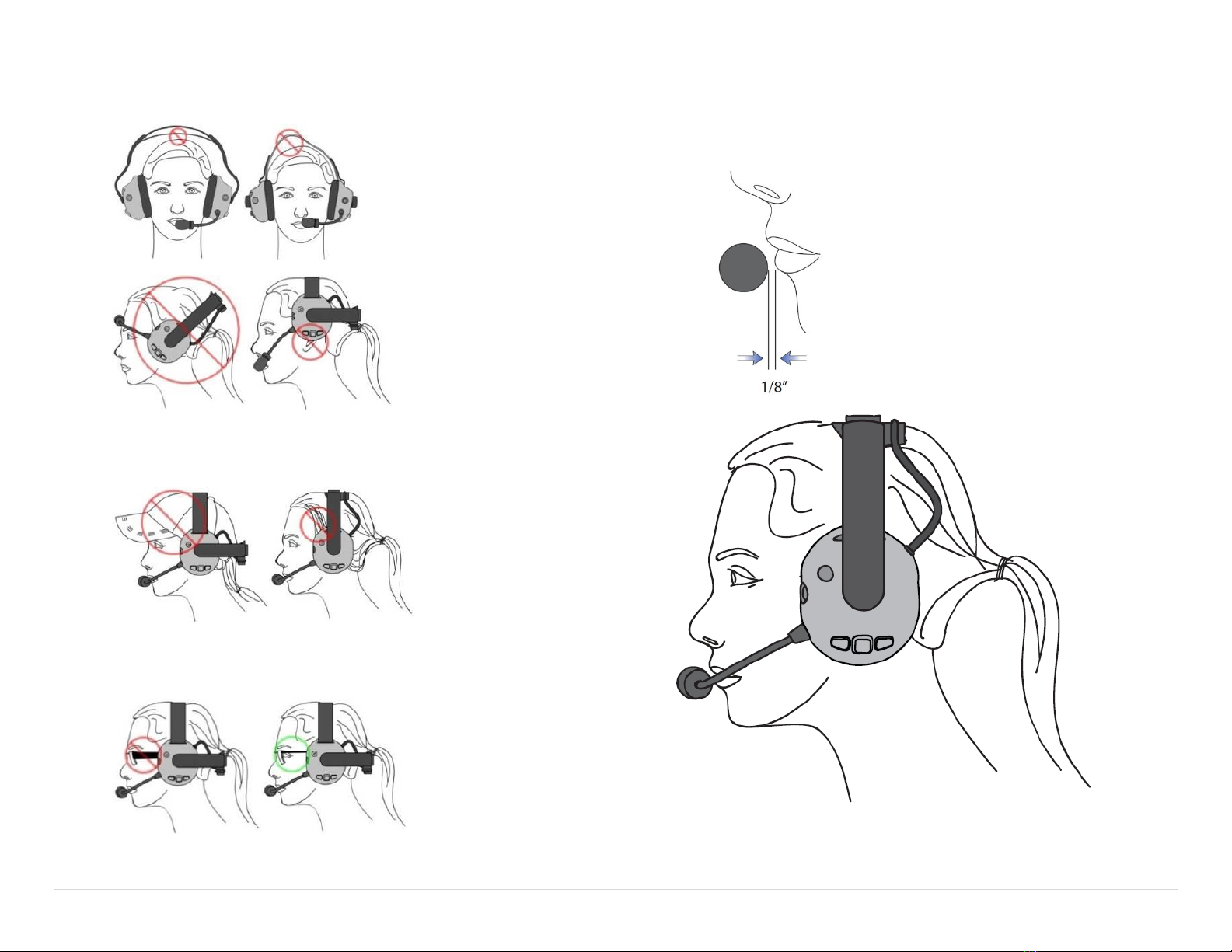
Fitment Warnings
Improper Placement and Adjustment
Obstructions
Ensure headwear and hair does not cause gap in the earseal.
Glasses
Ensure Glasses do not cause a gap in the earseal.
Microphone Placement
To optimize speech, a noise cancelling microphone is used. This type of microphone
is designed to enhance sounds from very close, while reducing sounds from afar.
Ensure proper placement for best results.
Dieses Handbuch passt für folgende Modelle
1
Inhaltsverzeichnis
Andere Firecom Headset Handbücher

Firecom
Firecom FH-10S Bedienungsanleitung

Firecom
Firecom FH-40 Bedienungsanleitung

Firecom
Firecom UH-20 Bedienungsanleitung

Firecom
Firecom UH-10S Bedienungsanleitung

Firecom
Firecom UHW-Series Bedienungsanleitung

Firecom
Firecom UH-15 Bedienungsanleitung

Firecom
Firecom FHW50X Bedienungsanleitung

Firecom
Firecom FH-10 Bedienungsanleitung

Firecom
Firecom UHW-10 Bedienungsanleitung

Firecom
Firecom UH-10 Bedienungsanleitung