
fischertechnik ROBOTICS TXT 4.0 Bedienungsanleitung

ROBOTICS
TXT 4.0 CONTROLLER
Operating manual

© Copyright 2001-2021 schertechnik GmbH | Klaus-Fischer-Straße 1 | 72178 Waldachtal 02
ROBOTICS TXT 4.0 CONTROLLER
schertechnik TXT Operating manual_EN | 10. November 2021, 9:18 PM
04
TABLE OF CONTENTS
Overview of connections 03
Safety information 04
Intended use 04
The ROBOTICS TXT 4.0 Controller 05
Connection options for the Controller 06
Software requirements 11
Supply the Controller with power 11
Switching the Controller on and off 11
Switch on process 11
Switch off process 12
Setting the Controller 12
Menu overview 12
Menu in detail 13
Status bar 13
Master or Extension 14
Time 14
Control elements 14
Menu 15
Main menu 15
01. Start program 15
02. File 15
03. Settings 18
04. Test 20
05. Info 21
Selecting and launching programs 22
Extensions (EXT connection) 23
Connect to the Controller 24
Updating the operating system 29
Faults 29
Technical data 30
Correct disposal 32
Warranty 32
Liability 32

© Copyright 2001-2021 schertechnik GmbH | Klaus-Fischer-Straße 1 | 72178 Waldachtal 03
ROBOTICS TXT 4.0 CONTROLLER
schertechnik TXT Operating manual_EN | 10. November 2021, 9:18 PM
04
OVERVIEW OF CONNECTIONS
01 02
03 04
05 06
07 08
M1
M2
M3
M4
C1
C2
C3
C4
I1
I2
I3
I4
I5
I6
I7
I8
EXT1
EXT2
ON/OFF
TXT 4.0 Controller
S1
S2
S3
SDUSB1 USB2
9V
OUT
IN9V
9V
OUT
Program1
12:30
PROGRAMM
NAME
STOPPED
PROGRAM 01
Program Running
Test
InfoSettings
File
Program1
12:30
01
0
0 0
1010
1
1
0
11
1
00
0 0
0
1
01 USB-A port (USB1)
02 Touch display
03 Micro SD card slot
04 Mini USB port (USB2)
05 9V IN, DC port
06 9V IN, Battery Pack connection
07 EXT connections for expansions
08 Outputs M1–M4 or O1–O8
09 Inputs C1–C4
10 9V Out
11 On / off switch
12 Speaker
13 Universal inputs I1– I8
14 Outputs S1-S3 for servo motors

© Copyright 2001-2021 schertechnik GmbH | Klaus-Fischer-Straße 1 | 72178 Waldachtal 04
ROBOTICS TXT 4.0 CONTROLLER
schertechnik TXT Operating manual_EN | 10. November 2021, 9:18 PM
SAFETY INFORMATION
›Inspect the charger regularly for damage.
›In case of damage, the charger may not be used until repairs are completed.
›Do not insert the wires into an outlet!
›Non-rechargeable batteries cannot be charged!
›Remove rechargeable batteries from the battery compartment before charging.
›Only charge rechargeable batteries with adult supervision.
›Insert batteries with the correct polarity.
›Connection terminals may not be short circuited.
›The ROBOTICS TXT 4.0 Controller may only be operated with a schertechnik power supply, such as the Battery
Pack 35537 or Power Supply 9V DC, 2.3-2.5A.
›When connecting the Battery Pack to the Controller, observe the following:
›Connect the plus pole of the “9V IN” connection to the plus pole (+) of the Battery Pack.
›Connect the minus pole of the “9V IN” connection to the minus pole (-) of the Battery Pack.
›The maximum operating temperature is 40°C.
›Do not allow sharp or pointed objects to come into contact with the touch display, as this may cause damage!
INTENDED USE
The Controller may only be used to operate and control schertechnik models.

© Copyright 2001-2021 schertechnik GmbH | Klaus-Fischer-Straße 1 | 72178 Waldachtal 05
ROBOTICS TXT 4.0 CONTROLLER
schertechnik TXT Operating manual_EN | 10. November 2021, 9:18 PM
THE ROBOTICS TXT 4.0 CONTROLLER
With 512 MB RAM and a 4 GB eMMC memory, three servo outputs and a capacitive touch display that supports
swipe gestures, the TXT 4.0 Controller includes a range of new features.
The Bluetooth/Wi-Fi module offers a wireless interface that can be used in many different applications. A
USB Host port is also provided, and can be used to connect the schertechnik USB camera or USB sticks, for
instance.
Up to nine additional controllers can be connected to a Controller as expansions. The Controller integrates
perfectly into the models thanks to its narrow housing.
Firmware updates are available to download from the cloud to ensure the device is always up to date, and the
Controller retains user-created programs following the download.
The ROBO Pro Coding software can be used for graphic programming or programming with Python. It is operating
system-independent, and can be used on mobile devices as well.
04

© Copyright 2001-2021 schertechnik GmbH | Klaus-Fischer-Straße 1 | 72178 Waldachtal 06
ROBOTICS TXT 4.0 CONTROLLER
schertechnik TXT Operating manual_EN | 10. November 2021, 9:18 PM
CONNECTION OPTIONS FOR THE CONTROLLER
The following devices can be connected and controlled.
In addition, the Controller can be expanded with additional devices:
ACTUATORS
9V, 250 mA
›Motors / Servos
›Compressors
›LEDs
›Buzzers
›Solenoid valves (from the pneumatic building set)
SENSORS
Digital: 5 kO,10 V; Analog: 0 – 5 kO, 0 –10 V
›Buttons
›Magnetic sensors (reed contacts)
›Light sensors (phototransistors, photoresistors)
›Heat sensors (NTC resistors)
›Ultrasound sensors
›Color sensors
›Infrared sensors (track sensors)
›USB camera

© Copyright 2001-2021 schertechnik GmbH | Klaus-Fischer-Straße 1 | 72178 Waldachtal 07
ROBOTICS TXT 4.0 CONTROLLER
schertechnik TXT Operating manual_EN | 10. November 2021, 9:18 PM
04
›Combination sensors
›Environmental sensors
›RGB gesture sensors

© Copyright 2001-2021 schertechnik GmbH | Klaus-Fischer-Straße 1 | 72178 Waldachtal 08
ROBOTICS TXT 4.0 CONTROLLER
schertechnik TXT Operating manual_EN | 10. November 2021, 9:18 PM
ROBOTICS TXT 4.0 CONTROLLER / EXPANSIONS
Up to nine Controllers can be linked via the two 6-pole expansion plugs (7). These plugs can also e used to connect
I2C components (such as combination sensors, environmental sensors, and RGB gesture sensors).
FISCHERTECHNIK USB CAMERA
The camera can be connected to the USB host interface (USB1) (1).
WIRELESS TRANSMISSION
The Controller can connect to other devices, such as a PC, tablet or smartphone, via Bluetooth or Wi-Fi.
PORT, PLUG AND BUTTON FUNCTIONS
01 02
03 04
05 06
07 08
M1
M2
M3
M4
C1
C2
C3
C4
I1
I2
I3
I4
I5
I6
I7
I8
EXT1
EXT2
ON/OFF
TXT 4.0 Controller
S1
S2
S3
SDUSB1 USB2
9V
OUT
IN9V
9V
OUT
Program1
12:30
PROGRAMM
NAME
STOPPED
PROGRAM 01
Program Running
Test
InfoSettings
File
Program1
12:30
01
0
0 0
1010
1
1
0
11
1
00
0 0
0
1
1. USB-A port (USB1):
USB 2.0 host connection, for instance for schertechnik
USB camera art. No. 152522 or USB stick.
2. Touch display
The color touch display shows the status of the Controller,
which programs are loaded, and where the user is in
the menu. Functions and programs can be selected,
activated or deactivated. The user can display the
values of variables or values from analog sensors while a
program is running. A helpful menu overview is provided
in the “Settings (Menu overview)” section. Swipe gestures
are supported.
3. Micro SD card slot
A Micro SD card ts in this slot (not included in the scope of delivery) to expand the device memory.
4. Mini USB port (USB2):
The USB 2.0 port (1.1 compatible) connects to the PC. A cable of this type is included

© Copyright 2001-2021 schertechnik GmbH | Klaus-Fischer-Straße 1 | 72178 Waldachtal 09
ROBOTICS TXT 4.0 CONTROLLER
schertechnik TXT Operating manual_EN | 10. November 2021, 9:18 PM
5. 9V IN, DC port (3.45 mm, plus pole internal)
The power supply from the Power Set is connected here (not included in the scope of delivery).
6. 9V IN, Battery Pack connection
This connection allows for a mobile power supply via the schertechnik Battery Pack (not included in the
scope of delivery) as an alternative to the power pack.
7. EXT connections for expansions
These connections can be used to link additional ROBOTICS TXT 4.0 Controllers, thereby expanding the
numbers of inputs and outputs. In addition, you receive an I2C interface, for instance for sensors.
8. Outputs M1– M4 or O1– O1
4 motors can be connected to the outputs. Alternatively, 8 LEDs or electromagnets with the second pole
connected to a ground connection ( ) can be used.
9. Inputs C1– C4
Fast counting inputs, record counting pulses up to 1 kHz
(1000 pulses / sec.), for instance from schertechnik
encoder motors. These can also be used as digital inputs,
for instance for buttons.
10. 9V Out
Supplies sensors with the required operating voltage 9V+,
such as color sensors, track sensors, ultrasound sensors,
magnetic encoders.
11. On / off switch
Switches the Controller on or off, and indicates the
operating status via different colors.
12. Speaker
The speakers can be used to play sounds or noises stored on the Controller or the memory card.
13. Universal inputs I1– I8
These signal inputs are designed for all-around use. They can be set using the ROBO Pro Coding software
for:
›Digital sensors (buttons, reed contacts, phototransistors) – Digital 5 kΩ
›Infrared track sensors – Digital 10V
›Analog sensors 0–5kΩ (NTC resistors, photoresistors, potentiometers)
01 02
03 04
05 06
07 08
M1
M2
M3
M4
C1
C2
C3
C4
I1
I2
I3
I4
I5
I6
I7
I8
EXT1
EXT2
ON/OFF
TXT 4.0 Controller
S1
S2
S3
SDUSB1 USB2
9V
OUT
IN9V
9V
OUT
Program1
12:30
PROGRAMM
NAME
STOPPED
PROGRAM 01
Program Running
Test
InfoSettings
File
Program1
12:30
01
0
0 0
1010
1
1
0
11
1
00
0 0
0
1
© Copyright 2001-2021 schertechnik GmbH | Klaus-Fischer-Straße 1 | 72178 Waldachtal 10
ROBOTICS TXT 4.0 CONTROLLER
schertechnik TXT Operating manual_EN | 10. November 2021, 9:18 PM
›Analog sensors 0–10V (color sensors) display the value in in mV (millivolt)
›Ultrasound distance sensors
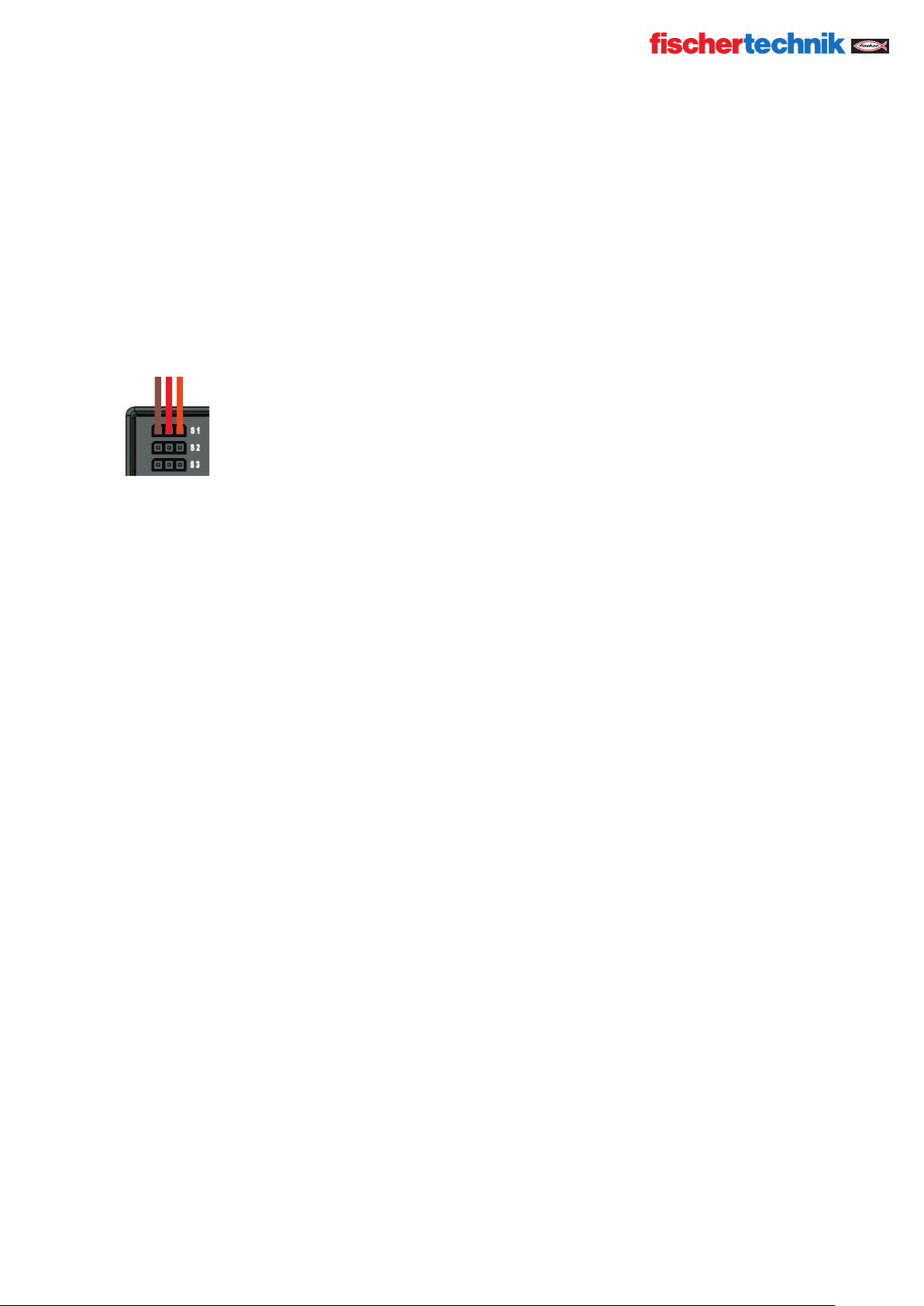
14. Servo connections S1-S3
3-Pole header to connect the schertechnik servo 132292.
Ensure correct polarity!
Inhaltsverzeichnis
Andere fischertechnik Controller Handbücher


