
Formon Core Bedienungsanleitung

FORMON CORE
USER MANUAL

LEGAL NOTICES
PRODUCT WARRANTY
Formon Core is covered by a limited warranty. For terms and conditions please visit
formon3d.com/legal.
ITENDED USE
Formon Core is designed and built for fused deposition modeling only for PLA plastics.
The small footprint and the ease-of-use of Formon Core make them great devices for
indoor use in home/business environments. They are great devices for concept mod-
-
ed by Formon, a lot of effort has been made in order to match material properties with
Copyright © 2017 Formon LLC. All rights reserved worldwide.
DISCLAIMERS
The instructions in this document have been carefully checked for accuracy and are
presumed to be reliable. Formon LLC assumes no responsibility for inaccuracies and
reserves the right to modify and revise this document without notice. You agree to
document, please contact the Formon team for up-to-date information.
Formon LLC does not warrant the accuracy or completeness of the information,
products or services provided by or through this user manual and assumes no
responsibility for any typographical, technical or other innacuracies in this manual. The
information in this user manual is provided without any warranty, express or implied,
LLC shall not be liable to you for any damages whatsoever, be they direct, economic,
commercial, special, consequential, incidental, exemplary, or indirect damages, even
if Formon has been advised of the possibilities of such damages. Formon assumes
no responsibility, nor will be liable, for any damages to, or any viruses or malware that
may infect, your computer, telecommunication equipment, or other property caused by
or arising from your downloading of any information or materials related to this user
manual. The conditions or methods used for assembling, handling, storage, use or
disposal of the device are beyond our control and may be beyond our knowledge. For
this and other reasons, we do not assume responsibiltiy and expressly disclaim liability
for loss, injuries, damage or expense araising out of or in any way connected with the
Please read and understand all the contents of this user manual. Failure to
read the manual may lead to personal injury or damage. Always make sure
that anyone who uses the 3D printer knows and understands the contents of
this manual.
LEGAL NOTICES | 2

TABLE OF CONTENTS
1. SAFETY AND COMPLIANCE
COMPLIANCE
SAFETY MESSAGES
HAZARDS
2. INTRODUCTION
FORMON CORE AT A GLANCE
TECHNICAL SPECIFICATIONS
3. SETTING UP
UNPACKING
ACCESSORY CHECKLIST
SETTING UP FORMON CORE
LOADING FILAMENT
GET FORMON SCOPE
WI-FI CONFIGURATION
4. STARTING A PRINT
FILE FORMAT AND KEY CONSIDERATIONS
PREPARING FOR PRINT
USING FORMON SCOPE
PRINTING PROCESS
5. HELP AND SUPPORT
SUPPORT AND MAINTENANCE
TROUBLESHOOTING
.........................................................4
..................................................................................5
......................................................................6
..........................................................................................7
...............................................................................8
........................................................9
......................................................11
....................................................................................12
....................................................................................13
.............................................................14
.......................................................15
......................................................................16
...................................................................18
.................................................................19
........................................................................20
...............................21
................................................................22
...............................................................23
.....................................................................27
....................................................................31
....................................................32
.....................................................................33
TABLE OF CONTENTS | 3

1. SAFETY AND COMPLIANCE
This part is about working safely with your
Formon Core. Please read all the information
carefully in order to prevent any possible
accidents or injuries.

COMPLIANCE
SAFETY AND COMPLIANCE | 5

SAFETY MESSAGES
Safety alert symbols in this manual indicate potential safety hazards that could harm
you or others. Please read the safety messages carefully throughout the manual.
Always unplug the printer before performing any kind of maintenance or
modications.
This sign warns of a situation that may cause material damage or injuries if
you do not follow the safety instructions.
This sign provides additional information that are useful to do a certain task
or to avoid problems.
GENERAL SAFETY INFORMATION
The print-head of the Formon Core generates high temperatures and has moving parts
that can cause injury. Never put your hands inside the printer while the printer is in
operation; when you turn it on and it calibrates; when its preparing for print; or while
it is printing. The only time you’re safe to put hands in is when the printer’s startup
calibration is over and you can take the built plate to apply adhesive, or after the print is
Always control the printer with the touch screen display at the front.
Do not change or adjust anything on the Formon Core unless it is authorized by the
manufacturer.
Do not leave Formon Core unattended during operation.
Do not store any item inside the printer.
Children should be under adult supervision when using Formon Core.
SAFETY AND COMPLIANCE | 6

HAZARDS
Only use your printer in a well-ventilated area.
Allow the printer to cool down for 30 minutes before performing any
maintenance or troubleshooting.
ELECTRICAL SAFETY
MECHANICAL SAFETY
Formon Core contains moving parts. Do not touch the printer and do not put your
hands inside while the top platform is moving upwards or downwards because the
force of the vertical movement is big enough to give physical damage. Keep your
hands out while the printer is in operation or while the top platform is moving.
RISK OF BURNS
The print-head can reach temperatures up to 210 . Do not touch the print-head
strongly advise against reaching inside the machine while the printhead is still hot.
HEALTH AND SAFETY
materials may damage the print-head. The use of materials other than PLA is
prohibited. Printing with pure PLA is considered safe, although good room ventilation is
still advised for possible unknown vapors released from coloring dyes in colored PLA.
ELECTROMAGNETIC COMPATIBILITY (EMC)
SAFETY AND COMPLIANCE | 7

2. INTRODUCTION
Thank you for choosing Formon Core. This
user manual is designed to help you get
familiar with Formon Core and see how easy
and simple it is to start printing. Please follow
the instructions carefully and experience the
magic of 3D printing through Formon Core.

FORMON CORE AT A GLANCE
1. Top Platform with a
removable plastic enclosure
2. Bottom Platform
3. Touch Screen Display
4. On/Off Power Switch
8. Filament Spool holder
1
23
4
5
6
78
INTRODUCTION | 9
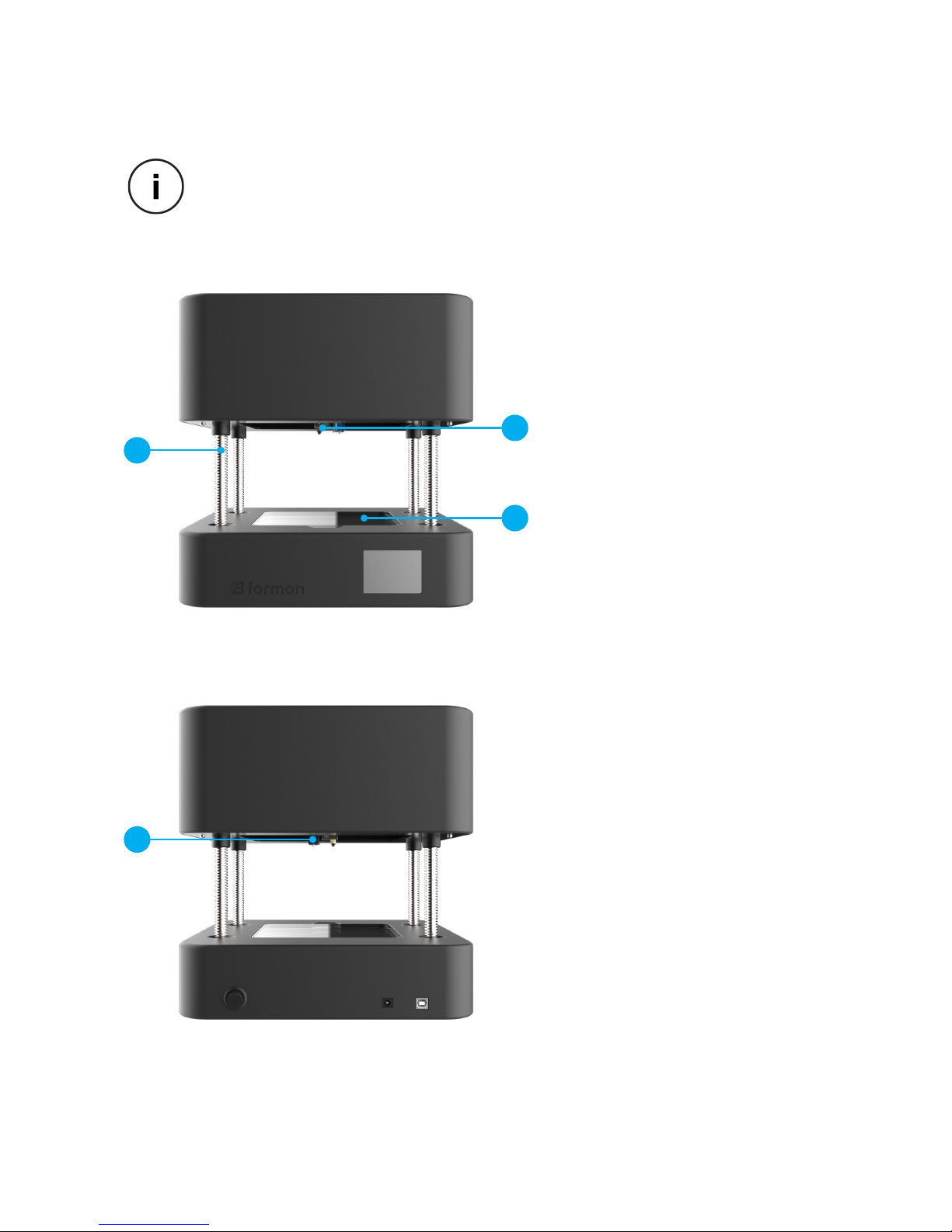
FORMON CORE AT A GLANCE
9. Z-Axis Spindles
10. Print-Head
11. Print Bed
12. Auto-Bed Leveling Solenoid
9
10
11
12
INTRODUCTION | 10
When you turn on Formon Core, during the calibration process and during the
printing process the Top Platform moves upwards through the
Z-Axis Spindles.
Inhaltsverzeichnis


