
FOS Technologies Luminus NANO Bedienungsanleitung

User’s Manual
Wireless Battery Light
Luminus NANO
USER’S MANUAL
--------------------------------------------------------------------------------------------------------
Before you operate this fixture read the manual carefully. Always make sure to include the manual
if you pass/rent/sell the fixture to another user.

User’s Manual
1
TABLE OF CONTENT
1.#Warning#………………………….…………………………………..………..…………….………………………………………….2#
1.1! Safety! Instructions!………………………………………….………………..………………………………………….2!
1.2!Rigging!………………………………………………………….………………………………………………………….….…3!
2.#Product#Introduction#……………………………………………………………………………………………….……………3!
2.1!Items!in!the!Package!…………………………………..………….…….…….…….…………………….……..........3!
2.2! Product! Overview………………………………………………………………….……………………………………….3!
2.3!Fixture!Temperature!………………………….………….………………….……….…….…………….……………….5!
2.4!Storing!the!Fixture!……………………….........……………………….…….………….………………………………6!
2.5!Mounting!………………………………………………...……………………………………….……….……………………6!
2.6! Specifications…………………………….……..……….………………………………….……….……………………! 7!
3.#Battery#Charge#…………………..……….……………….……………………………………………….…………………………8!
4. Product# Setup! …………....………..…………………………………………………………...…………………………………8#
4.1! Menu! Lock! ……………….………………………………………………………………………………………………….8!
4.2! Factory! Reset…………….…….…………………………………………………………………………………………8!
4.3! Menu! Map!…………………………………………………………………………….………………………………………9!
4.4! DMX! Addressing!……………………………………….………………………………………….……………………….9!
4.5! Wireless! DMX! Setup! ………………………………………………………………….…………………………………10!
4.6!DMX!Signal!Fail!………………………………………………………………………………………………………………12!
5.#Operation#……………………………………………………….…………………………………………………………………….12#
5.1!DMX!Control!Mode………………………………………………….…………………….………………………………12!
5.2!Master/Slave! Mode! ………………………………………………..……………………………………………………14!
5.3!Auto!Run!Mode!………………….…………………………………………………………………………………………14!
5.4!Sound!Mode!……………….…………………………………………………………………………………………………14!
5.5!Colour!Mix……..………………………………………………………………………………………………………………14!
5.6!IR!Remote!Control!…………….……………………………………………..……………………………………………15!
6. Maintenance………………………………………………………………………………….………………………………….…16
6.1!General!Maintenance!……………………………………………………………………………………………………16!
6.2! Fuse! Replacement!……………………………………………………………….………………………………………17!

User’s Manual
2
1. WARNING
1.1#Safety#Instructions
This! product! guide! contains! important! information! about! the! safe! installation! and! use! of! this!
product.!Please!read!and!follow!these!instructions!carefully!and!keep!this!manual!in!a!safe!place!
for!future!reference.!
When! unpacking! and! before! disposing! of! the! carton,! check! there! is! no! transportation! damage!
before!using! the!product.!Should! there!be!any!damage! caused!by!transportation,!consult!your!
dealer!and!do!not!use!the!products.!
The!product!is!for!indoor!use!only.!Use!only!in!dry!locations.!Keep!this!device!away!from!rain!and!
moisture,! excessive! heat,! humidity! and! dust.! Do! not! allow! contact! with! water! or! any! other!
liquids.! The! product! is! not! designed! or! intended! to! be! mounted! directly! on! to! inflammable!
surfaces.!
The!product!is!only!intended!for!installation,!operation!and!maintenance!by!qualified!personnel.!
The! product! must! be! installed! in! a! location! with! adequate! ventilation,! at! least! 50cm! from!
adjacent!wall!surfaces.!Be!sure!that!no!ventilation!slots!are!blocked.!
Do!not!directly!look!into!the!led.!It!can!cause!harm!to!your!eyes. !
Do!not!attempt!to!dismantle!and/or!modify!the!product!in!any!way.!
Electrical!connection!must!only!be!carried!out!by!qualified!personnel.!
Before!charging!the! fixture,!ensure!that!the!voltage!and!frequency!of! power!supply!match!the!
power!requirements!of!the!product.!
A!rechargeable!lithium!ion!battery!is!built!inside!this!fixture.!Please!avoid!bumping!or!plunging,!it!
may!cause!fire!or!explosion.!Never!store!the!battery!when!fully!drained.!Always!recharge!
immediately!when!empty.!Make!sure!to!fully!charge!all!fixtures!before!storing!them.!Partially!
charged!batteries!will!lose!capacity.!Fully!recharge!every!6!months!if!not!used.! !
When!charging!fixtures!in!flight!case,!always!charge!with!the!case! open.!It!is!recommended!to!
charge!at!a!temperature!between!0°C!and!35°C.!
Please! make! sure! the! battery! will! be! disposed! of! properly! according! to! your! local! law! when! it!
runs!out!of!its!life,!so!that!to!protect!the!environment.!
This!product!is!not!designed!for!permanent!operation.!Consistent!operation!breaks!will!ensure!
that!the!device!will!serve!you!for!a!long!time!without!defects.!
If!this! fixture!is!operated!in!any!other! way! other!than! the!one! said!in!this! manual,!this! device!
may!suffer!damages!and!thus!the!warranty!becomes!void.!

User’s Manual
3
Always#switch#off#the#fixture#when#it#is#not#in#use#or#before#cleaning#it#or#before#attempting#
any#maintenance#work.#
#
IMPORTANT:#
#
The# manufacturer# will# not# accept# liability# for# any# resulting# damages# caused# by# the#
non-observance#of#this#manual#or#any#unauthorized#modification#to#the#fixture.# #
#
1.2#Rigging#
!
Concerning!rigging,!trussing!for!this!fixture,!please!follow!the!European!and!national!guidelines.!
!
Only!the!qualified!technicians!are!allowed!for!the!device!installation,! !
!
The!fixture!must!never!be!mounted!for!a!possible!swinging!position,!and!a!safety!cord!attached!
must!always!be!used.!
#
#
2.#PRODUCT#INTRODUCTION#
#
2.1#Items#in#the#Package#
! !
After! receiving! the! fixture,! please! carefully! unpack! the! product! and! make! sure! the! following!
parts!are!all!included!inside!the!package!and!are!all!in!good!condition.!
!
- 1!x!H1!fixture!
- 1!x!IR!controller!
- 1!x!manual!
!
In!case!the!package!is!damaged!from!shipping,!inform!the!carrier!right!away!while!keeping!the!
damaged!box!or!flight!case!for! inspection.! Failure! to!report! damage! to!the! carrier! immediately!
may!cause!invalidity!to!your!claim.!The!dealer!or!manufacture!will!not!take!any!responsibilities!
for!the!damage.!
!
In!case!there!are!parts!missing!from!the!box!with!a!good!condition,!please!contact!your!dealer!or!
the!manufacturer!immediately!by!email!or!in!other!written!form.!
!
!
2.2#Product#Overview#
#
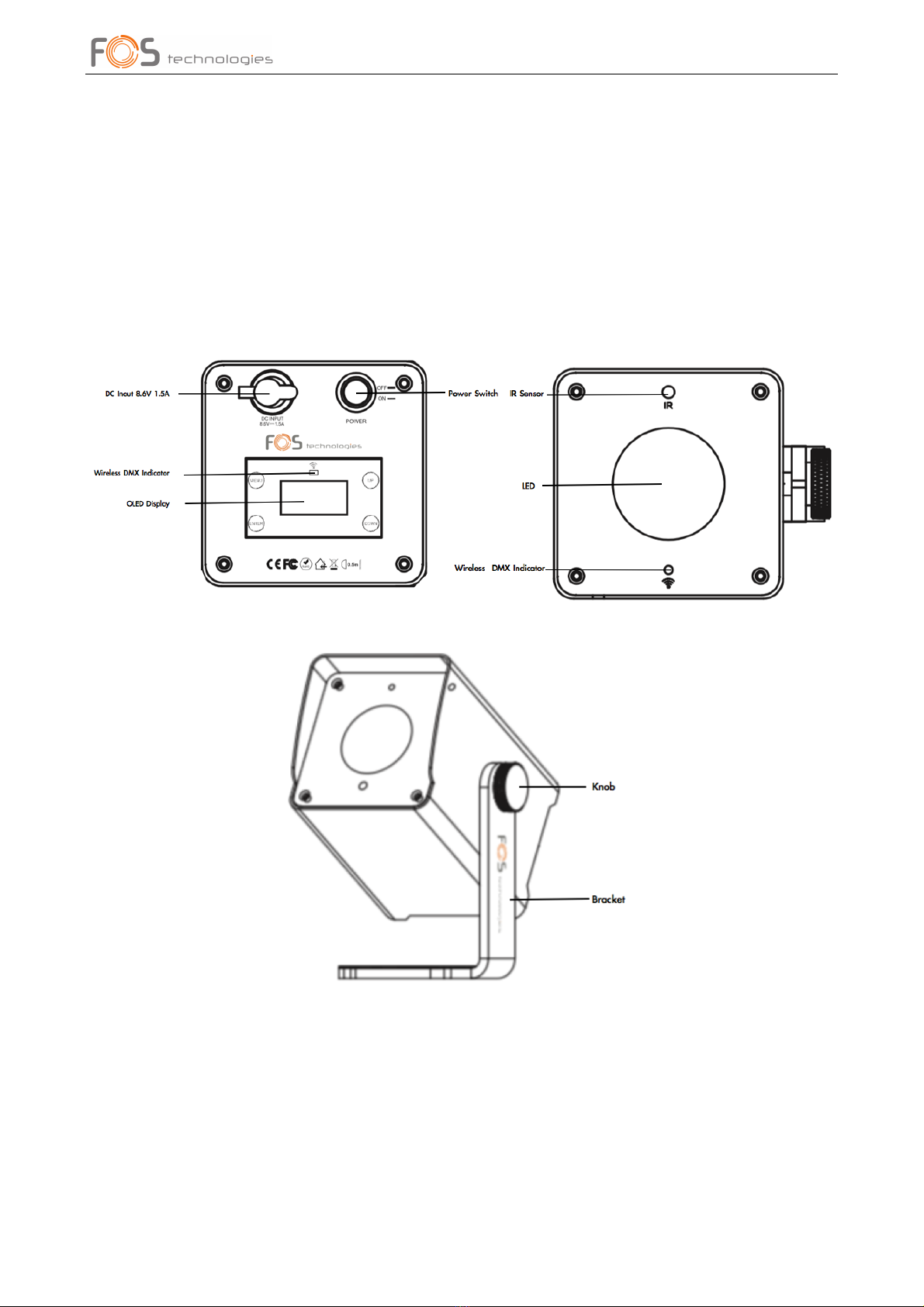
H1!is! a!battery! powered! led! luminaire! with! wireless! DMX! transceiver.! This! luminaire! features!
one!super! bright! RGBWA+UV!hex!color!led,! and! can! create! more! vivid!color! changing! effects!
besides!RGBWA!color!mixing,!and!wide!range!of!color!temperatures.! ! !
!
H1!has! a! built-in!rechargeable! lithium-ion!battery! fully! protected! against! overcharging! to!
maximize!battery!life!span.!
User’s Manual
4
H1!uses! a! very! stable! wireless! DMX! transceiver!(W-DMX! Sweden! compatible).! The! fixture! can!
also!be!controlled!with!infrared!remote!controller.!The!IR!controller!can!help!users!to!achieve!all!
working!functions.!
!
This!highly!compact! luminaire!has!very! small!dimensions.!It! has!strong!magnets!on! its!bracket!
and! can! be! attached! to! any! metal! surface.! It! is! absolutely!an! ideal! tool! for! mobile! DJ/Bands,!
wedding,!exhibitions,!ball!room!and!hotel!banquet!halls!etc.!
!
2.2.1#Fixture#Elements#and#Connectors#
! !
!
!
!
!
!
!
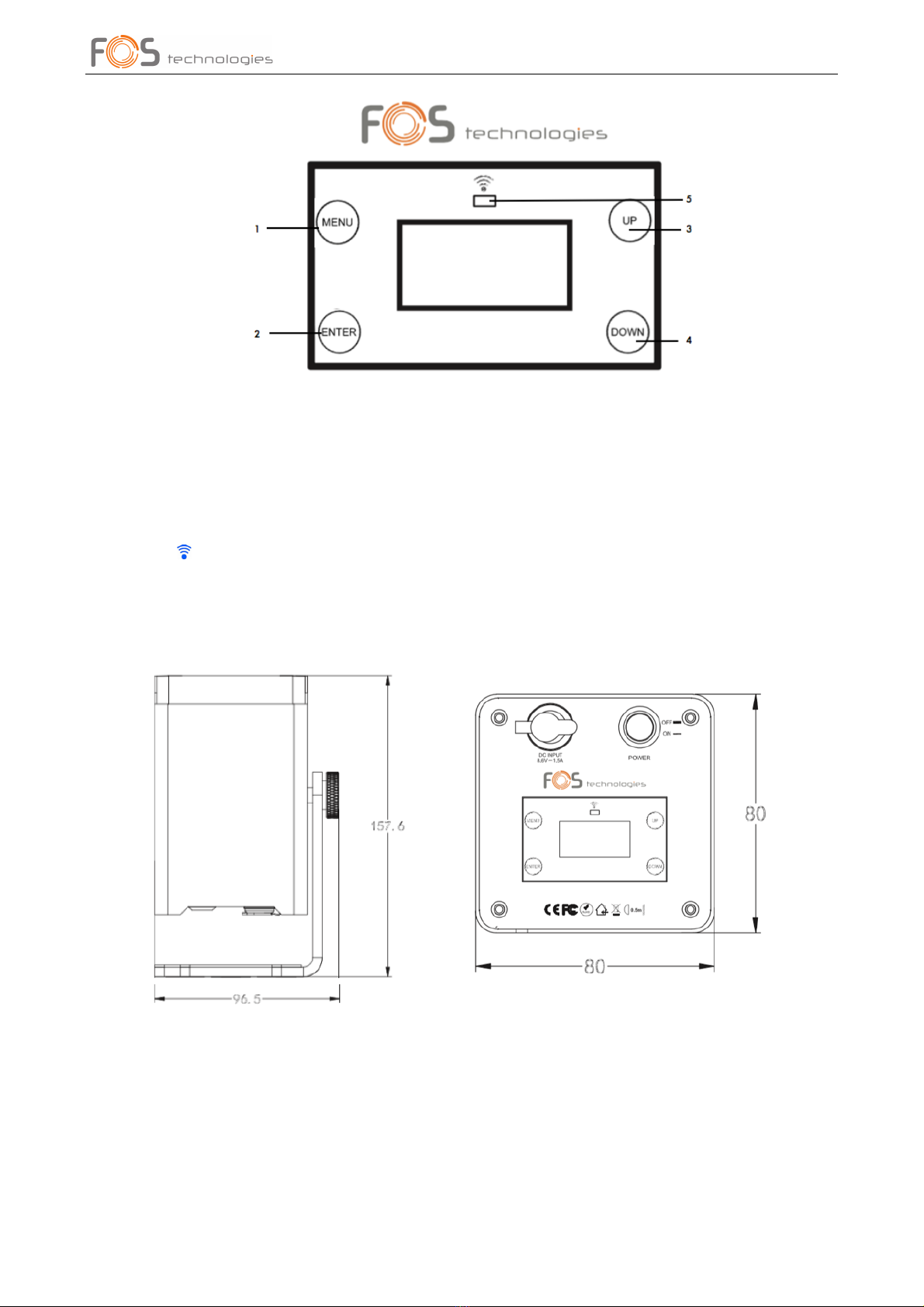
2.2.2#Fixture#Control#Panel#
!
There!are!4!touch!buttons!on!the!OLED!control!panel:!<MENU>,!<ENTER>,!<UP>!and!<DOWN>.!
! !
User’s Manual
5
!
#
1.!Menu!to! ! Select!the!programming!functions!or!exit!from!current!setup!
2.!Enter! !Enter!the!current!menu!or!confirm!the!current!function!value! !
3.!Up! ! Scroll!“UP”!through!menu!list!to!increase!value!of!current!function! !
4.!Down!!!!!Scroll!“DOWN”!through!menu!list!to!decrease!value!of!current!function! ! !
5.! ! ! ! !!!!Wireless!DMX!indictor!!!!!!
#
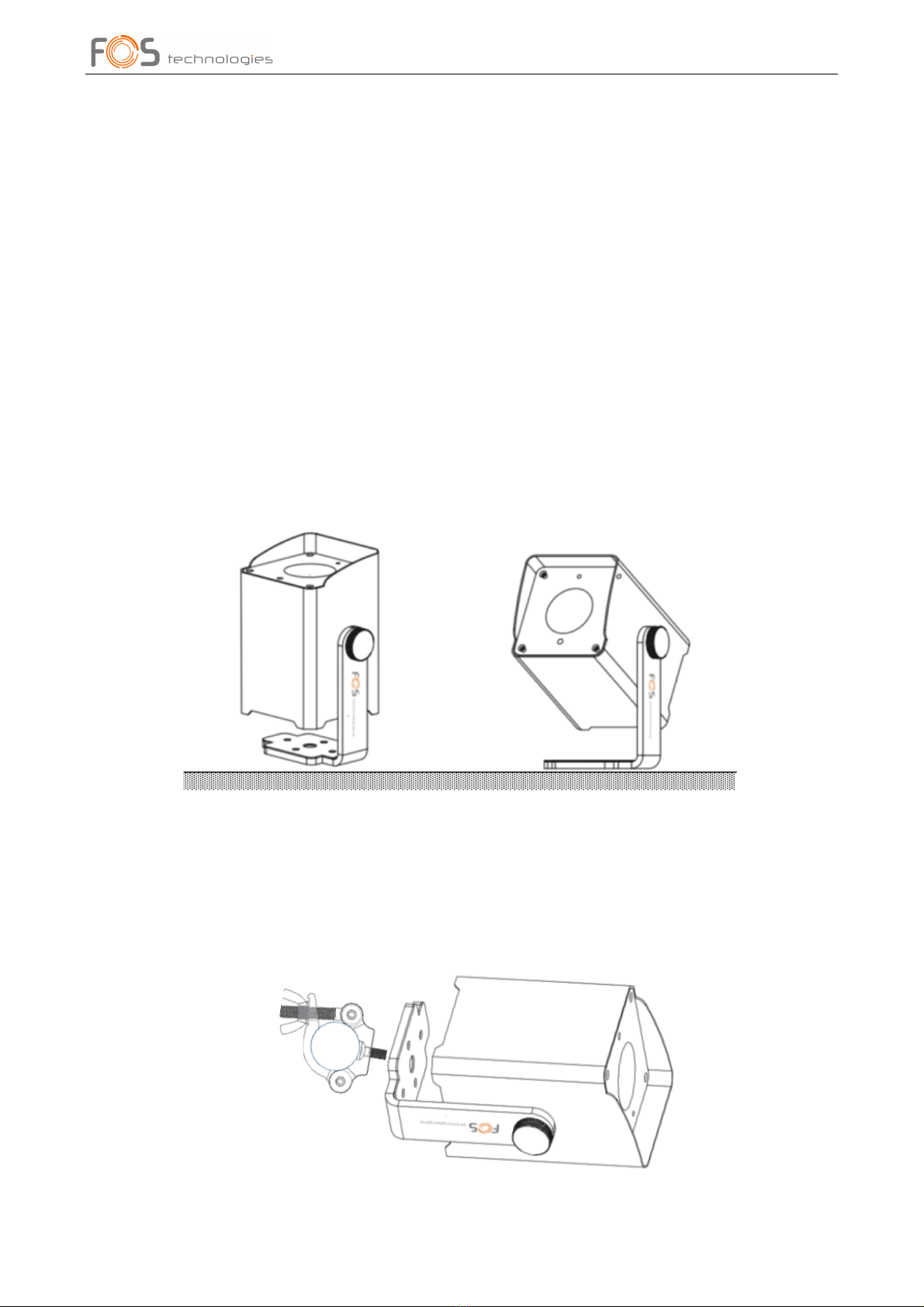
2.2.3#Fixture#Dimensions#
#
!
!
!
2.3#Fixture#Temperature#
!
The! fixture! has! temperature! protection! function.! You! can! easily! check! fixture! temperature! via!
the!OLED!display!information!menu.!
When! fixture!temperature!is! higher! than!65!degrees,!light!output! will!decrease!to! 80%.!When!
User’s Manual
6
fixture!temperature!is!higher!than!70!degrees,!light!output!will!decrease!to!60%.!When!fixture!
temperature! is! higher! than! 75!degrees,! leds! will! go! off! automatically! until! temperature! comes!
down!to!55!degrees.! !
!
2.4#Storing#the#Fixture#
!
Make!sure!to!fully!charge!all!fixtures!before!storing.!Partially!charged!batteries!will!lose!capacity.!
Fully!recharge!every!6!months!if!not!used.!
#
2.5#Mounting#
!
The!fixture!can!be!mounted!in!several!orientations.! !
!
!!!2.5.1!The!fixture!can!sit!on!even!and!solid!floor!and!work!as!an!uplight.!Uses!can!adjust!tilt!by!
turning!the!knob.! ! ! !
!
!!!!
!
Make! sure! that! the! fixture! is! always! placed! on! even! and! strong! enough! surface,! and!
keep!it!0.5m!away!from!projection!objects.!
! !
!2.5.2!The!fixture!has!a!M10!threaded!hold!for!rigging,!and!can!be!mounted!on!truss!as!truss! !
!!!!!!warmer.! !
!
!

User’s Manual
7
When!install!the!fixture!to!crossbar!or!truss,!always!use!an!extra!safety!cord!(not!supplied!with!
the!fixture).!Users!also!need!to!make!sure!the!crossbar!is!stable!or!not!moving,!and!can!support!
a!weight!of!37!kg!(fixture!net!weight!3.7kg).! !
!
2.5.3! The! fixture! also!has! strong! magnets! on! its! brackt,! and! can! be! attached! to!metal!
structures.!Please!use!safety!cord!when!attaching!the!fixture!to!metal!structures.!
!
For!the!rest!of!safety!installation,!please!always!respect!your!local!regulations.!
#
2.6#Specifications#
Electrical#
!
Power!input!
100-240VAC!50/60Hz!(via!charge!bag)!
Power!consumption!
12W!
DC! input!
8.6V!1.5A!
Battery#
!
Battery!type!
Rechargeable!lithium-ion!battery!
Charge!time!
About!5.0!hours!
Battery!life!
Around!5.0!hours!full!color!
!
Around!8!hours!at!running!preset!programs!
!
Around!12!hours!at!running!single!color!
Light#sources#
Led!
1x12W,!RGBWA+UV!6-in-1!
Beam!angle!
25o! !
!
!
!
Field! angle!
39o!
Led!average!life!span!
50,000!hours!
Control#
#
#
Control!mode!
Master/Slave,!Stand!Alone;!Sound!control,!Wireless!DMX,!IR!
Remote!Control!
!
!DMX!(From!Wireless!Solution);!IR!
DMX!channel!
6/8/13!channel!selectable!
!
!
!
!
Control!panel!
OLED!display!with!touch!buttons!
Physical#&#Construction#
Housing!
Rigid!metal!housing!
Housing!color!
Black!
Fixture!dimensions!
157.6!x!96.5!x!80mm!
Net!weight!
1.5!kg!
Working!temperature!
-10oC!-!45oC!
Charging! temperature!
0oC!-!45oC!
IP!rating!
IP20!
Cooling!
Natural!cooling,!silent!operation!
!
!
!

User’s Manual
8
3.#BATTERY#CHARGE#
!
The!fixture!has!a!rechargeable!lithium!battery!and!auto-ranging!charger!built!in.!Always!store!the!
fixtures!with!full!battery.!Depleted!batteries!must!be!recharged!immediately;!otherwise!fixture!
performance!will!suffer.!
!
Battery! runtime! will! decreased! time! by! time.! Battery! runtime! may! be! slightly! shorter! than!
predicted!due!to!different!working!enviroments.! !
!
The!fixture!has!a!DC!charging!input.!A!normal!charging!time!is!about!5!hours.! !
!
Battery!capacity!can!be!easily!seen!on!the!OLED!display.! !
!
It! is! recommended! to! charge! the! fixture! at! an! ambient! temperature! between! 0°C! and! 35°C.! If!
fixture!is!charged!but!not!in!operation,!please!always!keep!the!power!switch!“Off”.! !
Note:&The&battery&must&be&replaced&with&an&original&one&from&the&manufacuturer&only.& !
!
4.#PRODUCT#SETUP# # ##############! !
!
This! fixture! has! a! built-in! rechargeable! lithium! battery.! After! it! is! fully! charged,! switch! on! the!
fixture!with!the!power!switch!at!the!bottom!of!the!unit,!it!will!start!to!run!and!can!be!controlled!
with!wireless!DMX!desk!or!IR!controller.! !
!
After!operation,!please!switch!off!the!fixture!with!its!power!switch.!
!
4.1#Menu#Lock#
!
Users!can!lock!the!OLED!display!by!setting!it!to!“On”.! !
!
Follow!below!steps:!
!
! ! -!Continue!pressing!“Menu”!till!“Menu!Lock”!appears;!
! -!Scroll!Up/Down!to!select!“On”;! ! !
! -!Press!“Enter”!to!save!your!setting.!The!display!will!turn!off!in!about!1!minute.!
!
To! unlock! it,! press! both! “Menu”! and! “Enter”! at! the! same! time! for! one! 1-2! seconds,! the!
display!will!be!unlocked.!
!
4.2#Factory#Reset#
!

User’s Manual
9
Users!can!set!up!their!fixtures!to!factory!default.! !
!
Follow!below!steps:!
!
! ! -!Continue!pressing!“Menu”!till!“Factory!Reset”!appears;!
! -!Scroll!Up/Down!to!select!“Yes”;! ! !
! -!Press!“Enter”!to!save!your!setting.!Your!fixture!will!go!back!to!factory!default,!thus!all!your!
resettings!will!be!erased.! !
#
4.3#Menu#Map#
#
#
4.4#DMX#Addressing#
!
Inhaltsverzeichnis
Andere FOS Technologies Leuchte Handbücher


Beliebte Leuchte Handbücher anderer Marken

Emos
Emos CLASSIC ZY1431T Bedienungsanleitung

Westinghouse
Westinghouse Outdoor Lighting Fixture Bedienungsanleitung

Hedler
Hedler C 12 silent Bedienungsanleitung

Blizzard Lighting
Blizzard Lighting Puck: CSI Bedienungsanleitung

Energetic Lighting
Energetic Lighting ELYSL-5004 Series Bedienungsanleitung

Lightmaxx
Lightmaxx Shaft 5R Bedienungsanleitung


Cooper Lighting
Cooper Lighting Halo L3232E Bedienungsanleitung

Stageline
Stageline ODW-2410RGBW Bedienungsanleitung

Light Sky
Light Sky Tornado Series Bedienungsanleitung

Lightolier
Lightolier Paralyte 2424 PLA2G9LS26U Bedienungsanleitung

Lightolier
Lightolier Lytespan 83ED17S Bedienungsanleitung

Lightolier
Lightolier Calculite CS8226 Bedienungsanleitung