
Foxtech T12 Bedienungsanleitung

User Manual
V1.0
T12
12-Channel Radio Controller
2019.05

T12 12-Channel Radio Controller User Manual
©2019 FOXTECH All Rights Reserved 2
Overview
Product Characteristics
Main Use and Application Fields
Specication
Diagram
Using Environmental Conditions
Working Conditions
Security
Operation
Preparation and Checking Before Use
Connect to cellphone APP
Receiver / Camera / FC Connection and Setting
Connect to Cellphone to Display the Video
How to Upgrade the Firmware of T12
How to Switch Between Left and Right Hand
3
3
3
4
5
6
6
6
7
7
11
12
13
14
15
Contents

T12 12-Channel Radio Controller User Manual
©2019 FOXTECH All Rights Reserved 3
Overview
Product Characteristics
Main Use and Application Fields
1. Dual-antenna dual-module redundancy design, combined with algorithm control, greatly increases
the signal communication capability.FHSS technology, omni gain antenna, complete operation and
configuration of aircraft and camera within communication distance.
2. Reserved TX, RX, return flight data to the ground remote control. Maximize the use of 2.4G wireless
Bandwidth, which solves the shortcomings of instability and non-interference in the 433 and 915 bands.
3. Internal integrated digital radio.
4. Use the mobile APP assistant software to set the parameters anytime, anywhere.
5. Bluetooth, USB two connection methods, support for S.BUS, PPM, PWM, I2C and serial port ,support for
device expansion.
6. Support mobile phone APP assistant software. Connect your phone app via Bluetooth or USB OTG, fast
switch hand type, adjust channel forward and reverse, rudder amount, channel binding, runaway protection
value, SBUS, PPM output and data transmission baud rate. Provide one-key parameter adjustment function,
you can call it at any time after saving the parameter.
7. Ground station APP has better interactive interface, larger map vision, can control the aircraft to achieve
intelligent waypoint planning, automatic execution of tasks, one-key back to home.
8. Built-in 4000MAH lithium-ion battery for more than 24 hours. 100MW ultra low power, And support to
charge your phone.
9. Integrated data,video and rc three-in-one link. Ultra-small size, with aluminum alloy embedded folding
bracket,sturdy and stable, the jaws rotate 360 ??degrees, and the two holders can be adjusted 180
degrees.
10. equipped with a mini camera.
It is used to remote drones like plant protection drone, for video image transmission, data transmission and
radio control.

T12 12-Channel Radio Controller User Manual
©2019 FOXTECH All Rights Reserved 4
Specication
Specification:
Weight
Channel
Working Voltage
Working Current
Battery Capacity
Endurance
Frequency
Communication Technology
Transmission Distance
Signal Output
Mini Camera:
Resolution
Size
Weight
Voltage
Current
Working Temperature
490g(controller), 26g(receiver),15.6g(camera)
12
3.7V
170mA
4000mAh
25hours
2.400GHz-2.4833GHz
FHSS
10km
SBUS, PWM, I2C
720P@30
30.2x29.8x26.8mm
15.6g
5V
180mA
-10°C to +40°C

T12 12-Channel Radio Controller User Manual
©2019 FOXTECH All Rights Reserved 5
Diagram

T12 12-Channel Radio Controller User Manual
©2019 FOXTECH All Rights Reserved 6
Working Conditions
Security
Power supply method and notes.
The T12 series ground unit has built-in integrated rechargeable lithium battery, which is compatible with the
market standard micro USB interface 5v/1.5A power adapter (such as mobile phone, camera and other
digital products USB charger) for charging.
If you encounter smoke, odor, or liquid leakage when charging on the ground unit, do not continue to
charge the ground unit. Please transfer it to our company for repair.
Beginners should pay special attention to the following safety issues!
Do not charge the product in the baby's touch area to avoid the risk of electric shock.
Do not charge this product in an environment exceeding 60 ° C.
It is forbidden to fly when the body condition is not good, such as fatigue or drunkenness!
It is forbidden to fly in bad weather such as rain or strong wind!
It is forbidden to fly near high-voltage lines, communication base stations,or active places!
It is forbidden to fly at airports and other places where it is forbidden to fly!
It is forbidden to control the flight model in places where people are concentrated, in parking areas, or in
other areas where property damage or personal injury may occur.
Before the flight, check the equipment of the aircraft and check whether the transmit and receive system
and the aircraft are normal.
After the flight, turn off the power of the receiver and then turn off the power of the transmitter to prevent the
engine or motor from rotating and causing damage caused by the runaway protection function!
Please use a guaranteed professional charger to charge the battery.
This product antenna is a fragile component, please pay attention to avoid excessive damage.
Using Environmental Conditions
1. Environment temperature: -10 °C ~ +55 °C.
2. Storage temperature: -25 ° C ~ +70 ° C.
3. Relative humidity: no more than 85%.
4. Atmospheric pressure: 86 kPa to 106 kPa.
5. The use of the site is not allowed to explode dangerous media, the surrounding media should not contain
corrosive metals and insulating gas and conductive media, not allowed to be filled with water vapor and
serious mold.
6. The place of use should have facilities to protect against rain, snow, wind, sand and ash.
T12 12-Channel Radio Controller User Manual
©2019 FOXTECH All Rights Reserved 7
Operation
Preparation and Checking Before Use
1. Always check that it the remote control is fully charged before use.
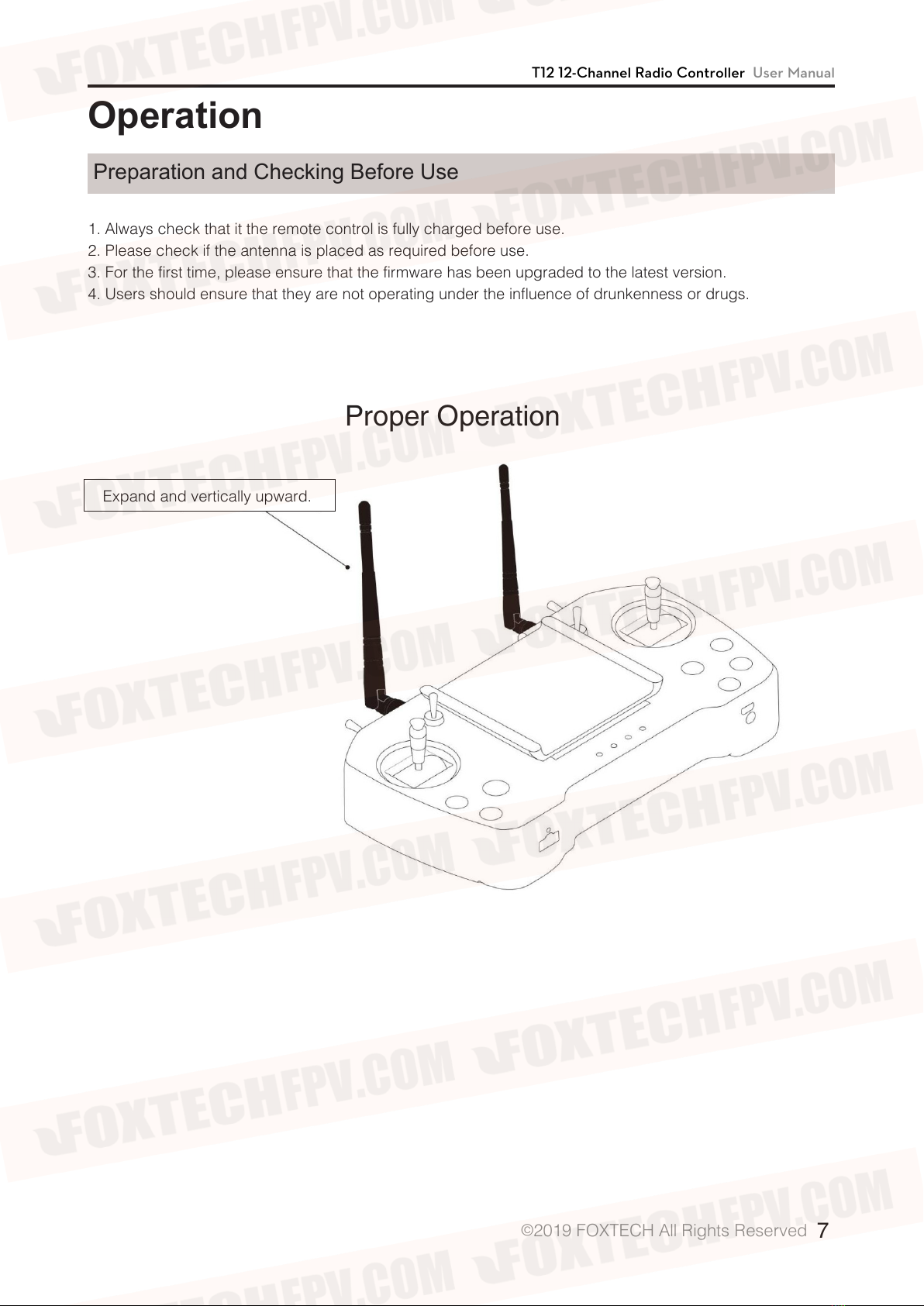
2. Please check if the antenna is placed as required before use.
3. For the first time, please ensure that the firmware has been upgraded to the latest version.
4. Users should ensure that they are not operating under the influence of drunkenness or drugs.
Proper Operation
Expand and vertically upward.

T12 12-Channel Radio Controller User Manual
©2019 FOXTECH All Rights Reserved 8
Faulty Operation
Antennas can not cross.
Cannot be parallel to the remote controller.

T12 12-Channel Radio Controller User Manual
©2019 FOXTECH All Rights Reserved 9
Uav Operation Diagram
Proper Operation
Away from the center plate,vertically
upward, no shielding.
Fixed under the arms.

T12 12-Channel Radio Controller User Manual
©2019 FOXTECH All Rights Reserved 10
Faulty Operation
Can not place in the center of the plate.
Antenna can not be close to the CF and metal.
Antennas can not cross, and can not be
placed in the middle of the tank.
Inhaltsverzeichnis
Andere Foxtech Fernbedienung Handbücher


Beliebte Fernbedienung Handbücher anderer Marken

Panasonic
Panasonic EUR7622KB0 Bedienungsanleitung

Bang & Olufsen
Bang & Olufsen Beo4 Bedienungsanleitung

Sunwave Tech.
Sunwave Tech. RemoteComm SRC-7000 Bedienungsanleitung

Multiplex
Multiplex PROFI TX 9 Bedienungsanleitung

One Remote
One Remote RMB4 Bedienungsanleitung

FUTABA
FUTABA 9ZAP - PART2 Bedienungsanleitung


