
FWE LCH-G2 Series Bedienungsanleitung

COOK & HOLD OVEN
OPERATING
INSTRUCTIONS
LCH-G2 SERIES
Caution: Read the
instructions before
using the machine.
INTERNATIONAL/DOMESTIC
WITH OPTIONAL 8-BUTTON KEYPAD

2FWE COOK & HOLD OVEN
FWE COOK & HOLD OVEN
...and thank you for purchasing an FWE Cook & Hold Oven. Your unit
has been designed and manufactured under rigid controls to assure
you the most efficient service. It is a full time unit, and may be used
continuously.
Please take a moment to read through this booklet of important
information pertaining to your cabinet. By following a routine of
proper use and care described on the following pages, your cabinet
will last for many years.
IMPORTANT: Your Manufacturer Registration Card must be
returned within 30 days after initial delivery to activate the warranty.
SERIAL AND MODEL NUMBER
UNPACKING
After uncrating your cabinet, remove all tape and padding
which held all doors, shelves, racks, cord, etc., in place
during shipment.
These numbers are found on the nameplate (serial tag) affixed
near the electrical cord portal. Please record them in this
booklet, in the space provided on page 13. When calling in
regards to service, you will need to provide this information.
The voltage and amperage of the unit are also stamped
on the serial tag.
CONGRATULATIONS...

CASTER WEIGHT LIMIT AND SERVICE
3
FWE COOK & HOLD OVEN
CASTER DESCRIPTION
2” GREY RUBBER CASTER,SWIVEL W/BRK
CASTER 2” RIGID
CASTER 3” RIGID
CASTER 3.5” RIGID HEAVY DUTY
CASTER 4X2” EZ ROLL RIGID POLYBLUE
CASTER 5” RIGID HEAVY DUTY
CASTER 5” RIGID SUPER DUTY
CASTER 5” SWIVEL BRAKE RB GRS FIT Poly
CASTER 5” RIGID EZ ROLL POLY
CASTER 5” SWIVEL BRAKE EZ ROLL POLY
CASTER 6” RIGID HEAVY DUTY
CASTER 6” RIGID SUPER DUTY
CASTER 6” SWIVEL BRAKE EZ ROLL POLY
CASTER 6” RIGID EZ ROLL POLY
CASTER 8” PNEUMATIC RIGID
CASTER 8” RIGID HEAVY DUTY
CASTER 8” RIGID SUPER DUTY
CASTER 8” SWIVEL BRAKE EZ ROLL POLY
CASTER 8” RIGID EZ ROLL POLY
MAX WEIGHT
34Kg
68Kg
68Kg
113Kg
272Kg
124Kg
226Kg
340Kg
362Kg
362Kg
158Kg
272Kg
453Kg
453Kg
113Kg
226Kg
272Kg
544Kg
544Kg
IN THE EVENT OF ACCIDENT OR
BREAKDOWN - UNPLUG UNIT.
FOR SERVICE INQUIRIES PLEASE CALL
FWE SERVICE - 800-222-4393
Improper use of this machine can result in injury and/or death.
A schedule should be put in place for inspections and
preventative maintenance.
New users should be properly trained in the use of this
equipment.
No special protective equipment is required to operate
this unit.
Unplug unit before servicing.
SEE SHIPPING LABEL FOR CASTER SIZE

4FWE COOK & HOLD OVEN
FWE COOK & HOLD OVEN
To indicate hazards arising from dangerous
voltages
To identify the terminals which, when connected
together, bring the various parts of an equipment or of a
system to the same potential.
To identify the terminal which is intended for
connection to an external conductor for protection against
electric shock in case of a fault, or the terminal of a
protective earth (ground) electrode
To indicate that the marked item can be hot and should not
be touched without taking care
To indicate the “ON” condition for a part of
equipment
To indicate the “OFF” condition for a part of
equipment
To indicate the stand-by or preparatory state for a part of
equipment
To indicate maximum ll level
To indicate minimum water level
WARNING SYMBOLS
WARNING SYMBOLS AND EXPLANATIONS
*Symbols will vary from unit to unit.

For U.S. and Canada Models:
The amperage of your cabinet is stamped on the name plate serial tag attached
to the unit. FWE models are equipped with a grounded cord plug for your
protection against possible shock hazards. Be sure to plug only into a properly
grounded wall receptacle. If you have any questions with regard to adequate
wiring or grounding in your building, a qualified electrician should be contacted
before using your cabinet.
For International Models:
May be shipped with no cord or plug
Contact qualified service personnel for cord and plug installation.
DO NOT, UNDER ANY CIRCUMSTANCES, CUT OR REMOVE THE
GROUNDING PRONG FROM THE
CORD PLUG.
WARNING: ONLY A QUALIFIED SERVICE PERSONNEL WILL REMOVE,
REPAIR OR REPLACE ELECTRICAL COMPONENTS OR WIRING.
BE SURE THAT MODEL IS UNPLUGGED FROM ELECTRICAL SOURCE
BEFORE REMOVING
CONTROL PANEL, MOVING, CLEANING, OR SERVICING UNIT.
WARNING AND CLEANING CARE
5
Keep your cabinet clean by simply wiping the interior and
exterior, as needed, with a damp cloth or sponge and a mild soapy solution.
NEVER USE ABRASIVES, ACIDS, OR STRONG CLEANERS.
Do not flood or allow electrical parts to become wet. The interior tray slide
assemblies are removable for easy
cleaning. A stainless steel cleaner/polish is recommended for the exterior to
maintain a “like-new” appearance.
DO NOT USE WAX OR STRONG CLEANERS ON DOOR GASKETS OR
VINYL TRIM.
ELECTRICAL REQUIREMENTS AND GROUNDING
CLEANING
INTENDED USE AND REQUIREMENTS
This unit is to be used for cooking only.
Unit must be installed level.
FWE COOK & HOLD OVEN

6FWE COOK & HOLD OVEN
GENERAL OPERATING INSTRUCTIONS
FWE COOK & HOLD OVEN
• Press COOK
• Rotate Dial to Oven Temp Set Point
• Press PROBE/TIME 1X to select Cook By Probe
• Rotate Dial to Probe Temp Set Point
• Press HOLD
• Rotate Dial to Hold Temp Set Point
• Press START/CANCEL to begin preheat cycle
• Load food after ‘rdY’ is displayed
• Press START/CANCEL to begin cooking cycle
TO COOK MANUALLY BY PROBE
• Press COOK
• Rotate Dial to Oven Temp Set Point
• Press PROBE/TIME 2X to select Cook By Time
• Rotate Dial to Cook Time
• Press HOLD
• Rotate Dial to Hold Temp Set Point
• Press START/CANCEL to begin preheat cycle
• Load food after ‘rdY’ is displayed
• Press START/CANCEL to begin cooking cycle
TO COOK MANUALLY BY TIME
COOK PROBE/TIME
HOLD
START/CANCEL
DIAL

GENERAL OPERATING INSTRUCTIONS
FWE COOK & HOLD OVEN
7
• Press COOK
• Rotate Dial to Cook Temp Set Point
• Press START/CANCEL to begin cooking cycle - display shows oven set temp.
NOTE: Unit must manually be canceled or shut off to end cook cycle.
TO COOK MANUALLY WITH NO TIME OR PROBE CONTROL
• Display will alternate between ‘PrHE’ and ‘Actual Temp’ until ‘rdY’ is displayed
• To display Set and Actual temperatures, Press COOK The display shows
“Set” for 1 second, then the oven set temp for 2 seconds, followed by “Act” for
1 second, then the actual oven temp for 2 seconds, then return to the original
display. If there is no set point, the display will show “ - ˮ in place of the set
temperature.
• To display Set and Actual Probe temperatures during preheat, ready and cook
states, press PROBE The display shows “Set” for 1 second, then the set
probe temp for 2 seconds, then returns to the original display.
• To display Set Cook Time during preheat, ready and cook states, press PROBE
The display shows “Set” for 1 second, then the set cook time for 2 seconds,
then returns to the original display.
• To display Set Hold Temp, press HOLD The display shows “Set” for 1
second, then the hold set temp for 2 seconds. If hold was not programmed, the
default hold set temp of 160°F (71°C) will be shown.
NOTE (applies to all cooking modes):
• Power on while pressing START/CANCEL
• Turn dial clockwise to select °F or counterclockwise to select °C
TO SET °F/°C UNITS
• Manual Cook - Press and hold START/CANCEL for 3 seconds, control beeps 3x displays
“----”
• Preset Cook - Press and hold START/CANCEL for 3 seconds, control beeps 3x and
displays the selected “Pr#”. After 5 seconds without a key press, the control returns to idle mode
and displays “----”. All LED’s turn OFF.
TO CANCEL ANY COOK CYCLE
TO VIEW HOLD TIME
• Press and hold the HOLD , hold time will be displayed in a count up timer until released.

GENERAL OPERATING INSTRUCTIONS
FWE COOK & HOLD OVEN
TO EDIT PRESETS
• To enter the edit mode, press and hold ANY keypad button (1-8) or ANY cook function
button (“Cook”, “Hold”, or “Probe/Time”) for 4 seconds to enable editiong of ALL cook
functions within the selected preset #. Edit mode entry will be indicated by a 1
second beep, then control will alternate displaying “edit” and “Pr#” for 1 second each
• Press and release any cook function button, current set value will be displayed along
with the associated LED, Rotate encoder dial to change set value and repeat as
necessary for remaining cook functions - (No auto save, must save changes manually)
• After 5 seconds without a key press or encoder dial rotation, the control beeps for 1
second, then exits edit mode and displays the preset # that was selected for editing. LED
constant ON.
• After an additional 5 seconds without a key press or encoder dial rotation, the control
returns to idle mode and displays “----”. All LED’s turn OFF.
• Pressing START/CANCEL at any time while in edit mode will save the current
settings and the control will beep for 1 second, then exits the edit mode and displays the
preset # that was selected for editing. LED is constant ON. You may select another preset
to edit or after 5 seconds without a key press, the control returns to idle mode and
displays “----”. All LED’s turn OFF.
8FWE COOK & HOLD OVEN
DEFAULT PRESETS (EDITABLE):
No: Smoke Oven Temp. Cook Time Probe Temp. Hold Temp.
Pr01
Pr02
Pr03
Pr04
Pr05
Pr06
Pr07
Pr08
NONE
NONE
NONE
NONE
NONE
NONE
NONE
NONE
190°F /
225°F /
350°F /
190°F / 88°C
190°F /
225°F /
350°F /
225°F /
NONE
NONE
NONE
NONE
NONE
6:00
8:00
6:00
130°F /
180°F /
160°F /
165°F / 74°C
165°F / 74°C
NONE
NONE
NONE
160°F / 71°C
140°F /
155°F /
150°F /
160°F /
145°F /
155°F /
155°F /
107°C
177°C
88°C
107°C
177°C
107°C
54°C
82°C
71°C
60°C
68°C
66°C
71°C
63°C
68°C
68°C
88°C
• Press and release keypad button (1-8) to select a preset.
• (Pr01 - Pr08) is displayed with corresponding LED turned ON.
• Press START/CANCEL to begin cooking by preset
• If no key is pressed after 5 seconds, the control returns to idle mode and displays “-----”
TO COOK BY PRESETS

CONTROL LOCKOUT FUNCTION: UPON INITIAL POWER UP, THE CONTROL WILL BE UNLOCKED
• To lock the control to prevent unwanted changes: ONLY idle, “----”,
START/CANCEL , and presets are accessible.
• From idle “----”, Press and Hold START/CANCEL , for 10 seconds. Control will
display “Loc” mode, pressing and holding any keypad button or cook function button
(“Cook”, “Hold”, or “Probe/Time”), for 4 seconds, display will indicate “Loc” and control will
beep 5 times to indicate editing is not allowed when unit is locked.
NOTE: Control will remember it is in “Loc” mode when powering up after a power
loss or after unit was turned OFF.
From idle “----”, Press and hold START/CANCEL for 10 seconds. Control will display
“ULoc” for two second with a one (1) second beep to acknowledge the change, then
returns to idle mode displaying “----”.
TO UNLOCK THE CONTROL:
“ERROR” Displayed
“Prb”,
constant beep
“Prb”,
constant beep
“no”...“Prb”
Beeps 5X
“Prb”...“Err”
Beeps 5X
“C by”...“Err”
Beeps 5X
ERROR MESSAGES:
When error is displayed
During power up
During cook cycle
Pressing “START”
after cook by probe
selected
During cook cycle
Pressing “START”
after setting cook
and hold values
in a manual cook
program
Reason for error
Temp Probe (TS1)
is open, shorted or
out of range
Temp Probe (TS1)
is open, shorted or
out of range
(Any cook
cycle canceled)
Meat Probe (TS2)
is open, or
not installed
Meat Probe (TS2)
is open, shorted
or out of range
“Cook by function”
not selected
Recommended Action
Turn power OFF
1) Check connections
2) Replace temp probe
Turn power OFF
1) Check connections
2) Replace temp probe
1) Check connections
2) Install meat probe
1) Check connections
2) Install meat probe
1) Choose “cook by
function”, set value, and
press “START”,
corresponding LED
will be lit
GENERAL OPERATING INSTRUCTIONS
FWE COOK & HOLD OVEN
9
FWE COOK & HOLD OVEN
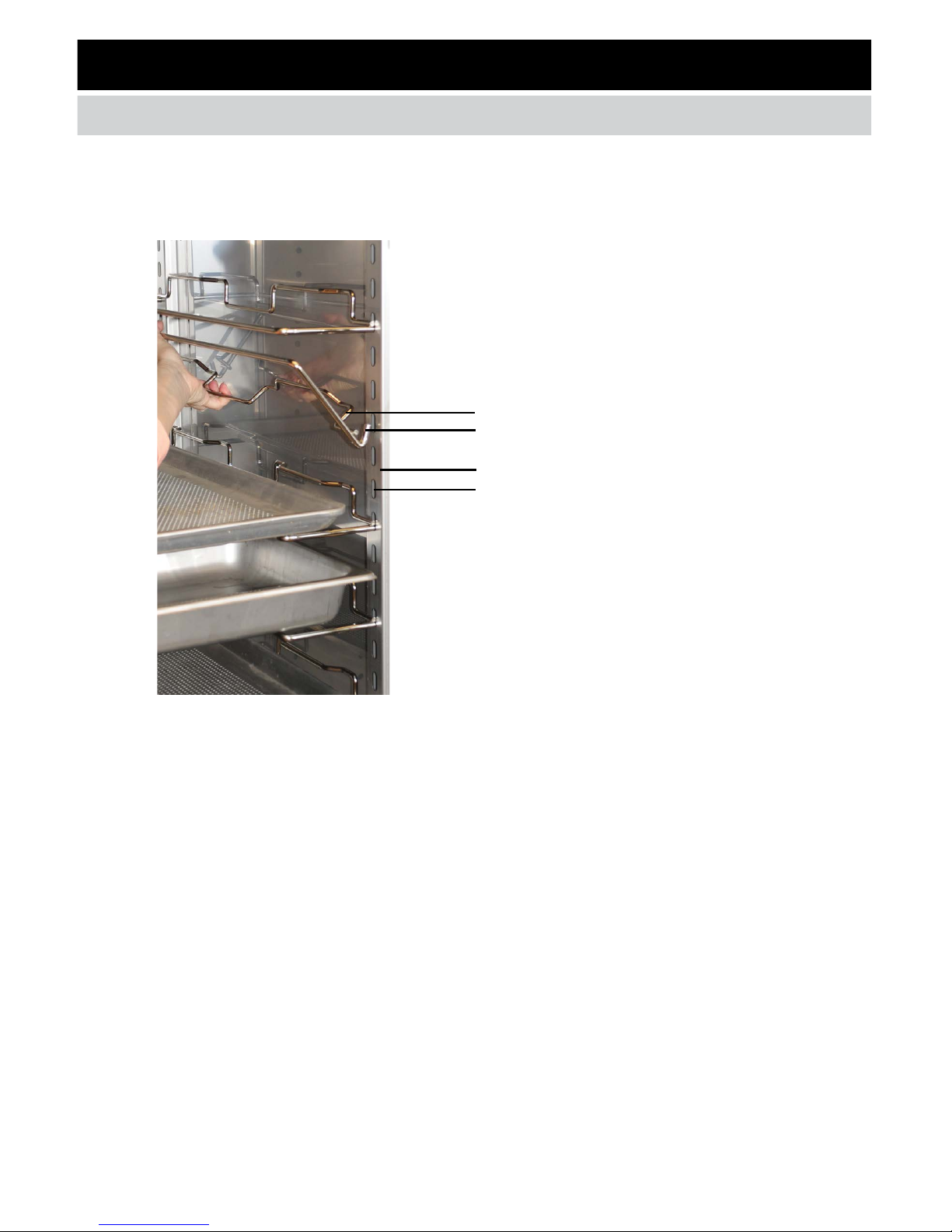
ADJUSTABLE TRAY SLIDES
EQUIPPED ON SOME MODELS.
Some cabinet models are equipped
with adjustable tray slides.
Adjust tray slide positions
by inserting “J” end of slide into
upright key hole.
Release tray slide from upright with
upward “J” motion.
Tray slides provide bottom
support of trays, pans, or shelves.
TRAY SLIDE
“J” END OF TRAY SLIDE
UPRIGHT
UPRIGHT KEY HOLE
Food safety is of paramount importance in any kitchen and
proper steps should always be taken to assure “Safe Food
Practices.” As a helpful guide, FWE has compiled the following
information for your review and use. Though the information
in this guide is deemed reliable and up-to-date, food safety is
always being updated. This information should be used with
a complete, ongoing safety program (HACCP, Food Safety
Course), and in accordance with your local health department.
DISCLAIMER: The information provided in this booklet has been compiled from sources and documents deemed to be
reliable and represent the best judgment of Food Warming Equipment Company, Inc. The accuracy of the information
is not guaranteed, however, nor is any responsibility assumed or implied by FWE for any damage or loss resulting from
inaccuracies, errors or omissions. Food safety laws change frequently and may vary by city, county or country. Food
Service operators and Consultants are urged to keep information of all regulations and safe food practices as well as
developed food safety-related policies and procedures as part of their commitment to employee and customer safety.
Use the advice and guidance of legal counsel. This booklet is not intended to provide legal advice.
DISCLAIMER
TRAY SLIDE INSTRUCTIONS
10 FWE COOK & HOLD OVEN
Inhaltsverzeichnis
Andere FWE Ofen Handbücher


