
Fysic FX-9000 Bedienungsanleitung

FX-9000
FX-9000 DUO
USER’S MANUAL

2
1 OVERVIEW
1.1 HANDSET:
Speaker
In standby mode, above
this the handset number
(1 - 5), the actual time
and the battery power are
shown
You may enable the
functions shown here by
pressing the soft buttons
underneath them
Soft button
Phone ‘on’ button, to call
somebody or to answer a
call
Direct memory buttons
‘asterisk’ button, function
button for e.g. telebanking
R button: function button
for certain teleservices
Microphone
Charging contacts, to recharge the handset’s
battery when the handset is placed into the
base or cradle/charger
Indicator; ashes when
you’re receiving a call
Flashes also to indicate
‘new call’ (this function may
be disabled)
++ button: to enable the
additional amplier during
a call
+and -buttons: to increase
or decrease the reception
volume during a call
and buttons, to scroll
through settings and mem-
ories
Phone ‘o’ button, to end a
telephone call
0-9 buttons: to dial phone
numbers and to enter mem-
ories
‘hash’ button, function but-
ton for e.G. Telebanking
Speaker button, press
during a call to enable the
hands-free function
3
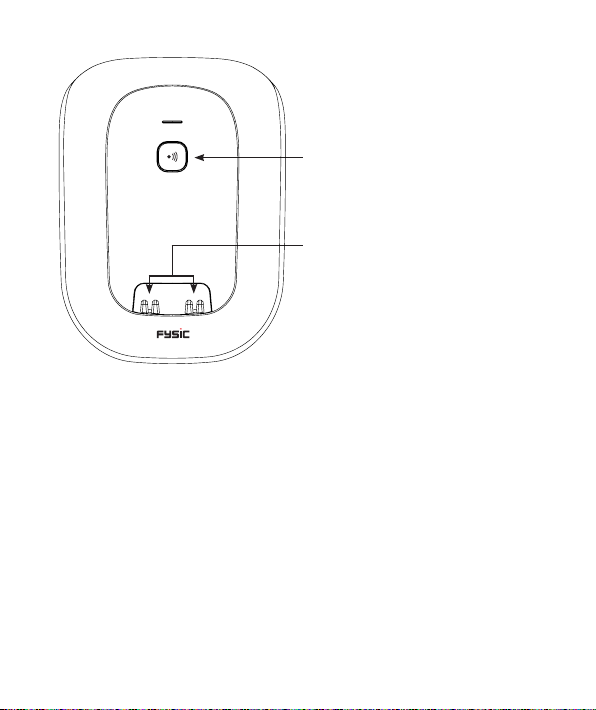
1.2 BASE:
Pager button: to call all handsets
(handset search button)
Serves also as the registration button
for a new handset.
Charging contacts: the rechargeable
batteries of the handset are recharged
through these contacts

4
2 INSTALLATION
2.1 BASE:
Telephone input:
Insert the small plug of the phone cord cable into the connection
underneath the base (depress the plug until you hear a click).
Insert the phone plug into a telephone wall socket.
Power supply:
Connect the supplied power adaptor with the input at the rear of
the base and insert the adaptor into a 230V wall socket.
ONLY USE THE SUPPLIED ADAPTOR. CONNECTING A
DIFFERENT ADAPTOR WILL LEAD TO DANGEROUS SITUA-
TIONS OR CAUSE DAMAGE TO THE ELECTRONICS OF THE
TELEPHONE.
Power adaptor input
Phone cord input

5
2.2 HANDSET:
1. Open the battery compartment of the handset by sliding down and
removing the battery cover
2. Install the batteries into the battery compartment, paying attention to
the polarity (+ and -)
3. Slide the battery cover back onto the handset and place the handset
onto the base or cradle/charger
4. Properly charge the batteries by leaving the handset on the base/char-
ger for 15 hours without interruptions
ONLY INSERT REACHARGEABLE NiMH (NICKEL-METAL-HY-
DRIDE, 750mAh) BATTERIES. USING NON-REACHARGE-
ABLE BATTERIES LEADS TO DANGEROUS SITUATION OR CAUS-
ES A RISK OF EXPLOSION.
2.3 EXTRA HANDSET AND CHARGER: (FX-9000 DUO)
Each handset is supplied with 2 batteries and a charger with adaptor.
Insert the adaptor of each charger into a 230 Volt wall socket, install
the batteries in the handset(s) and place the handset(s) for 15 hours
onto the charger(s) to charge the batteries.

6
3 CALLS
3.1 RECEIVING CALLS:
Upon receiving a call the device starts ringing, the handset’s display lighting
switches on and the indicator on top of the handset starts ashing; when the
vibration function is enabled you’ll also feel the handset vibrating
Press the phone “on” button to answer the call
• Refer to paragraph 9.3, item [ Auto answering ] to answer the call by only picking up the
receiver from the base
3.2 PHONE CONVERSATIONS USING THE RECEIVER OR SPEAKER
FUNCTION:
You may have phone conversations holding the receiver against your ear or
by using the speaker function allowing family members to listen in or to have
your hands free to e.g. make notes.
During the call, press the speaker button to enable the
speaker function
Press the speaker button again to turn the speaker func-
tion back o
3.3 TO END A CALL:
Press the phone “o” button to disconnect a call
• You may also place the handset back onto the base or cradle/charger to disconnect a call

7
3.4 DIALLING NUMBERS:
Use the keypad to enter the phone number
• Press and hold the 0 button for at least a second to insert a dial-
ling pause (the display will show a -P-)
• Press the [ CLEAR ] soft button to delete an incorrect input
Press the phone “on” button to dial the number
Dialling from the phonebook memory:
Use and to scroll to [ Phone book ]
Press the OK soft button
Use and to search for the desired person
Press the phone “on” button to dial the number
• See paragraph 7.3 with regards to programming the phonebook
memories
Calls
Phone book
OK
Barber
Rob
Karel P

8
Redialling or dialling from the call list:
Use and to scroll to [ Calls ]
Press the OK soft button
Use and to scroll to [ Redial List ] and redial a num-
ber or to [ Call List ] to call a person back who has called
you before
Press the OK soft button
Use and to search for the desired number or call
Press the phone “on” button to dial the number
Direct memory dialling: (*)
Briey press one of the buttons I, II, III or IV to dial the
number
Speed dial memory dialling: (*)
Press and hold the concerned numeric button (2-0) to
dial its corresponding speed dial number
• See paragraph 7.4 or 9.2 item [ Speed Dial ] with regards to pro-
gramming the memories
Calls
Phone book
OK
Redial List
Call List
OK
0201234567
Gerard
GP

9
3.5 INQUIRY:
During a phone conversation you may disable the microphone allowing you
to consult with family members without the person on the line listening in.
During a phone conversation, press and hold the
button for 2 seconds to disable the microphone;
Press and hold the button again for 2 seconds to en-
able the microphone
3.6 RECEPTION VOLUME:
Normal amplication:
During a conversation, use the +and -buttons to adjust
the reception volume; for this you may also use the
and buttons in the middle of the handset
Boost amplication:
During a conversation, press the ++ button on the right
side of the handset to enable the extra boost amplica-
tion
The display will show [ Boost On ]
• Volume levels for calls via the handset and via the hands-free function may be set individ-
ually
• The selected setting will be saved in the memory
• After a phone conversation, the boost amplier is automatically disabled
• The boost amplication factor is +8dB
2 sec.
2 sec.
or
Boost On
10
3.7 CALL DURATION:
During a phone conversation, the display of the handset
will show the call duration; several seconds after discon-
necting the call, the call duration will disappear from the
display.
3.8 R/FLASH FUNCTION:
R/FLASH means that you very briey interrupt the phone connection. On
certain home or oce switchboards, this allows you to transfer calls or to
activate phone services such as ‘Call Waiting’.
During a conversation, press the Rbutton to activate a
FLASH pulse
• Certain telephone companies may require you to also press a numeric button after acti-
vating the FLASH pulse to use e.g. ‘Call Waiting’; ask your telephone company for more
details.
• You may adjust the interruption duration of the FLASH pulse; to do so, refer to paragraph
9.4, item [ Flash Time ].
3.9 HANDSET SEARCH FUNCTION:
In case you’ve lost the handset, briey press the but-
ton on the base.
For 60 seconds the handset will emit a signal while
[ PAGE BUTTON! ] ashes in the display. The signal
stops after 60 seconds or you may press any button the
end the signal beforehand.
00:01:25
Dieses Handbuch passt für folgende Modelle
1
Inhaltsverzeichnis
Andere Fysic Schnurloses Telefon Handbücher


