
Gates DEEP EPIC Bedienungsanleitung

DEEP EPIC
Setup, Use, and Care Guide

Introducing DEEP EPIC Page 2
Copyright 2012, Gates Underwater Products, Inc.
Last document revision: January 11, 2012
Photos by Lee Peterson / Marine Camera Distributors and John Ellerbrock
This manual and current revision is available in 8.5 x 11 size and full color at
http://www.gateshousings.com/documentation.html
Gates Underwater Products, Inc.
13685 Stowe Drive
Poway, California 92064 USA
Phone: 800.875.1052 toll-free in the U.S.
858.391.0052 outside the U.S.
Fax: 858.391.0053
Web: GatesHousings.com

Introducing DEEP EPIC Page 3
Table of Contents
Setup, Use, and Care Guide.............................................. 1
1: Introducing DEEP EPIC ..................................................... 4
Features............................................................................. 4
Warranty Disclaimer .......................................................... 4
Unpacking DEEP EPIC...................................................... 5
2: Cautions............................................................................. 6
3: DEEP EPIC Setup ............................................................. 8
DEEP EPIC Housing Preparation...................................... 8
EPIC / Scarlet Camera Preparation................................. 12
Camera / Lens Installation ............................................... 14
Lens Gear Drives (LGD’s) ............................................... 19
REDMOTE Controller Installation .................................... 22
External Monitors............................................................. 24
Audio Connections (Optional).......................................... 29
Video Connections (Optional).......................................... 30
Water Alarm (Optional) .................................................... 31
Check Operation.............................................................. 32
Port and Port Extender .................................................... 33
Housing Closure .............................................................. 34
Seal Check ...................................................................... 36
Final Checks .................................................................... 37
4: DEEP EPIC Operation..................................................... 38
Right Side Controls.......................................................... 38
Left Side Controls ............................................................ 39
Rear Controls................................................................... 40
Monitor Controls .............................................................. 41
Buoyancy Adjustment ...................................................... 42
Adjustable Handles.......................................................... 45
Port Options..................................................................... 46
Tripod Mount (Optional)................................................... 47
Accessory Mount Locations............................................. 48
Lighting Systems ............................................................. 49
Controlling Reflections..................................................... 49
Travel / Transport ............................................................ 50
5: DEEP EPIC Maintenance ................................................ 51
Housing Care and Maintenance ...................................... 51
O-Ring Care and Maintenance ........................................ 52
6: Customer Support............................................................ 53

Introducing DEEP EPIC Page 4
1: Introducing DEEP EPIC
Congratulations on owning a new Gates product: the DEEP EPIC housing. You’ve
selected a product that will provide years of value and reliable service. We designed
DEEP EPIC specifically for the RDCC EPIC™ and Scarlet™ digital cinema cameras.
Please read through this entire guide to learn about DEEP EPIC so you can get the most
out of this imaging tool. In this section, we’ll introduce you to the features of DEEP EPIC
so you can get started.
Features
DEEP EPIC has several key features:
Lens flexibility. DEEP EPIC can accommodate a variety of different cinema and
DSLR lenses with no change to control locations. Focus, Iris, Zoom and Rec/Stdby
remain in the same location regardless of optics used.
Full control access. All controls are accessible on DEEP EPIC, including the
REDMOTE™.
Cinema-grade design. Lens choice and control access are just two of the many
features designed into DEEP EPIC. A/R coated glass optics, tally light, HD-SDI
surface feed, comm. inputs and Seal Check are a few of the items any professional
will appreciate.
Warranty Disclaimer
DEEP EPIC is a tool that, like any tool, requires knowledge and understanding to be
effective.
Your responsibility is to learn the proper setup, use and care of DEEP EPIC. Because
we can only provide you with the information necessary to do so, Gates does not
warrant the contents of your housing (e.g. your camera and lenses) under any
circumstance.
We warrant DEEP EPIC as an image acquisition tool for a period of 2 years. The Seal
Check unit is warranted for 1 year. Optics (Dome and Flat ports) are warranted for a
period of 1 year or 100 hours salt water contact, whichever comes first.
Gates does not warrant optical performance or image quality.
If you have any questions about the setup, use and care of DEEP EPIC, contact Gates
directly. Details are in section 6.
Introducing DEEP EPIC Page 5
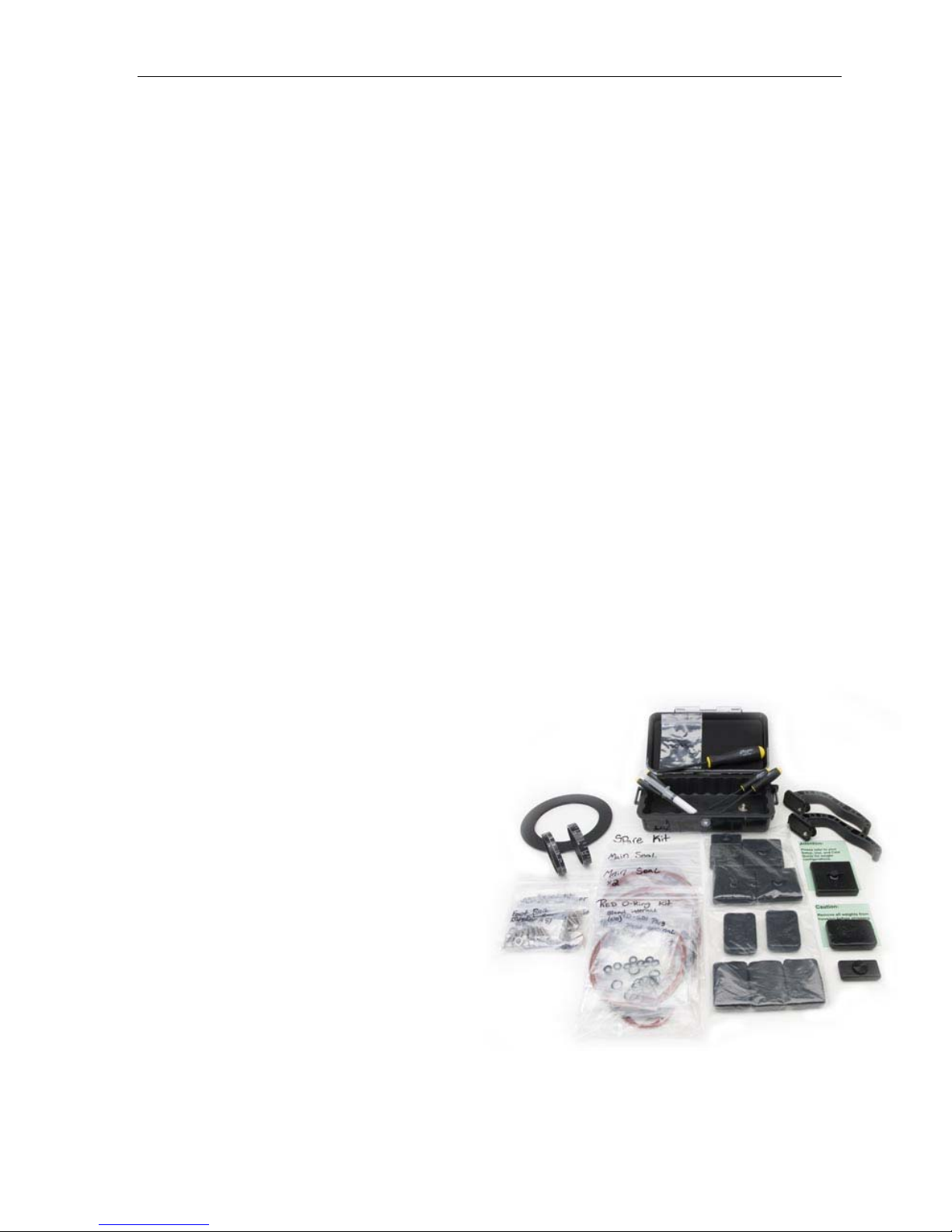
Unpacking DEEP EPIC
After you remove DEEP EPIC from its shipping container, carefully inspect it for missing
parts or damage that may have occurred during shipment. If you discover any
discrepancies, contact Gates or your dealer immediately for assistance.
Standard Parts
DEEP EPIC Housing
Camera Mount
Lens Gear Drives (2x upper and
1x lower)
Monitor Shell
* 5.6” LCD Monitor Shell or
* 5” RED PRO Monitor Shell
Hard Sided Rolling Case x 2
Seal Check system
Tool Kit with case
Various assembly and spare
parts for DEEP EPIC including
bolts, set screws and o-rings.
Spare O-Ring Kit
Carry Handle
Trim Weights (quantity
dependent on configuration)
Optional Parts
* = necessary for operation
Port Extender(s) of choice for your lens*
Port(s) of choice (Dome, either glass or
acrylic, or Flat) and shade*
Port Mask (as applicable for
specific lenses)
Focus / Iris Indicator Rings
Guide Bars and acetyl drive
shafts for your lens of choice*
Microphone or Hydrophone
Water alarm
HD-SDI surface feed bulkhead
connector and cable
Light System

Cautions Page 6
2: Cautions
SEAL CHECK VACUUM must remain below
6 in Hg. More vacuum can inhibit the
transfer of heat away from the housing.
Camera Fan. Set EPIC or Scarlet camera fan to 75% or 100% to maximize heat
dissipation. SETTINGS SETUP SYSTEM FAN CONTROL. Settings
are
Fan Control: MANUAL
Record Speed: 75% or 100%
Standby Speed: 75% or 100%
Do not block any ventilation openings or obstruct cooling fan airflow. The
intake is in the front just below the lens and the exhaust is on the top of the
camera.
Keep the vacuum on DEEP EPIC below 6 in Hg.
Fan Settings:
Fan Control to MANUAL
Record Speed to 75% or 100%
Standby Speed to 75% or 100%

Cautions Page 7
LEMO CONNECTOR MATING. When mating
LEMO connectors, ensure alignment of the red
dots on the plug and receptacle before
engagement. It is the user’s responsibility to
verify alignment, proper connection, and
connector integrity.
TRANSPORT. NEVER ship or transport your
EPIC or Scarlet™ cameras inside the DEEP EPIC housing. The housing was not
designed for this purpose and severe damage may result.
USER RESPONSIBILITY. This Setup, Use and Care guide contains important
detailed procedures for setup and use of DEEP EPIC. It is the user’s responsibility
to read, understand and employ these procedures. Failure to do so can result in
poor or non-operation of DEEP EPIC and may void your warranty.
Contact Gates if you have questions this manual or using DEEP EPIC.
REPLACE FAN. RED Digital Cinema has issued a warning on page 33 of the EPIC
user guide. If you have a camera that requires fan replacement, you must do so
prior to operating the EPIC camera in DEEP EPIC housing. Failure to follow this
instruction may result in camera damage.
Ensure alignment before engaging any LEMO connector. Also
ensure the SYNC and CTRL connectors are mated properly to the
SYNC and CTRL locations on the EPIC / Scarlet cameras.

DEEP EPIC Setup Page 8
3: DEEP EPIC Setup
DEEP EPIC requires complete and thorough setup prior to use.
DEEP EPIC Housing Preparation
Port. Remove the Port by rotating 90 degrees either direction. Gently pull the Port
away from the Port Extender.
TIP: Liberal lubrication of the Port o-ring allows easy rotation during
installation/removal.
Port Extender. Remove the Port Extender by removing 4 screws around the
perimeter.
Rotate the port 90 degrees either
direction, then gently pull forward to
remove.
Note: DEEP RED shown
Remove 4 screws securing the port extender and remove.
Pull the Port Extender forward until it clears the gear drive
mechanisms.
Note: DEEP RED shown

DEEP EPIC Setup Page 9
Shell removal. Before releasing the 3 latches on the shell, retract the Zoom, Iris
and Power control on the right side, and the Assignable control on the left (see the
controls section for additional details).
Release the latches by depressing the lock and pulling up on the latch. Once
released the shell will slide to the rear on the foot rails until free.
Step 2. Release 3
latches by pressing
on the release tab
and lifting up.
Step1. Pull out the
Zoom, Iris and
Power control on the
right side.
Pull out the Assign
control on the left
side.
Step 3. Slide the
shell back until free
from the housing.
Note: If you are opening the shell after a dive,
secure the monitor to the top of the front shell or
set off to the side of the housing.
Note: DEEP RED shown

DEEP EPIC Setup Page 10
Unwrap Connectors. Several connectors are bundled together for travel and
protection. Remove the protective covering and separate the cables.
Unbundle the connectors from the
protective covering. Save the
covering for later travel use.
Inhaltsverzeichnis


