
geratech EGE-UHD-5HDB-1411 Bedienungsanleitung

EGE-UHD-5HDB-1411
1×2 HDMI over 1 HDMI and 1 CAT5e/6/7
Splitter,100m with IR,PoC, LAN Serving,(not include 507RX)


EGE-UHD-5HDB-1411
1×2 HDMI over 1 HDMI and 1 CAT5e/6/7
Splitter,100m with IR,PoC, LAN Serving,(not include 507RX)
3
DISCLAIMERS
The information in this manual has been carefully checked and is believed to be accurate.
Geratech assumes no responsibility for any infringements of patents or other rights of third
parties which may result from its use.
Geratech assumes no responsibility for any inaccuracies that may be contained in
this document. Geratech also makes no commitment to update or to keep current the
information contained in this document.
Geratech reserves the right to make improvements to this document and/or product at any
time and without notice.
COPYRIGHT NOTICE
No part of this document may be reproduced, transmitted, transcribed, stored in a retrieval
system, or any of its part translated into any language or computer le, in any form or by
any means—electronic, mechanical, magnetic, optical, chemical, manual, or otherwise—
without express written permission and consent from Geratech.
© Copyright 2013 by Geratech.
All Rights Reserved.
Version 1.0 June 2013
TRADEMARK ACKNOWLEDGMENTS
All products or service names mentioned in this document may be trademarks of the
companies with which they are associated.
EGE-UHD-5HDB-1411
1×2 HDMI over 1 HDMI and 1 CAT5e/6/7
Splitter,100m with IR,PoC, LAN Serving,(not include 507RX)
4
SAFETY PRECAUTIONS
Please read all instructions before attempting to unpack, install or operate this equipment
and before connecting the power supply.
Please keep the following in mind as you unpack and install this equipment:
• Always follow basic safety precautions to reduce the risk of re, electrical shock and
injury to persons.
• To prevent re or shock hazard, do not expose the unit to rain, moisture or install this
product near water.
• Never spill liquid of any kind on or into this product.
• Never push an object of any kind into this product through any openings or empty slots
in the unit, as you may damage parts inside the unit.
• Do not attach the power supply cabling to building surfaces.
• Use only the supplied power supply unit (PSU). Do not use the PSU if it is damaged.
• Do not allow anything to rest on the power cabling or allow any weight to be placed
upon it or any person walk on it.
• To protect the unit from overheating, do not block any vents or openings in the unit
housing that provide ventilation and allow for sufcient space for air to circulate around
the unit.
REVISION HISTORY
VERSION NO. DATE DD/MM/YY SUMMARY OF CHANGE
VR0 09/01/14 Preliminary Release

EGE-UHD-5HDB-1411
1×2 HDMI over 1 HDMI and 1 CAT5e/6/7
Splitter,100m with IR,PoC, LAN Serving,(not include 507RX)
5
CONTENTS
1. Introduction.................................................................................... 1
2. Applications ................................................................................... 1
3. Package Contents ......................................................................... 1
4. System Requirements................................................................... 1
5. Features.......................................................................................... 2
6. Operation Controls and Functions .............................................. 3
6.1 Front Panel................................................................................. 3
6.2 Rear Panel.................................................................................. 4
6.3 IR Cable Pin Assignment............................................................ 5
6.4 D-Sub 9-Pin Denitions .............................................................. 5
7. Connection Diagram .................................................................... 6
8. Specications ................................................................................ 7
8.1 CAT5e/6/7 Cable Specication................................................... 8
9. Acronyms ....................................................................................... 8
EGE-UHD-5HDB-1411
1×2 HDMI over 1 HDMI and 1 CAT5e/6/7
Splitter,100m with IR,PoC, LAN Serving,(not include 507RX)
1
1. INTRODUCTION
The HDMI over HDMI and CAT5e/6/7 Transmitter can convert a single HDMI input, 2-way
IR and RS-232 control and LAN serving to a single CAT5e/6/7 output and includes a
simultaneous HDMI bypass output. It supports resolutions up to 1080p Full HD, 4K×2K
timing, 3D and multi-channel digital audio formats (such as LPCM 7.1CH, Dolby TrueHD,
Dolby Digital Plus and DTS-HD). The HDMI bypass output can be connected to an HDMI
display or cascaded to another splitter. The CAT5e/6/7 output can be connected to a
CAT5e/6/7 to HDMI Receiver to extend the operating distance up to 100 meters.
Additionally, the LAN connectivity will allow a 100BaseT network to be served to smart TVs
or games consoles. The Bidirectional Power over Ethernet (PoE) function provides greater
exibility in installations.
2. APPLICATIONS
• Household entertainment sharing and control
• Lecture room display and control
• Showroom display and control
• Meeting room presentation and control
• Classroom display and control
3. PACKAGE CONTENTS
• HDMI over HDMI & CAT5e/6/7 with LAN/IR/RS232 & Bidirectional PoE Transmitter
• IR Blaster x 1
• 3.5mm Phone Jack to RS-232 Cable
• 24V DC Power Adaptor
• Operation Manual
4. SYSTEM REQUIREMENTS
• Source equipment with HDMI output connector
• Display TV/Monitor with HDMI input connector
• HDMI over CAT5e/6/7 Receivers with industry CAT5e/6/7 cables

EGE-UHD-5HDB-1411
1×2 HDMI over 1 HDMI and 1 CAT5e/6/7
Splitter,100m with IR,PoC, LAN Serving,(not include 507RX)
2
5. FEATURES
• HDMI with 3D & 4Kx2K supported, HDCP and DVI compliant
• Simultaneous HDMI and CAT5e/6/7 outputs
• Supports data rate from 250Mbps up to 3Gbps
• Supports wide range of PC resolutions from VGA to WUXGA and HDTV resolutions up
to 4Kx2K (3840x2160@24/25/30Hz and 4096x2160@24Hz)
• Supports LPCM 7.1CH, Dolby TrueHD, Dolby Digital Plus and DTS-HD Master Audio
transmission (32-192kHz sample rate)
• Supports distances up to 100 meters through CAT5e/6/7 cables
• Supports Ethernet network rate up to 100Mbps
• Can select Standard or TV EDID
• Supports USB service port
• Provides 24V DC power to or received from compatible PoE Receiver through
CAT5e/6/7
• Supports control of devices via RS-232 and 2-way IR
• The 3D signal display follow by display TV’s EDID
• Supports Bidirectional IR PoE
Note:
1. This system was tested with CAT6/23AWG cables, results may vary with cables of a
different specication.
2. The PoE function is designed for powering compatible Receiver
units only non-PoE Receivers will need their own power supply.
Receivers of another brand may not be compatible.
3. Displaying HDMI 4Kx2K resolution require the standard 4Kx2K HDMI cable and display
in order for proper image displaying.
4. This device obtain the last memory function therefore, the device will use last
CAT5e/6/7 output port's EDID when CAT5e/6/7 output is not connected to a display after
power cycling.
The unit will detect CAT5e/6/7 output's EDID when it obtain a 4Kx2K EDID and send out
the signal accordingly to other output ports. If the CAT5e/6/7 output is without a 4Kx2K's
EDID the unit will detect all output's EDID and send out the signal that all outputs can
accept.

EGE-UHD-5HDB-1411
1×2 HDMI over 1 HDMI and 1 CAT5e/6/7
Splitter,100m with IR,PoC, LAN Serving,(not include 507RX)
3
"6. OPERATION CONTROLS AND FUNCTIONS
6.1 Front Panel
HDMI OUT HDMI IN
LAN
RS232 IN
HDMI to CAT5e/6 with LAN/IR/RS232 Transmitter
1 2 3 4
1HDMI OUT: Connect to HDMI display for instant image display or cascade with another
family type Transmitter. The unit will detect CAT5e/6/7 output's EDID when it obtain a
4Kx2K EDID and send out the signal accordingly to other output ports. If CAT5e/6/7
output is without a 4Kx2K's EDID the unit will detect all output's EDID and send out the
signal that all outputs can accept.
This device obtain the last memory function therefore, the device will use the last
CAT5e/6/7 output port's EDID when CAT5e/6/7 output port is not connected after power
cycling.
2HDMI IN: Connect with source equipment such as DVD/Blu-ray or PS3 player.
3LAN: Connect to intranet or internet service system for a total sharing rate of 100Mbps
within the link of Transmitter.
Warning: DO NOT connect this slot with any of the
CAT5e/6/7 port, doing so may trigger a power shot down and ruin the device.
4RS-232 IN: Connect to a PC/Laptop or RS-232 enabled device (with supplied 3.5mm
Phone Jack to D-Sub 9-Pin female adaptor) to transmit of RS-232 commands.

EGE-UHD-5HDB-1411
1×2 HDMI over 1 HDMI and 1 CAT5e/6/7
Splitter,100m with IR,PoC, LAN Serving,(not include 507RX)
4
6.2 Rear Panel
POWER
DC 24V
CAT5e/6 OUT
IR 1
BLASTER USB LINK
IR 2
EXTENDER
1 2 3 4 5 6 7
1POWER LED: Once the power supply is connected the LED will illuminate.
2DC 24V: Plug the 24V DC power supply into the unit and connect the adaptor to an AC
outlet.
3IR 1 BLASTER: Connect with the supplied IR Blaster to blast out the IR signal received
from the Receiver side. Place the IR Blaster in direct line-of-sight of the equipment to be
controlled.
4IR 2 EXTENDER: Connect with the supplied IR Extender to receive IR signal from
Transmitter side and blast out at Receiver side. Ensure that remote controller being
used is within the direct line-of-sight of the IR Extender.
5USB: This slot is reserved for rmware update only.
6LINK LED: This LED will illuminate when both the input source and output display
signals are connected through CAT cable. When it blinks regularly it states the display
is NOT sending signals to Receiver but the Transmitter and Receiver are linked and if it
blink irregularly it states an error has occurred.
7CAT5e/6/7 OUT: Connect this port to CAT5e/6/7 to HDMI Receiver with CAT5e/6/7
cable to extend the signal up to 100m.
EGE-UHD-5HDB-1411
1×2 HDMI over 1 HDMI and 1 CAT5e/6/7
Splitter,100m with IR,PoC, LAN Serving,(not include 507RX)
5
6.3 IR Cable Pin Assignment
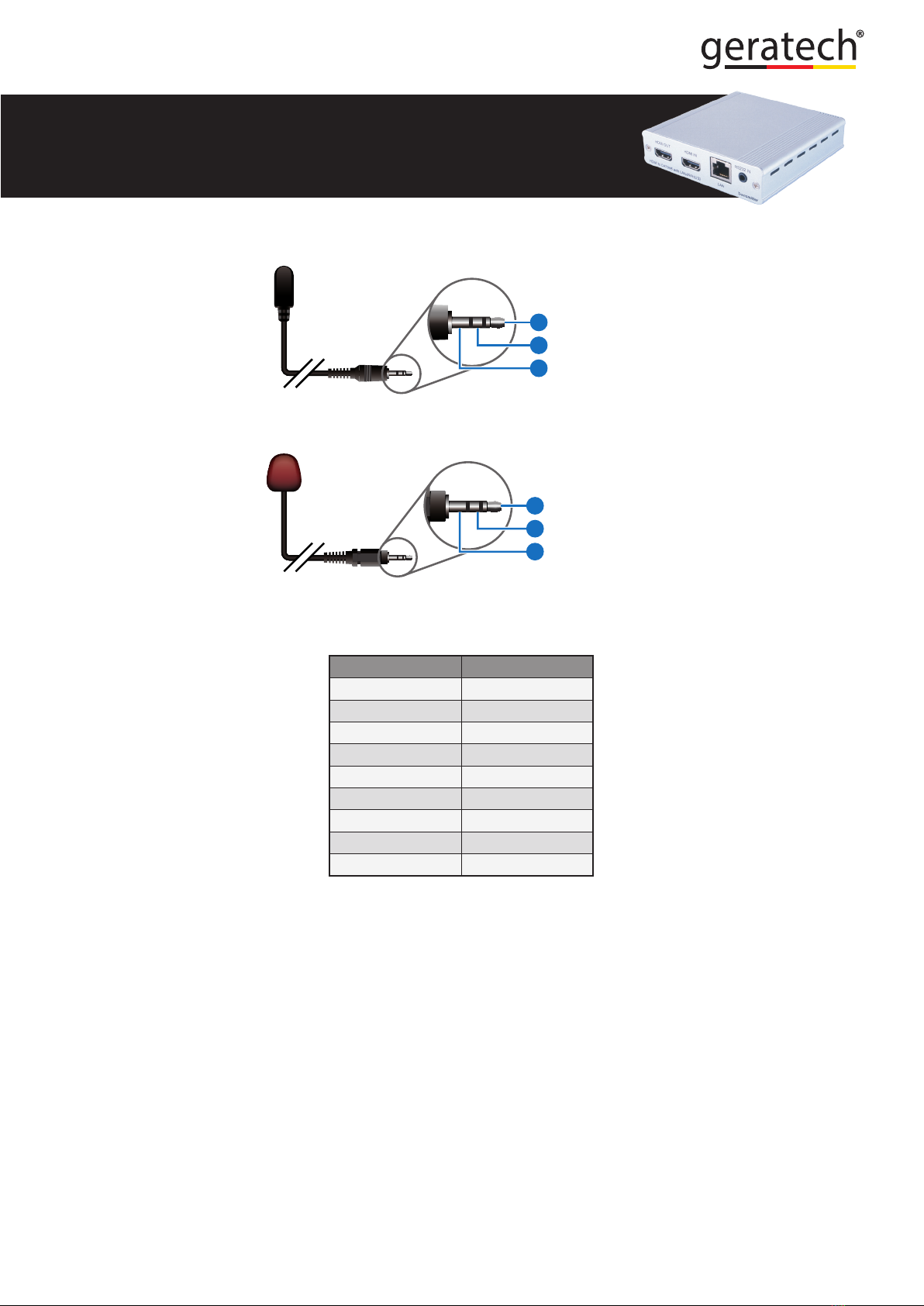
3
1
3
1
2
2
Power 3.3V
IR Blaster Signal
NC
IR Signal
Power 3.3V
Grounding
IR Extender
IR Blaster
6.4 D-Sub 9-Pin Denitions
Pin Dene TX / RX
1 N/C
2 TxD/RxD
3 RxD/TxD
4 NC
5 GND
6 NC
7 NC
8 NC
9 NC
Inhaltsverzeichnis
Andere geratech Kabel und Steckverbinder Handbücher

geratech
geratech EGE-SP116-4K Bedienungsanleitung

geratech
geratech EGE-SP118-4K Bedienungsanleitung

geratech
geratech EGE-SP112-4K Bedienungsanleitung

geratech
geratech EGE-UHD-5HDB-1431 Bedienungsanleitung

geratech
geratech EGE-6UHD-1410 Bedienungsanleitung

geratech
geratech EGE-UHD-2HDB-1431L Bedienungsanleitung

geratech
geratech EGE-UHD-148 Bedienungsanleitung


