
GIA Giatsu RA1A-WIFI Bedienungsanleitung

OWNER’S MANUAL
REMOTE CONTROL
ENGLISH
RA1A-WIFI
Thanks for choosing our product.
Please, read carefully this manual
before using the product.
Content
Operating guide.................................................................................3
Installation batteries.........................................................................3
Operation guide...................................................................................3
Remote Contoller - RA1A ..................................................................4
Remote Contoller Display& Button Instruction.................................5
Smart APP user guide......................................................................11
This marking indicates that this product should not be disposed with other household
wastes throughout the EU. To prevent possible harm to the environment or human
health from uncontrolled waste disposal, recycle it responsibly to promote the
sustainable reuse of material resources. To return your used device, please use
the
return and collection systems or contact the retailer where the product was
purchased.
They can take this product for environmental safe recycling.
2
Maintenance...................................................................................... 3
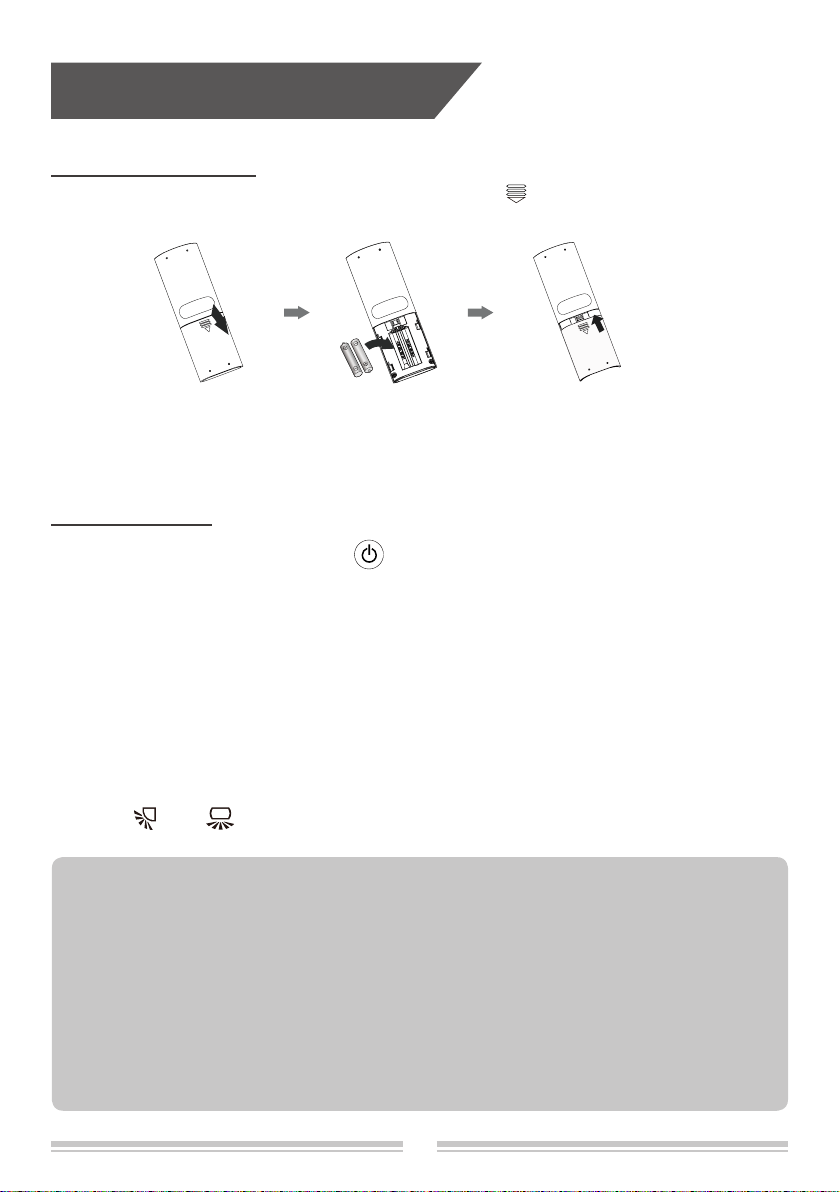
1. Press the back side of remote controller marked with " ", as shown in the g, and then
push out the cover of battery box along the arrow direction.
2. Installation two 7# (AAA 1.5V) dry batteries, and make sure the position of "+" polar and "-"
polar are correct.
3. Reinstall the cover of battery box.
Installation batteries
Operation guide
1. After connecting the power, press " " button on remote controller to turn on the air
conditioner.
2. Press "MODE" button to select your required mode: Auto, Cool, Dry, Fan, Heat.
3. Press " + " or " - " button to set your required temperature. (Temperature can’t be adjusted
under auto mode).
4. Press "FAN" button to set your required fan speed: auto, fan1, fan2 , fan3 , fan4, fan5,
stepless speed.
5. Press " " or " " button to select fan blowing angle.
● During operation, point the remote control signal sender at the receiving window on indoor unit.
● The distance between signal sender and receiving window should be no more than 8m, and there
should be no obstacles between them.
● Signal may be interfered easily in the room where there is uorescent lamp or wireless telephone;
remote controller should be close to indoor unit during operation.
● Replace new batteries of the same model when replacement is required.
● When you don’t use remote controller for a long time, please take out the batteries.
● If the display on remote controller is fuzzy or there’s no display, please replace batteries.
NOTE:
Operation guide
3
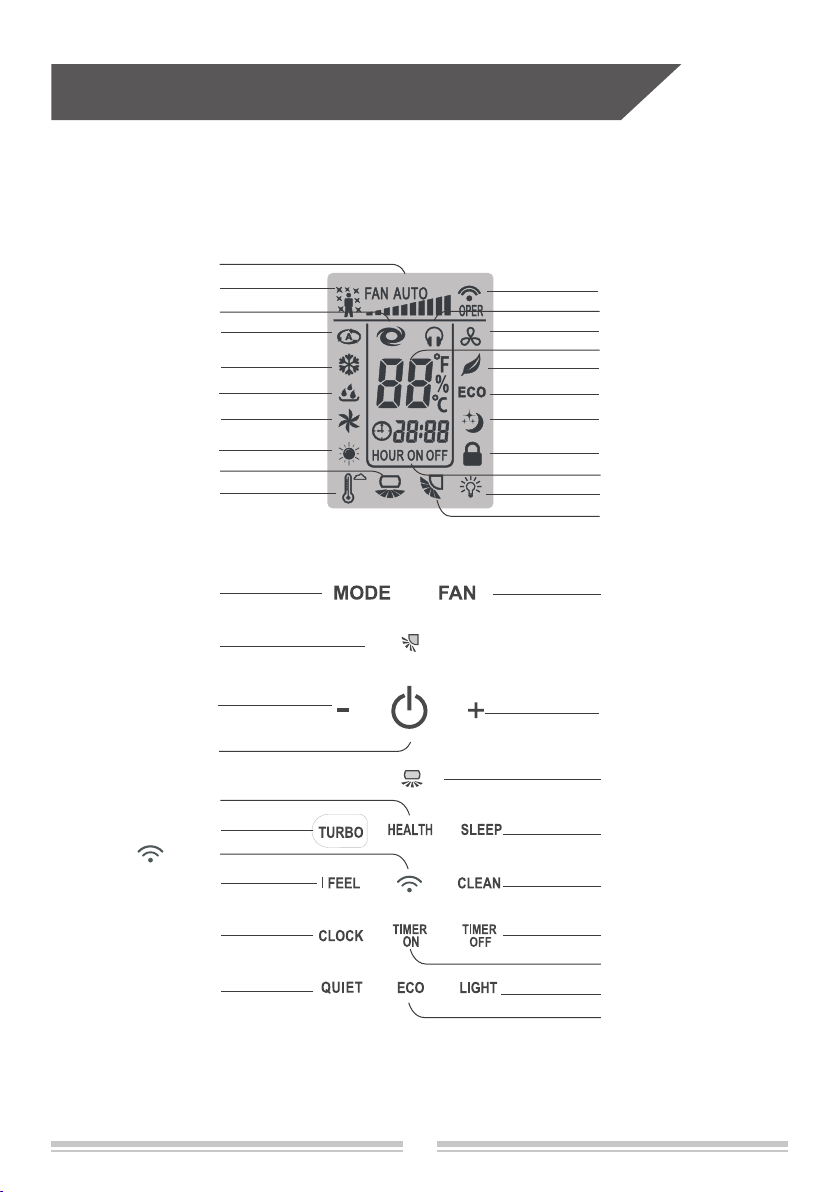
Remote controller RA1A
Turbo mode
Health function
Wi-Fi signal
Set fan speed
Child lock
Sleep mode
Up&down swing
Light
Dual-8 nixietube
Auto mode
Cooling mode
Dry mode
Fan mode
Heating mode
Clock display
Fan button
+ button
Left&right swing button
Light button
Timer off button
Timer on button
Health button
Clean button
button
I feel
Left&right swing
Up&down swing button
Turbo button Sleep button
Clock button
ECO button
I feel button
Quiet button
- button
ON/OFF button
Mode button
Quiet mode
Clean mode
ECO mode
Temp. display
●
●
●
●
●
●
●
●
●
●
●
●
●
●
●
●
●
●
●
●
●
●
●
●
●
●●●●●
●
●
●
●
●
●
●
●
●
●
4

Buttons on remote controller
ON/OFF button
Press this button can turn on or turn off the air conditioner.
After connecting the power, the air conditioner will make a sound.
Power indicator is ON. After that, you can operate the air conditioner by using remote controller.
Under on status, pressing the button on the remote controller, the display will show the corresponding
set function icons.
Under off status, light and clock icon will be displayed on the display of remote controller (If timer
on, timer off and light functions are set, the corresponding icons will be displayed on the display of
remote controller at the same time).
MODE button
Press this button to select your required operation mode.
●
When selecting auto mode, air conditioner will operate automatically according to ex-factory
setting. Set temperature can’t be adjusted and will not be displayed as well. Press "FAN"
button can adjust fan speed. Press " " or " " button can adjust fan blowing angle.
●After selecting cool mode, air conditioner will operate under cool mode. Press "+" or "-"
button to adjust set temperature. Press "FAN" button to adjust fan speed. Press " " or
" " button to adjust fan blowing angle.
●
When selecting dry mode, the air conditioner operates at fan1, fan speed can’t be adjusted.
Press " " or " " button to adjust fan blowing angle.
●When selecting fan mode, the air conditioner will only blow fan, no cooling and no heating.
Press "FAN" button to adjust fan speed. Press " " or " " button to adjust fan blowing
angle.
●When selecting heat mode, the air conditioner operates under heat mode. Press "+" or
"-" button to adjust set temperature. Press "FAN" button to adjust fan speed. Press " " or
" " button to adjust fan blowing angle. (Cooling only unit won’t receive heat mode signal.
If setting heat mode with remote controller, press "ON/OFF" button can’t start up the unit).
Note:
● For preventing cold air, after starting up heating mode, indoor unit will delay 1~5 minutes
to blow air (actual delay time is depend on indoor ambient temperature).
● Set temperature range from remote controller: 16~31°C;
Fan speed: auto, fan1, fan2 , fan3 , fan4, fan5, stepless speed.
Auto Cool Dry Fan Heat
5
Buttons on remote controller
fan1 fan2 fan3
fan4fan5
stepless speed
AUTO
Note:
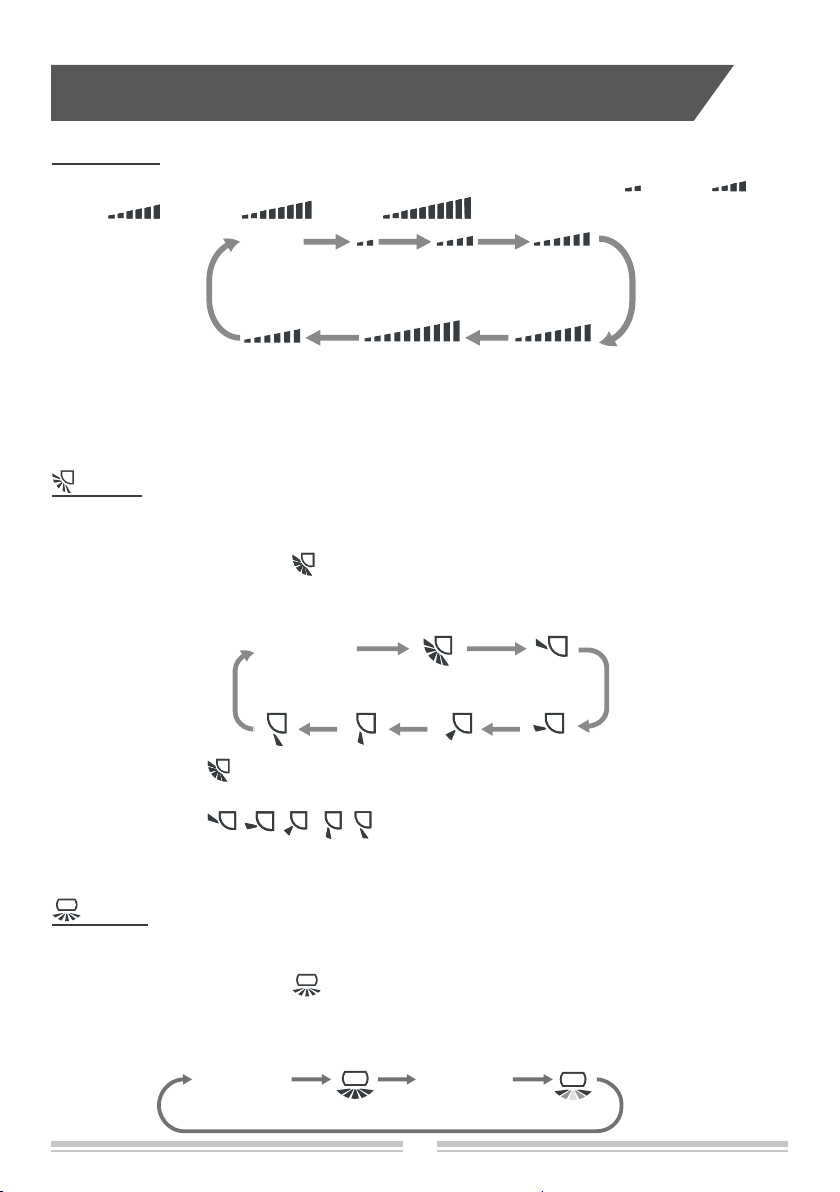
●When selecting " " with remote controller, it’s auto swing.
up&down swing louver
of air
conditioner will swing up&down automatically at the maximum angle.
● When selecting " , , , , " with remote controller, it's the xed position swing.
Up&down swing louver
of air conditioner will stop at that position as shown by the icon to
swing.
FAN button
Pressing this button can set fan speed circularly as: auto (AUTO), fan1( ), fan2 ( ) ,
fan3 ( ) , fan4 ( ), fan5 ( ), stepless speed.
Note:
● In AUTO speed, air conditioner will select proper fan speed automatically according to
ambient temperature.
● Fan speed under dry mode is fan1.
● After entering the stepless speed mode, users can adjust the fan speed according to the
button "+" or "-".
button
button
●Press this button the up&down swing function can be started and canceled. The remote
controller defaults to static swing condition.
●Press "MODE" button and " " button at the same time when remote controller OFF to
switch between simple swing and static swing.
●
In static swing condition, pressing this button, the swing angle of up&down swing louver
changes as
below: No display
●Press this button the left&right swing function can be started and canceled. The remote
controller defaults to simple swing condition.
●Press "MODE" button and " " button at the same time at remote controller OFF to
switch between simple swing and static swing.
●
In
simple
swing condition,pressing this button, the left&right swing control will cycle as
below: off status, the same direction swing,off status,the opposite direction swing.
No display No display
6

Buttons on remote controller
+ and - button
Press "+" or "-" button once to increase or decrease 1°C of set temperature. Holding "+" or
"-" button, set temperature on remote controller will change quickly. On releasing button after
setting is nished, temperature indicator on indoor unit will change accordingly. (Temperature
can’t be adjusted under auto mode)
● When setting TIMER ON, TIMER OFF or CLOCK, press "+" or "-" button to adjust time
(Refer to CLOCK, TIMER ON, TIMER OFF buttons).
TURBO button
Press this button to turn on or turn off the TURBO function in cool,heat,fan mode.
Note:
● Press "QUIET" or "FAN" button the unit will quit this function.
● This function is no use in auto mode or dry mode.
HEALTH button
Press this button to turn on or turn off the health function.
Note: This function is not available for some models.
SLEEP button
Press this button to turn on or turn off the SLEEP function under cool,heat ,dry mode.
Note:
● This function is off as defaulted after power on.
● It will be cleared after changing mode.
● It is no use under "FAN" mode and "AUTO" mode.
●When selecting " " with remote controller, it’s auto swing.
left&right swing
louver of air
conditioner will swing
left&right
automatically at the maximum angle.
● When selecting " , , , , , " with remote controller,it's the xed position
swing.
Left&right swing
louver of air conditioner will stop at that position as shown by the
icon to swing.
●When selecting " ", it’s the circulating swing.
Left&right swing
louver of air conditioner
will swing circularly according to the angle as shown by the icon.
Note:
There is no this function for the units. If press this button, the main unit will sound, but it also
runs under original status.
No display
●
In static swing condition, pressing this button, the swing angle of left&right swing louver
changes
as below:
7

Buttons on remote controller
I FEEL button
Press this button to start I FEEL function and " " will be displayed on the remote controller.
After this function is set, the remote controller will send the detected ambient temperature
to the indoor unit and the unit will automatically adjust the indoor temperature according to
the detected temperature. Press this button again to close I FEEL function and " " will
disappear.
Note:
Please put the remote controller near user and conrm the unit can receive the remote code
when this function is set. Do not put the remote controller near the object of high temperature
or low temperature in order to avoid detecting inaccurate ambient temperature.
● Press this button to start or cancel clean function.
● It is unable to set clean function when the unit is on; if the air conditioner runs in cool or
dry mode before turning off, press "CLEAN" button and show " " then the clean function
is on; press "CLEAN" button again, " " disappeared, then the clean function is off, or
running 10 mins in clean function then turn off automatically.
● In the rst power on, the clean function is off acquiescently.
● The clean function can not be set and displayed when the air conditioner is in auto, fan
and heat mode before turn off.
CLEAN button
CLOCK button
Press this button to set clock time. " "and " " icon on remote controller will blink.
Press "+" or "-" button within 5s to set clock time. Each pressing of "+" or "-" button, clock
time will increase or decrease 1 hour. Press this button again, " " and " " icon
on remote controller will blink. Press "+" or "-" button within 5s to set clock time. Press this
button another time, " " and " " icon on remote controller will blink. Press "+" or
"-" button within 5s to set clock time. If hold "+" or "-" button, clock time will change quickly.
Release when reaching your required time. Press "CLOCK " button to conrm the time,
" " icon stops blinking.
Note:
● Clock time adopts 24-hour mode.
● The interval between two operation can’t exceeds 5s. Otherwise, remote controller will quit
setting status. Operation for TIMER ON/TIMER OFF is the same.
TIMER ON button
This button can set the time for timer on. After pressing this button, " " icon disappears,
"ON" and " " icon on remote controller blinks. Press "+" or "- "button within 5s to set
"TIMER ON" time. Each pressing of "+" or "-" button, the time will increase or decrease 1hour.
8

Buttons on remote controller
This button can set the time for timer off. After pressing this button, " " icon disappears,
"OFF" and " " icon on remote controller blink. Press "+" or "-" button within 5s to set
"TIMER OFF" time. Each pressing of "+" or "-" button,the time will increase or decrease
1 hour. Press this button again, "OFF" and " " icon on remote controller will blink.
Press "+" or "-" button within 5s to set the time. Press this button another time, "OFF" and
" " icon on remote controller will blink. Press "+" or "-" button within 5s to set the
time. Hold "+" or "-" button, the time will change quickly until reaching your required time.
Press "TIMER OFF" to conrm it.The word "OFF" will stop blinking. " " icon resumes
displaying.
Cancel TIMER OFF
Under the condition that TIMER OFF is started up, press "TIMER OFF" button to cancel it.
QUIET button
Press this button to turn on or turn off the QUIET function in cool,heat,auto mode.
Note:
● Press "TURBO" or "FAN" button the unit will quit this function.
● This function is no use in fan mode or dry mode.
ECO button
In cool mode, press "ECO" button and the unit will operate under ECO mode.
Note:
● Remote controller displays " ".
● Air conditioner will operate at auto speed. Set temperature can’t be adjusted.
● Under cool mode, sleep function can not work with ECO mode together at the same time.
● Change mode will exit the ECO mode.
LIGHT button
Press this button can turn off the light for indoor unit’s display. " " icon on remote
controller will disappear.Press this button again to turn on the light for indoor unit’s display.
" " icon on remote controller will be displayed.
When the light is on, display board displays enviroment temp. for 3 seconds and then display
the setting temp.
Press this button again, "ON" and " " icon on remote controller will blink. Press "+" or
"-" button within 5s to set the time. Press this button another time, "ON" and " " icon
on remote controller will blink. Press "+" or "-" button within 5s to set the time. Hold "+"
or "-"
button, the time will change quickly until reaching your required time. Press "TIMER ON"
to
confirm it. The word "ON" will stop blinking. " " icon resumes displaying.
Cancel TIMER ON
Under the condition that TIMER ON is started up, press "TIMER ON" button to cancel it.
TIMER OFF button
9
Buttons on remote controller
Function introduction for combination buttons
Child lock function
Press "+" and "-" simultaneously to turn on or turn off child lock function. When child lock
function is on, " " icon is displayed on remote controller. If you operate the remote
controller, the " " icon will blink three times without sending signal to the unit.
Temperature display switchover function
In the off mode, press "-" and "MODE" buttons simultaneously to switch temperature display
between °C and °F.
In the heating mode, press "SLEEP" and "TURBO" buttons together for 3s would start or
cancel the Timing defrost.
Timing defrost
● In heating mode, pressing "Mode" and "+" button at the same time will enter/exit the low
temperature heating function.
● "LA" would be showed on the remote controller after entered into the low temperature
heating funtion.
● When switching from one mode to another mode, low temperature heating function was
canceled. Turn off and then turn on air conditioner that will remain the low temperature
heating function. After powered on, the low temperature heating mode was default to off
status.
● In the low temperature heating mode, "SLEEP" and "Low temperature heating" function
cannot start at the same time.When low temperature heating mode has already started,
meanwhile you press the "
SLEEP
" button, the air conditioner will exit low temperature
heating
mode and enter the sleep mode. Vice versa.
Note:
1. In the low temperature heating mode, the fan speed was default to Auto and non-ajusatable.
2. In the low temperature heating mode, "TURBO" and "QUIET" can't be set. If enter the low
temperature heating mode, the turbo and quiet function that started before will be canceled.
As well as when exit the low temperature heating mode, it will not resume .
3. When exit from the low temperature heating mode, the speed and temperature will turn
into the original condition before it started.
4. You can set up other function.
Low temperature heating function setting
button
Press this button to turn on or turn off the SMART function, for more details, please see next
page for Smart APP User Guide.
10
Inhaltsverzeichnis
Andere GIA Fernbedienung Handbücher


Beliebte Fernbedienung Handbücher anderer Marken

Panasonic
Panasonic EUR7622KB0 Bedienungsanleitung

Bang & Olufsen
Bang & Olufsen Beo4 Bedienungsanleitung

Sunwave Tech.
Sunwave Tech. RemoteComm SRC-7000 Bedienungsanleitung

Multiplex
Multiplex PROFI TX 9 Bedienungsanleitung

One Remote
One Remote RMB4 Bedienungsanleitung

FUTABA
FUTABA 9ZAP - PART2 Bedienungsanleitung


