
GOsingGO GS-SB60S Bedienungsanleitung

GS-SB60S
Soundbar
INSTRUCTION MANUAL

Functions.......................................................... 1-2
What’s In The Box............................................ 3
Instructions Guide........................................... 4-6
Connecting to the Mains Supply...................................... 4
Bluetooth Operation.......................................................... 4
Using the USB Input.......................................................... 5
Using the RCA Input.......................................................... 5
Using the Optical Input..................................................... 6
Using the AUX Input.......................................................... 6
Troubleshooting.............................................. 7
Wall mount Installation................................... 8
Features & Specifications.............................. 9
Safety Information........................................... 10
Support & Warranty......................................... 11
1
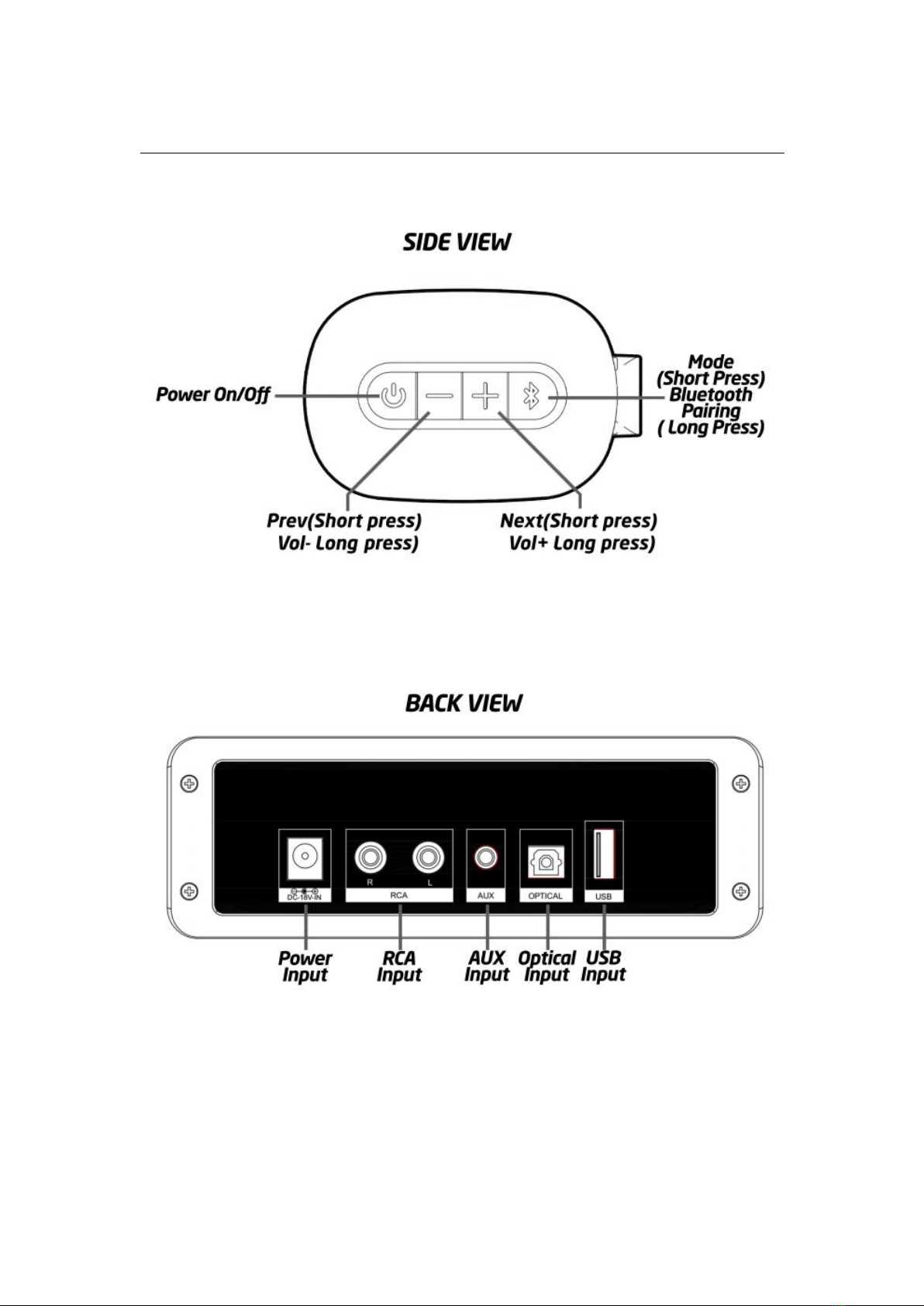
FUNCTIONS
2
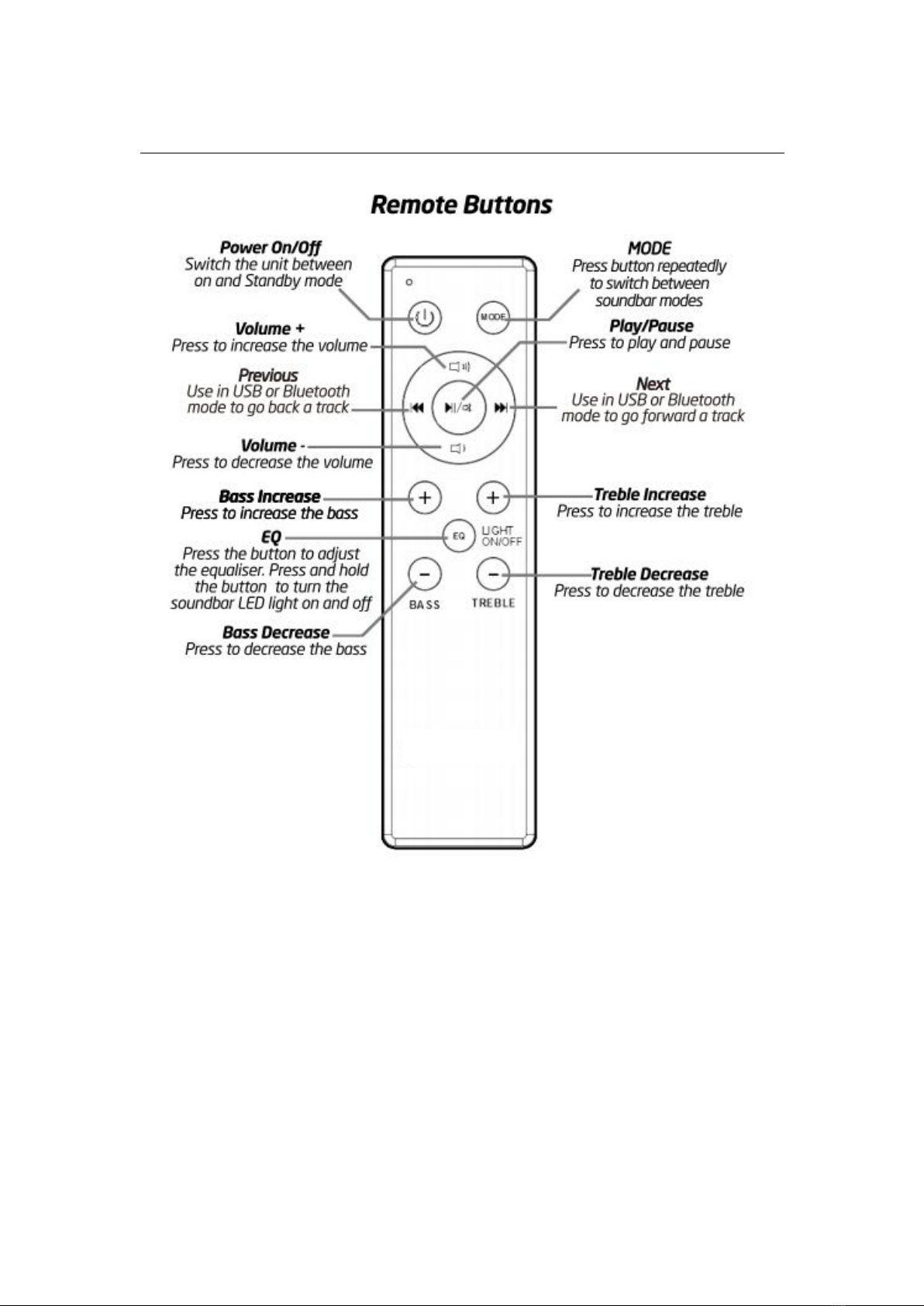
FUNCTIONS
Using the Remote Control
The remote control sensor at the front of the soundbar is sensitive to the remote control's
commands up to a maximum of 8 metres away and within a maximum arc of 30 degrees. Please
note that the operating distance may vary depending on the brightness of the room.
3
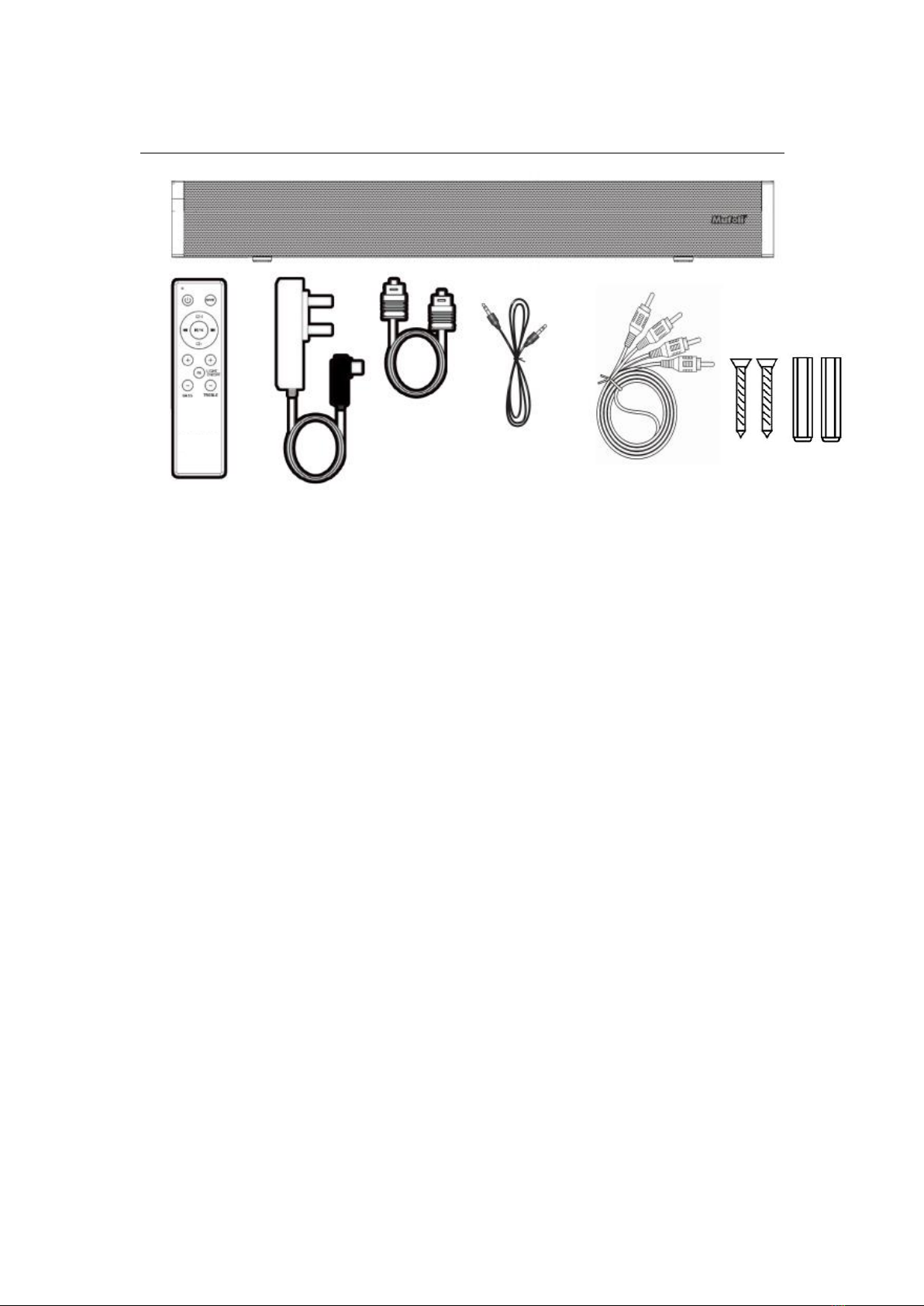
WHAT’S IN THE BOX
BOX CONTENTS
GS-SB60S Soundbar X 1
Remote control(batteries not included) X 1
Power adaptor X 1
OPTICAL cable X 1
RCA cable X 1
AUX IN cable X 1
Wall mount kits X 1
4
INSTRUCTIONS GUIDE
Connecting to the Mains Supply
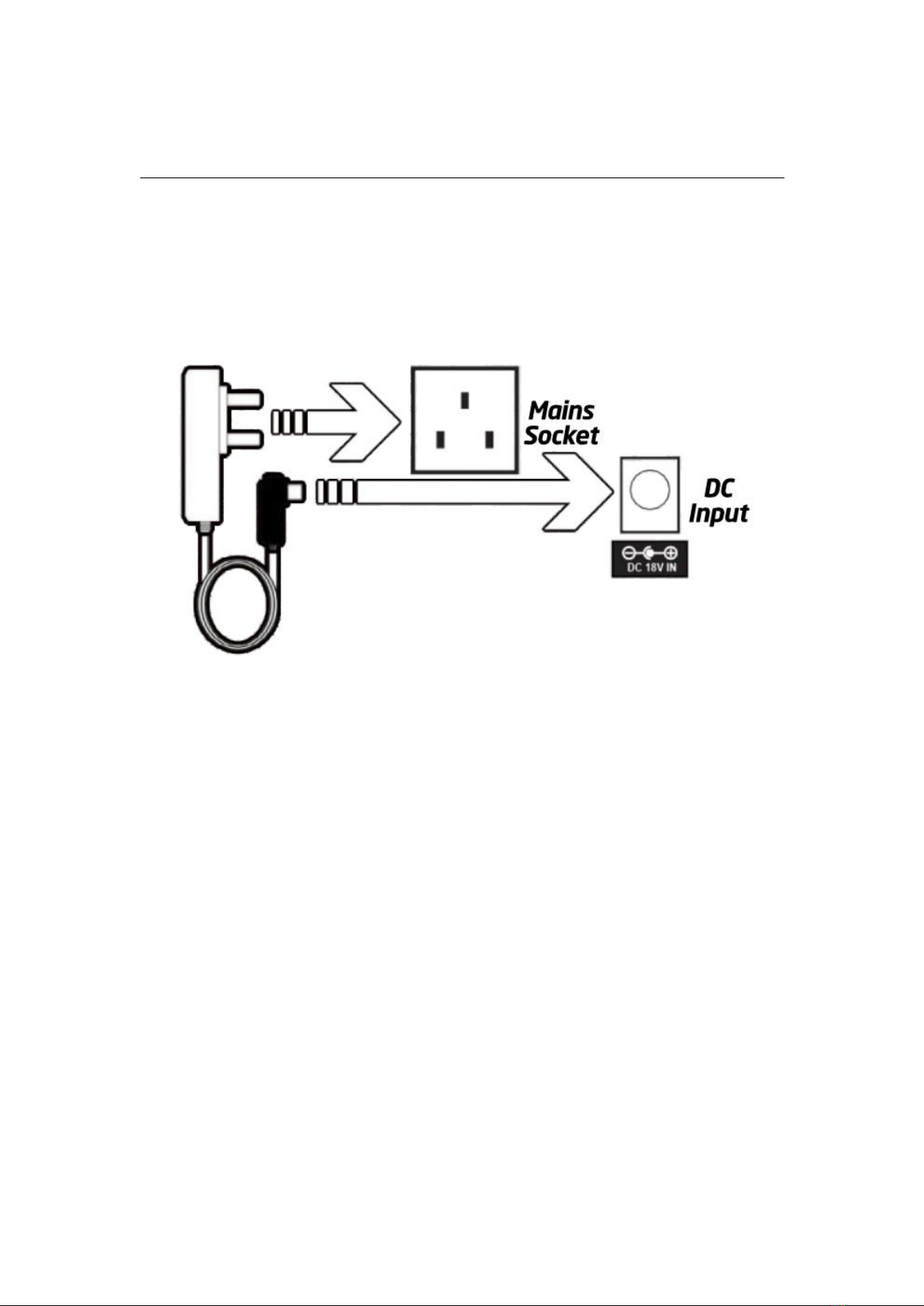
Ensure that the power supply voltage is in the voltage of 100V~240V. This unit is designed to use
the supplied adapter only. Connecting the unit to any other power source may cause damage to
the unit. Unwind the mains cable to its full length. Connect the mains plug to a mains socket.
Make sure the mains plug is fully inserted into the mains socket. Connect the adapter to the unit
via the DC input Socket.(DC-18V-IN)
NOTE: Ensure all audio connections of the unit are connected before connecting to the mains
power socket.
Bluetooth Operation
Pairing a Bluetooth Device for the First Time. Press the POWER button on the unit or the POWER
button on the remote control to switch on the unit. Select and press the MODE button
repeatedly on the remote control until in Bluetooth mode or press the Mode button repeatedly
on the soundbar to enter Bluetooth mode. Using the controls on your Bluetooth device, select
the "GS-SB60S" in your Bluetooth settings to pair. Refer to the user manual for your specific
device for instructions on pairing and connecting Bluetooth devices. When successfully paired
and connected, a beep will issue from the unit. After initial pairing, the unit will stay paired
unless unpaired manually by the user. If your device should become unpaired or you find it is
unable to connect, repeat the above steps.
Playing Audio Wirelessly
Follow the instructions for pairing a Bluetooth device. Use the controls on the connected
Bluetooth Device to select a track. To Play/Pause the track or Skip Forwards/Backwards to a
selected track, use the remote control. Audio played through the connected Bluetooth device will
now be heard.
5
INSTRUCTIONS GUIDE
Using the USB Input
Insert a USB drive to Play Music Automatically. Select and press the MODE button repeatedly on
the remote control until in USB mode or press the Mode button repeatedly on the sound bar to
enter USB mode. To Play/Pause the track or Skip Forwards/Backwards to a selected track, use the
remote control. Audio played through the connected USB device will now be heard.
Using the RCA Input
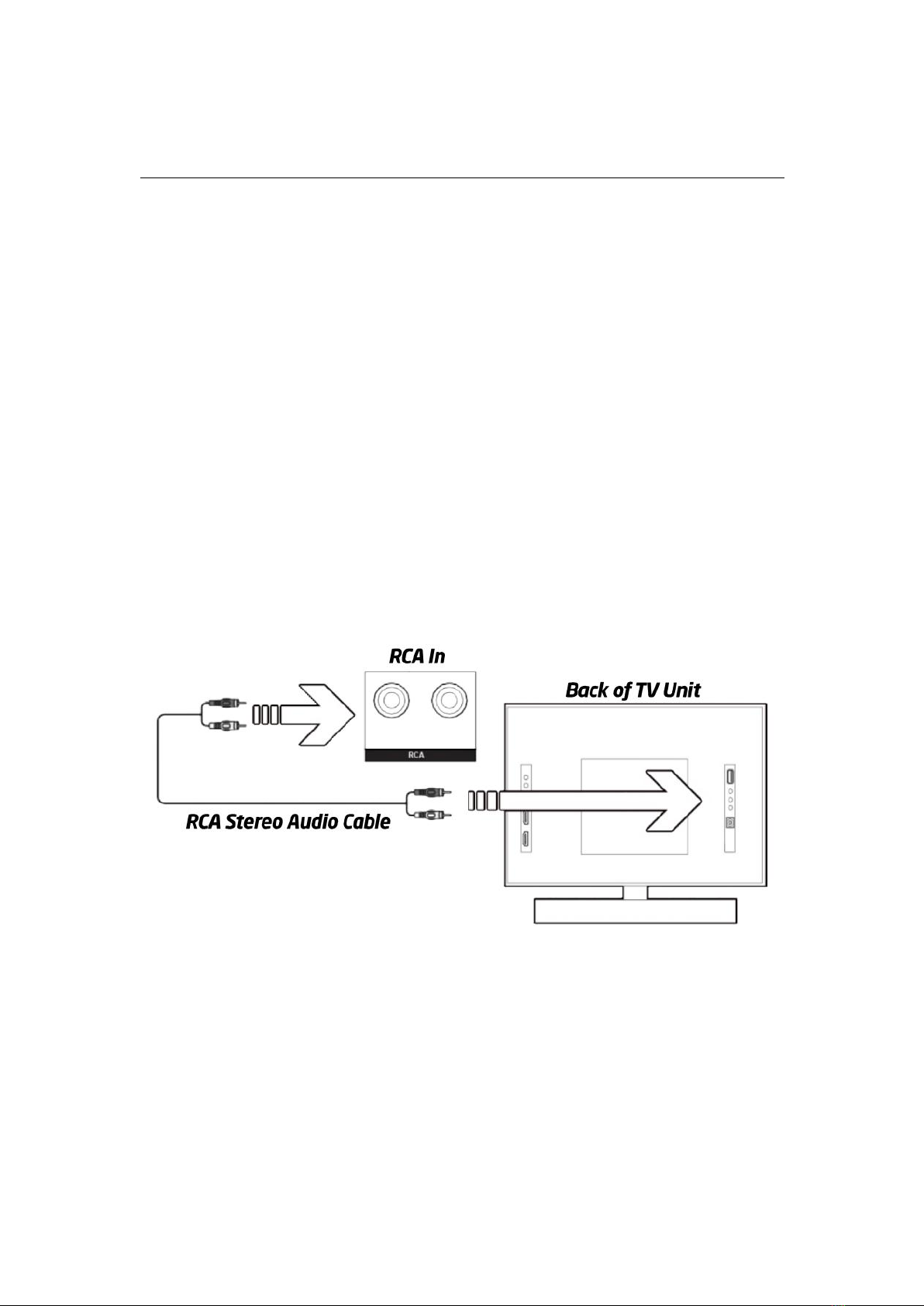
Use an RCA Stereo Audio Cable (included) to connect to the TV's stereo RCA (L/R) audio output
sockets. Connect the audio output cable of the soundbar via the 'RCA input sockets of the unit.
Then press MODE on the remote control or press the Mode button on the unit to scroll to the
RCA function. Turn on your television.
Troubleshooting: If you are not receiving a picture or encountering interference, please ensure
that the RCA cable is being connected to the 'output 'RCA port on your TV set. This will ensure
that the sound is being exported correctly. If your TV does not have 'output' RCA port, please use
an alternative connection method.
6
INSTRUCTIONS GUIDE
Using the Optical Input
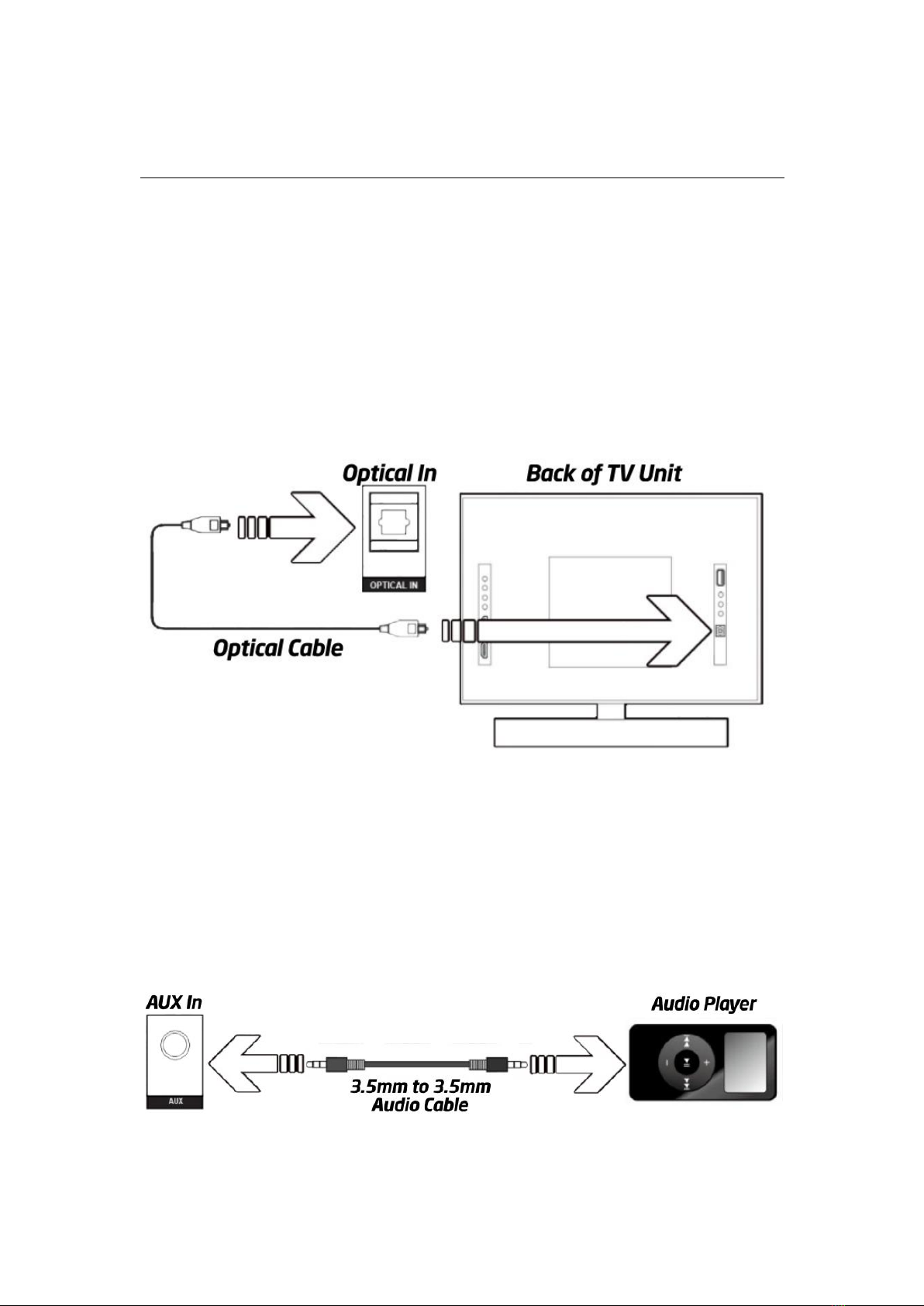
You will need: An audio source with an Optical Audio Output and an Optical cable(included).
Connect the Optical Audio cable to the optical output on the audio source and to the Optical
Input on the soundbar. Press the POWER button on the soundbar or POWER button directly on
the remote control to switch on the unit. Press the MODE button on the remote control to switch
to Optical mode or select the MODE button on the main unit press repeatedly to select the
Optical mode.
Using the controls on your connected device, make sure the audio settings are set to PCM or
Audio and are turned On. Audio from the connected audio source will now be played through the
speakers.
Using the AUX Input
Plug one end of a 3.5mm to 3.5mm Aux In cable (included) into the AUX In port on the unit.
Before use, disconnect any cables connected to the Stereo RCA Inputs. Then plug the other end
of the cable into the audio output or an MP3 player or other audio source. Press the Power
button on the soundbar or Power button directly on the remote control to switch on the unit.
Press the Mode button repeatedly on the soundbar or press the MODE button on remote control
repeatedly to enter AUX mode. Audio played through the connected device will now be heard
through the speakers.

7
TROUBLESHOOTING
If the soundbar does not work properly as desired, please check the following,
Malfunction
Possible Cause/ Measures
No power / function
Check whether the power is switched on or off at the wall.
Check whether the power adaptor is properly connected to
power outlet or not.
No sound
Check whether cables are properly installed.
If they are, please try alternative cable to connect to your TV if
possible.
Check unit is out of standby and in mode.
No sound from Bluetooth
connection
Disconnect the soundbar from your device and reconnect.
Function disturbance
Switch off and unplug the unit. Leave it for 2 minutes and switch
it on again.
If a particular mode is causing problems, please try an
alternative connection to your TV such as Optical or Bluetooth.
Remote control does not
work [properly]
Check whether the batteries have run out or not.
Replace with a new ones if necessary.
Check whether there is an obstacle blocking the remotes signal.
8
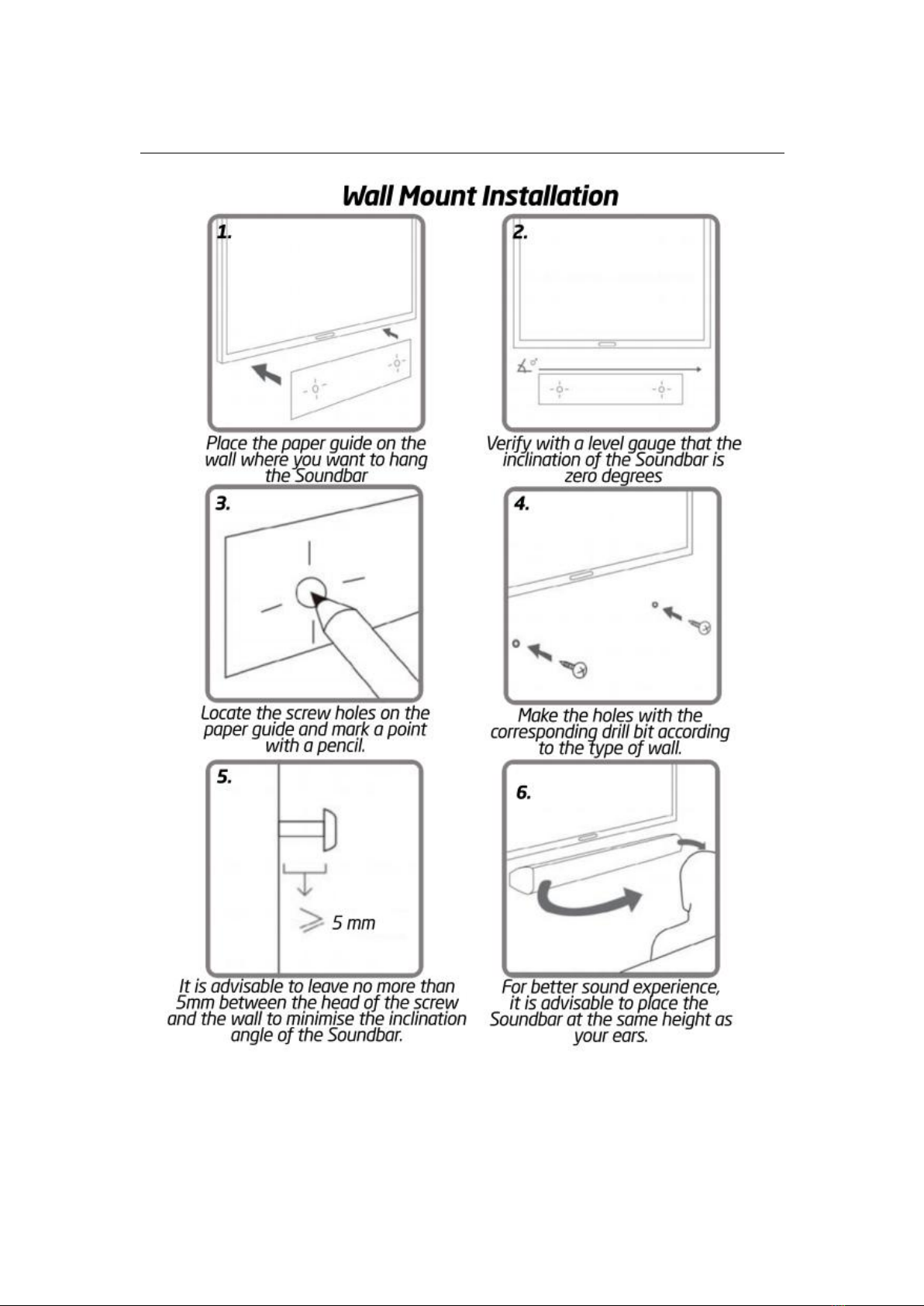
WALL MOUNT INSTALLATION
Inhaltsverzeichnis
Andere GOsingGO Lautsprechersystem Handbücher


Beliebte Lautsprechersystem Handbücher anderer Marken


Sondpex
Sondpex Active Speaker System and Digital Music... Bedienungsanleitung

JVC
JVC NX-PN7 Bedienungsanleitung

Marshall Amplification
Marshall Amplification AR-DM61-BT Bedienungsanleitung

Yamaha
Yamaha NX-A01 - Speaker Sys Bedienungsanleitung

SE Audiotechnik
SE Audiotechnik I-LINE Bedienungsanleitung

Gemini
Gemini WRX-843 Series Bedienungsanleitung