
HEDECO LIME ONE Bedienungsanleitung

USER MANUAL
MANUAL V1.0 16.04.2021
PRODUCT NAME: LIME ONE
MODEL NUMBER: H-LM010
HEDECO GMBH NÜRNBERG

Contents
1 Introduction 1
1.1 General information . . . . . . . . . . 1
1.2 Basic control . . . . . . . . . . . . . . 4
1.3 Menu . . . . . . . . . . . . . . . . . . 5
1.4 ISO selection . . . . . . . . . . . . . . 5
1.5 Battery . . . . . . . . . . . . . . . . . 6
1.6 Mounting/adapters . . . . . . . . . . . 8
2 Exposure modes 9
2.1 aperture priority . . . . . . . . . . . . 10
2.2 shutter priority . . . . . . . . . . . . . 11
2.3 manual mode . . . . . . . . . . . . . . 11
2.4 exposure value . . . . . . . . . . . . . 12
3 Setup 13
3.1 Inverted mode . . . . . . . . . . . . . 13
3.2 Low resolution mode . . . . . . . . . . 14
4 Measurement and calibration 14
4.1 Introduction . . . . . . . . . . . . . . 14
4.2 Calibration . . . . . . . . . . . . . . . 15
4.3 User calibration . . . . . . . . . . . . 15

5 General exposure advice 17
5.1 Exposure compensation . . . . . . . . 18
6 Technical data 20
7 Service/Cleaning 21
7.1 Cleaning . . . . . . . . . . . . . . . . 21
7.2 Dismantling . . . . . . . . . . . . . . 21
7.3 Problems . . . . . . . . . . . . . . . . 22


1 Introduction
1.1 General information
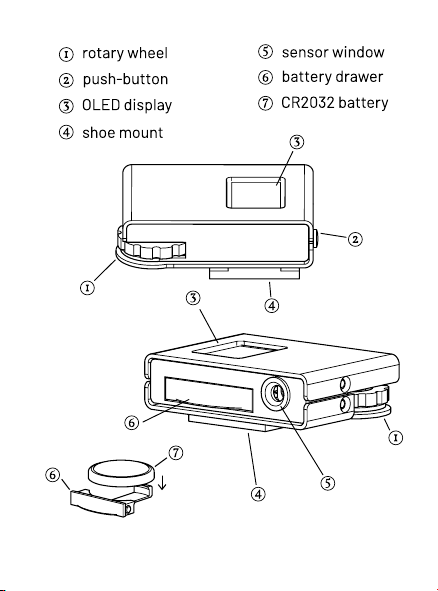
The Lime One is designed in a way that most experi-
enced photographers probably only need to check out
the quick guide. Additionally, this manual contains a
detailed description of all the functionality and oper-
ation of the Lime One light meter.
The light meter is delivered with an included battery
protected with a plastic strip. Remove the strip on the
battery cover carefully to activate the device.
1
2

3

1.2 Basic control
Step by step rst use:
The basic operation of the light meter with the default
settings (aperture priority mode) is as follows: Attach
the light meter to your camera via the accessory shoe.
Power the meter on by pressing the push button .
Double press the button and use the wheel to go
to the ISO screen. Press the button to select the lm
ISO using the control wheel. Double press again, to go
back to the main info screen.
Being on the main Infoscreen, rotate the control wheel
to change the aperture to the desired value you also
have set on your lens. The light meter reading in this
case is the calculated shutter speed.
When you are comfortable with a reading, transfer the
shutter speed to your camera shutter dial.
If desired, the exposurecompensationcan be changed
when holding the button while rotating the control
wheel (exposure compensationexplainedin section
5.1).
4

When wanting to lock in the reading after framing us-
ing the eye piece, holding down the button locks in
the reading until button release.
The meter shuts off automatically after 40 seconds of
not having an input.
1.3 Menu
The menu is entered and exited by pressing button
two times in short succession. Rotate the wheel to
the desired setting to change and enter the selection
by pressing the button.
Thecontentsof the menu are describedin theupcom-
ing sections.
1.4 ISO selection
The ISO, also called "lm speed", denes the sensitiv-
ity to light of the used lm or emulsion. It is the sec-
ond parameter selectable in the menu.
5

When planing to use low ISO lm/emulsions with long
exposure times, note to look up and account for the
reciprocity failure of the specic lm/emulsion.
1.5 Battery
The Lime One is designed to work with a CR 2032 coin
cell. Similarcoin cells like theCR2025 could also work,
as long as they output 3V and have the 20mm diame-
ter, though because of their thinner size, they have a
shorter battery life.
Thebattery indicationis displayedas a percentagevalue
on the menu screen. This is only a rough estimation:
It uses the cell voltage as a way to gauge the battery
level, which is affected by a lot of different factors, so
6
Dieses Handbuch passt für folgende Modelle
1
Inhaltsverzeichnis


