
HEIDELBERG Suprasetter A106 Bedienungsanleitung

Suprasetter A106
User’s Guide
07/2019
Order No. PU.999.0005/02

ABC
Copyright © 2019 Heidelberger
Druckmaschinen AG.
No part of this book may be repro-
duced without prior written permis-
sion.
Heidelberger Druckmaschinen AG
Dr.-Hell-Straße
24107 Kiel
Germany
Phone +49 431 386-0
Fax +49 431 386-1380
www.heidelberg.com
. . . . . . . . . . . . . . . . . . . . . . . . . . . . . . . . . . . . . . . . . . . . . . . . . . . . . . . . . . . . . . .

Heidelberg and the Heidelberg logo
are registered trademarks of Heidel-
berger Druckmaschinen AG.
PostScript®is a trademark of Adobe
Systems Incorporated.
Other company names, product
names and trademarks not expressly
mentioned in this manual are trade-
marks or registered trademarks of
the corresponding manufacturers
and fall within the regulations
regarding the protection of trade-
marks.
. . . . . . . . . . . . . . . . . . . . . . . . . . . . . . . . . . . . . . . . . . . . . . . . . . . . . . . . . . . . . . .
Important notice:
Our products are constantly
improved and subjected to further
development. Consequently, the
information in this manual is sub-
ject to change without notice.
Heidelberger Druckmaschinen AG
assumes no responsibility for infor-
mation and description as far as
third-party products are concerned.
The information contained in this
manual about performance and
speed as well as technical data con-
cerning application of our products
is not legally binding as it does not
constitute a written contract of fea-
tures.
If any problems occur with the prod-
uct described in this manual, please
contact the agency which is respon-
sible for you.
Translation of the original Instruc-
tion Manual
Order No. PU.999.0005/02
07/2019
Printed in Germany.
. . . . . . . . . . . . . . . . . . . . . . . . . . . . . . . . . . . . . . . . . . . . . . . . . . . . . . . . . . . . . . .








Imprint/Company Address

Table of Contents
Suprasetter A106 – User’s Guide 3
Tab le of Co n te nt s
Table of Contents 3
3
Before you start ...
About This Documentation . . . . . . . . . . . . . . . . . . . . . . . . . . . . . . . 7
What You Should Already Know . . . . . . . . . . . . . . . . . . . . . . . . . 7
Symbols and Styles . . . . . . . . . . . . . . . . . . . . . . . . . . . . . . . . . . 7
Important Information . . . . . . . . . . . . . . . . . . . . . . . . . . . . . . . . 8
Safety Notes . . . . . . . . . . . . . . . . . . . . . . . . . . . . . . . . . . . . . . . . . 9
Device Designation . . . . . . . . . . . . . . . . . . . . . . . . . . . . . . . . . . . 9
Intended Use . . . . . . . . . . . . . . . . . . . . . . . . . . . . . . . . . . . . . . . 9
Avoid Misuse . . . . . . . . . . . . . . . . . . . . . . . . . . . . . . . . . . . . . . . 9
Qualification of the Users . . . . . . . . . . . . . . . . . . . . . . . . . . . . . . 10
General . . . . . . . . . . . . . . . . . . . . . . . . . . . . . . . . . . . . . . . . . . . 10
Power Switch with Emergency Cutoff Function . . . . . . . . . . . . . . 12
Emergency Stop Switch . . . . . . . . . . . . . . . . . . . . . . . . . . . . . . . 12
On/Off button . . . . . . . . . . . . . . . . . . . . . . . . . . . . . . . . . . . . . . . 12
Laser Safety . . . . . . . . . . . . . . . . . . . . . . . . . . . . . . . . . . . . . . . . 13
Service and Maintenance . . . . . . . . . . . . . . . . . . . . . . . . . . . . . . 14
Safety Loop . . . . . . . . . . . . . . . . . . . . . . . . . . . . . . . . . . . . . . . . 15
Check of the safety loop . . . . . . . . . . . . . . . . . . . . . . . . . . . . . . . 15
Automatic check of the safety loop . . . . . . . . . . . . . . . . . . . . . . 15
Manual check of the safety loop . . . . . . . . . . . . . . . . . . . . . . . . 16
ESD Protective Measures for Prepress Systems and Operators . . . 17
Basics . . . . . . . . . . . . . . . . . . . . . . . . . . . . . . . . . . . . . . . . . . . 17
Formation . . . . . . . . . . . . . . . . . . . . . . . . . . . . . . . . . . . . . . . . 17
Practical Tips . . . . . . . . . . . . . . . . . . . . . . . . . . . . . . . . . . . . . 18
Standards/Sources . . . . . . . . . . . . . . . . . . . . . . . . . . . . . . . . . 19
Heidelberg online . . . . . . . . . . . . . . . . . . . . . . . . . . . . . . . . . . . . . 19
Introduction
Description of the Unit and its Functions . . . . . . . . . . . . . . . . . . . . 21

Table of Contents
4Version2019
Ambient Conditions . . . . . . . . . . . . . . . . . . . . . . . . . . . . . . . . . . 22
Status Panel . . . . . . . . . . . . . . . . . . . . . . . . . . . . . . . . . . . . . . . 22
Power switch . . . . . . . . . . . . . . . . . . . . . . . . . . . . . . . . . . . . . . . 24
On/Off button . . . . . . . . . . . . . . . . . . . . . . . . . . . . . . . . . . . . . . 24
Notes on the Use of Plates . . . . . . . . . . . . . . . . . . . . . . . . . . . . . 25
Punch Systems . . . . . . . . . . . . . . . . . . . . . . . . . . . . . . . . . . . . . 25
1 Notes on Installation
Transport of the Suprasetter . . . . . . . . . . . . . . . . . . . . . . . . . . . . . 27
Installation of the Suprasetter . . . . . . . . . . . . . . . . . . . . . . . . . . . . 27
Automatic Cutouts . . . . . . . . . . . . . . . . . . . . . . . . . . . . . . . . . . . . 28
Selecting the User Interface Language . . . . . . . . . . . . . . . . . . . . . . 28
2Operation
Power-on and Power-off Rules with a Linux Operating System . . . . 29
Power-on order . . . . . . . . . . . . . . . . . . . . . . . . . . . . . . . . . . . . . 29
Power-off order . . . . . . . . . . . . . . . . . . . . . . . . . . . . . . . . . . . . . 29
Workstation (PC) restart . . . . . . . . . . . . . . . . . . . . . . . . . . . . . . . 30
Switching on the Suprasetter . . . . . . . . . . . . . . . . . . . . . . . . . . . . . 30
Manual Startup . . . . . . . . . . . . . . . . . . . . . . . . . . . . . . . . . . . . . 30
Automatic Startup . . . . . . . . . . . . . . . . . . . . . . . . . . . . . . . . . . . 31
Switching off the Suprasetter . . . . . . . . . . . . . . . . . . . . . . . . . . . . 32
Shutdown using the User Interface on the Workstation . . . . . . . . 33
Shutdown with the On/Off button on the Suprasetter. . . . . . . . . . 33
Quick Shutdown with the On/Off button on the Suprasetter. . . . . 35
Material Handling . . . . . . . . . . . . . . . . . . . . . . . . . . . . . . . . . . . . . 36
Material storage . . . . . . . . . . . . . . . . . . . . . . . . . . . . . . . . . . . . . . 36

Table of Contents
Suprasetter A106 – User’s Guide 5
Manual Loading of a Printing Plate . . . . . . . . . . . . . . . . . . . . . . . . 37
Removing a Printing Plate . . . . . . . . . . . . . . . . . . . . . . . . . . . . . . 40
Troubleshooting . . . . . . . . . . . . . . . . . . . . . . . . . . . . . . . . . . . . . . . 41
Switching on an Automatic Cutout . . . . . . . . . . . . . . . . . . . . . . 42
3 Service and Maintenance
General . . . . . . . . . . . . . . . . . . . . . . . . . . . . . . . . . . . . . . . . . . . . 45
Cleaning the Suprasetter . . . . . . . . . . . . . . . . . . . . . . . . . . . . . . . 46
Cleaning the Cleaning Roller on the Imaging Drum . . . . . . . . . . . . 47
Removing the Punch Waste . . . . . . . . . . . . . . . . . . . . . . . . . . . . . 53
Replacing the Air Filter . . . . . . . . . . . . . . . . . . . . . . . . . . . . . . . . . 57
4TechnicalData
Suprasetter A106 . . . . . . . . . . . . . . . . . . . . . . . . . . . . . . . . . . . . . 63
Protection and Safety Requirements . . . . . . . . . . . . . . . . . . . . . . . 65
Standards . . . . . . . . . . . . . . . . . . . . . . . . . . . . . . . . . . . . . . . . 65
General safety . . . . . . . . . . . . . . . . . . . . . . . . . . . . . . . . . . . . . 65
Laser safety . . . . . . . . . . . . . . . . . . . . . . . . . . . . . . . . . . . . . . . 65
Mechanical Safety . . . . . . . . . . . . . . . . . . . . . . . . . . . . . . . . . . 66
Electrical Safety . . . . . . . . . . . . . . . . . . . . . . . . . . . . . . . . . . . . 66
Electromagnetic Compatibility (EMC) . . . . . . . . . . . . . . . . . . . . 66
Interference Emission (Stray Radiation and Interference Voltage) 67
Interference Immunity . . . . . . . . . . . . . . . . . . . . . . . . . . . . . . . 67
Radio Interference Suppression . . . . . . . . . . . . . . . . . . . . . . . . . 67
Note on FCC . . . . . . . . . . . . . . . . . . . . . . . . . . . . . . . . . . . . . . 68
Approvals and Conformity . . . . . . . . . . . . . . . . . . . . . . . . . . . . . 68
CE Declaration of Conformity . . . . . . . . . . . . . . . . . . . . . . . . . . . . 69

Table of Contents
6Version2019
Disposal . . . . . . . . . . . . . . . . . . . . . . . . . . . . . . . . . . . . . . . . . . . . 70
General Dimensions . . . . . . . . . . . . . . . . . . . . . . . . . . . . . . . . . . 70
Harmful Substances . . . . . . . . . . . . . . . . . . . . . . . . . . . . . . . . . . 70
Disposal of Glysantin . . . . . . . . . . . . . . . . . . . . . . . . . . . . . . . 71
Recyclable Materials . . . . . . . . . . . . . . . . . . . . . . . . . . . . . . . . . 72
Dismantling . . . . . . . . . . . . . . . . . . . . . . . . . . . . . . . . . . . . . . . . 74
Disposal Instructions for Chiller . . . . . . . . . . . . . . . . . . . . . . . . . 84
Labels on the Suprasetter A106 . . . . . . . . . . . . . . . . . . . . . . . . . . . 85
Position of Labels . . . . . . . . . . . . . . . . . . . . . . . . . . . . . . . . . . . 88
Index

Before you start ...
Suprasetter A106 – User’s Guide 7
Before you start ...
About This Documentation
This documentation is intended as a reference work for the operator during
training courses and in operation.
Note: The documentation must be kept safely for future use right up to
the disposal of the Suprasetter.
What You Should Already Know
The user, having attended a training course, should be familiar with the Supra-
setter.
Symbols and Styles
The following typographical conventions are used in this manual:
• References to other chapters and sections are blue (on the screen) and
underlined.
Example: See section "Symbols and Styles", page 7.
• Quotation marks are used to indicate menus, folders, functions, hard-
ware conditions, switch settings, system messages, etc.
Example: Set the switch to "off".
• Menus, functions and sub-functions are separated by ">".
Example: Select "File > Open...".
• Buttons which you should hold down simultaneously are connected with
a plus character.
Example: Press Alt+A.
i
i

Before you start ...
8Version2019
Important Information
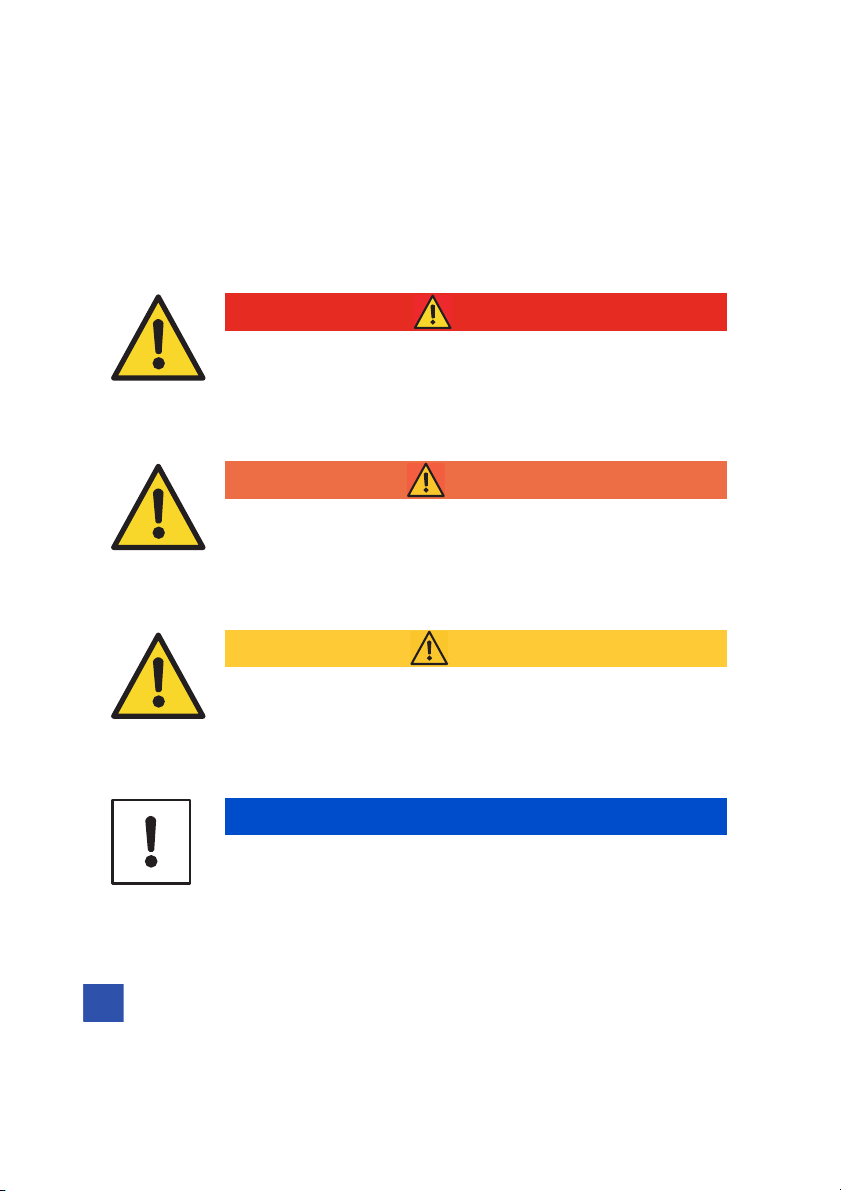
Important information in the text is marked by symbols at the side which are
used as follows:
Note: Contains important general or supplementary information about
a specific topic.
DANGER
The "DANGER" signal word indicates a hazard with a high
risk which, if not avoided, will result in death or severe
injury.
WARNING
The "WARNING" signal word indicates a hazard with a
medium risk which, if not avoided, can result in death or
severe injury.
CAUTION
The "CAUTION" signal word indicates a hazard with a low
risk which, if not avoided, can result in minor or moderate
injury.
NOTICE
The "NOTICE" signal word indicates possible material dam-
age. Non-observance of this notice can cause damage to the
machine.
i
i

Before you start ...
Suprasetter A106 – User’s Guide 9
Prerequisite: Lists requirements which must be met before the subse-
quent steps can be performed.
Safety Notes
The Suprasetter complies with the safety regulations of the standards and
specifications listed in the "Technical Data" chapter.
Device Designation
Intended Use
The Suprasetter is a laser imagesetter for imaging offset printing plates and
may only be used for this purpose as described in the customer documenta-
tion.
All other use that does not comply with the correct use is prohibited.
Avoid Misuse
Do not place any objects or liquids on the Suprasetter.
Ventilation outlets must be kept clear at all times.
Do not use the Suprasetter as a seat.
Bezeichnungsart Name
Sales designation Suprasetter A106
Type designation PU.001.0000

Before you start ...
10 Version 2019
Qualification of the Users
After installation, users will be instructed in the operation and service and
maintenance of the Suprasetter by Heidelberg service personnel. Further
instruction, for example, for new staff employed subsequently, must be
ensured by the operator of the Suprasetter.
General
The Suprasetter is to be installed by authorized service personnel only. The
ambient conditions must be observed in this process.
For the operating company of a print shop, it is important that the exposure
limits regarding the breathable air in the work area, where the Suprasetter is
located, are adhered to. The air exchange must be arranged in such a way that
the measured dust particles are regularly below the exposure limit values. In
accordance with the state of the art, this can be achieved with an 8 to 10 air
change rate per hour. If this is not the case at the installation site, the operat-
ing company should install an additional exhaust system.
Servicing work may only be performed by authorized specialist personnel. The
relevant accident prevention regulations must be observed at all times.
Non-observance of accident prevention regulations can lead to the loss of acci-
dent insurance cover.
WARNING
Risk of fatal injury from unauthorized opening of the
device
Unauthorized opening of any parts of the casing not specifi-
cally referred to in the operating manual and inexpert repairs
can lead to considerable danger for the user.
Andere Handbücher für Suprasetter A106
1
Inhaltsverzeichnis
Andere HEIDELBERG Drucker Handbücher

HEIDELBERG
HEIDELBERG Suprasetter 145 Bedienungsanleitung

HEIDELBERG
HEIDELBERG Suprasetter 145 Bedienungsanleitung

HEIDELBERG
HEIDELBERG Suprasetter A52 Bedienungsanleitung

HEIDELBERG
HEIDELBERG Suprasetter 74 Bedienungsanleitung

HEIDELBERG
HEIDELBERG Speedmaster SM 52 Kurzanleitung

HEIDELBERG
HEIDELBERG mPG 501 Bedienungsanleitung

HEIDELBERG
HEIDELBERG Suprasetter A106 Bedienungsanleitung

HEIDELBERG
HEIDELBERG Speedmaster SM 102 Bedienungsanleitung

HEIDELBERG
HEIDELBERG Suprasetter A52 Bedienungsanleitung

HEIDELBERG
HEIDELBERG Suprasetter 145 Bedienungsanleitung


