HPE G2 R5000 3U Bedienungsanleitung

HPE G2 R5000/6000 3U UPS
User Guide
Part Number: P12219-003
Published: September 2020
Edition: 3
Abstract
This document includes installation, configuration, and operation information for the HPE G2 R5000/R60003U UPS . This
document is for the person who installs and maintains power products. Hewlett Packard Enterprise assumes you are qualified
in the servicing of high-voltage equipment and trained in recognizing hazards in products with hazardous energy levels.

©Copyright 2019, 2020 Hewlett Packard Enterprise Development LP
Notices
The information contained herein is subject to change without notice. The only warranties for Hewlett Packard Enterprise
products and services are set forth in the express warranty statements accompanying such products and services. Nothing
herein should be construed as constituting an additional warranty. Hewlett Packard Enterprise shall not be liable for technical
or editorial errors or omissions contained herein.
Confidential computer software. Valid license from Hewlett Packard Enterprise required for possession, use, or copying.
Consistent with FAR 12211 and 12212, Commercial Computer Software, Computer Software Documentation, and Technical
Data for Commercial Items are licensed to the U.S. Government under vendor's standard commercial license.
Links to third-party websites take you outside the Hewlett Packard Enterprise website. Hewlett Packard Enterprise has no
control over and is not responsible for information outside the Hewlett Packard Enterprise website.
Acknowledgments
Intel®, Itanium®, Pentium®, Xeon®, Intel Inside®, and the Intel Inside logo are trademarks of Intel Corporation in the U.S. and
other countries.
Microsoft®and Windows®are either registered trademarks or trademarks of Microsoft Corporation in the United States
and/or other countries.
Adobe®and Acrobat®are trademarks of Adobe Systems Incorporated.
Java®and Oracle®are registered trademarks of Oracle and/or its ailiates.
UNIX®is a registered trademark of The Open Group.

Contents
Important safety information .............................................................................................. 6
Personal safety............................................................................................................................................................................................................................ 6
Product safety..............................................................................................................................................................................................................................6
Special precautions................................................................................................................................................................................................................... 7
Component identification...................................................................................................... 8
Overview..........................................................................................................................................................................................................................................8
Front panel components........................................................................................................................................................................................................ 8
UPS front panel controls........................................................................................................................................................................................................9
Front panel LEDs........................................................................................................................................................................................................................9
Rear panel components.......................................................................................................................................................................................................10
ERM rear panel components.............................................................................................................................................................................................12
USB communications port..................................................................................................................................................................................................12
Dry contact port.......................................................................................................................................................................................................................12
ROO................................................................................................................................................................................................................................................. 13
RPO port.......................................................................................................................................................................................................................................14
Installation............................................................................................................................. 16
Precautions................................................................................................................................................................................................................................. 16
Preparing to install the hardware.................................................................................................................................................................................. 16
Tools and materials.............................................................................................................................................................................................. 16
Selecting a site.........................................................................................................................................................................................................17
Preparing the equipment.................................................................................................................................................................................. 17
Installing the mounting rails............................................................................................................................................................................................. 18
Installing the UPS....................................................................................................................................................................................................................18
Connecting the battery...................................................................................................................................................................................... 19
Connecting the serial communications port.......................................................................................................................................... 21
Connecting the RPO port..................................................................................................................................................................................21
Connecting the ground bonding cable......................................................................................................................................................22
Connecting the UPS to utility power..........................................................................................................................................................22
Connecting devices to the UPS..................................................................................................................................................................... 24
Charging the UPS batteries............................................................................................................................................................................. 24
Starting power to the load................................................................................................................................................................................26
Installing the ERM...................................................................................................................................................................................................................26
Connecting the ERM to the UPS...................................................................................................................................................................27
Charging the ERM batteries............................................................................................................................................................................ 27
Operations..............................................................................................................................28
Modes of operation................................................................................................................................................................................................................ 28
Standby mode..........................................................................................................................................................................................................28
Online mode..............................................................................................................................................................................................................28
Battery mode............................................................................................................................................................................................................28
Bypass mode............................................................................................................................................................................................................ 28
Configuring the UPS..............................................................................................................................................................................................................29
Changing the language...................................................................................................................................................................................... 29
3

Changing display functions..............................................................................................................................................................................29
Verifying the RPO port connection...............................................................................................................................................................................30
Powering down the UPS......................................................................................................................................................................................................31
Power protector.................................................................................................................... 32
Power protector software...................................................................................................................................................................................................32
Maintenance...........................................................................................................................33
Battery replacement precautions.................................................................................................................................................................................. 33
Replacing the UPS.................................................................................................................................................................................................................. 33
Replacing the ERM................................................................................................................................................................................................................. 34
Replacing the UPS batteries............................................................................................................................................................................................. 34
Replacing the ERM batteries............................................................................................................................................................................................ 36
Updating the UPS firmware.............................................................................................................................................................................................. 38
Troubleshooting....................................................................................................................39
Bypass mode..............................................................................................................................................................................................................................39
Battery low.................................................................................................................................................................................................................................. 39
No battery....................................................................................................................................................................................................................................39
Battery fault................................................................................................................................................................................................................................40
Backup time................................................................................................................................................................................................................................40
Bypass mode..............................................................................................................................................................................................................................40
Power overload.........................................................................................................................................................................................................................41
UPS overtemperature...........................................................................................................................................................................................................41
UPS does not start..................................................................................................................................................................................................................42
I/O bad wiring............................................................................................................................................................................................................................42
Specifications.........................................................................................................................43
UPS physical specifications............................................................................................................................................................................................... 43
ERM physical specifications.............................................................................................................................................................................................. 43
UPS input specifications......................................................................................................................................................................................................43
UPS output specifications.................................................................................................................................................................................................. 44
Power protection specifications....................................................................................................................................................................44
Voltage specifications.........................................................................................................................................................................................44
Output tolerance specifications.................................................................................................................................................................... 44
Output feature specifications.........................................................................................................................................................................44
Battery specifications........................................................................................................................................................................................................... 45
Average battery runtime.................................................................................................................................................................................................... 45
Environmental specifications........................................................................................................................................................................................... 45
RPO port specifications....................................................................................................................................................................................................... 46
UPS spare parts.....................................................................................................................47
Electrostatic discharge.........................................................................................................48
Preventing electrostatic discharge............................................................................................................................................................................... 48
Grounding methods to prevent electrostatic discharge...................................................................................................................................48
Websites................................................................................................................................. 49
4

Support and other resources.............................................................................................. 50
Accessing Hewlett Packard Enterprise Support...................................................................................................................................................50
Accessing updates..................................................................................................................................................................................................................50
Customer self repair...............................................................................................................................................................................................................51
Remote support........................................................................................................................................................................................................................51
Warranty information............................................................................................................................................................................................................51
Regulatory information........................................................................................................................................................................................................52
Documentation feedback....................................................................................................................................................................................................52
5

Important safety information
For important safety, environmental, and regulatory information, see Safety and Compliance Information for Server, Storage,
Power, Networking, and Rack Products, available at the Hewlett Packard Enterprise website.
Personal safety
• The system has its own power source (the battery). Consequently, the power outlets may be energized, even if the system
is disconnected from the AC power source.
• Dangerous voltage levels are present within the system. The system must be opened exclusively by qualified service
personnel.
• The system must be properly grounded.
• The battery supplied with the system contains small amounts of toxic materials.
• There are no user serviceable parts inside the system, except for the replaceable battery.
• To avoid accidents, observe the following directives:
◦Battery hot swap service must be performed by qualified service personnel with knowledge of batteries and the
required precautions.
◦When replacing batteries, replace with the same type and number of batteries or battery packs.
◦Do not dispose of batteries in a fire, the batteries might explode.
◦Batteries constitute a danger (electrical shock, burns). The short-circuit current might be high.
• The following precautions must be taken for all handling:
◦Wear rubber gloves and boots.
◦Do not lay tools or metal parts on top of batteries.
◦Battery removal and/or replacement, by the end user, requires powering down the load and UPS. Consider scheduling a
maintenance window.
Product safety
• The UPS connection instructions and operation described in the guide must be followed in the indicated order.
• To reduce the risk of fire, the unit only connects to a dedicated circuit provided with branch circuit overcurrent protection
with D curve in accordance with the National Electric Code, ANSI/NFPA 70, 30A for R5000, 32A for R6000. The upstream
circuit breaker must be easily accessible. The unit can be disconnected from AC power source by opening this circuit
breaker.
• A means of disconnection and overcurrent protection devices will be provided by others for permanently connected AC
input/output circuits.
• Verify that the indication on the rating plate corresponds to the AC powered system and to the electrical consumption of
all the equipment that will be connected to the system.
• For pluggable equipment, the socket-outlet must be installed near the equipment and must be easily accessible.
• Never install the system near liquids or in an excessively damp environment.
Important safety information 6

• Never let a foreign body penetrate inside the system.
• Never block the ventilation grates of the system.
• Never expose the system to direct sunlight or source of heat.
• If the system must be stored prior to installation, storage must be in a dry place.
• The admissible storage temperature range is 0°C to 40°C (32°F to 104°F).
• The system is not for use in a computer room as defined in the standard for the Protection of Information Technology
Equipment, ANSI/NFPA 75.
Special precautions
• The unit is heavy. Wear safety shoes for handling operations.
• All handling operations will require at least two people, including:
◦Unpacking
◦Lifting
◦Installation in rack system
• Straps are provided only for manually unpacking the unit from the carton. Do not use the straps to carry the unit around.
The unit can slip from the straps during handling resulting in a risk of injury and product damage.
◦Keep 30 cm (12 in) minimum distance between the straps.
◦Lift the unit carefully and keep at a low height.
◦Keep the unit horizontal during unpacking.
• Before and after the installation, if the UPS remains de-energized for a long period, the UPS must be energized for a period
of 24 hours, at least once every six months for a normal storage temperature, less than 25°C (77°F). Energizing the UPS
charges the battery and avoids damage.
• During the replacement of the battery module, it is important to use the same type and number of elements as the original
battery module provided with the UPS to maintain the same level of performance and safety. If there is doubt, contact
Hewlett Packard Enterprise.
• Other than batteries, all repairs and service must be performed by authorized personnel only. There are no user serviceable
parts inside the UPS.
Important safety information 7

Component identification
This chapter describes the external and internal server features and components.
Overview
The HPE G2 R5000/60003U UPS features a 3U rack-mount design and oers power protection for the following loads:
• 5kVA models—5000VA/4500W/09PF
• 6kVA models—6000VA/5400W/ 09PF
To benefit from the latest product enhancements, update to the latest version of the UPS firmware and software.
NOTE: To download the latest versions of the UPS firmware and software, see the Hewlett Packard Enterprise website.
Front panel components
Item Description
1 Battery compartment
2 LED display
3 Control buttons
Component identification 8

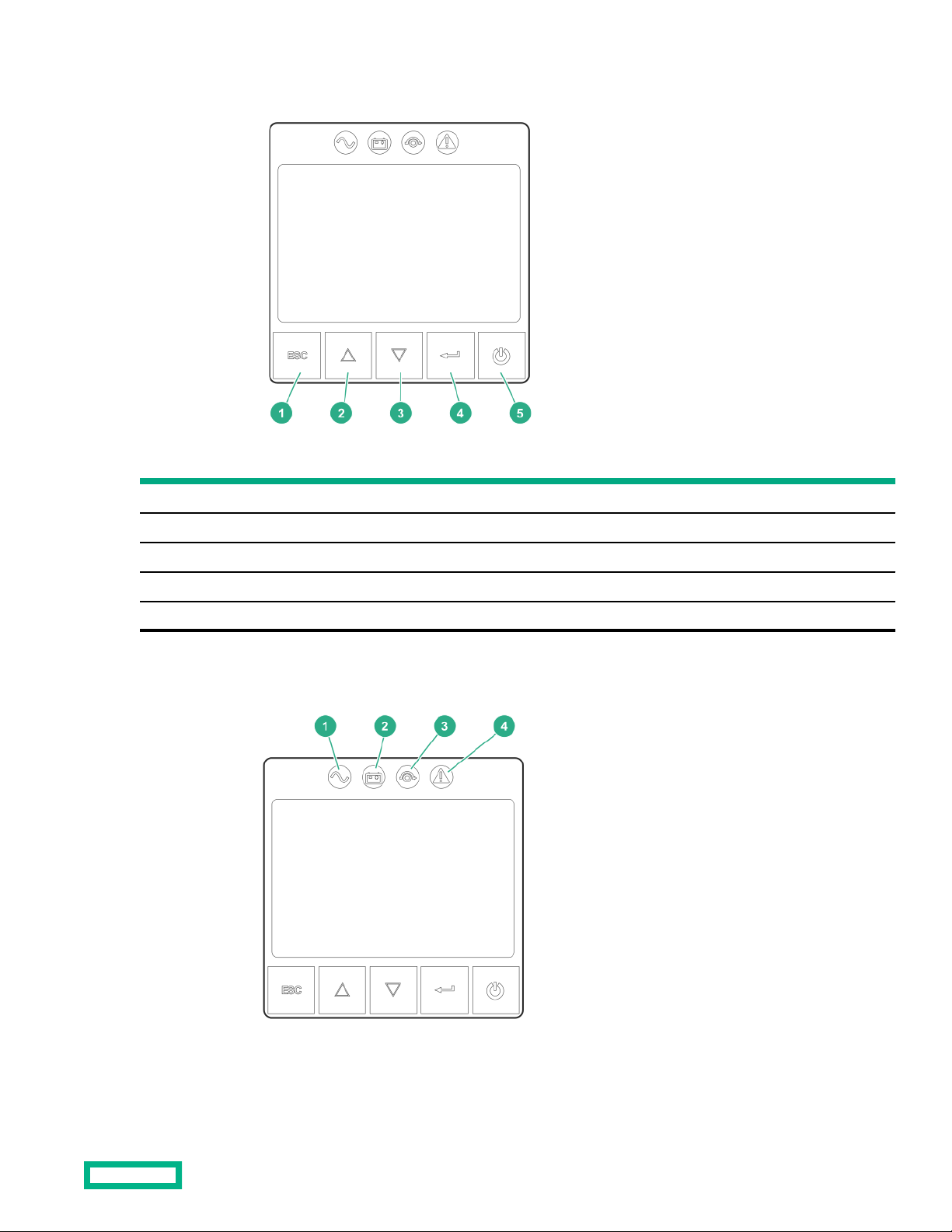
UPS front panel controls
Item Description
1 Escape button
2 Up button
3 Down button
4 Enter button
5 Power button
Front panel LEDs
Component identification 9

Item Indicator Status Description
1 Online mode On The UPS is operating normally online or in high eiciency mode.
2 Battery mode On The UPS is on battery mode.
3 Bypass mode On The UPS is in bypass mode.
4 Fault On The UPS has an active alarm or fault. For more information, see
the Troubleshootingsection.
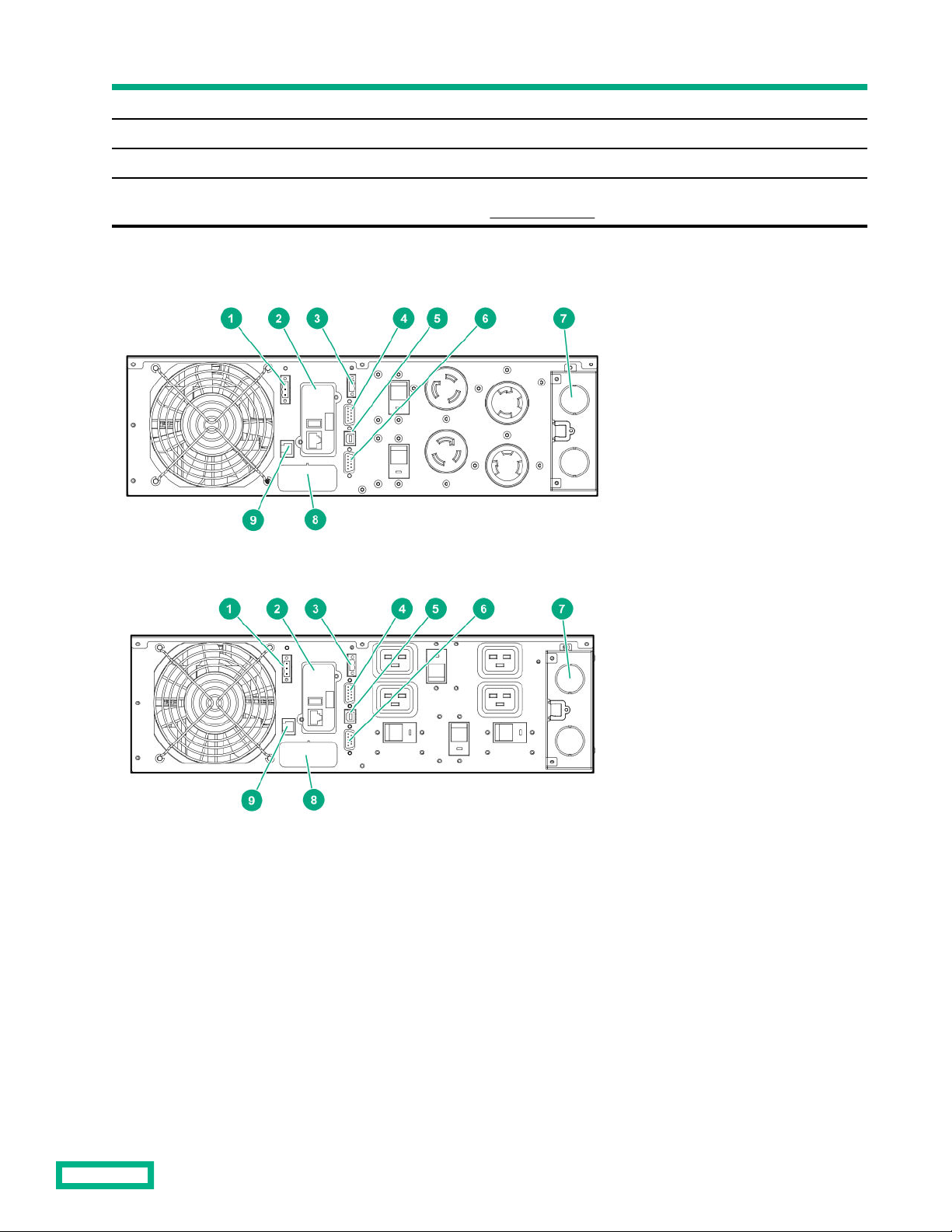
Rear panel components
Figure 1: G2 R5000 4 out NA/JPN model
Figure 2: G2 R5000 5 out NA/JPN model
Component identification 10
Dieses Handbuch passt für folgende Modelle
1
Inhaltsverzeichnis
Andere HPE UPS Handbücher

HPE
HPE R/T2200 G5 Montageanleitung

HPE
HPE R/T3000 G5 Montageanleitung

HPE
HPE R1500 G5 Montageanleitung

HPE
HPE R1500 Bedienungsanleitung

HPE
HPE R/T3000 G2 Bedienungsanleitung

HPE
HPE R/T3000 G5 Montageanleitung

HPE
HPE T750 G5 NA/JP Tower Bedienungsanleitung

HPE
HPE G2 R5000 Bedienungsanleitung

HPE
HPE R/T2200 G4 Bedienungsanleitung
Beliebte UPS Handbücher anderer Marken

Pylontech
Pylontech Victron & Pylontech US5000 Bedienungsanleitung

Tecnoware
Tecnoware EVO DSP PLUS MM 6.8 Bedienungsanleitung

Mecer
Mecer ME-1000-WTU Bedienungsanleitung

Mustek
Mustek PowerMust 530(B) Plus Installations- und Betriebshandbuch

Emerson
Emerson Liebert NXL series Bedienungsanleitung

MAKELSAN
MAKELSAN BOXER SERIES Bedienungsanleitung