Inovance MD500-EN1 Bedienungsanleitung

Date code 19011561 A00
User Guide
Expansion Card
MD500-EN1 Communication

Preface
- 1 -
Preface
■Introduction
MD500 series Ethernet/IP communication card (hereinafter referred to as MD500-EN1
card) is an adapter card for Ethernet/IP eldbus. It complies with international Ethernet/
IP bus standards and features high eciency, exible topology, and easy operation.
This user guide describes the specications, dimensions, installation, wiring,
communication protocols, communication-related parameters, and communication
examples of the MD500-EN1 expansion card.
■Revision history
Date Version Revision
August 2021 A00
◆First release
■Document acquisition
This user guide is not delivered along with the product. You can obtain the PDF version
of this document by the following method:
Log in to Inovance's ocial website (http://en.inovance.cn/), choose Support >
Download, search for keywords, and then download the PDF le.

Contents
- 2 -
Contents
Preface ..........................................................................................................................................1
Safety Instructions .......................................................................................................................3
Safety Precautions .................................................................................................................3
Safety Levels and Denitions ...............................................................................................3
Safety Instructions .................................................................................................................3
Safety Signs ............................................................................................................................8
1 Product Information .................................................................................................................9
1.1 Applicable AC drive ..........................................................................................................9
1.2 Introduction .....................................................................................................................9
1.3 Appearance and Dimensions ..........................................................................................9
1.4 Interface Layout and Description .................................................................................10
2 Installation and Wiring ............................................................................................................12
2.1 Installation .....................................................................................................................12
2.2 Wiring ..............................................................................................................................13
2.2.1 Ethernet/IP Topology................................................................................................... 13
2.2.2 EMC Wiring .................................................................................................................... 14
3 Ethernet/IP Communication Protocol ...................................................................................15
3.1 Description of I/O Messages Data ................................................................................15
3.2 Description of Data Transmitted by the Master ...........................................................15
3.3 Description of Data Responded to by the AC Drive .....................................................16
4 Parameters Related to Communication ................................................................................17
4.1 Communication Card Type Setting .............................................................................17
4.2 IP Address Setting of MD500-EN1 Card ........................................................................17
4.3 Parameters of AC Drive Communication Card .............................................................19
4.4 Parameter Related to Communication Control ...........................................................19
4.5 Parameters Related to Communication Monitoring ...................................................20
5 Communication Examples .....................................................................................................23
5.1 AB L16ER Controller as the Master ...............................................................................23
5.2 Inovance AM600 Controller as the Master....................................................................36
6 Troubleshooting ......................................................................................................................41

Safety Instructions
- 3 -
Safety Instructions
Safety Precautions
1) Before installing, using, and maintaining this equipment, read the safety
information and precautions thoroughly, and comply with them during operations.
2) To ensure the safety of humans and equipment, follow the signs on the equipment
and all the safety instructions in this user guide.
3) "CAUTION", "WARNING", and "DANGER" items in the manual do not indicate all
safety precautions that need to be followed; instead, they just supplement the
safety precautions.
4) Use this equipment according to the designated environment requirements.
Damage caused by improper usage is not covered by warranty.
5) Inovance shall take no responsibility for any personal injuries or property damage
caused by improper usage.
Safety Levels and Denitions
DANGER
indicates that failure to comply with the notice will result in severe
personal injuries or even death.
WARNING
indicates that failure to comply with the notice may result in severe
personal injuries or even death.
CAUTION
indicates that failure to comply with the notice may result in minor
personal injuries or damage to the equipment.
Safety Instructions
Unpacking
CAUTION
◆Check whether the packing is intact and whether there is damage, water seepage, damp,
and deformation.
◆Unpack the package by following the package sequence. Do not hit the package with
force.
◆Check whether there are damage, rust, or injuries on the surface of the equipment or
equipment accessories.
◆Check whether the number of packing materials is consistent with the packing list.

Safety Instructions
- 4 -
WARNING
◆Do not install the equipment if you nd damage, rust, or indications of use on the
equipment or accessories.
◆Do not install the equipment if you nd water seepage, component missing or damage
upon unpacking.
◆Do not install the equipment if you nd the packing list does not conform to the
equipment you received.
Storage and Transportation
CAUTION
◆Store and transport this equipment based on the storage and transportation
requirements for humidity and temperature.
◆Avoid transporting the equipment in environments such as water splashing, rain, direct
sunlight, strong electric eld, strong magnetic eld, and strong vibration.
◆Avoid storing this equipment for more than three months. Long-term storage requires
stricter protection and necessary inspections.
◆Pack the equipment strictly before transportation. Use a sealed box for long-distance
transportation.
◆Never transport this equipment with other equipment or materials that may harm or
have negative impacts on this equipment.
WARNING
◆Use professional loading and unloading equipment to carry large-scale or heavy
equipment.
◆When carrying this equipment with bare hands, hold the equipment casing rmly with
care to prevent parts falling. Failure to comply may result in personal injuries.
◆Handle the equipment with care during transportation and mind your step to prevent
personal injuries or equipment damage.
◆Never stand or stay below the equipment when the equipment is lifted by hoisting
equipment.
Installation
WARNING
◆Thoroughly read the safety instructions and user guide before installation.
◆Do not modify this equipment.
◆Do not rotate the equipment components or loosen xed bolts (especially those marked
in red) on equipment components.
◆Do not install this equipment in places with strong electric or magnetic elds.
◆When this equipment is installed in a cabinet or nal equipment, protection measures
such as a reproof enclosure, electrical enclosure, or mechanical enclosure must be
provided. The IP rating must meet IEC standards and local laws and regulations.

Safety Instructions
- 5 -
DANGER
◆Equipment installation, wiring, maintenance, inspection, or parts replacement must be
performed by only professionals.
◆Installation, wiring, maintenance, inspection, or parts replacement must be performed
by only experienced personnel who have been trained with necessary electrical
information.
◆Installation personnel must be familiar with equipment installation requirements and
relevant technical materials.
◆Before installing equipment with strong electromagnetic interference, such as a
transformer, install an electromagnetic shielding device for this equipment to prevent
malfunctions.
Wiring
DANGER
◆Equipment installation, wiring, maintenance, inspection, or parts replacement must be
performed by only professionals.
◆Never perform wiring at power-on. Failure to comply will result in an electric shock.
◆Before wiring, cut o all equipment power supplies. Wait at least 10 minutes before
further operations because residual voltage exists after power-o.
◆Make sure that the equipment is well grounded. Failure to comply will result in an
electric shock.
◆During wiring, follow the proper electrostatic discharge (ESD) procedures, and wear
an antistatic wrist strap. Failure to comply will result in damage to internal equipment
circuits.
WARNING
◆Never connect the power cable to output terminals of the equipment. Failure to comply
may cause equipment damage or even a re.
◆When connecting a drive with the motor, make sure that the phase sequences of the
drive and motor terminals are consistent to prevent reverse motor rotation.
◆Wiring cables must meet diameter and shielding requirements. The shielding layer of the
shielded cable must be reliably grounded at one end.
◆After wiring, make sure that no screws are fallen and cables are exposed in the
equipment.
Power-on

Safety Instructions
- 6 -
DANGER
◆Before power-on, make sure that the equipment is installed properly with reliable wiring
and the motor can be restarted.
◆Before power-on, make sure that the power supply meets equipment requirements to
prevent equipment damage or even a re.
◆At power-on, unexpected operations may be triggered on the equipment. Therefore, stay
away from the equipment.
◆After power-on, do not open the cabinet door and protective cover of the equipment.
Failure to comply will result in an electric shock.
◆Do not touch any wiring terminals at power-on. Failure to comply will result in an electric
shock.
◆Do not remove any part of the equipment at power-on. Failure to comply will result in an
electric shock.
Operation
DANGER
◆Do not touch any wiring terminals during operation. Failure to comply will result in an
electric shock.
◆Do not remove any part of the equipment during operation. Failure to comply will result
in an electric shock.
◆Do not touch the equipment shell, fan, or resistor for temperature detection. Failure to
comply will result in heat injuries.
◆Signal detection must be performed by only professionals during operation. Failure to
comply will result in personal injuries or equipment damage.
WARNING
◆Prevent metal or other objects from falling into the device during operation. Failure to
comply may result in equipment damage.
◆Do not start or stop the equipment using the contactor. Failure to comply may result in
equipment damage.
Maintenance
DANGER
◆Equipment installation, wiring, maintenance, inspection, or parts replacement must be
performed by only professionals.
◆Do not maintain the equipment at power-on. Failure to comply will result in an electric
shock.
◆Before maintenance, cut o all equipment power supplies and wait at least 10 minutes.
WARNING
◆Perform daily and periodic inspection and maintenance for the equipment according to
maintenance requirements and keep a maintenance record.

Safety Instructions
- 7 -
Repair
DANGER
◆Equipment installation, wiring, maintenance, inspection, or parts replacement must be
performed by only professionals.
◆Do not repair the equipment at power-on. Failure to comply will result in an electric
shock.
◆Before inspection and repair, cut o all equipment power supplies and wait at least 10
minutes.
WARNING
◆Require for repair services according to the product warranty agreement.
◆When the equipment is faulty or damaged, require professionals to perform
troubleshooting and repair by following repair instructions and keep a repair record.
◆Replace quick-wear parts of the equipment according to the replacement guide.
◆Do not operate damaged equipment. Failure to comply may result in worse damage.
◆After the equipment is replaced, perform wiring inspection and parameter settings again.
Disposal
WARNING
◆Dispose of retired equipment by following local regulations or standards. Failure to
comply may result in property damage, personal injuries, or even death.
◆Recycle retired equipment by following industry waste disposal standards to avoid
environmental pollution.

Safety Instructions
- 8 -
Safety Signs
For safe equipment operation and maintenance, comply with safety signs on the
equipment, and do not damage or remove the safety labels. The following table
describes the safety signs.
Safety Sign Description
◆Read the user guide before installation and operation.
Failure to comply will result in an electric shock.
◆Do not remove the cover at power-on or within 10 minutes
after power-o.
◆Before maintenance, inspection, and wiring, cut o input
and output power, and wait at least 10 minutes until the
power indicator is o.

1 Product Information
- 9 -
1 Product Information
1.1 Applicable AC drive
Expansion Card AC drive Remark
MD500-EN1
MD500-PLUS -
MD520 -
1.2 Introduction
MD500 series Ethernet/IP communication card (hereinafter referred to as MD500-EN1
card) is an adapter card for Ethernet/IP eldbus. It complies with international Ethernet/
IP bus standards and features high eciency, exible topology, and easy operation.
It is installed in the MD series AC drive to increase the communication eciency and
implement the AC drive networking function, which enables the AC drive to be a slave
controlled by the eld bus master.
The MD500-EN1 card software version required is 1.00 or later (check the software
version in U0-67 upon power-on after installing the card). The corresponding EDS le
name is MD500P_EIP_V1.00.eds. This user guide is applicable only for the MD500-PLUS
series AC drive. If you need to use the MD500-EN1 card with other AC drives, contact our
technical support for details.
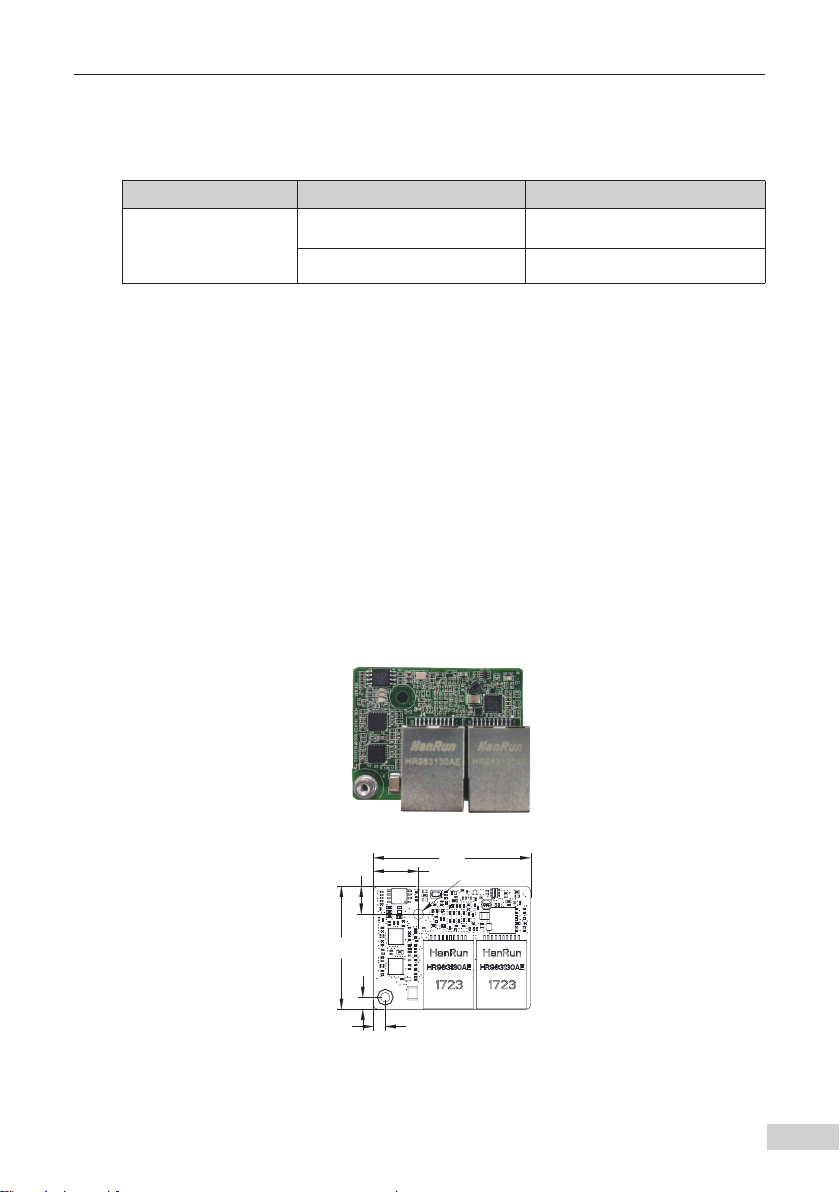
1.3 Appearance and Dimensions
Figure 1-1 2. Appearance of the M500-EN1 card
Figure 1-2 Dimensions of the M500-EN1 card
.OVU
ħ
Inhaltsverzeichnis
Andere Inovance Computerhardware Handbücher
Beliebte Computerhardware Handbücher anderer Marken

EMC2
EMC2 VNX Series Betriebsanleitung

Panasonic
Panasonic DV0PM20105 Bedienungsanleitung

Mitsubishi Electric
Mitsubishi Electric Q81BD-J61BT11 Bedienungsanleitung

Gigabyte
Gigabyte B660M DS3H AX DDR4 Bedienungsanleitung

Raidon
Raidon iT2300 Bedienungsanleitung

National Instruments
National Instruments PXI-8186 Bedienungsanleitung